المنتج انتهىview

Image: The LTC SS-503 TWS Wireless Earbuds shown with their charging case, highlighting the sleek white design and RGB lighting on the case.
The LTC SS-503 TWS Wireless Earbuds are designed for an immersive audio experience, featuring Bluetooth 5.1 connectivity, dual music and gaming modes, and a distinctive RGB light charging case. They are built for comfort and durability, with an IPX4 waterproof rating suitable for various activities.
المميزات الرئيسية:
- Cool RGB Light: Customizable lighting modes on the charging case.
- IPX4 مقاوم للماء: Resistant to splashes and sweat, ideal for workouts.
- Quick Charging & Long Playtime: Fast charging via USB-C or wireless, with extended battery life.
- Bluetooth 5.1 & Low Latency: Stable connection and minimal audio delay.
- Dual Mode (Music & Gaming): تحسين الصوت الاحترافيfiles for different uses.
- صوت ستيريو عالي الدقة: Delivers clear audio with deep bass and crisp treble.
- Simply Pairing & Touch Controls: Easy device connection and intuitive touch-sensitive controls.
يثبت
1. ماذا يوجد في الصندوق
Upon unboxing, ensure the following components are present:
- LTC SS-503 TWS Wireless Earbuds (Left and Right)
- حافظة الشحن اللاسلكي
- كابل شحن USB-C
- دليل المستخدم (هذا المستند)
2. الشحن الأولي
قبل الاستخدام الأول، قم بشحن سماعات الأذن وعلبة الشحن بالكامل.

Image: The charging case demonstrating both USB-C cable charging and wireless charging capabilities.
- عبر كابل USB-C: Connect the provided USB-C cable to the charging case and a power source. The charging case will indicate charging status.
- الشحن اللاسلكي: Place the charging case on a compatible wireless charging pad. Ensure the case is properly aligned for efficient charging.
- وقت الشحن: The charging case takes approximately 1.5 hours to fully charge. Earbuds charge when placed inside the case.
Note: Wireless charging devices with fast charging functions may adversely affect the charging case. Avoid using such devices to charge the case.
3. الاقتران بجهازك
The earbuds support hassle-free pairing with iOS/Android phones, Mac, or Windows laptops.

Image: A smartphone displaying Bluetooth settings, showing the "SS-503" earbuds available for connection, with the charging case open beside it.
- الاقتران لأول مرة:
- افتح علبة الشحن. سيتم تشغيل سماعات الأذن تلقائيًا ودخول وضع الاقتران.
- على جهازك (الهاتف الذكي، الجهاز اللوحي، الكمبيوتر المحمول)، قم بتمكين البلوتوث وابحث عن الأجهزة المتاحة.
- Select "SS-503" from the list of found devices to connect.
- بمجرد الاتصال، سيؤكد صوت التنبيه نجاح الاقتران.
- الاتصال بالأجهزة الأخرى:
- To connect to a new device or reset pairing, open the earbud compartment without removing the earbuds.
- Press and hold the function key (MFB) in the middle of the charging case for approximately 5 seconds until both earbud indicators light up simultaneously. This indicates a successful reset.
- When the earbud indicators begin single blinking, the headset is in pairing state and ready to connect to a new device.
تعليمات التشغيل
1. تشغيل/إيقاف التشغيل
- تشغيل الطاقة: افتح علبة الشحن، وسيتم تشغيل سماعات الأذن تلقائيًا والاتصال بآخر جهاز تم إقرانه.
- إيقاف التشغيل: أعد وضع سماعات الأذن في علبة الشحن وأغلق الغطاء. ستتوقف تلقائيًا وتبدأ عملية الشحن.
2. أدوات التحكم التي تعمل باللمس
The earbuds feature intuitive touch controls on both the left and right earbuds (MFB - Multi-Function Button).
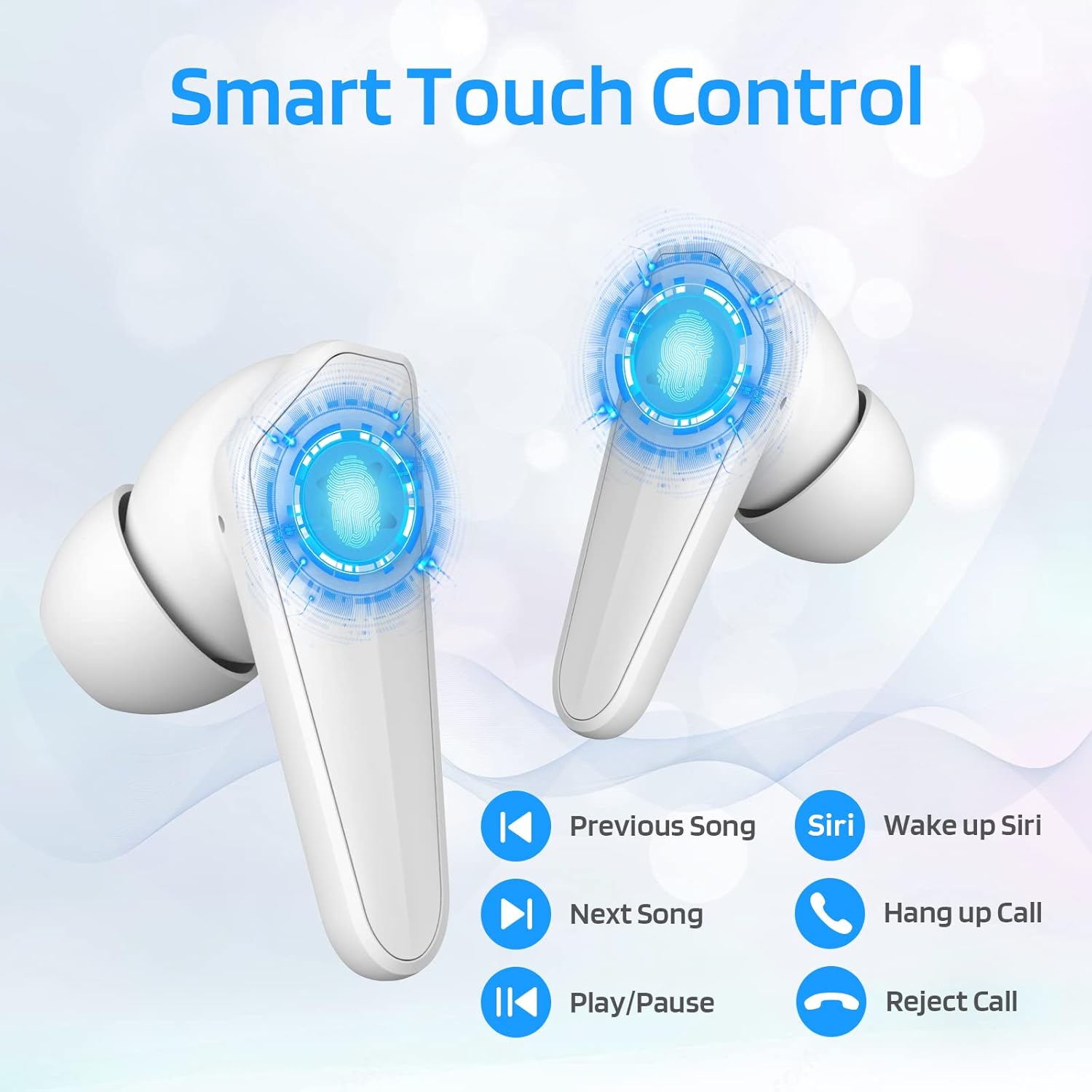
Image: Diagram illustrating the touch control functions on the earbuds, including play/pause, track navigation, call management, and voice assistant activation.
| وظيفة | فعل |
|---|---|
| تشغيل/إيقاف مؤقت | ضغطة واحدة على أي سماعة أذن. |
| الأغنية التالية | اضغط مرتين على سماعة الأذن اليمنى. |
| الأغنية السابقة | اضغط مرتين على سماعة الأذن اليسرى. |
| الرد على المكالمة/إنهائها | ضغطة واحدة على أي سماعة أذن. |
| رفض المكالمة | اضغط مع الاستمرار على أي من سماعات الأذن لمدة ثانيتين. |
| Activate Voice Assistant (Siri/Google) | اضغط ثلاث مرات على سماعة الأذن اليسرى. |
3. Dual Mode Switching (Music/Gaming)
The LTC SS-503 earbuds offer two distinct audio modes for optimized performance.

Image: A smartphone screen displaying both music playback and a gaming interface, with icons indicating "Music Mode" and "Gaming Mode" for the earbuds.
- أوضاع التحويل: Press the right earbud's MFB for 3 seconds to switch between modes.
- وضع الألعاب: This mode is designed to weaken ambient sound and strengthen specific in-game audio cues, such as footsteps, providing a low-latency experience for immersive gaming.
- وضع الموسيقى: This mode produces high-fidelity stereo sound with deep bass and clear treble, optimized for general music listening.
4. RGB Light Control (Charging Case)
The charging case features customizable RGB lighting.

Image: The charging case illuminated with vibrant RGB lights, emphasizing its colorful and fashionable design.
- تبديل أوضاع الإضاءة: Short press the MFB (Multi-Function Button) in the middle of the charging box to cycle through 9 different light modes.
- تشغيل/إطفاء الأنوار: Double-press the MFB in the middle of the charging box to turn the RGB lights on or off.
صيانة
تضمن الصيانة المناسبة طول عمر سماعات الأذن والأداء الأمثل لها.
- تنظيف: Regularly wipe the earbuds and charging case with a soft, dry, lint-free cloth. Avoid using abrasive materials or harsh chemicals. For ear tips, remove them and clean with mild soap and water, then dry thoroughly before reattaching.
- مقاومة الماء (IPX4): The earbuds are IPX4 waterproof, meaning they are resistant to splashing water from any direction. This makes them suitable for workouts and light rain. However, they are not designed for submersion in water, swimming, or showering. Do not expose them to pressurized water or high-velocity water.
- تخزين: عند عدم استخدام سماعات الأذن، احفظها في علبة الشحن لحمايتها والحفاظ على شحنها. خزّنها في مكان بارد وجاف بعيدًا عن درجات الحرارة المرتفعة وأشعة الشمس المباشرة.
- العناية بالبطارية: للحفاظ على عمر البطارية، تجنب تفريغ سماعات الأذن وعلبة الشحن بالكامل بشكل متكرر. اشحنها بانتظام، حتى لو لم تستخدمها لفترات طويلة.

Image: The earbuds and charging case shown with water droplets, illustrating their IPX4 waterproof capability.
استكشاف الأخطاء وإصلاحها
If you encounter issues with your LTC SS-503 earbuds, refer to the following common problems and solutions:
Issue 1: Only one earbud has sound.
This product supports a dual-host function, allowing use of a single earbud. If only one earbud has sound when both are in use, it may require a reset.
- حل: Place both earbuds back into the charging case. Close the lid, then open it again. This will reset and re-pair the earbuds. If the issue persists, perform a full reset as described in the "Connecting to Other Devices" section under Setup.
Issue 2: Occasional disconnection or unstable connection.
Bluetooth 5.1 technology provides a stable connection, but environmental factors can affect performance.
- حل:
- Ensure the effective connection distance (less than 10 meters) is maintained between the earbuds and your device.
- Avoid signal-blocking objects such as thick walls or large metal structures between your device and the earbuds.
- Ensure there is no significant electromagnetic interference from other electronic devices nearby.
- Try resetting the earbuds and re-pairing them with your device.
Issue 3: Earbuds or charging case not charging.
If your device is not charging as expected, check the following:
- حل:
- Verify that the USB-C cable is securely connected to both the charging case and the power adapter.
- Ensure the power adapter is functioning correctly and plugged into a live outlet.
- If using wireless charging, ensure the charging case is correctly positioned on the wireless charging pad and the pad is powered.
- Try using a different USB-C cable or power adapter to rule out faulty accessories.
- Clean the charging contacts on both the earbuds and inside the charging case with a dry cotton swab to ensure good connection.
تحديد
Detailed technical specifications for the LTC SS-503 TWS Wireless Earbuds:
| ميزة | التفاصيل |
|---|---|
| اسم الموديل | Sound Slave (SS-503) |
| تكنولوجيا الاتصال | لاسلكي (بلوتوث 5.1) |
| مدى البلوتوث | حتى 10 أمتار |
| مستوى مقاومة الماء | IPX4 (مقاوم للماء) |
| عمر بطارية سماعة الأذن | حتى ساعتين |
| إجمالي وقت اللعب (مع علبة الشحن) | حتى ساعتين |
| مدة الشحن (العلبة) | 1.5 ساعة |
| نوع التحكم | التحكم باللمس (التحكم بالوسائط) |
| نوع برنامج تشغيل الصوت | سائق ديناميكي |
| نطاق التردد | 20 هرتز - 20,000 هرتز |
| مادة | بلاستيك |
| وزن العنصر | 5 أونصة (الحزمة الإجمالية) |
| لون | أبيض |
الضمان والدعم
LTC products are manufactured with high standards of quality. For specific warranty details, please refer to the warranty card included with your product or visit the official LTC webالموقع. احتفظ بإيصال الشراء الخاص بك كإثبات للشراء في حالة وجود أي مطالبات بالضمان.
For further assistance, technical support, or inquiries, please refer to the official user manual PDF available online or contact LTC customer service through their official channels. The user manual PDF can be accessed via this link: LTC SS-503 User Manual (PDF).


