مقدمة
This manual provides essential information for the safe and efficient operation of your Victron Energy Phoenix 1200VA 24-Volt 120V AC Pure Sine Wave Inverter. This inverter is designed to convert 24-Volt DC battery power into 120-Volt AC power, suitable for various domestic equipment in leisure, automotive, or off-grid applications.
فيديو 1: أكثر منview of the Victron Energy Phoenix Pure Sinewave Inverter, highlighting its suitability for off-grid RV or boat applications due to its small and compact design.
تتضمن الميزات الرئيسية ما يلي:
- مخرج موجة جيبية نقية للأجهزة الإلكترونية الحساسة.
- 250VA continuous power and 400-Watt peak power.
- High efficiency with a low 0.8-Watt draw in ECO mode.
- VE.Direct communication port for monitoring and configuration via VictronConnect app.
- High start-up power capability for inductive loads.
- Compact design utilizing hybrid HF technology.
معلومات السلامة
WARNING: Electrical Shock Hazard. Read all safety instructions before installation or operation.
- يجب أن يتم التركيب بواسطة فنيين مؤهلين وفقًا لقوانين الكهرباء المحلية.
- Ensure the inverter is disconnected from all power sources before performing any maintenance or wiring.
- Do not expose the inverter to rain, snow, spray, or liquids.
- Operate the inverter in a well-ventilated area.
- لا تفتح العاكس جasinز. لا توجد أجزاء قابلة للصيانة من قبل المستخدم بالداخل.
- تأكد من التأريض الصحيح للعاكس.
- Use appropriate battery cables and fuses as specified in the installation guide.
المنتج انتهىview
The Victron Energy Phoenix Inverter is a compact and robust device designed for reliable AC power conversion.
المظهر الخارجي والأبعاد

الشكل 2: الجبهة view of the Victron Energy Phoenix 1200VA Pure Sine Wave Inverter. For more information, visit ve3.nl/plJz.

Figure 3: Dimensions of the Victron Energy Phoenix Inverter. The unit measures approximately 327 mm (12.9 inches) in length, 232 mm (9.1 inches) in width, and 117 mm (4.6 inches) in height. For more information, visit ve3.nl/plJz.
التوصيلات والضوابط
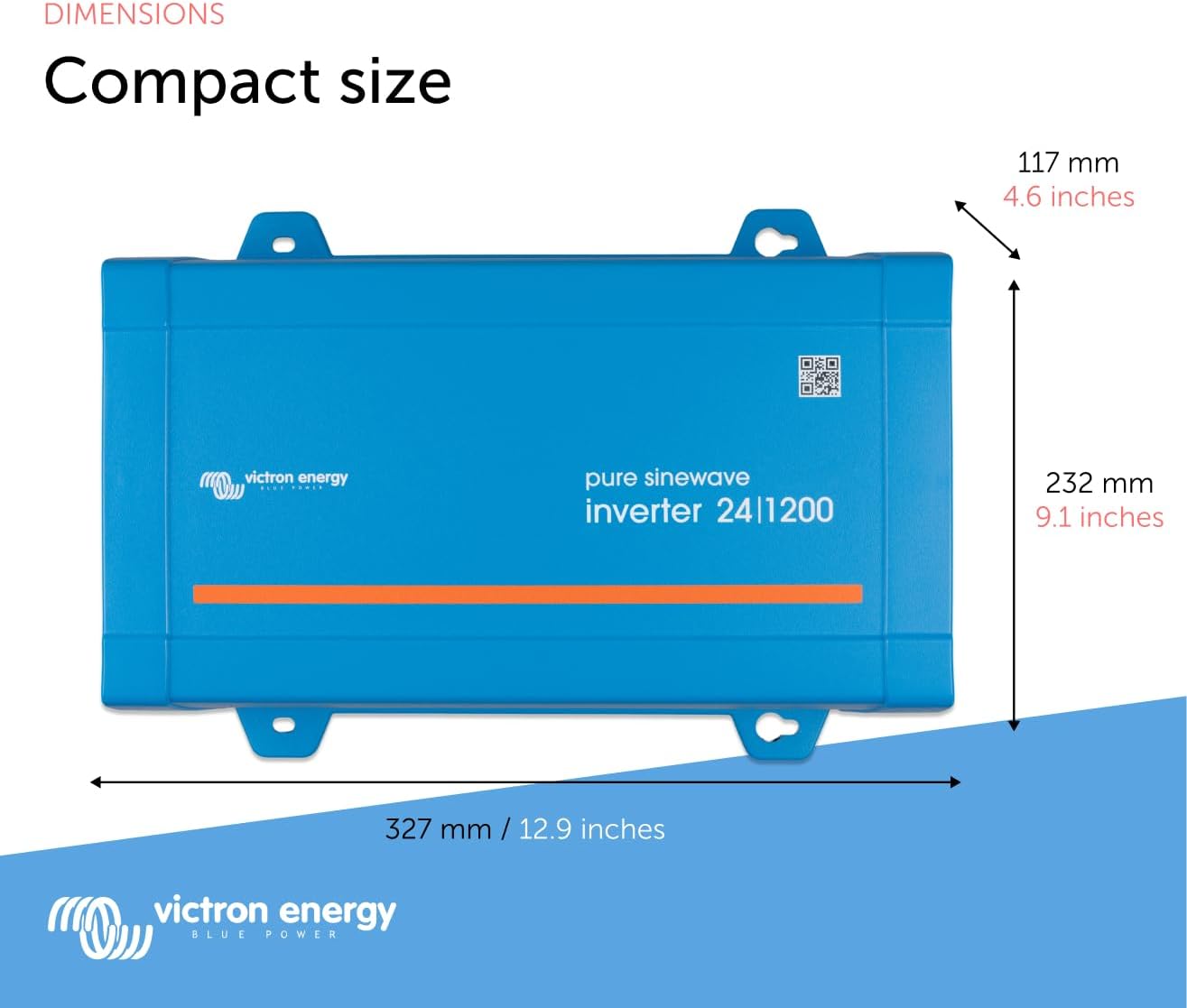
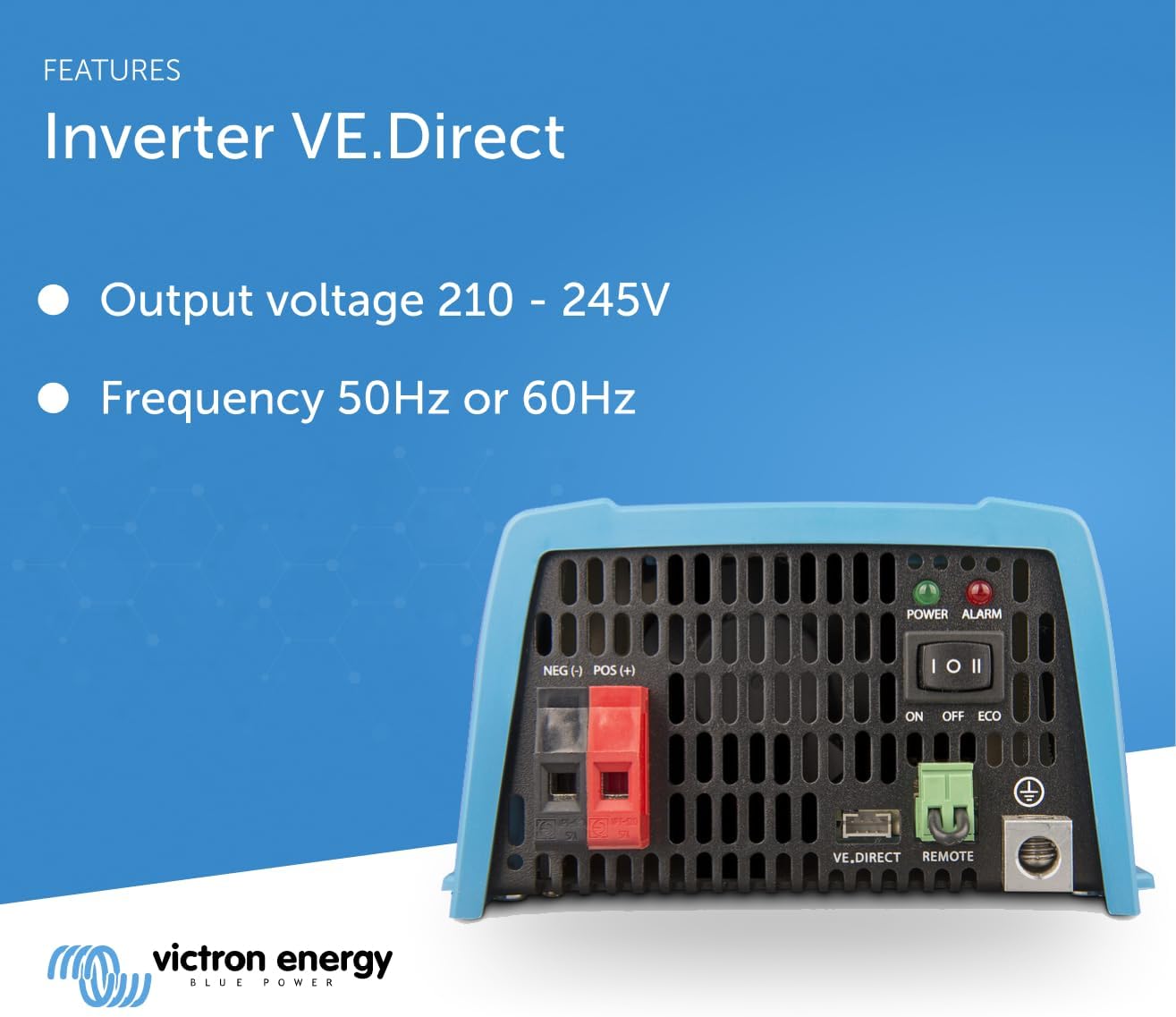
Figure 4: Rear panel of the inverter with DC input terminals, ON/OFF/ECO switch, VE.Direct port, remote connection, and ground terminal.
- أطراف إدخال التيار المستمر: Marked NEG (-) and POS (+), these are for connecting the 24-Volt DC battery bank.
- ON/OFF/ECO Switch: Controls the inverter's operating mode.
- على: Inverter is continuously active.
- OFF: Inverter is powered off.
- سابقة بمعنى البِيْئَة: Energy-saving mode where the inverter switches to standby when the load decreases below a preset value. It periodically checks for load and reactivates when detected.
- مؤشر LED للطاقة (أخضر): Indicates the inverter is operating.
- Alarm LED (Red): Indicates a fault or warning condition.
- VE.Direct Port: A communication port for connecting to a computer (via VE.Direct to USB interface cable) or smartphones/tablets (via VE.Direct Bluetooth Smart dongle) for monitoring and configuration.
- Remote Connector: Allows connection of an external ON/OFF switch or vehicle ignition for remote control.
- محطة أرضية: For proper grounding of the inverter.
- خرج التيار المتردد: The 120V AC NEMA GFCI outlet for connecting AC loads.
الشكل 5: الجانب view of the inverter showing the NEMA GFCI AC output socket.
يثبت
تثبيت
- Mount the inverter in a dry, well-ventilated area, away from direct sunlight and heat sources.
- Ensure adequate clearance around the unit for proper airflow.
- Use appropriate mounting hardware to secure the inverter firmly.
الأسلاك
- اتصال التيار المستمر: Connect the battery cables to the NEG (-) and POS (+) terminals. Ensure correct polarity. Use appropriately sized cables and fuses for your system.
- التأريض: Connect the ground terminal to a reliable earth ground.
- خرج التيار المتردد: Plug your 120V AC appliances into the NEMA GFCI outlet.
- جهاز التحكم عن بعد (اختياري): If using a remote switch, connect it to the REMOTE terminals.
- VE.Direct Connection (Optional): For monitoring and configuration, connect a VE.Direct to USB interface cable to a computer or a VE.Direct Bluetooth Smart dongle for wireless connection to a smartphone/tablet.

Figure 6: Illustration of various output socket types and the VE.Direct port for connectivity, including options for remote control and different output sockets.
تعليمات التشغيل
Powering On/Off and ECO Mode
- To turn the inverter ON, set the switch to the 'ON' position. The green Power LED will illuminate.
- To turn the inverter OFF, set the switch to the 'OFF' position. All LEDs will turn off.
- To activate ECO mode, set the switch to the 'ECO' position. The inverter will enter a low-power standby state and periodically check for connected loads.

Figure 7: Visual representation of high start-up power, ECO mode functionality, and the remote on/off connector for easy system management.
VE.Direct Communication and VictronConnect App
The VE.Direct port allows for advanced monitoring and configuration of your inverter using the VictronConnect app on a smartphone, tablet, or computer.
Video 2: This video demonstrates how to reduce power consumption of an inverter in standby mode using the AES function in VE.Configure and VictronConnect. It explains the modified sine wave and search modes for energy saving.
Using VictronConnect, you can:
- Monitor real-time status, including input voltage, output power, and battery state.
- تكوين الإعدادات مثل مستوى الصوت الناتجtage, frequency, and low battery shutdown levels.
- Enable and adjust the Automatic Energy Saver (AES) function to optimize standby power consumption.
- Access diagnostic information and update firmware.


Figure 8: Screenshots of the VictronConnect app interface for monitoring and configuring inverter settings.
For detailed instructions on using VictronConnect, refer to the app's help section or the Victron Energy webموقع.
صيانة
- تنظيف: Keep the inverter clean and free from dust and debris. Use a dry cloth for cleaning. Do not use liquid cleaners.
- تهوية: Regularly check that the ventilation openings are not blocked to ensure proper cooling.
- الاتصالات: Periodically inspect all electrical connections for tightness and corrosion. Tighten any loose connections and clean any corrosion.
- صحة البطارية: Monitor your battery bank's health and charge levels to ensure optimal inverter performance and battery longevity.
استكشاف الأخطاء وإصلاحها
This section provides guidance on common issues. For more complex problems, contact Victron Energy support.
| الأعراض | السبب المحتمل | حل |
|---|---|---|
| No AC output, Red Alarm LED on. | Overload, short circuit, over-temperature, low battery voltage. | Reduce load, check for short circuits, allow inverter to cool, charge batteries. |
| Inverter frequently switches to ECO mode or off. | انخفاض مستوى البطاريةtage, high standby consumption, or load below ECO threshold. | Charge batteries, adjust ECO mode settings via VictronConnect, ensure load is above threshold. |
| No communication via VE.Direct. | Incorrect cable, faulty dongle, software issue. | Check cable connections, ensure correct dongle is used, restart VictronConnect app. |
تحديد
| ميزة | التفاصيل |
|---|---|
| رقم الموديل | رقم التعريف الشخصي 242120510 |
| Continuous Power (25°C) | 1200 فولت أمبير |
| الطاقة القصوى | 2200 واط |
| حجم الإدخال DCtage | 24 فولت |
| حجم إخراج التيار المترددtage | 120 فولت تيار متردد |
| شكل الموجة الناتجة | موجة جيبية نقية |
| No-load Power (ECO mode) | 0.8 واط |
| الأبعاد (الطول × العرض × الارتفاع) | 12.9 × 9.1 × 4.6 بوصة (327 × 232 × 117 مم) |
| وزن العنصر | 18.33 رطل |
| الشركة المصنعة | فيكتورون إنيرجي |
Note: Full specifications can be found on the official Victron Energy webموقع.
الضمان والدعم
Victron Energy products are known for their quality and reliability. For specific warranty terms and conditions, please refer to the documentation included with your product or visit the official Victron Energy webموقع.
For technical support, product registration, or service inquiries, please contact Victron Energy customer service or an authorized dealer.
الموارد المتاحة على الإنترنت:
- مسؤول شركة فيكترون للطاقة Webموقع: www.victronenergy.com
- VictronConnect App: Available for download on major app stores.


