1. المقدمة
This manual provides essential information for the safe and efficient use of your Aligator A675 Senior Double SIM 2G Mobile Phone. Please read it carefully before using the device and keep it for future reference. The Aligator A675 is designed for ease of use, featuring large buttons and a clear display, making it ideal for senior users.
2. محتويات العبوة
تأكد من وجود جميع العناصر في العبوة:
- هاتف أليغاتور A675 المحمول
- بطارية
- شاحن
- دليل المستخدم (هذا المستند)
إذا كانت أي من العناصر مفقودة أو تالفة، يرجى الاتصال بالتاجر الخاص بك.
3. انتهى الجهازview
Familiarize yourself with the key components of your Aligator A675 phone.

الصورة 3.1: الامام والخلف view of the Aligator A675 mobile phone. The front shows the display, keypad, and navigation buttons. The back features the speaker and camera module.
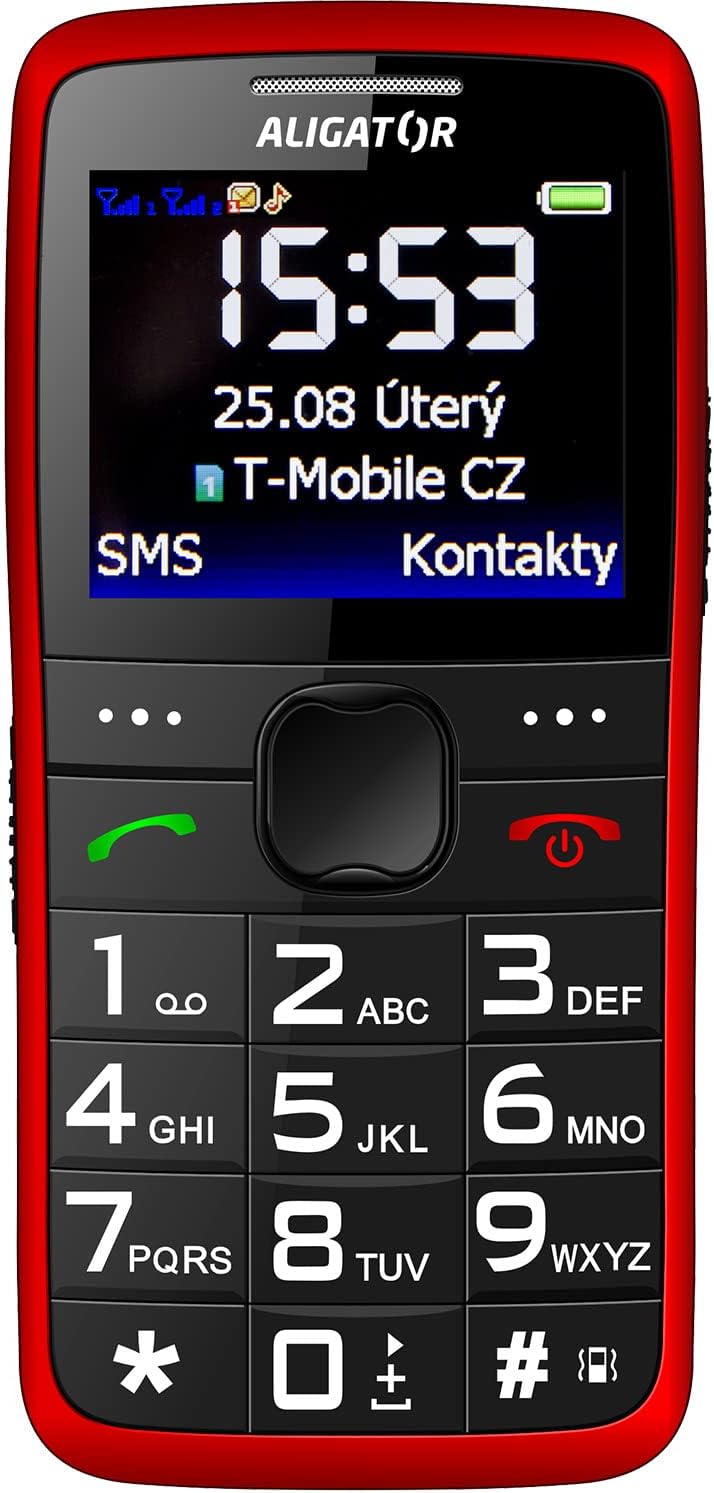
الصورة 3.2: واجهة أمامية مفصلة view of the Aligator A675 mobile phone, highlighting the large display, clear numeric keypad, and dedicated call/end buttons.
3.1 الجبهة View
- عرض: Shows time, date, network status, battery level, and menu options.
- مفتاح التنقل: تُستخدم للتنقل بين القوائم والخيارات.
- زر الاتصال (أخضر): Initiates calls and answers incoming calls.
- End/Power Button (Red): Ends calls, returns to the home screen, and powers the phone on/off.
- لوحة المفاتيح: Numeric keys (0-9), asterisk (*), and hash (#) for dialing and text input.
3.2 العودة View
- مكبر الصوت: For ringtones and hands-free calls.
- آلة تصوير: For basic photo capture.
- زر الاستغاثة: A dedicated button for emergency calls/SMS (refer to section 5.4 for setup).
4. الإعداد
Follow these steps to prepare your phone for first use.
4.1 إدخال بطاقات SIM
- قم بإزالة الغطاء الخلفي للهاتف عن طريق فتحه برفق من الشق.
- إذا تم إدخال البطارية، قم بإزالتها.
- Locate the SIM card slots. The Aligator A675 supports two SIM cards (Dual SIM).
- Carefully insert your 2G GSM SIM card(s) into the designated slot(s) with the gold contacts facing down, ensuring they are correctly oriented.
- تأكد من تثبيت بطاقات SIM في مكانها بشكل آمن.
4.2 إدخال البطارية
- قم بمحاذاة نقاط توصيل البطارية مع نقاط التوصيل الموجودة في حجرة بطارية الهاتف.
- Gently press the battery into place until it fits snugly.
- أعد تركيب الغطاء الخلفي، وتأكد من تثبيته في مكانه بنقرة.
4.3 شحن الهاتف
- Connect the charger cable to the charging port on the phone (usually located at the bottom).
- قم بتوصيل الشاحن بمأخذ الطاقة.
- The battery icon on the display will indicate charging status.
- Allow the phone to charge completely before first use. This typically takes a few hours.
5. تشغيل الهاتف
Basic functions and features of your Aligator A675.
5.1 تشغيل/إيقاف التشغيل
- لتشغيل: اضغط مع الاستمرار على End/Power Button (red button) until the screen lights up.
- لإيقاف التشغيل: اضغط مع الاستمرار على End/Power Button until the power-off options appear, then confirm.
5.2 إجراء واستقبال المكالمات
- لإجراء أتصال: أدخل رقم الهاتف باستخدام لوحة المفاتيح واضغط على زر الاتصال (زر أخضر).
- للرد على مكالمة: اضغط على زر الاتصال عندما يرن الهاتف.
- لإنهاء المكالمة: اضغط على End/Power Button.
5.3 إرسال واستقبال الرسائل النصية القصيرة
- Navigate to the 'Messages' menu using the navigation key.
- اختر "كتابة رسالة" لإنشاء رسالة نصية قصيرة جديدة.
- أدخل رقم المستلم أو اختر من جهات الاتصال.
- Type your message using the keypad. Press the appropriate key multiple times for different letters (e.g., '2' for A, B, C).
- حدد "إرسال".
- Incoming messages will be displayed on the screen and stored in the 'Inbox'.
5.4 وظيفة SOS
تتيح لك وظيفة SOS الاتصال بسرعة بأرقام الطوارئ المحددة مسبقًا.
- Setting Up SOS Numbers: Go to 'Settings' > 'SOS Settings'. Add up to 5 emergency contact numbers.
- تفعيل SOS: اضغط مع الاستمرار على زر الاستغاثة on the back of the phone for a few seconds.
- The phone will automatically send an emergency SMS to the pre-set numbers and then start dialing them one by one until a call is answered.
5.5 جهات الاتصال
- إضافة جهة اتصال: Go to 'Contacts' > 'Add New'. Enter the name and phone number, then save.
- البحث عن جهة اتصال: Go to 'Contacts' and use the navigation key to scroll or type the first letters of the name.
6. الصيانة والعناية
Proper care ensures the longevity of your Aligator A675 phone.
- تنظيف: استخدم قطعة قماش ناعمة وجافة لتنظيف سطح الهاتف. تجنب المنظفات السائلة أو المواد الكاشطة.
- العناية بالبطارية: لا تعرض البطارية لدرجات حرارة قصوى. تجنب تفريغ البطارية بالكامل بشكل متكرر.
- تخزين: خزّن الهاتف في مكان بارد وجاف بعيداً عن أشعة الشمس المباشرة والرطوبة.
- مقاومة الماء: This phone is not water-resistant. Avoid contact with liquids.
7. استكشاف الأخطاء وإصلاحها
المشاكل الشائعة وحلولها.
| مشكلة | السبب المحتمل | حل |
|---|---|---|
| الهاتف لا يعمل | بطارية منخفضة؛ البطارية غير مُدخلة بشكل صحيح | اشحن البطارية؛ أعد إدخال البطارية بشكل صحيح |
| لا يمكن إجراء/استقبال المكالمات | No network signal; SIM card not inserted; SIM card not activated | Move to an area with better signal; Reinsert SIM card; Contact your network provider |
| لا يوجد صوت أثناء المكالمات | Volume too low; Speaker blocked | Increase call volume; Check if speaker is obstructed |
| وظيفة SOS لا تعمل | لم يتم ضبط أرقام الطوارئ؛ لا توجد إشارة شبكة | Set up SOS numbers in settings; Ensure network coverage |
إذا استمرت المشكلة، يرجى الاتصال بدعم العملاء.
8. المواصفات
Key technical details of the Aligator A675.
- ماركة: المحول
- نموذج: أ675
- ناقل لاسلكي: مفتوح
- تكنولوجيا الشبكات اللاسلكية: جي إس إم (2G)
- حجم الشاشة: 3 بوصة
- مدخلات واجهة الإنسان: لوحة المفاتيح
- دعم بطاقة SIM: شريحتين اتصال
9. الضمان والدعم
Your Aligator A675 phone is covered by a standard manufacturer's warranty. Please refer to the warranty card included in your package for specific terms and conditions, including the warranty period and coverage details.
For technical support, service, or warranty claims, please contact your retailer or the official Aligator customer service. Contact information can typically be found on the manufacturer's webالموقع أو على العبوة.
احتفظ بإثبات الشراء (الإيصال أو الفاتورة) لأنه سيكون مطلوبًا لأي خدمة ضمان.


