1. المقدمة
This manual provides detailed instructions for the VTech AM18447 4-Line Corded Base Phone System, including the AM18447 main console and up to three AM18247 corded desksets. This system is designed to manage calls across 1 to 4 telephone lines simultaneously, offering advanced features for efficient communication. Please read this manual thoroughly to ensure proper installation, operation, and maintenance of your phone system.

Image 1: The VTech AM18447 4-Line Corded Base Phone System, showing the main console and three additional corded desksets.
2. الإعداد
2.1 تفريغ النظام
قم بإخراج جميع المحتويات من الصندوق بعناية. تأكد من وجود المكونات التالية:
- VTech AM18447 Main Console (Base Unit)
- Up to three VTech AM18247 Corded Desksets
- Power Adapters for each unit
- حبال خط الهاتف
- Corded Handsets and Coiled Cords
2.2 Connecting the Main Console (AM18447)
- Connect one end of the coiled handset cord to the handset jack on the main console and the other end to the handset.
- Plug one end of the telephone line cord into the LINE 1 jack on the back of the main console and the other end into a telephone wall jack. Repeat for LINE 2, LINE 3, and LINE 4 if you have multiple lines.
- Connect the power adapter to the POWER jack on the main console and plug the other end into an electrical outlet.
- If using DSL service, ensure you use a DSL filter (not included) for each telephone line to prevent interference.
2.3 Connecting Additional Corded Desksets (AM18247)
Each AM18247 deskset connects to the main console wirelessly. Follow these steps for each deskset:
- Connect one end of the coiled handset cord to the handset jack on the deskset and the other end to the handset.
- Connect the power adapter to the POWER jack on the deskset and plug the other end into an electrical outlet.
- The deskset will automatically register with the main console upon power-up. If registration fails, refer to the troubleshooting section.
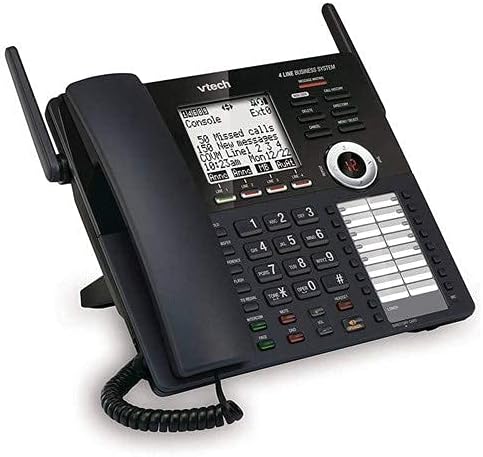
الصورة 2: تفصيلية view of the VTech AM18447 main console, highlighting the display, keypad, and line indicators.
2.4 Battery Installation for Power Failure Operation
The main console requires 4 AAA batteries (not included) for power failure operation, allowing basic functionality during a power outage. Locate the battery compartment on the underside of the main console, insert the batteries according to the polarity markings, and replace the cover.
3. تعليمات التشغيل
3.1 وظائف الاتصال الأساسية
- إجراء مكالمة: ارفع سماعة الهاتف أو اضغط على المتحدث button. Select an available line (LINE 1-4) if not automatically selected. Dial the number.
- الرد على مكالمة: ارفع سماعة الهاتف أو اضغط على المتحدث الزر عندما يرن الهاتف.
- إنهاء المكالمة: ضع سماعة الهاتف مرة أخرى في مكانها أو اضغط على المتحدث الزر مرة أخرى.
- يمسك: أثناء المكالمة ، اضغط على يمسك button to place the call on hold. Press the flashing line button to retrieve the call.
- معاودة الاتصال: اضغط على إعادة button to redial the last 10 numbers called.
3.2 مكبر صوت
The system features a full-duplex speakerphone, allowing both parties to speak and be heard simultaneously. To use, press the المتحدث button during a call or to initiate a call without lifting the handset.
3.3 نظام الرد الرقمي
The integrated digital answering system records up to 180 minutes of messages, announcements, and memos.
- Recording an Outgoing Announcement: Access the answering system menu and follow voice prompts to record your personalized message.
- تشغيل الرسالة: اضغط على تشغيل/إيقاف زر. يستخدم يتخطى to advance, يكرر to replay, and يمسح to remove messages. Variable speed playback is available through menu options.
- Memo Recording: Record personal memos for later playback.
- الوصول عن بعد: Access your messages from an outside line by dialing your phone number and entering your remote access code.
- Private Mailbox: Configure private mailboxes for individual users.
3.4 Caller ID / Call Waiting
The system stores up to 50 names and numbers in the Caller ID history.
- Viewing Caller ID: Use the navigation buttons to scroll through the Caller ID log.
- خدمة انتظار المكالمات: When on a call, a tone indicates an incoming call. Press the فلاش زر للتبديل بين المكالمات.
3.5 دليل دليل الهاتف
يمكنك تخزين ما يصل إلى 100 اسمًا ورقمًا في دليل الهاتف.
- إضافة مدخل: Access the phonebook menu, select 'Add New Entry', and enter the name and number.
- اتصال سريع: Assign frequently called numbers to speed dial locations (up to 32).
3.6 Intercom, Call Transfer, and Conferencing
- الاتصال الداخلي: اضغط على الاتصال الداخلي button and select the desired station to initiate an internal call.
- تحويل المكالمة: أثناء إجراء مكالمة خارجية، اضغط تحويل, select the internal station, and then hang up to complete the transfer.
- مؤتمرات ثلاثية: Connect up to four parties (internal and external) on a single call. Refer to the menu for specific steps.
3.7 إعدادات النظام
Access the setup menu to customize various settings.
- لغة: Select English, Spanish, or French for the display menu.
- Ringers: Choose from 10 polyphonic ringers, assignable per line.
- المصاحبة التلقائية: Enable or disable the auto attendant feature for each line.
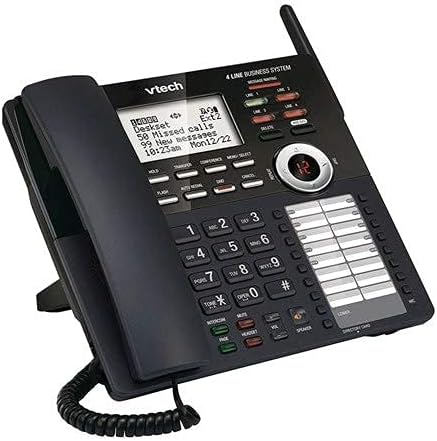
الصورة 3: زاوية view of the VTech AM18447 main console, providing a clear perspective of its ergonomic design and button layout.
4. الصيانة
لضمان طول عمر نظام الهاتف VTech الخاص بك وأدائه الأمثل، اتبع إرشادات الصيانة التالية:
- تنظيف: Wipe the phone surfaces with a soft, slightly damp قماش. لا تستخدم مواد كيميائية قاسية أو منظفات كاشطة.
- موقع: Place the phone system in a dry area, away from direct sunlight, heat sources, and excessive moisture.
- قوة: Ensure all power adapters are securely plugged into working electrical outlets.
5. استكشاف الأخطاء وإصلاحها
If you encounter issues with your VTech phone system, try the following solutions:
- لا طنين:
- Check all telephone line cord connections.
- تأكد من توصيل محول الطاقة بشكل آمن.
- Test the telephone line with another phone.
- لا يوجد طاقة للوحدة:
- Verify the power adapter is correctly connected to the unit and a working electrical outlet.
- افحص مأخذ الكهرباء بجهاز آخر.
- نظام الرد الآلي لا يسجل:
- تأكد من تشغيل نظام الرد الآلي.
- تحقق من أن الذاكرة ممتلئة؛ قم بحذف الرسائل القديمة.
- عدم ظهور معرف المتصل:
- تأكد من اشتراكك في خدمة معرف المتصل من مزود خدمة الهاتف الخاص بك.
- Verify the phone line connection.
- Deskset Not Registering:
- Ensure the deskset is powered on.
- Refer to the main console's menu for manual registration options if automatic registration fails.
6. المواصفات
| ميزة | التفاصيل |
|---|---|
| أبعاد المنتج | 9 × 5.7 × 8.8 بوصة |
| وزن العنصر | 2 رطل |
| البطاريات المطلوبة | 4 AAA batteries (for power failure operation) |
| الشركة المصنعة | فيتك |
| ماركة | تيك |
| لون | أسود |
| نوع الهاتف | حبالي |
| مادة | بلاستيك |
| مصدر الطاقة | كهرباء سلكية |
| نوع المسجل | لوحة مفاتيح واحدة |
| نوع نظام الرد | رقمي |
7. الضمان والدعم
VTech products are manufactured with high-quality components and are designed for reliable performance. For specific warranty information, please refer to the warranty card included with your product packaging or visit the official VTech webموقع.
For technical support, troubleshooting assistance, or to inquire about replacement parts, please contact VTech Customer Service. Contact details can typically be found on the VTech webالموقع أو في عبوة منتجك.


