مقدمة
Thank you for choosing the TAOPON Smart Watch. This device is designed to enhance your daily life with its comprehensive features, including fitness tracking, health monitoring, and smart notifications. This manual provides detailed instructions to help you set up, operate, and maintain your smartwatch for optimal performance.

Figure 1: TAOPON Smart Watch Overview
ماذا يوجد في الصندوق
- TAOPON Smart Watch (with Watch Band)
- كابل الشحن
- دليل المستخدم
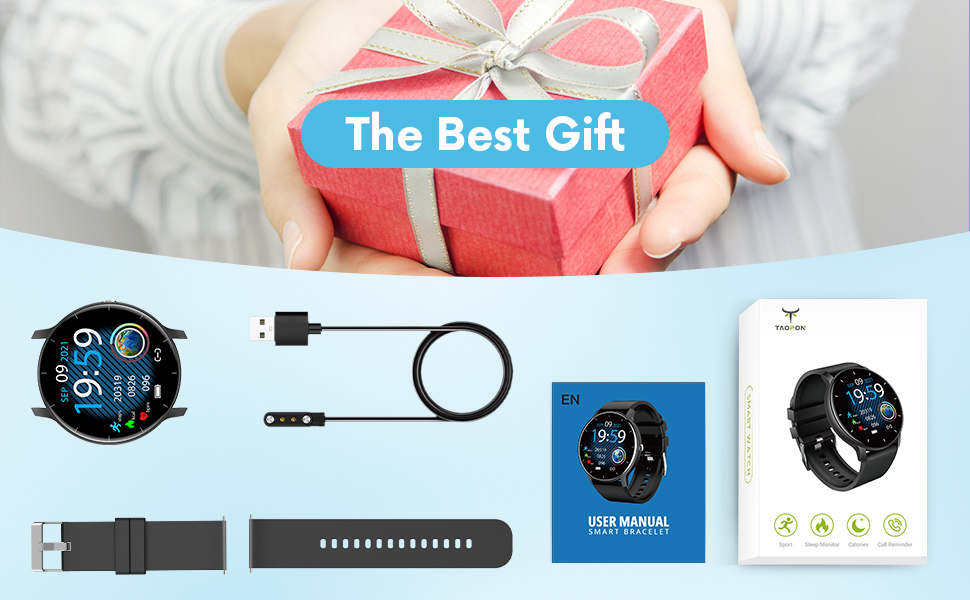
الشكل 2: محتويات العبوة
دليل الإعداد
1. شحن الساعة الذكية
Before first use, fully charge your smartwatch. Connect the magnetic charging cable to the charging points on the back of the watch and plug the USB end into a power adapter (not included) or a computer's USB port. A full charge typically takes about 2 hours and provides up to 7 days of typical use or 30 days of standby time.

الشكل 3: شحن الساعة الذكية
2. تثبيت التطبيق وإقرانه
To unlock the full potential of your TAOPON Smart Watch, download and install the "Da Fit" app on your smartphone. The app is compatible with iOS 9.0 & Android 5.0 or higher.
- Scan the QR code in the manual or search for "Da Fit" in your phone's app store (App Store for iOS, Google Play Store for Android).
- Install the "Da Fit" app.
- افتح التطبيق واتبع التعليمات التي تظهر على الشاشة لإنشاء حساب أو تسجيل الدخول.
- قم بتمكين البلوتوث على هاتفك الذكي.
- In the "Da Fit" app, navigate to the device section and search for your smartwatch. Select "smartwatch zl02" to pair.
- قم بتأكيد طلب الاقتران على كل من هاتفك وساعتك الذكية.
بمجرد الاقتران، ستقوم الساعة بمزامنة الوقت والبيانات مع هاتفك.
تعليمات التشغيل
الملاحة الأساسية
- شاشة اللمس: اسحب لليسار/اليمين أو لأعلى/لأسفل للتنقل بين القوائم والميزات.
- زر جانبي: Press to quickly return to the home screen or turn the screen on/off.
- رفع للاستيقاظ: The display will automatically light up when you raise your wrist.
Customizing Watch Dials
Your smartwatch offers a variety of pre-installed dials. You can also personalize your watch face by setting your favorite photo as the dial through the "Da Fit" app.

Figure 4: Watch Dial Customization
تتبع اللياقة البدنية
The watch supports 8 sports modes to track your activities:
- المشي
- جري
- ركوب الدراجات
- حبل القفز
- تنس الريشة
- كرة السلة
- كرة القدم
- Swimming (IP67 waterproof, suitable for hand washing or rainy days, not for prolonged submersion or hot water)
During exercise, the watch tracks calorie consumption, steps, distance, minutes of activity, and heart rate. Connect to your mobile phone's GPS via the app to record your movement track.

Figure 5: Multiple Sports Modes Tracking
مراقبة الصحة
The smartwatch accurately tracks real-time health data:
- رصد معدل ضربات القلب: Records your heart rate throughout the day. You can also measure it in real-time by tapping the heart rate icon on the watch.
- مراقبة الأكسجين في الدم: Provides SpO2 readings.
- مراقبة ضغط الدم: Measures blood pressure levels.
- مراقب النوم: Tracks deep sleep, light sleep, and overall sleep duration, showing trends in sleep quality over a week.

الشكل 6: المراقبة الصحية الشاملة
Smart Features and Tools
The TAOPON Smart Watch offers various convenient tools:
- إخطارات الرسائل: Receive call reminders, SMS, Facebook, Twitter, LinkedIn, WhatsApp, Line, Instagram, etc., by connecting to the "Da Fit" APP. You can reject calls directly from the watch.
- كاميرا عن بعد: تحكم بكاميرا هاتفك عن بعد من ساعتك.
- التحكم بالموسيقى: تشغيل، إيقاف مؤقت، تخطي المقاطع الصوتية على مشغل الموسيقى الخاص بهاتفك.
- النشرة الجوية: احصل على تحديثات الطقس في الوقت الحقيقي.
- عداد الخطى: احسب خطواتك اليومية.
- تذكير بالخمول: ينبهك للتحرك بعد فترات من الخمول.
- المؤقت: Built-in timer function.
- Deep Breathing Guide: Assists with guided breathing exercises.
- الانذارات: Set up to 3 alarms directly on the watch.
- سطوع قابل للتعديل: اضبط سطوع الشاشة للحصول على أفضل النتائج viewعمل.
- وضع المسرح: Reduces screen brightness and disables vibrations for undisturbed viewعمل.

Figure 7: Remote Camera

الشكل 8: التحكم في الموسيقى
صيانة
- تنظيف: Regularly wipe your smartwatch and band with a soft, damp القماش. تجنب المواد الكيميائية القاسية أو المواد الكاشطة.
- مقاومة الماء: The watch is IP67 waterproof, meaning it is effective against splashes and can be worn during hand washing or rainy days. It is not recommended for showering with hot water, diving, or prolonged submersion.
- العناية بالبطارية: To prolong battery life, avoid extreme temperatures and do not allow the battery to fully drain frequently. Charge the watch regularly.
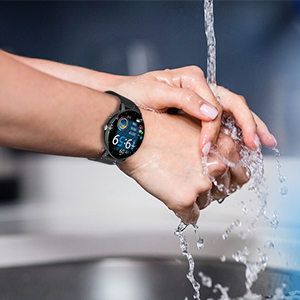
الشكل 9: مقاومة الماء IP67
استكشاف الأخطاء وإصلاحها
- الساعة لا تعمل: تأكد من شحن الساعة بالكامل. وصّلها بكابل الشحن ومصدر الطاقة لمدة 30 دقيقة على الأقل.
- غير قادر على الاقتران بالهاتف:
- تأكد من تمكين البلوتوث على هاتفك وأن الساعة ضمن النطاق.
- أعد تشغيل هاتفك والساعة الذكية.
- Check if the "Da Fit" app is updated to the latest version.
- If previously paired, try unpairing the device from your phone's Bluetooth settings and re-pairing through the app.
- بيانات صحية غير دقيقة:
- تأكد من ارتداء الساعة بشكل مريح على معصمك، على بعد إصبع واحد تقريبًا من عظمة معصمك.
- احرص على إبقاء المستشعر نظيفًا وخاليًا من الحطام.
- Note that health monitoring features are for reference only and should not be used for medical diagnosis.
- الإشعارات غير المستلمة:
- تحقق من أذونات التطبيق في إعدادات هاتفك للتأكد من أن تطبيق "Da Fit" لديه إمكانية الوصول إلى الإشعارات.
- Verify that notification settings are enabled within the "Da Fit" app for specific applications.
- تأكد من أن الساعة متصلة بهاتفك عبر البلوتوث.
تحديد
| ميزة | التفاصيل |
|---|---|
| رقم الموديل | smartwatch zl02 |
| حجم الشاشة | 1.28 بوصة (قطر الشاشة المرئية: 2 بوصة / 4 سم) |
| دقة | 240*240 بكسل |
| سعة البطارية | بطارية ليثيوم بوليمر 200 مللي أمبير في الساعة (متضمنة) |
| عمر البطارية | 7 أيام (الاستخدام النموذجي)، 30 يومًا (الاستعداد) |
| تصنيف مقاومة الماء | IP67 |
| التوافق | iOS 9.0 & Android 5.0 or higher |
| الاتصال | بلوتوث |
| وزن العنصر | 110 جرام (3.88 أونصة) |
| أبعاد المنتج | 6.18 × 4.02 × 1.06 بوصة |
| الشركة المصنعة | تاوبون |
معلومات هامة حول السلامة
- لا تحاول تفكيك الجهاز أو إصلاحه أو تعديله.
- احتفظ بالجهاز بعيدًا عن درجات الحرارة العالية وأشعة الشمس المباشرة واللهب المكشوف.
- تجنب الصدمات القوية أو إسقاط الجهاز.
- يحفظ بعيدًا عن متناول الأطفال.
- تخلص من الجهاز وبطاريته وفقًا للوائح المحلية. لا تتخلص منهما مع النفايات المنزلية.
- Consult a medical professional before starting any new exercise regimen or if you have any health concerns. The health monitoring data is for reference only.
الضمان والدعم
For warranty information, technical support, or customer service inquiries, please refer to the contact details provided on the product packaging or the official TAOPON webيرجى الاحتفاظ بإثبات الشراء الخاص بك للمطالبة بالضمان.


