1. المقدمة
شكرا لك على الشراءasing the KEPLUG Sunrise Alarm Clock. This device is designed to enhance your waking and sleeping experience with its unique features, including sunrise and sunset simulations, dual alarms, FM radio, and various natural sounds. Please read this manual carefully to ensure proper use and optimal performance.
محتويات الحزمة:
- 1 x KEPLUG Sunrise Alarm Clock
- 1 × كابل ميكرو USB
- 1 × محول حائط
- 1 × دليل المستخدم
2. انتهى المنتجview
Familiarize yourself with the main components and controls of your KEPLUG Sunrise Alarm Clock.

الصورة 2.1: أمام view of the KEPLUG Sunrise Alarm Clock, showing the digital time display and the illuminated light panel. The clock face is round with a white base.
Control Buttons and Ports:
Refer to the diagram below for button identification (exact button layout may vary slightly by model, but functions are consistent).
- زر ضبط الوقت: يُستخدم للدخول إلى وضع ضبط الوقت.
- زر التنبيه 1: Used to set and activate Alarm 1.
- زر التنبيه 2: Used to set and activate Alarm 2.
- زر راديو FM: Activates and controls FM radio functions.
- زر الضوء: Controls the light brightness and color modes.
- أزرار التحكم في مستوى الصوت +/-: يضبط حجم الصوت.
- أزرار أعلى / أسفل: التنقل عبر القوائم وضبط القيم.
- Snooze/Sleep Aid Button: Activates snooze during an alarm or sleep aid function.
- منفذ شحن USB: لشحن الأجهزة الخارجية.
- Micro USB Power Input: يتصل بمحول الطاقة.
3. الإعداد
3.1 توصيل الطاقة
- Connect the micro USB cable to the power input port on the back of the alarm clock.
- قم بتوصيل محول الحائط بمأخذ كهربائي قياسي.
- ستضيء الشاشة، مما يشير إلى أن الجهاز قيد التشغيل.
The clock includes a built-in backup battery to retain settings during power outages or disconnections.
3.2 ضبط الوقت
- اضغط على زر ضبط الوقت (often represented by a clock icon). The hour display will start flashing.
- استخدم أزرار أعلى / أسفل لضبط الساعة.
- اضغط على زر ضبط الوقت again to confirm the hour and move to minute setting. The minute display will flash.
- استخدم أزرار أعلى / أسفل لضبط الدقائق.
- اضغط على زر ضبط الوقت a third time to confirm the minutes.
- للتبديل بين تنسيق 12 ساعة وتنسيق 24 ساعة، اضغط على أزرار أعلى / أسفل while the time is flashing during setup, or refer to the specific instructions in your manual for a dedicated time format button.
3.3 Time Display Brightness
The time display offers three brightness settings: High, Low, and Off. This can typically be adjusted by repeatedly pressing a dedicated display brightness button or by holding the Time Setting button. Refer to your specific model's instructions for exact control.
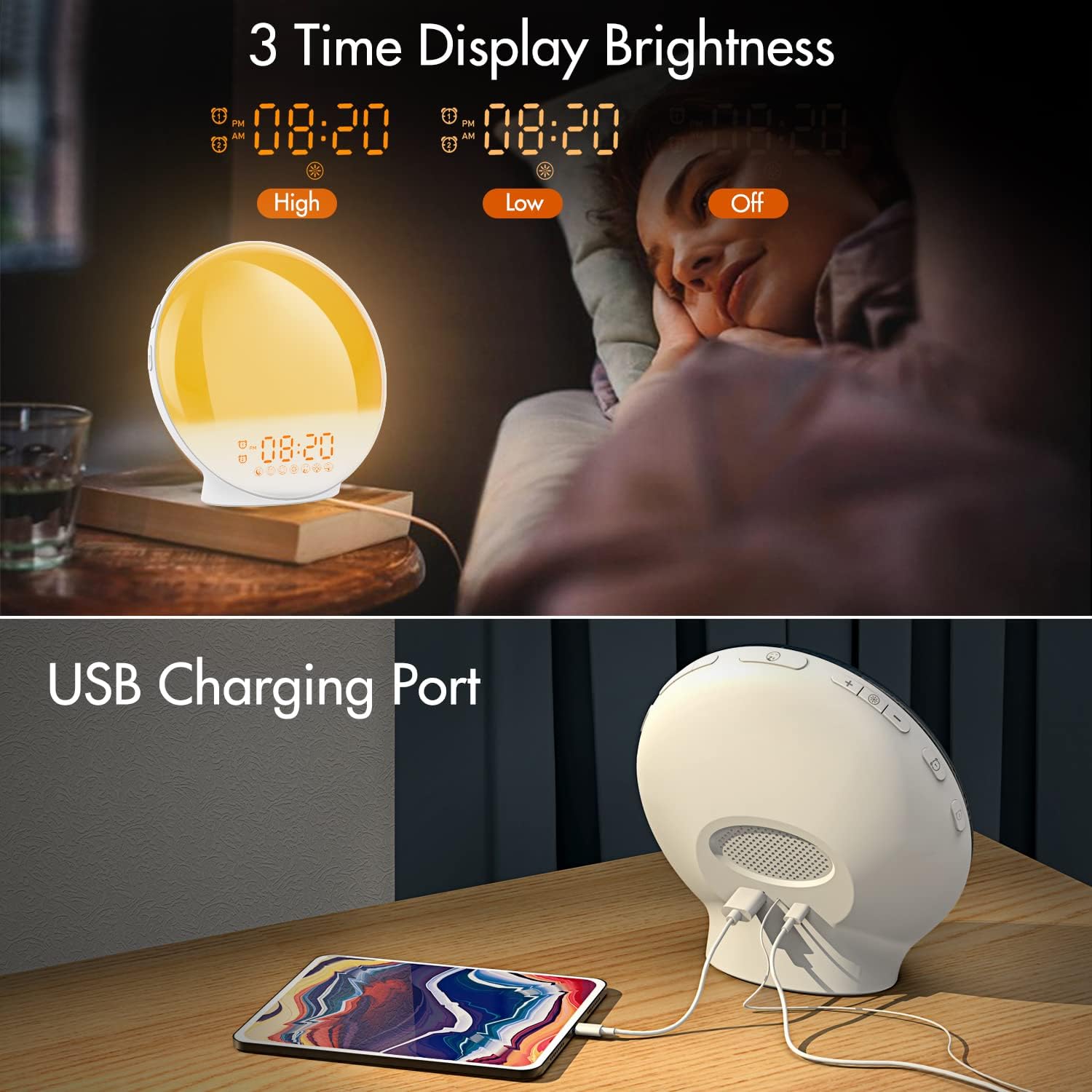
الصورة 3.1: Illustration of the three time display brightness options: High, Low, and Off, allowing users to customize visibility for different times of day or night.
4. تعليمات التشغيل
4.1 ضبط المنبهات (المنبه 1 والمنبه 2)
The clock features two independent alarms, allowing for separate wake-up times (e.g., weekday and weekend).

الصورة 4.1: Depiction of the dual alarm functionality, allowing users to set different alarms for weekdays and weekends, along with the snooze feature.
- اضغط على زر التنبيه 1 (أو زر التنبيه 2) to activate and enter alarm setting mode. The alarm time will flash.
- استخدم أزرار أعلى / أسفل لضبط ساعة التنبيه المطلوبة.
- اضغط على زر التنبيه again to confirm the hour and set the minutes.
- استخدم أزرار أعلى / أسفل لضبط عدد دقائق التنبيه المطلوبة.
- اضغط على زر التنبيه again to select the wake-up sound. Use أزرار أعلى / أسفل to cycle through 7 nature sounds or FM radio.
- اضغط على زر التنبيه again to set the volume level (1-16) for the alarm sound. Use أزرار أعلى / أسفل للتعديل.
- اضغط على زر التنبيه one last time to confirm all settings and activate the alarm. An alarm icon will appear on the display.
4.2 وظيفة الغفوة
عند سماع صوت الإنذار، انقر على زر الغفوة (often the large button on top or front) to pause the alarm for 9 minutes. This can be repeated up to 5 times.
4.3 محاكاة شروق الشمس
The sunrise simulation gradually brightens the light before your alarm time, mimicking a natural sunrise.

الصورة 4.2: Visual representation of the sunrise simulation feature, where the light intensifies gradually over a set period before the alarm, designed for a gentle wake-up.
- When setting an alarm, after selecting the sound and volume, you will typically be prompted to set the sunrise duration.
- استخدم أزرار أعلى / أسفل to choose a duration between 10 to 60 minutes. The light will gradually increase from 0% to the set brightness level (0-20) during this period.
- The light color will transition from deep red to bright yellow, simulating a natural sunrise.
4.4 Sunset Simulation / Sleep Aid
The sunset simulation gradually dims the light and can play soothing sounds to help you fall asleep.

الصورة 4.3: Illustration of the sunset simulation, where the light gradually dims over a period of 10 to 120 minutes, accompanied by optional sleep sounds like rain, forest, river, or FM radio.
- اضغط على Snooze/Sleep Aid Button (or a dedicated Sleep Aid button) to activate the sleep aid function.
- استخدم أزرار أعلى / أسفل to select a duration for the dimming process (10-120 minutes).
- You can also select a natural sound (Rain, Forest, River) or FM radio to play during this period.
- The light will gradually dim from 100% to 0% over the selected duration, and the sound will fade out.
4.5 راديو FM
The built-in FM radio allows you to listen to your favorite stations or use them as an alarm sound.

الصورة 4.4: زيادةview of the 7 available alarm sounds and the FM radio option, providing diverse choices for waking up.
- اضغط على زر راديو FM لتشغيل / إيقاف تشغيل الراديو.
- امسك زر راديو FM to automatically scan and save available stations.
- استخدم أزرار أعلى / أسفل to manually tune to a specific frequency or cycle through saved stations.
- اضبط مستوى الصوت باستخدام ملف حجم +/- أزرار.
4.6 Night Light / Color Light
The clock can function as a night light with various color options and adjustable brightness.

الصورة 4.5: Display of the 7 color atmosphere light options and 20 brightness levels, highlighting the clock's versatility as a mood light or reading lamp.
- اضغط على زر الضوء لتشغيل الضوء.
- اضغط على زر الضوء repeatedly to cycle through 7 static colors (e.g., Red, Green, Blue, Yellow, Indigo, Purple, White) or an automatic color-changing mode.
- استخدم أزرار أعلى / أسفل to adjust the brightness level (0-20) of the selected color or white light.
- امسك زر الضوء لإطفاء الضوء.
4.7 منفذ شحن USB
A 5V/2.4A USB port is located on the back of the device, allowing you to charge your smartphone or other small electronic devices.
الصورة 4.6: مؤخرة view of the alarm clock showing the USB charging port in use, connected to a tablet for charging.
5. الصيانة
- تنظيف: امسح الجهاز بقطعة قماش ناعمة وجافة. لا تستخدم منظفات أو مذيبات كاشطة.
- تخزين: قم بتخزين الجهاز في مكان بارد وجاف عندما لا يكون قيد الاستخدام لفترات طويلة.
- قوة: Always use the provided power adapter to prevent damage.
6. استكشاف الأخطاء وإصلاحها
| مشكلة | السبب المحتمل | حل |
|---|---|---|
| الساعة لا تعمل. | محول الطاقة غير متصل أو معيب. | Ensure the power adapter is securely connected to both the clock and a working power outlet. Try a different outlet. |
| لا يصدر صوت الإنذار. | لم يتم تفعيل التنبيه أو مستوى الصوت منخفض جدًا. | Check if the alarm icon is displayed. Re-set the alarm and ensure the volume is set to an audible level. |
| محاكاة شروق الشمس لا تعمل. | Sunrise duration not set during alarm setup. | Ensure you have set a sunrise duration (10-60 minutes) when configuring the alarm. |
| تشويش أو ضعف استقبال راديو FM. | إشارة ضعيفة أو وضع الهوائي غير الصحيح. | Extend the antenna wire fully. Reposition the clock to improve reception. Perform an auto-scan for stations. |
| شحن USB لا يعمل. | Device not compatible or cable faulty. | Ensure the device you are charging is compatible with 5V/2.4A USB charging. Try a different USB cable. |
7. المواصفات
- ماركة: كيبلوج
- نموذج: B09FRY71NH
- أبعاد المنتج: 16 × 16 × 6.1 سم
- وزن السلعة: 481 جرام
- المجلدtage: 5 فولت
- مصدر الطاقة: يعمل بالبطارية (مع محول تيار متردد)
- نوع العرض: رقمي
- المميزات الخاصة: Charging Port, Dimmable Light, Sunrise/Sunset Simulation, Dual Alarm, FM Radio, Nature Sounds
- تاريخ التوفر الأول: 12 نوفمبر 2021
8. الضمان والدعم
For warranty information or technical support, please refer to the contact details provided with your purchase documentation or visit the official KEPLUG webالموقع. احتفظ بإيصال الشراء كإثبات للشراء.