1. المقدمة
The Hama MW-650 is a versatile 6-button optical wireless mouse designed for multi-device use. It offers flexible connectivity options via a 2.4 GHz USB-A receiver and Bluetooth, allowing seamless switching between up to three devices. The optical sensor provides precise cursor control, and adjustable DPI settings cater to various user preferences. This manual provides detailed instructions for setup, operation, maintenance, and troubleshooting to ensure optimal performance of your device.
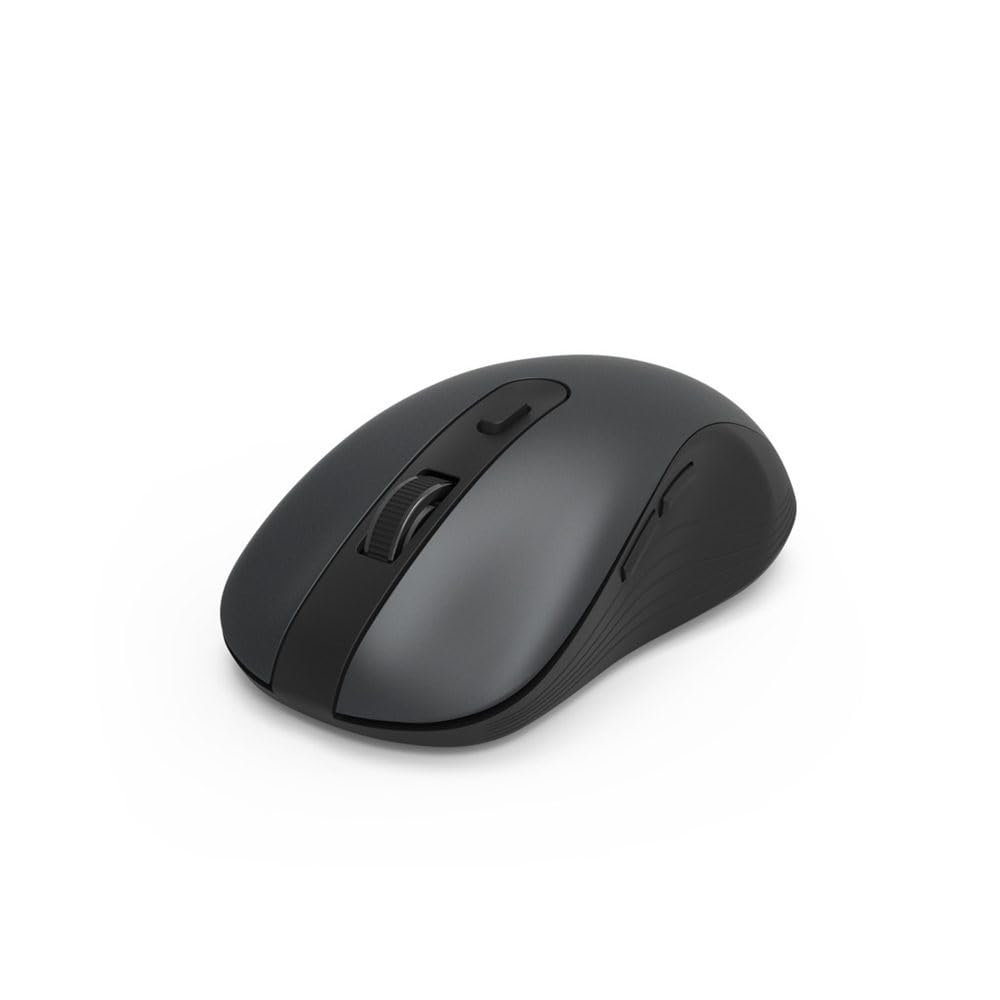
Image 1.1: Hama MW-650 Wireless Mouse (Top View)
2. محتويات العبوة
يرجى التحقق من الحزمة للعناصر التالية:
- 1 x Hama MW-650 6-Button Optical Wireless Mouse
- 1 × جهاز استقبال USB-A
- بطاريتان من نوع AA مينيون
- 1 × دليل التعليمات (هذه الوثيقة)

Image 2.1: Hama MW-650 Product Packaging
3. الإعداد
3.1. تركيب البطارية
- حدد موقع حجرة البطارية على الجانب السفلي من الماوس.
- افتح غطاء حجرة البطارية.
- أدخل بطاريتي AA Mignon، مع التأكد من صحة القطبية (+/-).
- أغلق غطاء حجرة البطارية جيدًا.
3.2. تشغيل/إيقاف التشغيل
On the underside of the mouse, slide the ON/OFF switch to the 'ON' position to power on the mouse. Slide it to 'OFF' when not in use to conserve battery life.

Image 3.1: Underside of Hama MW-650 Mouse with ON/OFF Switch and Receiver
3.3. خيارات الاتصال
The Hama MW-650 mouse supports two wireless connection methods: 2.4 GHz via USB-A receiver and Bluetooth.
3.3.1. 2.4 GHz USB-A Receiver Connection
- Remove the USB-A receiver from its storage slot on the underside of the mouse.
- Plug the USB-A receiver into an available USB-A port on your computer or laptop.
- ينبغي لنظام التشغيل أن يكتشف ويثبت برامج التشغيل اللازمة تلقائيًا.
- The mouse will connect automatically. The LED indicator for BT1/BT2 will not be lit when using the USB receiver.
3.3.2. اتصال بلوتوث
يمكن للفأرة الاتصال بجهازين منفصلين مزودين بتقنية بلوتوث (BT1 وBT2).
- تأكد من تشغيل الماوس.
- Press the 'BT1' or 'BT2' button on the underside of the mouse to select the desired Bluetooth channel. The corresponding LED will flash slowly.
- To enter pairing mode, press and hold the selected 'BT1' or 'BT2' button for approximately 3 seconds until the LED flashes rapidly.
- على جهازك (الكمبيوتر الشخصي، الكمبيوتر المحمول، الجهاز اللوحي، الهاتف الذكي)، قم بتمكين البلوتوث وابحث عن أجهزة جديدة.
- Select "Hama MW-650" from the list of available devices to pair.
- Once successfully paired, the LED will stop flashing and remain steadily lit for a few seconds before turning off.
4. تعليمات التشغيل
4.1. وظائف الماوس الأساسية
The Hama MW-650 features 6 buttons and a scroll wheel:
- زر النقر الأيسر: Primary function, typically for selecting items or opening links.
- زر النقر بالزر الأيمن: Secondary function, typically for context menus.
- عجلة التمرير: For scrolling up and down documents or web يمكن أيضًا الضغط على الصفحات لتفعيل وظيفة النقر الأوسط.
- زر DPI: Located behind the scroll wheel, used to adjust cursor sensitivity.
- أزرار التقدم/التراجع: Located on the side of the mouse, typically used for navigating web الصفحات أو المجلدات.
4.2. التبديل بين الأجهزة
The MW-650 mouse allows you to switch between three connected devices (one via USB receiver, two via Bluetooth).
- To switch to a Bluetooth-connected device, press the 'BT1' or 'BT2' button on the underside of the mouse. The corresponding LED will light up briefly.
- To switch to the device connected via the USB receiver, press the 'USB' button (or the button without a BT label) on the underside of the mouse.

Image 4.1: Multi-Device Connectivity Example

Image 4.2: Multi-Device Setup with Monitor
4.3. DPI Sensitivity Adjustment
The mouse offers adjustable DPI (Dots Per Inch) settings to control cursor speed and sensitivity. Press the DPI button located behind the scroll wheel to cycle through the available sensitivities:
- 800 نقطة في البوصة
- 1200 نقطة في البوصة (افتراضي)
- 1600 نقطة في البوصة
- 2000 نقطة في البوصة
- 2400 نقطة في البوصة
Each press of the DPI button will change the sensitivity, allowing you to find the setting that best suits your task or preference.
5. إدارة الطاقة
The Hama MW-650 mouse is designed with intelligent power management features to conserve battery life:
- وضع الاستعداد التلقائي: The mouse will automatically enter a standby mode after a period of inactivity. To wake it up, simply move the mouse or click any button.
- مفتاح التشغيل/الإيقاف: For extended periods of non-use, slide the ON/OFF switch on the underside of the mouse to the 'OFF' position to completely power down the device and maximize battery life.
6. الرعاية والصيانة
6.1. التنظيف
للحفاظ على أداء ومظهر الماوس الخاص بك:
- Ensure the mouse is powered off before cleaning.
- استخدم قطعة قماش ناعمة وجافة وخالية من الوبر لمسح سطح الفأرة.
- بالنسبة للأوساخ العنيدة، قم بإزالة الأوساخ برفق.ampامسح بقطعة قماش مبللة بالماء أو بمحلول تنظيف خفيف. تجنب المواد الكيميائية القاسية أو المواد الكاشطة.
- قم بتنظيف منطقة المستشعر البصري الموجودة أسفل الماوس بشكل دوري باستخدام قطعة قطن لضمان التتبع الدقيق.
6.2. استبدال البطارية
When the mouse's performance degrades or it stops responding, it may be time to replace the batteries.
- Power off the mouse using the ON/OFF switch.
- افتح حجرة البطارية على الجانب السفلي.
- Remove the old AA batteries and dispose of them according to local regulations.
- Insert new AA Mignon batteries, observing correct polarity.
- أغلق حجرة البطارية.
7. استكشاف الأخطاء وإصلاحها
If you encounter issues with your Hama MW-650 mouse, please refer to the following common solutions:
| مشكلة | الحل المحتمل |
|---|---|
| Mouse does not respond. |
|
| حركة المؤشر غير منتظمة أو بطيئة. |
|
| لا يمكن التبديل بين الأجهزة. |
|
| فشل اقتران البلوتوث. |
|
8. المواصفات الفنية
| رقم الموديل | 00182617 (MW-650) |
| تكنولوجيا الاتصال | 2.4GHz RF (USB-A Receiver), Bluetooth 5.0 |
| تقنية كشف الحركة | بصري |
| حساسية نقطة في البوصة | 800 / 1200 / 1600 / 2000 / 2400 DPI (adjustable) |
| عدد الأزرار | 6 (بما في ذلك عجلة التمرير) |
| عامل الشكل | اليد اليمنى |
| مصدر الطاقة | بطاريتان من نوع AA مينيون (مرفقتان) |
| عمر البطارية | مدة تصل إلى 288 يومًا (حسب الاستخدام) |
| أنظمة التشغيل المتوافقة | Windows 11/10/8/7, Android 4.3 or higher, macOS 10.10 or higher, iOS 13 or higher |
| أبعاد المنتج (الطول × العرض × الارتفاع) | 11.3 x 6.3 x 4 cm (4.41 x 2.48 x 1.57 inches) |
| وزن العنصر | 3.62 أونصات |
| لون | أسود |
9. الضمان والدعم
للحصول على معلومات الضمان والدعم الفني، يرجى الرجوع إلى موقع هاما الرسمي. webالموقع أو تواصل مع خدمة العملاء مباشرةً. احتفظ بإثبات الشراء لأي مطالبات بالضمان.
- الشركة المصنعة: شركة هاما المحدودة وشركاه
- Webموقع: www.hama.com


