مقدمة
The SilverStone Technology RC05 is a 220mm flexible PCIe 4.0 x16 riser cable designed to extend the connection between a PCIe 4.0 supported motherboard and a compatible graphics or expansion card. This cable facilitates alternative mounting orientations for components within a computer chassis, offering high-speed data transmission and robust signal integrity.

Image: The SilverStone RC05 220mm Flexible PCIe 4.0 x16 Riser Cable, showcasing its overall design and length.
الميزات الرئيسية
- نقل البيانات عالي السرعة: Supports PCIe 4.0 x16 for optimal performance with compatible motherboards and graphics cards.
- تصميم مرن: 220mm length with a flexible ribbon design allows for folding and twisting without impacting signal reliability or performance.
- EMI Shielding: Incorporates comprehensive EMI shielding to prevent electromagnetic interference and maintain signal integrity.
- Strengthened Connection Protection: Enhanced durability at connector points to minimize signal loss.
- التثبيت متعدد الاستخدامات: Ideal for various graphics card installation orientations, including vertical mounts.
الإعداد والتثبيت
Proper installation of the SilverStone RC05 riser cable is crucial for stable system operation and optimal performance. Follow these steps carefully:
- حضّر نظامك:
- Power off your computer completely and unplug it from the power outlet.
- Open your computer case to access the motherboard and PCIe slots.
- Ensure you are working in a static-free environment or use an anti-static wrist strap.
- Identify PCIe Slots:
Locate the primary PCIe x16 slot on your motherboard where the graphics card would normally be installed. Also, identify the desired mounting location for your graphics card within the chassis.

الصورة: عن قرب view of the male PCIe connector on the riser cable, designed to plug into the motherboard's PCIe slot.
- الاتصال باللوحة الأم:
Carefully insert the male end of the RC05 riser cable into the PCIe x16 slot on your motherboard. Ensure it is fully seated and the retention clip (if present on your motherboard slot) is engaged.
- Connect to Graphics Card:
Take your graphics card and carefully insert it into the female PCIe x16 slot on the other end of the RC05 riser cable. Ensure it is fully seated. If a protective cover is present on the female connector, remove it before insertion.
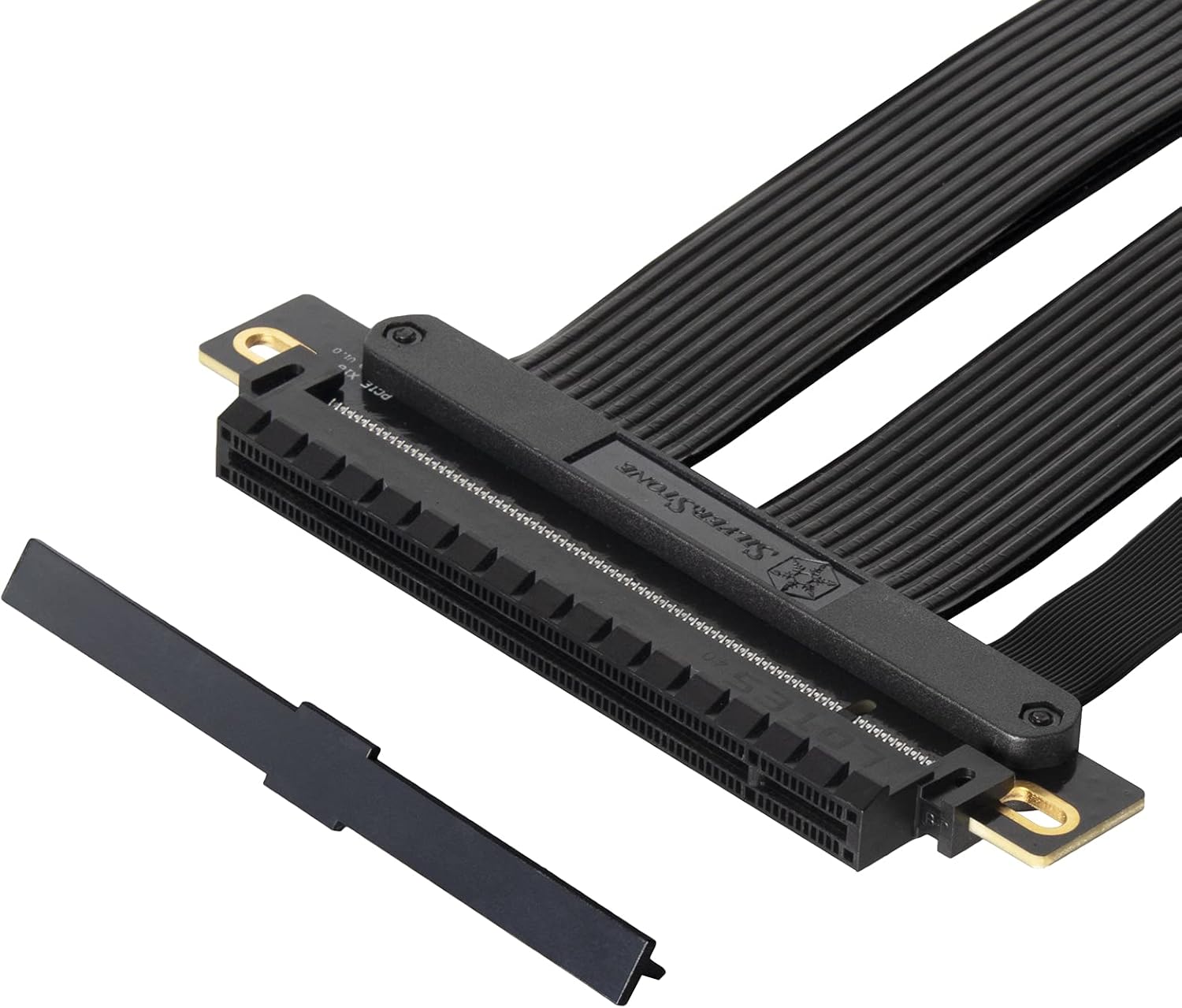
الصورة: عن قرب view of the female PCIe connector on the riser cable, showing a protective cover that should be removed before connecting a graphics card.
- المكونات الآمنة:
Once both ends are connected, carefully route the flexible cable to the desired position for your graphics card. Secure the graphics card in its new mounting location within the chassis using appropriate screws or retention mechanisms. Ensure the cable is not sharply bent or under excessive tension.

Image: This diagram highlights the durability and flexibility of the RC05 cable, demonstrating how it can be routed and bent to accommodate various graphics card orientations within a computer case.
- التشغيل والاختبار:
Close your computer case, reconnect the power cable, and power on your system. Verify that the graphics card is detected and functioning correctly in your operating system.
ملاحظة هامة: For systems with PCIe 3.0 motherboards, it is recommended to manually set the PCIe slot speed to Gen3 in the motherboard's BIOS/UEFI settings before installing a PCIe 4.0 riser cable to ensure compatibility and stability. While the RC05 is designed for PCIe 4.0, some older motherboards may require this adjustment for proper operation with riser cables.
عملية
The SilverStone RC05 PCIe riser cable is a passive component designed to extend a PCIe connection. Once correctly installed, it operates transparently, allowing your graphics card or other PCIe expansion card to communicate with the motherboard as if it were directly plugged in. No additional software or drivers are required for the cable itself.

Image: This diagram illustrates the high-speed data transmission capabilities of the RC05, ensuring minimal performance loss when extending a PCIe 4.0 x16 connection.
صيانة
The SilverStone RC05 riser cable requires minimal maintenance. To ensure longevity and optimal performance:
- حافظ على نظافة: Periodically inspect the cable and connectors for dust accumulation. Use compressed air to gently clean any dust.
- تجنب التوتر: Do not excessively bend, twist, or pull on the cable, especially near the connectors. While flexible, extreme stress can damage internal wiring.
- اتصالات آمنة: Ensure both ends of the cable remain firmly seated in their respective slots. Loose connections can lead to intermittent issues or performance degradation.
- الظروف البيئية: Operate the cable within standard computer operating temperatures and humidity levels.
استكشاف الأخطاء وإصلاحها
If you encounter issues after installing the RC05 riser cable, consider the following troubleshooting steps:
- لا يوجد عرض/النظام لا يقوم بالتمهيد:
- Ensure the riser cable and graphics card are fully seated in their slots.
- Verify that all necessary power cables are connected to the graphics card.
- If your motherboard is PCIe 3.0, try setting the PCIe slot speed to Gen3 in the BIOS/UEFI.
- Test the graphics card by plugging it directly into the motherboard's PCIe slot to rule out a card issue.
- انخفاض الأداء:
- Confirm that your motherboard and graphics card both support PCIe 4.0 for optimal speed.
- Check BIOS/UEFI settings to ensure the PCIe slot is configured for PCIe 4.0 (if supported by all components).
- Ensure the cable is not excessively bent or kinked, which could affect signal integrity.
- Intermittent Issues/Crashes:
- Reseat the riser cable and graphics card.
- تحقق من وجود أي تلف مادي في الكابل أو الموصلات.
- Ensure proper airflow within the case to prevent overheating of components.
تحديد
| ميزة | التفاصيل |
|---|---|
| ماركة | سيلفرستون |
| رقم الموديل | SST-RC05-220 |
| طول الكابل | 220 ملم |
| إصدار PCIe | منفذ PCIe 4.0 x16 |
| نوع الموصل | PCIe x16 Male to PCIe x16 Female |
| معدل نقل البيانات | Up to 16 Gigabits Per Second (PCIe 4.0) |
| المميزات الخاصة | Flexible ribbon design, EMI shielding, strengthened connection protection |
| الأجهزة المتوافقة | PCIe 4.0 supported motherboards and graphics/expansion cards |
| أبعاد المنتج | 10.35 × 4.61 × 0.35 بوصة (حوالي 263 × 117 × 9 مم) |
| وزن العنصر | 7 أونصة (حوالي 0.2 كجم) |
المنتج انتهىview فيديو
Video: An official SilverStone overview of the PCIe Riser Cable, highlighting its features and compatibility. This video provides a visual demonstration of the product's design and functionality.
الضمان والدعم
For warranty information and technical support, please refer to the official SilverStone Technology webالموقع أو تواصل مع خدمة العملاء مباشرةً. احتفظ بإيصال الشراء لطلبات الضمان.
Official SilverStone Webموقع: www.silverstonetek.com


