1. المقدمة
The XZEAL XZ100 Gaming PC Case (Model XZCGB00B) is designed to accommodate a variety of high-performance computer components. This mid-tower case offers compatibility with ATX, Micro ATX, and Mini ITX motherboards, providing a robust foundation for your gaming or professional build. This manual provides essential information for proper installation, operation, and maintenance of your PC case.

الشكل 1: الجبهة view of the XZEAL XZ100 Gaming PC Case.
2. مواصفات المنتج
- توافق اللوحة الأم: Supports ATX, Micro ATX, and Mini ITX form factors.
- حملة الخلجان: Includes 2 x 2.5" SSD bays and 2 x 3.5" HDD bays for versatile storage options.
- دعم التبريد: Designed to accommodate up to two 120mm front fans (fans not included).
- مادة: Constructed with durable steel and features a tempered glass side panel for component visibility.
- لوحة الإدخال/الإخراج الأمامية: Conveniently located USB 2.0, USB 3.0, and audio ports for easy peripheral access.
- إدارة الكابلات: يوفر ample space behind the motherboard tray for organized cable routing.

Figure 2: Interior layout of the XZEAL XZ100 PC Case.
3. محتويات العبوة
يرجى التأكد من وجود جميع العناصر في الحزمة الخاصة بك:
- XZEAL XZ100 Gaming PC Case
- مجموعة الملحقات (البراغي، الفواصل، روابط الكابلات)
- دليل المستخدم (هذا المستند)
4. معلومات السلامة
يرجى مراعاة إرشادات السلامة التالية أثناء التركيب والتشغيل:
- افصل دائمًا مصدر الطاقة من مأخذ الحائط قبل تثبيت أو إزالة أي مكونات.
- تعامل مع كافة المكونات بعناية لمنع التلف.
- Wear an anti-static wrist strap or frequently touch a grounded metal object to discharge static electricity, which can harm sensitive electronic components.
- احتفظ بالجراب بعيدًا عن السوائل والرطوبة الزائدة.
- تأكد من التهوية المناسبة لمنع ارتفاع درجة الحرارة.
5. الإعداد والتثبيت
5.1 التحضير
- Unpack the XZEAL XZ100 PC case and place it on a stable, flat surface.
- قم بإزالة الألواح الجانبية عن طريق فك البراغي اليدوية الموجودة في الجزء الخلفي من العلبة.
- Familiarize yourself with the internal layout and included accessories.
5.2 تركيب اللوحة الأم
- قم بتركيب غطاء منافذ الإدخال/الإخراج المرفق مع اللوحة الأم في الفتحة الخلفية للهيكل.
- Align the motherboard with the pre-installed standoffs. If your motherboard is Micro ATX or Mini ITX, ensure only the necessary standoffs are used.
- Secure the motherboard using the screws from the accessory kit. Do not overtighten.
5.3 تركيب وحدة إمداد الطاقة (PSU)
- Position the PSU in the designated bay at the bottom rear of the case.
- Secure the PSU with screws from the accessory kit, ensuring the fan faces the correct direction for optimal airflow (typically downwards if there's a vent, or upwards if not).
- قم بتمرير كابلات الطاقة اللازمة عبر فتحات إدارة الكابلات.
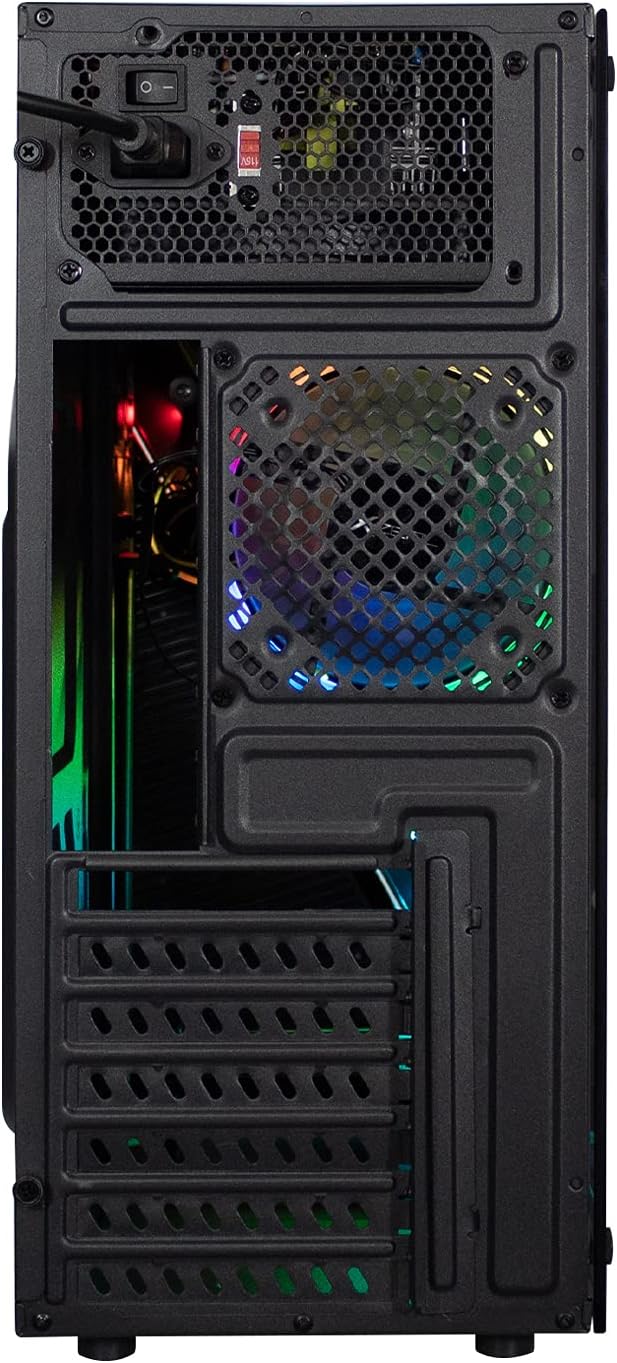
الشكل 3: خلفي view illustrating PSU and I/O shield placement.
5.4 Drive Installation (SSD/HDD)
- أقراص SSD مقاس 2.5 بوصة: Locate the 2.5" drive bays, typically behind the motherboard tray or on the PSU shroud. Secure SSDs using the provided screws.
- محركات الأقراص الصلبة مقاس 3.5 بوصة: Locate the 3.5" drive cage. Slide the HDDs into the bays and secure them with screws.
5.5 Expansion Card Installation (GPU, PCIe Cards)
- قم بإزالة أغطية فتحة PCIe الضرورية من الجزء الخلفي للعلبة.
- Insert your expansion card (e.g., graphics card) into the corresponding PCIe slot on the motherboard.
- ثبّت البطاقة بمسمار.
5.6 تركيب المروحة
The XZ100 supports up to two 120mm fans at the front. Install fans by aligning them with the mounting holes and securing them with screws. Connect fan power cables to your motherboard or a fan controller.
5.7 توصيلات اللوحة الأمامية
Connect the front panel cables to the appropriate headers on your motherboard. Refer to your motherboard manual for exact header locations.
- Power Switch (PWR SW): Connects to the motherboard's power header.
- Reset Switch (RESET SW): Connects to the motherboard's reset header.
- Power LED (PLED +/-): Connects to the motherboard's power LED header.
- HDD LED (HDD LED): Connects to the motherboard's HDD activity LED header.
- يو اس بي 3.0: Connects to the motherboard's USB 3.0 header.
- يو اس بي 2.0: Connects to the motherboard's USB 2.0 header.
- HD Audio (AUDIO): Connects to the motherboard's front panel audio header.
- RGB Connector: Connect the RGB cable from the front panel to a compatible RGB header on your motherboard or an RGB controller.
6. تعليمات التشغيل
6.1 تشغيل/إيقاف التشغيل
After all components are installed and connected, close the side panels. Connect your monitor, keyboard, mouse, and power cable. Press the power button on the front panel to turn on your system.
6.2 Front Panel Ports
Utilize the front panel USB 2.0, USB 3.0, and audio jacks for convenient access to peripherals and headsets.
إضاءة RGB 6.3
The XZ100 features an integrated RGB LED strip on the front panel. If connected to a compatible motherboard header or controller, you can customize lighting effects using your motherboard's software or a dedicated RGB control button (if present on the case).
7. الصيانة
تساعد الصيانة الدورية على ضمان الأداء الأمثل وطول عمر مكونات جهاز الكمبيوتر الخاص بك.
- تنظيف الغبار: نظّف فلاتر الغبار (إن وجدت) والمكونات الداخلية دوريًا باستخدام الهواء المضغوط. تأكد من إيقاف تشغيل النظام وفصله عن الكهرباء قبل التنظيف.
- إدارة الكابلات: قم بإجراء فحص دوري لمسار الكابلات للتأكد من عدم وجود كابلات تعيق تدفق الهواء أو تشغيل المروحة.
- التنظيف الخارجي: امسح الجزء الخارجي من العلبة بقطعة قماش ناعمة و...amp قماش. تجنب المواد الكيميائية القاسية.
8. استكشاف الأخطاء وإصلاحها
إذا واجهت مشاكل، فضع في اعتبارك خطوات استكشاف الأخطاء وإصلاحها الشائعة التالية:
- النظام لا يعمل:
- Ensure the power supply is switched on and properly connected to the wall outlet and motherboard.
- تأكد من أن كابل مفتاح الطاقة في اللوحة الأمامية متصل بشكل صحيح بموصل اللوحة الأم.
- Check all internal power connections (24-pin ATX, CPU 8-pin, GPU PCIe power).
- المراوح لا تدور:
- Confirm fan power cables are securely connected to the motherboard or fan controller.
- تحقق من إعدادات BIOS/UEFI للتحكم في المروحة.
- منافذ اللوحة الأمامية لا تعمل:
- Ensure USB and audio headers are correctly connected to the motherboard.
- Check motherboard drivers for front panel audio/USB.
- Motherboard Fit Issues:
- Ensure you are using the correct standoffs for your motherboard form factor (ATX, Micro ATX, Mini ITX).
- Verify that no components or cables are obstructing the motherboard's seating.
9. المواصفات
| ميزة | مواصفة |
|---|---|
| اسم الموديل | اكس زد100 |
| رقم القطعة | XZCGB00B |
| دعم اللوحة الأم | ATX، Micro ATX، Mini ITX |
| نوع الحالة | برج متوسط |
| حجرات القيادة | 2 × 2.5 بوصة SSD، 2 × 3.5 بوصة HDD |
| دعم المروحة (الأمامي) | 2 x 120mm (fans not included) |
| منافذ الإدخال / الإخراج الأمامية | USB 3.0, USB 2.0, HD Audio, Power, Reset |
| الأبعاد (الطول × العرض × الارتفاع) | 52 × 48.5 × 23.5 سم |
| وزن | 4.94 كجم |
| مواد | فولاذ، زجاج مقسّى |
| لون | أسود |
10. الضمان والدعم
XZEAL products are designed for reliability and performance. For warranty information or technical support, please refer to the warranty card included with your product or visit the official XZEAL website. Please have your product model (XZ100) and part number (XZCGB00B) ready when contacting support.


