1. المقدمة
شكرا لك على الشراءasing the SZELAM 7-inch LED Mirror Digital Alarm Clock. This device combines a clear digital time display with a reflective mirror surface, dual USB charging ports, and adjustable brightness settings. Please read this manual carefully to ensure proper use and optimal performance.
2. انتهى المنتجview
تعرّف على مكونات وأزرار التحكم في ساعة المنبه الخاصة بك.

الشكل 1: الجبهة view of the SZELAM Digital Alarm Clock. The large LED display shows the time 10:05, and the mirror surface reflects a modern living room interior.
2.1 المكونات والضوابط

Figure 2: Detailed diagram of the alarm clock's features and controls.
- مستشعر الضوء: Automatically adjusts display brightness.
- زر M: Mode button for setting time and alarm.
- + زر: Increase value / 12/24H format switch.
- - زر: Decrease value / Alarm ON/OFF.
- زر الغفوة: Activates snooze function / Adjusts brightness.
- 2 منافذ شحن يو اس بي: لشحن الأجهزة الخارجية.
- توصيل كابل الطاقة: DC-5V/1A USB power input.
- CR2032 Battery Compartment: For memory backup (time/alarm settings).
- حامل قابل للإزالة: For desktop use.
- Wall Hanging Hole: لتركيب الجدار.
3. الإعداد
3.1 توصيل الطاقة
- Connect the provided USB power cable to the power cable connection port on the back of the alarm clock.
- Plug the other end of the USB cable into a DC-5V/1A USB power adapter (not included) or a compatible USB port.
- ستضيء الشاشة، مما يشير إلى أن الساعة قيد التشغيل.
3.2 Memory Battery Installation
The clock uses a CR2032 button cell battery (not included) for memory backup. This battery preserves time and alarm settings during a power outage, but the display will not be visible without USB power.
- Locate the CR2032 battery compartment on the back of the clock.
- افتح غطاء الحجرة.
- Insert a CR2032 battery with the positive (+) side facing up.
- أغلق غطاء المقصورة بشكل آمن.
3.3 إزالة الغشاء الواقي
Before first use, please remove the protective film from the mirror display surface for optimal clarity.

Figure 3: Gently peel off the protective film from the display surface to reveal the clear mirror.
4. تعليمات التشغيل
4.1 ضبط الوقت
- اضغط مع الاستمرار على M اضغط على الزر لمدة 3 ثوانٍ للدخول إلى وضع ضبط الوقت. ستومض أرقام الساعة.
- استخدم + or - أزرار لضبط الساعة.
- اضغط على M اضغط على الزر مرة أخرى لتأكيد الساعة والانتقال إلى ضبط الدقائق. ستومض أرقام الدقائق.
- استخدم + or - أزرار لضبط الدقائق.
- اضغط على M اضغط على الزر مرة أخرى للتأكيد والخروج من وضع ضبط الوقت.
4.2 تنسيق 12/24 ساعة
في وضع عرض الوقت العادي، اضغط على الزر + button to switch between 12-hour and 24-hour formats. In 12-hour format, 'AM' or 'PM' will be displayed.
4.3 ضبط المنبه
- اضغط على M button once to enter alarm setting mode. The alarm icon and hour digits will flash.
- استخدم + or - أزرار لضبط ساعة التنبيه.
- اضغط على M button again to confirm the alarm hour and move to minute setting. The minute digits will flash.
- استخدم + or - أزرار لضبط دقائق التنبيه.
- اضغط على M اضغط على الزر مرة أخرى لتأكيد والخروج من وضع ضبط التنبيه.
4.4 تشغيل / إيقاف التنبيه
في وضع عرض الوقت العادي، اضغط على الزر - button to toggle the alarm ON or OFF. When the alarm is ON, an alarm icon will appear on the display.
4.5 وظيفة الغفوة
عندما يصدر صوت المنبه:
- اضغط على كبير غفوة button on the top of the clock. The alarm will pause and sound again after 5 minutes (default snooze time).
- To adjust the snooze duration (5-60 minutes), press and hold the غفوة button during the snooze period, then use the + or - أزرار لضبط الوقت المطلوب.
- To turn off the alarm completely, press any other button (M, +, -) on the back of the clock.

Figure 4: Activating the snooze function by pressing the large button on top.
4.6 ضبط السطوع
The clock offers three brightness levels (Low, Medium, High) and an automatic dimming feature.
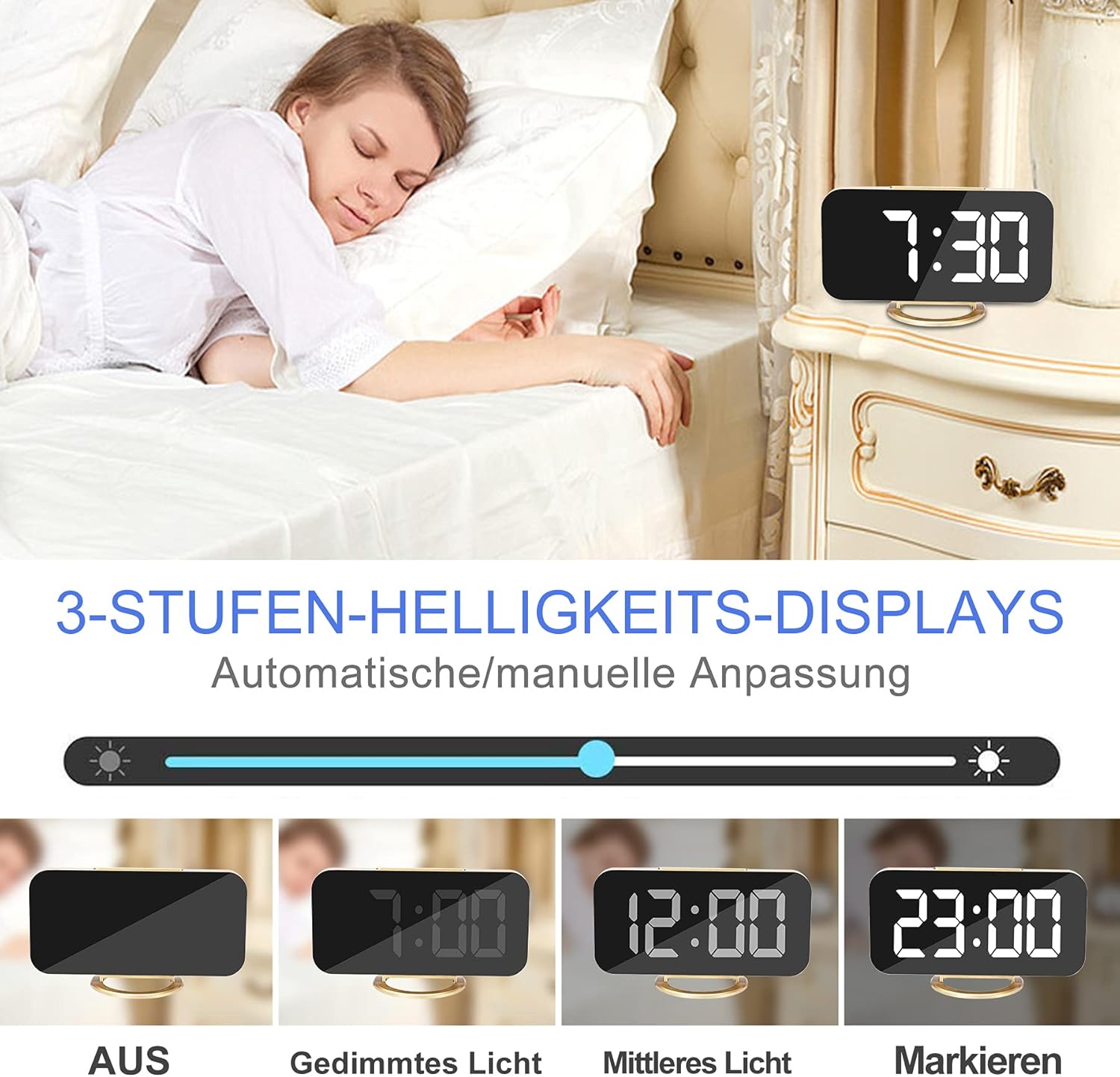
Figure 5: Visual representation of the different brightness settings: Off, Dimmed Light, Medium Light, and Highlight.
- الضبط اليدوي: في وضع عرض الوقت العادي، اضغط ضغطة قصيرة على غفوة button to cycle through Low, Medium, High brightness levels.
- الضبط التلقائي: The clock is equipped with a photosensitive sensor that automatically adjusts the display brightness based on ambient light conditions. This feature ensures optimal visibility without being too bright in dark environments.
4.7 الوضع الليلي
The night mode automatically switches the LED display to its lowest brightness level during a set period to avoid disturbing sleep. To activate and set Night Mode:
- اضغط على M button twice to enter Night Mode setting. The display will show 'ON' or 'OFF'.
- استخدم + or - buttons to toggle Night Mode ON/OFF.
- If ON, press M again to set the start hour, then minutes.
- يضعط M again to set the end hour, then minutes.
- يضعط M للتأكيد والخروج.
عدد 4.8 منفذ شحن يو إس بى
The alarm clock features two USB ports (DC-5V/1A output) on the side, allowing you to charge your mobile phone, tablet, or other USB-powered devices.

Figure 6: Two smartphones charging simultaneously via the clock's USB ports.
Simply connect your device's USB charging cable to one of the clock's USB ports. Ensure the alarm clock is powered via its main USB input for the charging ports to function.
5. خيارات التنسيب
The versatile design allows for various placement options.
5.1 Desktop / Bedside Placement
Attach the removable stand to the bottom of the clock for stable placement on a desk, bedside table, or shelf.

Figure 7: The alarm clock positioned on a bedside table, showing the time 6:00.
5.2 التركيب على الحائط
Remove the stand to use the clock as a wall-mounted display. Use the hanging hole on the back of the clock to secure it to a wall hook or screw.
5.3 وظيفة المرآة
The clock's display surface doubles as a mirror, which can be used for quick checks or makeup application.

Figure 8: The clock's reflective surface can be used as a convenient mirror.
6. الصيانة
To maintain your alarm clock in good condition:
- Wipe the display and body with a soft, dry cloth.
- تجنب استخدام المنظفات أو المذيبات الكاشطة، لأنها قد تلحق الضرر بالسطح.
- Keep the device away from excessive heat, direct sunlight, and moisture.
7. استكشاف الأخطاء وإصلاحها
| مشكلة | السبب المحتمل | حل |
|---|---|---|
| العرض فارغ. | لا يوجد طاقة أو اتصال فضفاض. | Ensure the USB power cable is securely connected to both the clock and a working power source. |
| Time/Alarm settings reset after power loss. | CR2032 memory battery is missing or depleted. | Install a new CR2032 battery. |
| لا يصدر صوت الإنذار. | Alarm is turned OFF or set incorrectly. | Check if the alarm icon is displayed. Re-set the alarm time. |
| منافذ شحن USB لا تعمل. | Clock is not powered via its main USB input. | Ensure the clock is connected to a power source via its main USB input. |
| الشاشة ساطعة/خافتة للغاية. | Brightness setting needs adjustment or Night Mode is active. | Manually adjust brightness using the SNOOZE button. Check Night Mode settings. |
8. المواصفات
| ميزة | التفاصيل |
|---|---|
| ماركة | شيلام |
| رقم الموديل | 3S-51Q0-6DMM |
| نوع العرض | 7-inch LED Digital |
| مادة | Glass (Mirror Surface) |
| الأبعاد (الطول × العرض × الارتفاع) | 15.24 × 0.03 × 17.78 سم (تقريبًا 6.0 × 0.01 × 7.0 بوصة) |
| وزن | 220 جرام |
| مصدر الطاقة | USB DC-5V/1A |
| بطارية الذاكرة | CR2032 (غير مدرج) |
| مخرج يو اس بي | 2 x DC-5V/1A Ports |
| المميزات الخاصة | Alarm, Large Display, Adjustable Brightness, USB Charging Ports, Snooze, Mirror Surface, Automatic Dimming, Night Mode, Wall Mountable |
9. الضمان والدعم
This product is covered by a standard manufacturer's warranty. For specific warranty details, please refer to the documentation provided at the time of purchase or contact your retailer. For technical support or inquiries, please reach out to SZELAM customer service through your purchase platform.


