مقدمة
This manual provides instructions for setting up, operating, and maintaining your HP 235 Wireless Keyboard and Mouse Combo. Please read this guide thoroughly before using the product to ensure proper functionality and longevity.
محتويات الحزمة
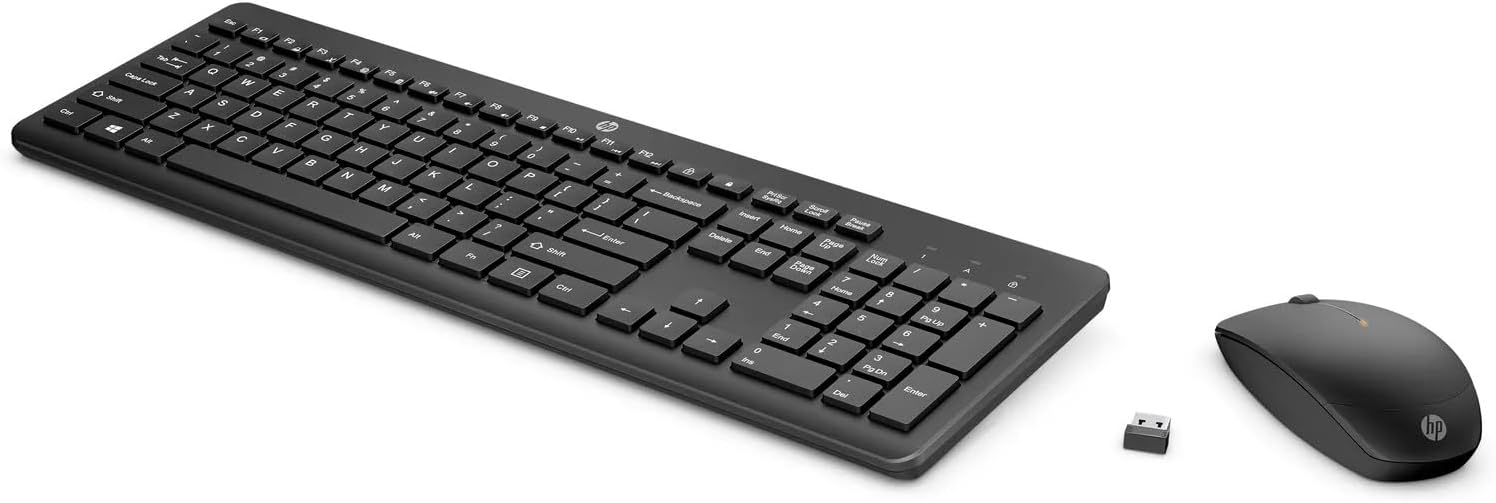
- لوحة مفاتيح HP اللاسلكية
- فأرة لاسلكية من HP
- USB Type-A Wireless Receiver
- AA Batteries (pre-installed or included separately)
يثبت
Follow these steps to set up your HP 235 Wireless Keyboard and Mouse Combo:
- أدخل البطاريات: If not already installed, open the battery compartments on the underside of both the keyboard and the mouse. Insert the AA batteries, ensuring correct polarity. Close the compartments.
- توصيل جهاز استقبال USB: Locate an available USB Type-A port on your computer. Insert the USB wireless receiver into the port. Your computer should automatically detect the device.
- تشغيل الطاقة: Turn on the keyboard and mouse using their respective power switches, usually located on the underside. The devices should connect automatically to the receiver.

تشغيل لوحة المفاتيح
The HP 235 Wireless Keyboard features a standard layout with additional function keys.
- المفاتيح القياسية: Use the alphanumeric keys for typing text and numbers.
- مفاتيح الوظائف (F1-F12): These keys may have secondary functions (e.g., volume control, media playback, brightness adjustment) when pressed in combination with the Fn key. Refer to your computer's documentation for specific Fn key combinations.
- المفاتيح العددية: The dedicated numeric keypad on the right provides quick entry for numbers and calculations. Ensure قفل الأرقام is active for numeric input.
تشغيل الماوس
The HP 235 Wireless Mouse provides precise cursor control.
- الزر الأيسر: Primary click function, typically used for selecting items or opening applications.
- الزر الأيمن: Secondary click function, typically used for context menus.
- عجلة التمرير: Roll the wheel to scroll through documents or web الصفحات. قد تعمل عجلة التمرير أيضًا كزر نقر أوسط.
صيانة
Proper maintenance ensures the longevity of your wireless combo.
- تنظيف: استخدم قطعة قماش ناعمة وجافة لتنظيف أسطح لوحة المفاتيح والماوس. لإزالة الأوساخ المستعصية، افركها برفق.ampاغسل القماش بالماء. تجنب المواد الكيميائية القاسية أو المواد الكاشطة.
- استبدال البطارية: When performance degrades (e.g., delayed response, intermittent connection), replace the batteries in both the keyboard and mouse with new AA batteries. Dispose of old batteries according to local regulations.
- تخزين: When not in use for extended periods, turn off the devices to conserve battery life. Store the USB receiver in a safe place, possibly inside the mouse's battery compartment if available.
استكشاف الأخطاء وإصلاحها
If you encounter issues with your HP 235 Wireless Combo, try the following solutions:
| مشكلة | حل |
|---|---|
| لوحة المفاتيح/الماوس لا يستجيب |
|
| اتصال متقطع |
|
| مؤشر الماوس يتحرك بشكل غير منتظم أو لا يتحرك بسلاسة |
|
تحديد
- ماركة: HP
- نموذج: 235
- تقنية الاتصال: Wireless (USB Type A receiver)
- توافق نظام التشغيل: ويندوز 10
- وزن السلعة: حوالي 1.83 رطل (0.83 كجم)
- أبعاد المنتج (الطول × العرض × الارتفاع): حوالي 18 × 8.8 × 1.9 بوصة (45.7 × 22.4 × 4.8 سم)
- مصدر الطاقة: يعمل بالبطارية (بطاريات AA)
الضمان والدعم
For warranty information and technical support, please visit the official HP support webقم بزيارة الموقع الإلكتروني أو اتصل بخدمة عملاء HP. احتفظ بإيصال الشراء لتقديم مطالبات الضمان.
يمكنك العثور على مزيد من المعلومات وموارد الدعم على www.hp.com/support.