1. المقدمة
The VTech RM5752 Wi-Fi 1080p HD Video Monitor provides a secure and reliable way to monitor your baby. This system includes a 5-inch color screen parent unit and a 1080p HD camera unit, offering both local and remote viewing capabilities. Utilizing your home's wireless network, the monitor streams live video and audio, allowing you to stay connected whether you are at home or away via the MyVTech Baby 1080p app.
تتضمن الميزات الرئيسية ما يلي:
- 5-inch full color HD parent unit with 1080p HD camera.
- رؤية ليلية تلقائية للحصول على صور واضحة viewجي في ظروف الإضاءة المنخفضة.
- 2x local digital zoom and 10x remote digital zoom for detailed viewعمل.
- بعيد viewing access and control via the free VTech app.
- Motion alerts and temperature sensor with alerts on both parent unit and app.
- 9 soothing sounds and lullabies to assist with sleep.
- Local and remote two-way talk functionality.
2. محتويات العبوة
Ensure all items are present in your package. If any items are missing or damaged, contact your retailer.
- Parent Unit (with rechargeable battery)
- وحدة الكاميرا
- Parent Unit Power Adapter
- Camera Unit Power Adapter
- Wall Mount Bracket (for camera)
- دليل البدء السريع

Image: The VTech RM5752 Wi-Fi 1080p HD Video Monitor package contents, including the parent unit, camera unit, and power adapters.
3. البدء
3.1 التشغيل
- Connect the small plug of the parent unit power adapter to the parent unit's power jack.
- Connect the large plug of the parent unit power adapter to a wall outlet.
- اضغط مع الاستمرار على قوة اضغط على الزر الموجود على الوحدة الرئيسية حتى يتم تشغيل الشاشة.
- Connect the small plug of the camera unit power adapter to the camera unit's power jack.
- Connect the large plug of the camera unit power adapter to a wall outlet. The camera unit will power on automatically.
3.2 وضع الكاميرا
ضع وحدة الكاميرا على سطح مستوٍ، مثل خزانة أو رف، أو قم بتثبيتها على الحائط. تأكد من وضع الكاميرا بشكل يوفر رؤية واضحة. view of the desired area. The camera features an adjustable angle for optimal positioning.

Image: The camera unit of the VTech RM5752, illustrating its adjustable angle for flexible placement.
4. تشغيل الشاشة
4.1 وظائف الوحدة الأصلية
The 5-inch color LCD screen on the parent unit displays the live video feed from the camera. Use the control buttons to navigate menus and adjust settings.

Image: The VTech RM5752 parent unit, showcasing its 5-inch color LCD screen with a live video feed.
- التحكم في مستوى الصوت: اضبط مستوى الصوت باستخدام المجلد - و المجلد + أزرار.
- التكبير الرقمي: اضغط على تكبير button to activate 2x local digital zoom.
- الحديث في اتجاهين: اضغط مع الاستمرار على يتحدث button to speak through the camera unit. Release to listen.
- التهويدات: Access and play 9 pre-set lullabies and 4 natural sounds through the menu.
- الرؤية الليلية: The camera automatically activates infrared night vision in low light conditions.
- مستشعر درجة الحرارة: The parent unit displays the room temperature detected by the camera. Alerts can be set for temperature fluctuations.

Image: A composite image highlighting the VTech RM5752's features: temperature sensor, automatic infrared night vision, two-way talk, and soothing sounds/lullabies.
4.2 Mobile App Integration (MyVTech Baby 1080p App)
For remote access and additional features, download the free MyVTech Baby 1080p app on your smartphone or tablet. This app allows you to:
- View live video and audio from anywhere with an internet connection.
- Control the camera's digital zoom (10x remote digital zoom).
- Receive motion alerts directly on your device.
- Engage in two-way talk with the camera unit.
- Monitor room temperature and receive alerts.
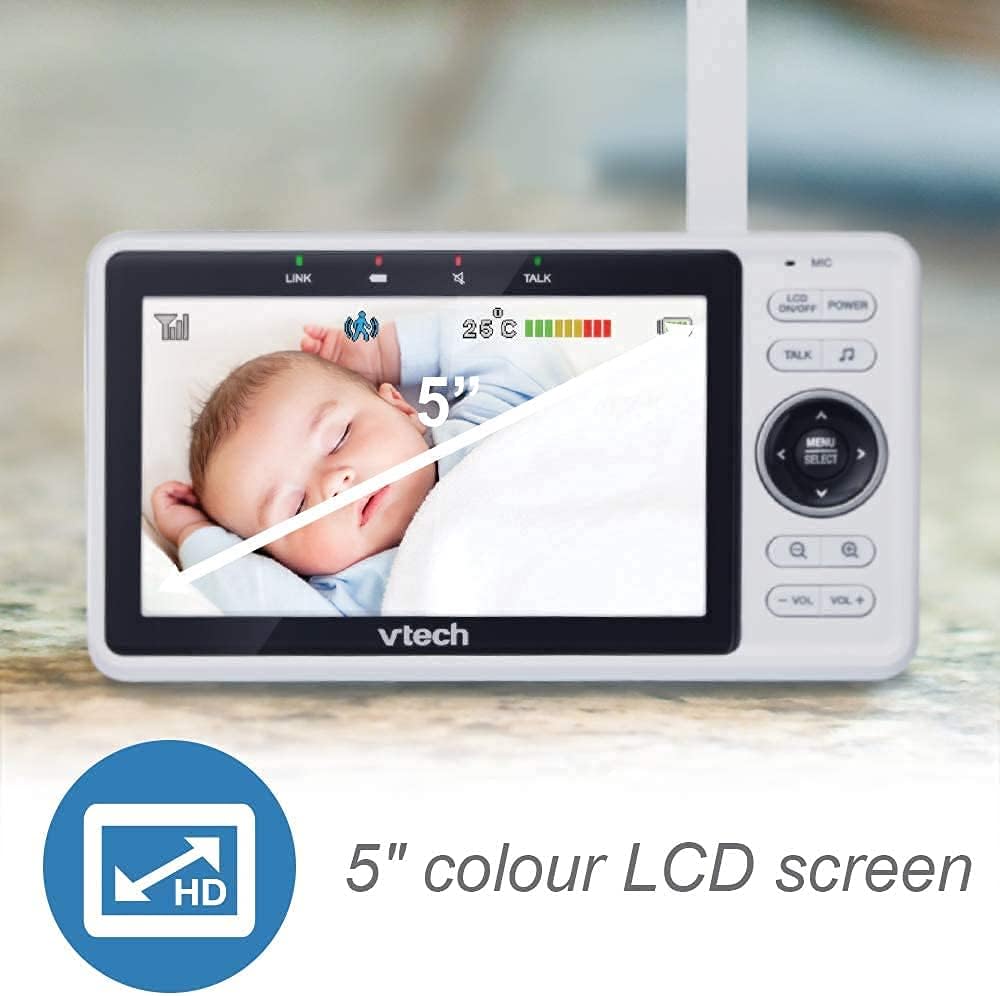
Image: A smartphone screen showing an instant motion alert notification from the VTech baby monitor app.
5. الرعاية والصيانة
5.1 تنظيف الشاشة
To keep your VTech RM5752 monitor clean, wipe the surfaces of the parent unit and camera unit with a soft, damp cloth. Do not use cleaning sprays or liquid cleaners. Ensure the units are unplugged before cleaning.
5.2 العناية بالبطارية (الوحدة الرئيسية)
The parent unit contains a rechargeable battery. To maximize battery life:
- قم بشحن البطارية بالكامل قبل الاستخدام الأولي.
- تجنب تعريض البطارية لدرجات حرارة عالية.
- إذا لم يتم استخدام الجهاز لفترة طويلة، فقم بإزالة البطارية.
6. استكشاف الأخطاء وإصلاحها
If you experience issues with your VTech RM5752 monitor, refer to the following common problems and solutions:
| مشكلة | حل |
|---|---|
| No link to camera / Disconnects frequently | Ensure both parent and camera units are within range of your Wi-Fi router. Check for obstructions. Restart both units and your Wi-Fi router. Verify your Wi-Fi network is stable. |
| No picture on parent unit | Check if the camera unit is powered on. Ensure the parent unit is charged and powered on. Re-pair the camera if necessary (refer to the full user manual for pairing instructions). |
| لا يوجد صوت أو صوت منخفض | Increase the volume on the parent unit. Ensure the camera's microphone is not obstructed. |
| App not connecting or working | Ensure your smartphone/tablet has a stable internet connection. Verify the MyVTech Baby 1080p app is updated to the latest version. Restart the app and your device. Check your home Wi-Fi network settings. |
| Poor picture quality / Blurry image | Clean the camera lens. Ensure adequate lighting (night vision will activate in low light). Check for strong Wi-Fi signal strength. |
7. المواصفات الفنية
Below are the technical specifications for the VTech RM5752 Wi-Fi 1080p HD Video Monitor:
- اسم الموديل: 5752 رينغيت ماليزي
- دقة التقاط الفيديو: 1080 بكسل
- تقنية الاتصال: لاسلكي، واي فاي
- مصدر الطاقة: سلك كهرباء (5 فولت)
- الأجهزة المتوافقة: الهاتف الذكي والكمبيوتر اللوحي
- نوع التركيب: حامل الحائط
- المميزات الخاصة: مستشعر حركة، رؤية ليلية
- لون: أبيض
- أبعاد المنتج: 3 × 10 × 9 بوصة
- وزن السلعة: 1.7 رطل
- تصنيف الحماية الدولية: IP54
- نوع التركيز: التركيز التلقائي
- نوع التكبير: تقريب رقمي
- النوع المحذر: الحركة فقط
- تنسيق التقاط الفيديو: ام بي اي جي-4
8. الضمان والدعم
For detailed warranty information and technical support, please refer to the warranty card included with your product or visit the official VTech webموقع. ال website provides comprehensive support resources, including FAQs, product registration, and contact information for customer service.


