1. المقدمة
This manual provides detailed instructions for the setup, operation, and maintenance of your CHERRY DW 9100 Slim Wireless Keyboard and Mouse Set. This rechargeable desktop set offers both 2.4 GHz wireless and Bluetooth connectivity, featuring a slim design and silent keystroke SX Scissor Mechanism for comfortable and efficient use in various environments.

Image 1.1: The CHERRY DW 9100 Slim Wireless Keyboard and Mouse Set, including the USB nano receiver.
2. محتويات العبوة
يرجى التحقق من محتويات العبوة عند فتح الصندوق للتأكد من وجود جميع المكونات:
- CHERRY DW 9100 Slim Wireless Keyboard
- CHERRY DW 9100 Slim Wireless Mouse
- استقبال USB نانو
- كابل شحن USB-C
- دليل المستخدم (هذا المستند)
3. الإعداد
3.1 شحن الأجهزة
Both the keyboard and mouse are equipped with rechargeable lithium batteries.
- قم بتوصيل كابل الشحن USB-C المرفق بمنفذ USB-C الموجود على لوحة المفاتيح والماوس.
- قم بتوصيل الطرف الآخر من الكابل بمنفذ USB مزود بالطاقة (مثل الكمبيوتر أو محول USB الجداري).
- The status LED on each device will indicate the charging status. A full charge is indicated when the LED changes color or turns off (refer to Section 4.3 for LED indicators).
3.2 الاتصال عبر شبكة لاسلكية 2.4 جيجاهرتز
For a stable and fast wireless connection, use the included USB nano receiver.
- Locate the USB nano receiver.
- قم بتوصيل جهاز استقبال USB النانوي بمنفذ USB متاح على جهاز الكمبيوتر الخاص بك.
- On both the keyboard and mouse, locate the connectivity switch. Set the switch to the 2.4 جيجاهرتز position (often indicated by a receiver icon or "RF").
- ينبغي أن تتصل الأجهزة بجهاز الكمبيوتر الخاص بك تلقائيًا.
3.3 الاتصال عبر البلوتوث
The set supports Bluetooth connectivity for devices that have Bluetooth capabilities.
- On both the keyboard and mouse, locate the connectivity switch. Set the switch to the بلوتوث position (often indicated by a Bluetooth icon).
- افتح إعدادات البلوتوث على جهاز الكمبيوتر أو الجهاز الخاص بك.
- Initiate the pairing process on your device. The keyboard and mouse should appear in the list of discoverable devices (e.g., "CHERRY DW 9100 Keyboard", "CHERRY DW 9100 Mouse").
- Select each device to pair them. Follow any on-screen prompts, such as entering a pairing code for the keyboard.
ملحوظة: The keyboard and mouse can be paired with multiple Bluetooth devices. Use the connectivity switch to toggle between paired devices or 2.4 GHz mode.
4. تعليمات التشغيل
4.1 وظائف لوحة المفاتيح
The CHERRY DW 9100 Slim Keyboard features a full-size layout with an SX Scissor Mechanism for silent and precise keystrokes.
- المفاتيح القياسية: جميع مفاتيح الأحرف والأرقام والرموز القياسية تعمل كما هو متوقع.
- مفاتيح الوظائف (F1-F12): These keys may have secondary functions (e.g., media control, volume, brightness) accessible by pressing the Fn key simultaneously. Refer to your operating system's settings for specific function key behavior.
- المفاتيح العددية: Provides dedicated number entry.

الصورة 4.1: الجانب المحترفfile of the CHERRY DW 9100 Slim Keyboard, highlighting its thin design.

Image 4.2: Visual representation of the CHERRY SX Scissor Mechanism, responsible for silent and precise keystrokes.
4.2 وظائف الماوس
The CHERRY DW 9100 Slim Mouse features 6 buttons and a scroll wheel for versatile navigation.
- النقر بالزر الأيسر/الأيمن: أزرار الماوس القياسية.
- عجلة التمرير: For vertical scrolling and as a middle click button.
- الأزرار الجانبية: Typically used for forward/backward navigation in web المتصفحات.
- مفتاح DPI: A button, usually near the scroll wheel, allows adjustment of the mouse's sensitivity (DPI - Dots Per Inch). Pressing this button cycles through different DPI settings, indicated by the mouse's status LED.

الصورة 4.3: الأعلى view of the CHERRY DW 9100 Slim Mouse, showing the left/right click buttons, scroll wheel, and DPI switch.
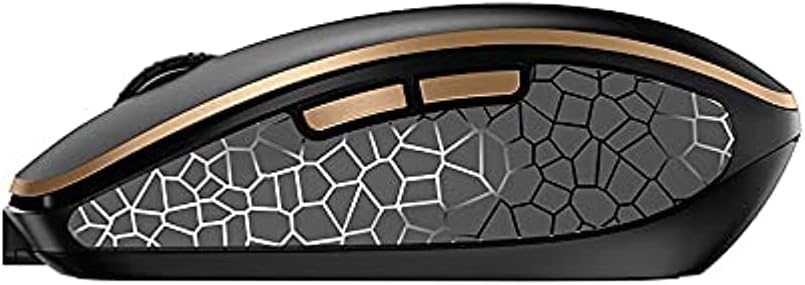
الصورة 4.4: الجانب view of the CHERRY DW 9100 Slim Mouse, illustrating the ergonomic design and side buttons.
4.3 مؤشرات LED للحالة
Both the keyboard and mouse feature status LEDs to provide information on battery level, charging status, and mouse resolution.
- بطارية منخفضة: The LED will flash or illuminate in a specific color (e.g., red) when the battery level is low, indicating that charging is required.
- الشحن: The LED will illuminate while charging and typically change color or turn off when fully charged.
- Mouse Resolution (DPI): When adjusting the DPI, the mouse LED may briefly flash to indicate the current setting.
5. الصيانة
5.1 التنظيف
للحفاظ على أداء ومظهر أجهزتك:
- افصل الأجهزة عن الكمبيوتر قبل التنظيف.
- استخدم قطعة قماش ناعمة وخالية من الوبر وامسحها برفق.ampبالماء أو بمحلول تنظيف معتدل.
- تجنب استخدام المواد الكيميائية القاسية، أو المنظفات الكاشطة، أو المذيبات، لأنها قد تؤدي إلى إتلاف الأسطح.
- بالنسبة للوحة المفاتيح، استخدم الهواء المضغوط لإزالة الغبار والحطام من بين المفاتيح.
5.2 العناية بالبطارية
The integrated lithium batteries are designed for long-term use.
- أعد شحن الأجهزة عند ظهور مؤشر انخفاض البطارية.
- Avoid fully discharging the batteries frequently to prolong their lifespan.
- If storing the devices for an extended period, charge them to approximately 50% before storage.
6. استكشاف الأخطاء وإصلاحها
If you encounter issues with your CHERRY DW 9100 Slim set, refer to the following common solutions:
6.1 مشاكل الاتصال
- No Connection (2.4 GHz):
- Ensure the USB nano receiver is securely plugged into a working USB port.
- Verify the keyboard and mouse connectivity switches are set to the 2.4 جيجاهرتز موضع.
- حاول توصيل جهاز الاستقبال بمنفذ USB مختلف.
- Ensure the devices are sufficiently charged.
- لا يوجد اتصال (بلوتوث):
- Ensure the keyboard and mouse connectivity switches are set to the بلوتوث موضع.
- Confirm Bluetooth is enabled on your computer/device.
- Remove previous pairings from your device's Bluetooth settings and attempt to re-pair.
- Ensure the devices are sufficiently charged.
6.2 مشاكل الطاقة والشحن
- الأجهزة التي لا تشحن:
- Check that the USB-C charging cable is properly connected to both the device and the power source.
- Try a different USB-C cable or a different USB power source.
- تأكد من أن مصدر الطاقة نشط.
- عمر البطارية قصير:
- تأكد من شحن الأجهزة بالكامل قبل الاستخدام.
- Battery life can vary based on usage patterns.
6.3 Mouse Tracking Issues
- Inaccurate or No Tracking:
- تأكد من أن مستشعر الماوس نظيف وخالٍ من الأوساخ.
- Use the mouse on a suitable surface (e.g., mouse pad). Highly reflective or transparent surfaces may cause issues.
- اضبط إعداد DPI باستخدام مفتاح DPI الموجود على الماوس.
7. المواصفات
| ميزة | التفاصيل |
|---|---|
| رقم الموديل | دينار-9100US-2 |
| أبعاد المنتج | 17.32 × 5.12 × 0.59 بوصة |
| وزن العنصر | 2.35 رطل |
| البطاريات | Rechargeable Lithium (USB-C) |
| تكنولوجيا الاتصال | Bluetooth, 2.4 GHz Radio Frequency (USB) |
| ميزة خاصة | Rechargeable, Silent Keystroke (SX Scissor Mechanism) |
| الأجهزة المتوافقة | كمبيوتر شخصي |
| الشركة المصنعة | الكرز |
Note on Batteries: The product description indicates USB-C rechargeable lithium batteries. The specification "1 AA batteries required. (included)" in the source data appears to be a discrepancy. Please rely on the USB-C rechargeable feature for this model.
8. الضمان والدعم
CHERRY products are manufactured to high-quality standards. For detailed warranty information, including terms and conditions, please refer to the official CHERRY webالموقع أو بطاقة الضمان المرفقة مع المنتج الخاص بك.
For technical support, troubleshooting assistance beyond this manual, or to inquire about replacement parts, please visit the official CHERRY support portal or contact their customer service directly.
- Official CHERRY Webموقع: www.cherry.de/en/ (or regional equivalent)
- دعم العملاء: ارجع إلى webموقع للحصول على تفاصيل الاتصال.


