1. انتهى المنتجview
The Cecotec Conga 8090 Ultra is an advanced 4-in-1 robot vacuum cleaner designed for comprehensive floor care. It simultaneously brushes, vacuums, and performs wet or dry wiping, offering a complete cleaning solution for your home. Equipped with a powerful 12000 Pa suction, it effectively removes various types of dirt, including pet hair, thanks to its specialized BestFriend Care brush and Jalisco brush.
This robot features intelligent laser navigation for precise mapping and efficient cleaning routes, along with RoomPlan 3.0 technology for customized room-specific cleaning. It can be controlled via a smartphone app and integrates with virtual voice assistants like Alexa and Google Assistant for convenient operation.

Figure 1.1: The Conga 8090 Ultra robot vacuum cleaner, showcasing its main unit, interchangeable brushes, remote control, and the accompanying smartphone application interface.
2. الإعداد والاستخدام الأولي
2.1 فك الصندوق والتحقق من المكونات
أزل جميع المكونات من العبوة بعناية. تأكد من وجود جميع العناصر:
- Conga 8090 Ultra Robot Vacuum Cleaner
- قاعدة الشحن
- محول الطاقة
- Jalisco Brush (pre-installed or separate)
- BestFriend Care Brush (for pet hair)
- Wet and Dry Tank (Twerking Tank)
- ممسحة الملابس
- فرش جانبية
- أداة التنظيف
- جهاز التحكم عن بعد (بالبطاريات)
- دليل التعليمات
2.2 شحن الروبوت
Place the charging base against a wall in an open area, ensuring there are no obstacles within 1 meter to each side and 2 meters in front of the base. Connect the power adapter to the charging base and plug it into a power outlet. Place the robot onto the charging base, ensuring the charging contacts align. The robot will indicate charging status. For first use, fully charge the robot before operation.

Figure 2.1: The robot vacuum cleaner docked at its charging station, ready for or undergoing charging.
2.3 تثبيت التطبيق وإقرانه
Download the "Conga" app from your smartphone's app store (available for iOS and Android). Open the app and follow the on-screen instructions to create an account and add your Conga 8090 Ultra robot. Ensure your robot is powered on and your smartphone is connected to a 2.4 GHz Wi-Fi network during the pairing process.
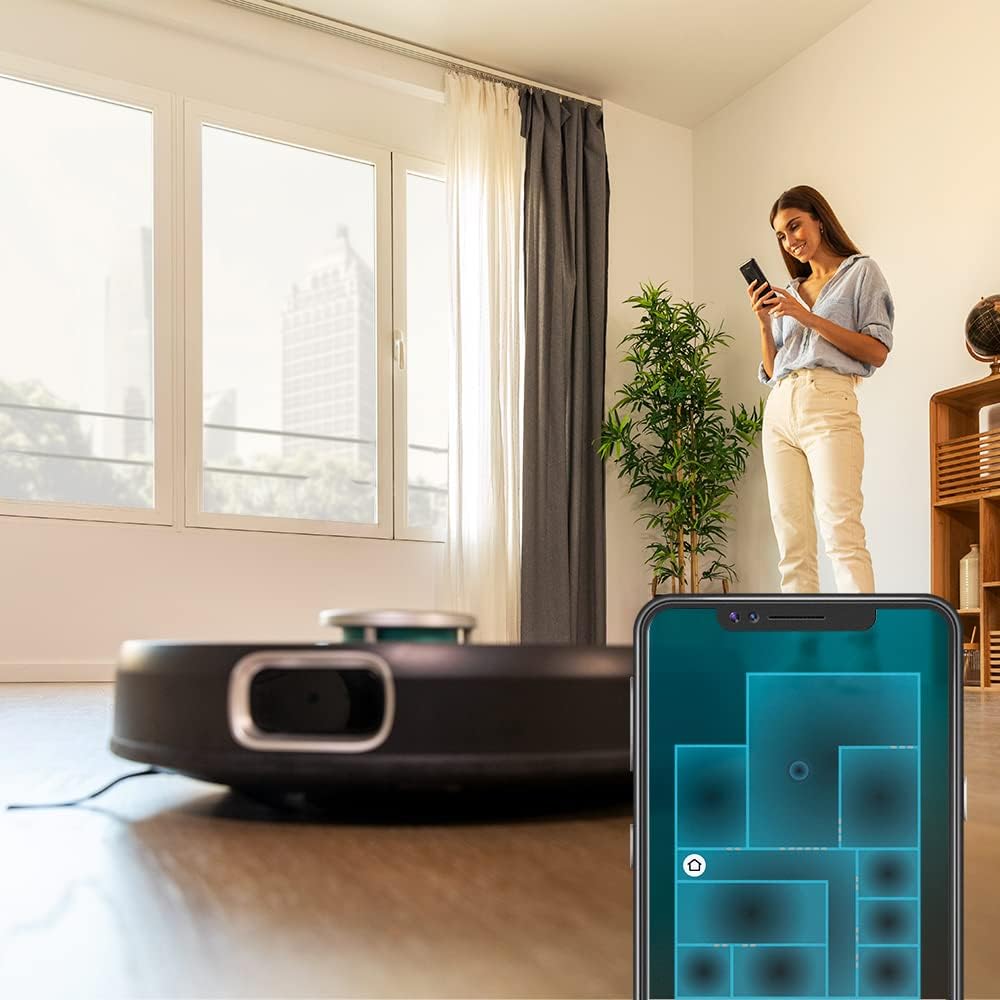
الشكل 2.2: مستخدم viewing the cleaning map and controls on the Conga smartphone application, demonstrating remote control capabilities.
2.4 التخطيط الأولي
After successful pairing, initiate the first cleaning cycle. The robot will use its iTech Laser Eye Navigation to scan and create a detailed map of your home. Ensure all doors are open and clear any obstacles to allow for a complete and accurate map generation. This map will be saved in the app for future customized cleaning plans.

Figure 2.3: The robot vacuum cleaner actively mapping its surroundings using its laser navigation system, indicated by a blue light projection.
3. تعليمات التشغيل
3.1 أوضاع التنظيف
The Conga 8090 Ultra offers 10 distinct cleaning programs accessible via the app or remote control:
- Intelligent Area: Cleans a specific area defined on the map.
- Locked Area: Designates areas the robot should avoid.
- تنظيف البقعة: Concentrates cleaning on a small, dirty spot.
- مرتين: Performs two cleaning passes over the selected area.
- آلي: Standard full-home cleaning.
- دليل: Control the robot's movement manually using the app or remote.
- حافة: Cleans along the perimeter of rooms.
- التنظيف: Activates the wet wiping function.
- حلزوني: Cleans in an expanding spiral pattern from a starting point.
- العودة إلى المنزل: Directs the robot back to its charging base.
3.2 RoomPlan 3.0 and MultiMap 3D
Utilize RoomPlan 3.0 in the app to customize cleaning for specific rooms or floor types. You can select the cleaning order, mode, and even define restricted areas. The MultiMap 3D feature allows the robot to store up to 5 different maps, ideal for multi-level homes or different layouts.
3.3 Virtual Voice Technology
Connect your robot to Alexa or Google Assistant for voice-activated control. Refer to the app's settings for detailed instructions on linking your robot to these smart home platforms. Common commands include "Start cleaning," "Stop cleaning," and "Go back to charging station."
3.4 Adjusting Suction and Scrubbing Levels
The robot offers three suction powers (high, medium, low) and three scrubbing levels for wet wiping. These can be adjusted via the smartphone app to suit different cleaning needs and floor types.

Figure 3.1: The robot vacuum cleaner in operation on a wooden floor, demonstrating its compact design and ability to navigate open spaces.
4. الصيانة
Regular maintenance ensures optimal performance and extends the lifespan of your Conga 8090 Ultra.
4.1 إفراغ صندوق الغبار
After each cleaning cycle, or when indicated by the app, remove and empty the dust box. Open the dust box, discard collected debris, and clean the filter if necessary. Reinsert the dust box securely.
4.2 Filling the Water Tank (Twerking Tank)
For wet wiping, remove the Twerking Tank. Fill it with clean water. A small amount of non-foaming cleaning solution can be added if desired. Attach a clean mop cloth firmly to the tank before reinserting it into the robot.
4.3 فرش تنظيف
- Jalisco Brush / Main Brush: Remove the main brush cover and lift out the brush. Use the provided cleaning tool to remove tangled hair and debris. Clean the brush bearings.
- الفرش الجانبية: Periodically check side brushes for wear and tear. Remove any tangled hair or debris. Replace if bristles are bent or damaged.
- فرشاة العناية بيست فريند: If using the pet hair brush, clean it regularly to prevent hair buildup.
4.4 Cleaning Mop Cloths and Filters
Remove mop cloths after each wet cleaning cycle and wash them thoroughly. Allow them to air dry completely before reattaching. The high-efficiency filter inside the dust box should be tapped clean regularly and replaced every 3-6 months depending on usage.
4.5 General Robot Cleaning
Wipe the robot's exterior, including sensors and charging contacts, with a dry, soft cloth. Ensure no dust or debris obstructs the laser sensor or cliff sensors.
5. استكشاف الأخطاء وإصلاحها
This section addresses common issues you might encounter with your Conga 8090 Ultra.
| مشكلة | السبب المحتمل | حل |
|---|---|---|
| الروبوت لا يبدأ أو لا يستجيب. | بطارية منخفضة؛ إيقاف تشغيل الطاقة؛ الروبوت عالق. | Ensure robot is fully charged. Check power switch. Clear any obstructions around the robot. |
| أداء شفط ضعيف. | Full dust box; Clogged filter; Main brush tangled. | Empty dust box. Clean or replace filter. Clean main brush and side brushes. |
| الروبوت يتعطل بشكل متكرر. | Cables or small objects on floor; Low clearance areas. | Clear floor of obstacles before cleaning. Use "Locked Area" function in app for low clearance zones. |
| مشاكل الاتصال بالتطبيق. | Incorrect Wi-Fi password; Router issues; Robot offline. | Verify Wi-Fi password. Restart router and robot. Ensure robot is within Wi-Fi range. Re-pair if necessary. |
| Ineffective wet wiping. | Empty water tank; Dirty mop cloth; Incorrect water flow setting. | Fill water tank. Wash mop cloth. Adjust water flow to higher setting in app. |
| Mapping errors or navigation issues. | Changes in room layout; Sensor obstruction; Robot confused. | Ensure consistent room layout. Clean all sensors. If persistent, delete map and allow robot to re-map. |
إذا استمرت المشكلة بعد تجربة هذه الحلول، يرجى الاتصال بدعم عملاء Cecotec.
6. المواصفات
| ميزة | التفاصيل |
|---|---|
| ماركة | سيكوتيك |
| اسم الموديل | كونجا 8090 الترا |
| رقم الموديل | 05004 |
| لون | أسود |
| أبعاد المنتج | 35 × 35 × 9.4 سم |
| وزن العنصر | 6.32 كجم |
| قوة الشفط | ما يصل إلى 12000 باسكال |
| مستوى الضوضاء | 64 ديسيبل |
| عدد السرعات | 3 (suction) |
| الموديلات المتوافقة | أمازون إيكو، جوجل هوم |
| بطارية | 14.8 V, 6400 mAh Li-Ion (Immortal Battery System) |
| تكنولوجيا الملاحة | iTech Laser Eye Navigation |
| رسم الخرائط | RoomPlan 3.0, MultiMap 3D (stores 5 maps) |
| برامج التنظيف | 10 (Intelligent Area, Locked Area, Spot, Twice, Auto, Manual, Edge, Scrubbing, Spiral, Back Home) |
7. الضمان والدعم
The Cecotec Conga 8090 Ultra Robot Vacuum Cleaner comes with a manufacturer's warranty. For detailed information regarding warranty terms, conditions, and duration, please refer to the warranty card included in your product packaging or visit the official Cecotec webموقع.
For technical support, troubleshooting assistance beyond this manual, or to inquire about spare parts and accessories, please contact Cecotec customer service. Contact details can typically be found on the official webالموقع أو على عبوة المنتج.
مهم: Always use genuine Cecotec spare parts and accessories to ensure optimal performance and to maintain your product's warranty.


