مقدمة
Thank you for choosing the SONICAKE Rude Mouse Distortion Pedal. This manual provides essential information for the proper setup, operation, and maintenance of your new guitar effects pedal. Please read this manual thoroughly to ensure optimal performance and longevity of your device.
المنتج انتهىview
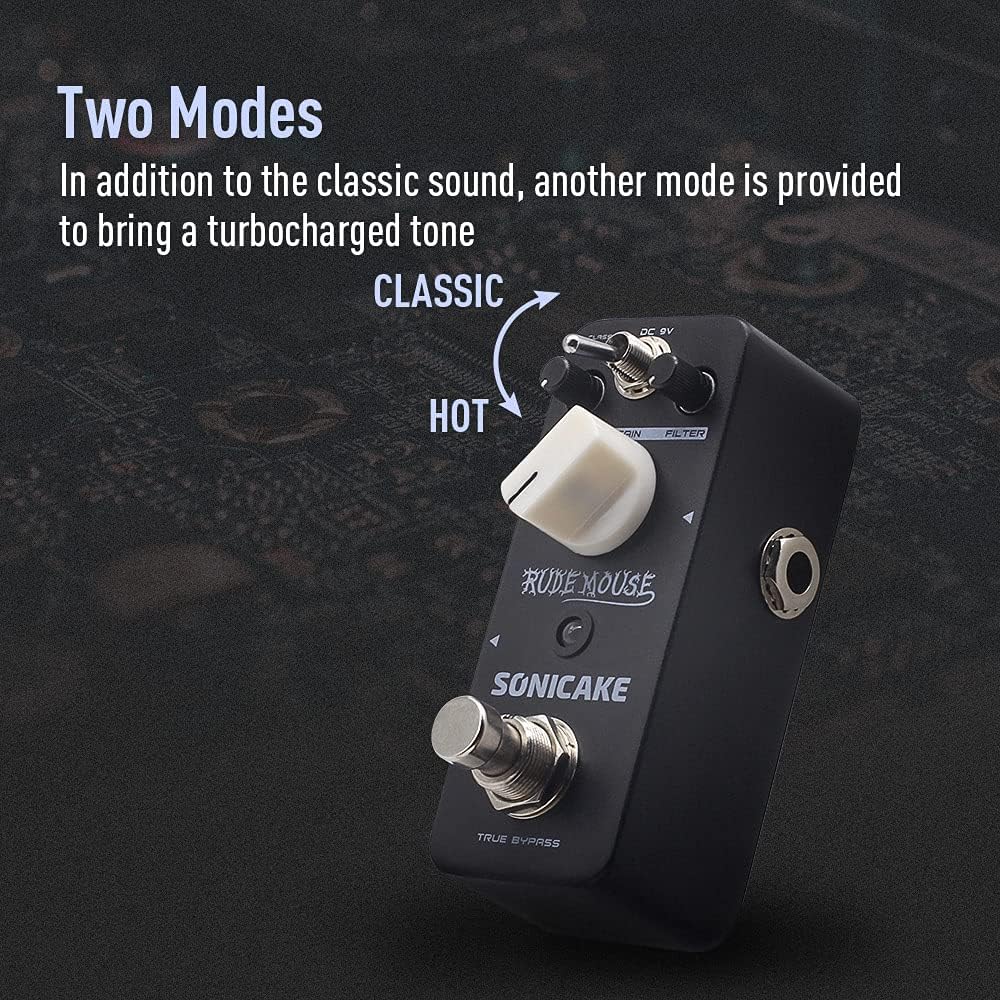
The SONICAKE Rude Mouse is a compact, all-analog distortion pedal designed to deliver a wide range of classic and modern distortion tones. It features two distinct modes, "Classic" and "Hot," offering versatility from creamy overdrive to aggressive fuzz. Its true bypass design ensures your guitar's signal remains uncolored when the effect is disengaged.
- 100% Analog Circuit: Provides authentic and rich distortion, overdrive, and fuzz tones.
- وضعين: Switch between "Classic" for vintage distortion and "Hot" for a more aggressive, turbo-charged sound.
- التحكم في التصفية: Offers a broad tonal range, from dark to bright, allowing precise sound sculpting.
- التجاوز الحقيقي: Maintains the integrity of your guitar's signal when the pedal is off.
- بناء متين: Housed in a robust zinc-alloy die-cast casing for reliability.
- الحجم الصغير: Designed for portability and efficient pedalboard space utilization.


عناصر التحكم والوظائف
Familiarize yourself with the controls of the Rude Mouse pedal:

- مدخلات DC 9V: Connect a standard 9V DC power adapter (center negative) here. The pedal requires a stable power supply for operation.
- مقبض المستوى: Controls the overall output volume of the effect. Adjust to balance the effect volume with your clean signal.
- مقبض الربح: Adjusts the amount of distortion. Turning clockwise increases the intensity of the distortion.
- مقبض الفلتر: Shapes the tone of the distorted sound. This control allows you to dial in a wide range of frequencies, from dark and bass-heavy to bright and cutting.
- MODE Switch (Classic/Hot): Toggles between two distinct distortion voicings.
- كلاسيكي: يوفر رقم تعريف المركبةtage, smooth distortion tone.
- حار: Delivers a more aggressive, higher-gain distortion with increased saturation.
- جاك الإخراج: قم بتوصيل هذا بـ ampمكبر الصوت أو الدواسة التالية في سلسلة الإشارة الخاصة بك.
- جاك المدخلات: Connect your guitar or the preceding pedal in your signal chain here.
- صحيح الالتفافية Footswitch: Engages or disengages the effect. When engaged, the LED indicator will illuminate. When disengaged, the pedal is bypassed, and your signal passes through unaffected.
يثبت
Follow these steps to set up your SONICAKE Rude Mouse pedal:
- توصيل الطاقة: Connect a standard 9V DC power adapter (center negative) to the DC 9V input jack (1). Ensure the power supply meets the specified voltagمتطلبات القطبية والكهرباء. (Note: Power adapter is not included.)
- اتصال الإدخال: Connect your guitar to the Input Jack (7) using a standard 1/4-inch instrument cable.
- اتصال الإخراج: Connect the Output Jack (6) to your amplifier's input or to the input of the next pedal in your effects chain using a standard 1/4-inch instrument cable.
- الإعدادات الأولية: Before powering on, set the LEVEL knob to a low position, and the GAIN and FILTER knobs to their middle positions (12 o'clock).
- تشغيل الطاقة: بمجرد التأكد من سلامة جميع التوصيلات، قم بتشغيل جهازك amplifier and then the pedal.


تعليمات التشغيل
To achieve various distortion sounds:
- تفعيل التأثير: Press the TRUE BYPASS Footswitch (8) to activate the distortion effect. The red LED indicator will light up.
- ضبط المستوى: Use the LEVEL knob (2) to set the desired output volume. Start low and increase gradually to avoid sudden loud sounds.
- Set Gain: Rotate the GAIN knob (3) to control the amount of distortion. Lower settings provide a mild crunch, while higher settings deliver heavy, saturated distortion.
- Shape Tone with Filter: Adjust the FILTER knob (4) to fine-tune the tonal characteristics. Turning it clockwise generally brightens the sound, while counter-clockwise makes it darker. Experiment to find the sweet spot for your guitar and ampمكبر.
- حدد الوضع: Use the MODE Switch (5) to toggle between "Classic" and "Hot" voicings.
- For a more traditional, smooth distortion, select كلاسيكي.
- For a more aggressive, modern, and higher-gain sound, select حار.
- Disengage Effect: Press the TRUE BYPASS Footswitch (8) again to bypass the effect. The LED indicator will turn off, and your signal will pass through the pedal without modification.
صيانة
- تنظيف: Use a soft, dry cloth to clean the pedal's exterior. Avoid using abrasive cleaners or solvents, as they may damage the finish.
- تخزين: قم بتخزين الدواسة في بيئة جافة، بعيدًا عن درجات الحرارة القصوى وأشعة الشمس المباشرة.
- مزود الطاقة: Always use a regulated 9V DC power supply with a center-negative plug. Incorrect power supplies can damage the unit and void the warranty.
- الاتصالات: Ensure all cables are securely connected but do not overtighten. Periodically check cables for wear and tear.
استكشاف الأخطاء وإصلاحها
| مشكلة | السبب المحتمل | حل |
|---|---|---|
| لا يصدر أي صوت عند الضغط على الدواسة. | Incorrect power supply, faulty cables, incorrect connections, LEVEL knob set too low. | Verify 9V DC center-negative power supply. Check all instrument cables. Ensure guitar is connected to INPUT and amplifier to OUTPUT. Increase LEVEL knob. |
| صوت ضعيف أو مشوه (غير مقصود). | Low battery (if applicable, though this pedal is not battery-powered), incorrect impedance, faulty cables. | Ensure proper power supply. Check cable integrity. Ensure correct input/output impedance matching with other gear. |
| ضوضاء أو طنين غير مرغوب فيه. | حلقة أرضية، مصدر طاقة معيب، تداخل من أجهزة إلكترونية أخرى. | Use a high-quality, isolated power supply. Try a different power outlet. Move pedal away from other electronic devices. Check for faulty cables. |
| LED not lighting up. | No power, pedal not engaged. | Ensure power supply is connected and functional. Press the footswitch to engage the effect. |
تحديد
| ميزة | التفاصيل |
|---|---|
| رقم الموديل | كيو اس اس-18 |
| ماركة | سونيكيك |
| وزن العنصر | 7.3 أونصة (208 جرامًا) |
| أبعاد المنتج | 2.05 بوصة طول × 1.65 بوصة عرض × 3.68 بوصة ارتفاع (52 مم طول × 42 مم عرض × 93.5 مم ارتفاع) |
| مادة الجسم | Zinc-alloy die-cast casing |
| مصدر الطاقة | Corded Electric (9V DC, center negative) |
| المجلدtage | 9 فولت |
| تنسيق الإشارة | التناظرية |
| نوع الموصل | مقبس صوت مقاس 1/4 بوصة (6.35 مم) |


الضمان والدعم
For warranty information, please refer to the documentation included with your purchase or visit the official SONICAKE website. If you encounter any issues or require technical assistance, please contact SONICAKE customer support through their official channels.
يمكنك العثور على مزيد من المعلومات وتفاصيل الاتصال على SONICAKE Amazon Store.
معلومات هامة
- رقم سري: For product identification and warranty purposes, please note your pedal's serial number: 60190008971.
- رمز المنتج العالمي: 0843037101667
- رقم EAN: 6971002021666
مصادر الفيديو
While this manual provides comprehensive instructions, visual demonstrations can be helpful. Please note that specific product videos were not available in the provided data for embedding. For official product videos and demonstrations, please visit the SONICAKE official website or their official YouTube channel.


