1. المقدمة
The D-Link DGS-105GL is a 5-Port Gigabit Unmanaged Desktop Switch designed to provide a simple and efficient solution for expanding network connectivity in small office/home office (SOHO) and small to medium-sized business (SMB) environments. This device offers plug-and-play functionality, requiring no complex configuration. Its fanless design ensures silent operation, and the metal housing provides durability. The DGS-105GL incorporates energy-efficient features, including IEEE 802.3az Energy-Efficient Ethernet, to reduce power consumption without compromising performance.
2. محتويات العبوة
تأكد من أن الحزمة الخاصة بك تحتوي على العناصر التالية:
- D-Link DGS-105GL 5-Port Gigabit Unmanaged Desktop Switch
- محول الطاقة
في حال وجود أي عناصر مفقودة أو تالفة، يرجى الاتصال بموزع D-Link المحلي.
3. انتهى المنتجview
The DGS-105GL switch features a compact, low-profile design with a durable metal housing. It is equipped with five Gigabit Ethernet ports for high-speed network connections.
3.1 اللوحة الأمامية

الصورة: الجبهة view of the D-Link DGS-105GL switch, showing the D-Link logo, model number DGS-105GL, a power LED, five port status LEDs (1-5), and five RJ45 Gigabit Ethernet ports (1-5).
The front panel includes the following indicators and ports:
- مؤشر الطاقة LED: يشير إلى حالة الطاقة للمفتاح.
- Port LEDs (1-5): Each port has an LED that indicates link status and activity. A solid light indicates a successful connection, and a blinking light indicates data transmission.
- RJ45 Gigabit Ethernet Ports (1-5): These ports are used to connect network devices such as computers, servers, and other switches.
3.2 اللوحة الخلفية

الصورة: الخلفية view of the D-Link DGS-105GL switch, showing the power input port labeled '5V --- 1A'.
The rear panel contains the power input port, where the included power adapter is connected.
4. الإعداد
The DGS-105GL is a plug-and-play device, making installation straightforward. Follow these steps to set up your switch:
- قم بتوصيل محول الطاقة: Plug the included power adapter into the power input port on the rear panel of the DGS-105GL switch. Then, plug the other end of the adapter into a standard electrical outlet. The Power LED on the front panel should illuminate.
- ربط أجهزة الشبكة: Connect your network devices (e.g., computers, network-attached storage, routers) to any of the five RJ45 Gigabit Ethernet ports on the front panel using standard Ethernet cables.
- التحقق من الاتصالات: Once a device is connected and powered on, the corresponding Port LED on the switch's front panel should light up, indicating a successful link. If there is network activity, the LED will blink.

Image: The D-Link DGS-105GL switch placed on a desk in an office setting, connected to a laptop and other peripherals, demonstrating a typical setup.
5. تشغيل المفتاح
The DGS-105GL operates automatically once connected. It supports auto-negotiation for speed and duplex mode, and auto-MDI/MDIX, eliminating the need for crossover cables. The switch automatically detects the speed of the connected device (10/100/1000 Mbps) and adjusts accordingly.
5.1 مؤشرات LED
The LEDs provide visual feedback on the switch's status:
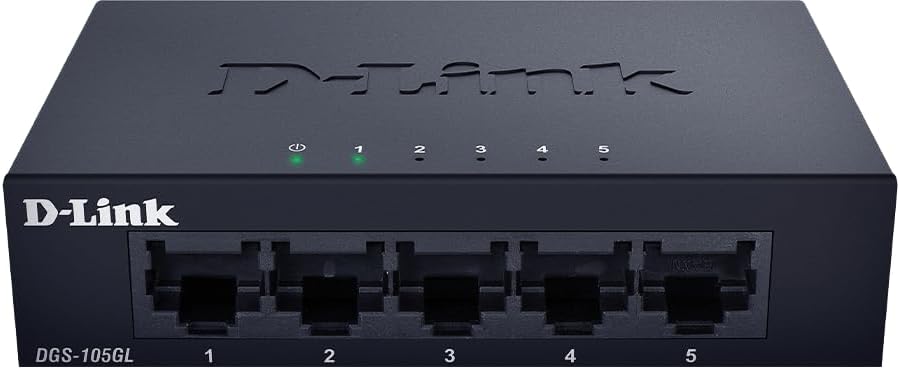
الصورة: الجبهة view of the D-Link DGS-105GL switch with the green power LED and green port LEDs 1-5 illuminated, indicating active connections.
| قاد | حالة | وصف |
|---|---|---|
| قوة | أخضر صلب | المفتاح قيد التشغيل. |
| قوة | عن | المفتاح لا يستقبل الطاقة. |
| المنفذ (1-5) | أخضر صلب | تم توصيل الجهاز بالمنفذ بنجاح. |
| المنفذ (1-5) | وامض باللون الأخضر | يتم إرسال البيانات أو استقبالها عبر المنفذ. |
| المنفذ (1-5) | عن | لا يوجد جهاز متصل بالمنفذ، أو أن الجهاز المتصل مطفأ. |
6. الصيانة
To ensure optimal performance and longevity of your DGS-105GL switch, consider the following maintenance guidelines:
- تنظيف: Periodically clean the exterior of the switch with a soft, dry cloth. Avoid using liquid or aerosol cleaners directly on the device.
- الظروف البيئية: Ensure the switch is placed in a well-ventilated area, away from direct sunlight, heat sources, and excessive moisture. Maintain operating temperatures within the specified range (refer to specifications).
- إدارة الكابلات: Keep network cables neatly organized to prevent strain on ports and improve airflow around the device.
- ركوب الدراجات السلطة: If you experience network issues, a simple power cycle (unplugging the power adapter, waiting 10 seconds, and plugging it back in) can often resolve minor problems.
7. استكشاف الأخطاء وإصلاحها
If you encounter issues with your DGS-105GL switch, refer to the following common troubleshooting steps:
- لا يوجد مؤشر LED للطاقة:
- تأكد من توصيل محول الطاقة بشكل آمن بالمفتاح والمأخذ الكهربائي العامل.
- تأكد من أن مأخذ الكهرباء يعمل عن طريق توصيل جهاز آخر.
- No Link LED for a Connected Device:
- Check that the Ethernet cable is securely plugged into both the switch port and the network device.
- تأكد من أن جهاز الشبكة المتصل يعمل بشكل صحيح.
- حاول استخدام كابل إيثرنت مختلف لاستبعاد وجود كابل معيب.
- حاول توصيل الجهاز بمنفذ مختلف على المفتاح.
- سرعة الشبكة بطيئة:
- تأكد من أن جميع الأجهزة والكابلات المتصلة تدعم تقنية جيجابت إيثرنت (Cat5e أو أعلى).
- Check for excessive network traffic or bandwidth-intensive applications running on connected devices.
- Perform a power cycle on the switch and connected devices.
8. المواصفات
Key technical specifications for the D-Link DGS-105GL switch:
| ميزة | مواصفة |
|---|---|
| رقم الموديل | DGS-105GL |
| عدد المنافذ | منفذ إيثرنت جيجابت واحد (RJ45) |
| معدل نقل البيانات | 1 Gbps per port |
| نوع الواجهة | آر جيه 45 |
| مادة العلبة | معدن |
| تصميم بدون مروحة | نعم |
| كفاءة الطاقة | إيثرنت موفرة للطاقة IEEE 802.3az (EEE) |
| مدخلات الطاقة | 5 Volts (DC), 1 Amps |
| وزن العنصر | 160 جرام (5.6 أونصة) |
| أبعاد المنتج | 39.37 بوصة طول × 25.2 بوصة عرض × 0.94 بوصة ارتفاع (تقريبي) |
| رمز المنتج الموحد | 790069458606 |
9. الضمان والدعم الفني
D-Link products are backed by a limited warranty. For specific warranty terms and conditions, please refer to the warranty information included with your product or visit the official D-Link webموقع.
For technical assistance, product documentation, or to download the latest software and firmware updates, please visit the D-Link support portal or contact D-Link technical support directly. Contact information can typically be found on the D-Link webموقع لمنطقتك.


