1. المقدمة
This manual provides essential information for the safe and effective operation, assembly, and maintenance of your Matrix Fitness T50 Treadmill with XIR Console. Please read this manual thoroughly before initial use and retain it for future reference.

Figure 1.1: Matrix Fitness T50 Treadmill with XIR Console. This image shows the complete treadmill unit from a front-right angle, highlighting its sleek design and the integrated XIR console.
مميزات المنتج:
- 20" x 60" running surface for ampلو الفضاء.
- Adjustable speed range from 0.5 to 12.5 mph.
- Incline range from 0% to 15% for varied workout intensity.
- Johnson Drive System ensures quiet and responsive operation.
- Exclusive Ultimate Deck System with heavy-duty frame, thick deck, and industrial-grade cushioning for durability and comfort.
- 16" Touchscreen XIR Console with integrated apps for entertainment and workout programs.
- Includes iFIT and Virtual Active for immersive workout experiences (30-day iFIT membership included).
2. الإعداد والتجميع
The Matrix Fitness T50 Treadmill requires assembly. It is recommended that two people perform the assembly process to ensure safety and ease of installation.
المكونات المتضمنة:
قبل البدء بالتجميع، تأكد من وجود جميع المكونات المدرجة أدناه في العبوة:
- إطار جهاز المشي
- الصواري
- Mast Boots
- قاعدة وحدة التحكم
- المقود
- Handlebar Sleeves
- أغطية المقود
- Frame Cover Sets
- الغلاف الخلفي
- سلك الطاقة
- مفتاح الأمان
- طقم الأجهزة
خطوات التجميع:
- فك التعبئة: Carefully remove all components from the packaging. Place them on a clean, flat surface, ensuring no parts are damaged.
- تجميع القاعدة: Attach the masts to the treadmill frame using the provided hardware. Ensure all bolts are securely tightened.
- تركيب وحدة التحكم: Mount the console base onto the masts. Connect all necessary cables from the console to the treadmill frame.
- ملحق المقود: Secure the handlebar to the console base, ensuring it is firm and stable. Install handlebar sleeves and caps.
- تركيب الغطاء: Attach the frame cover sets and back cover.
- الفحوصات النهائية: Before plugging in, ensure all connections are secure and all hardware is tightened. Place the treadmill on a level surface.
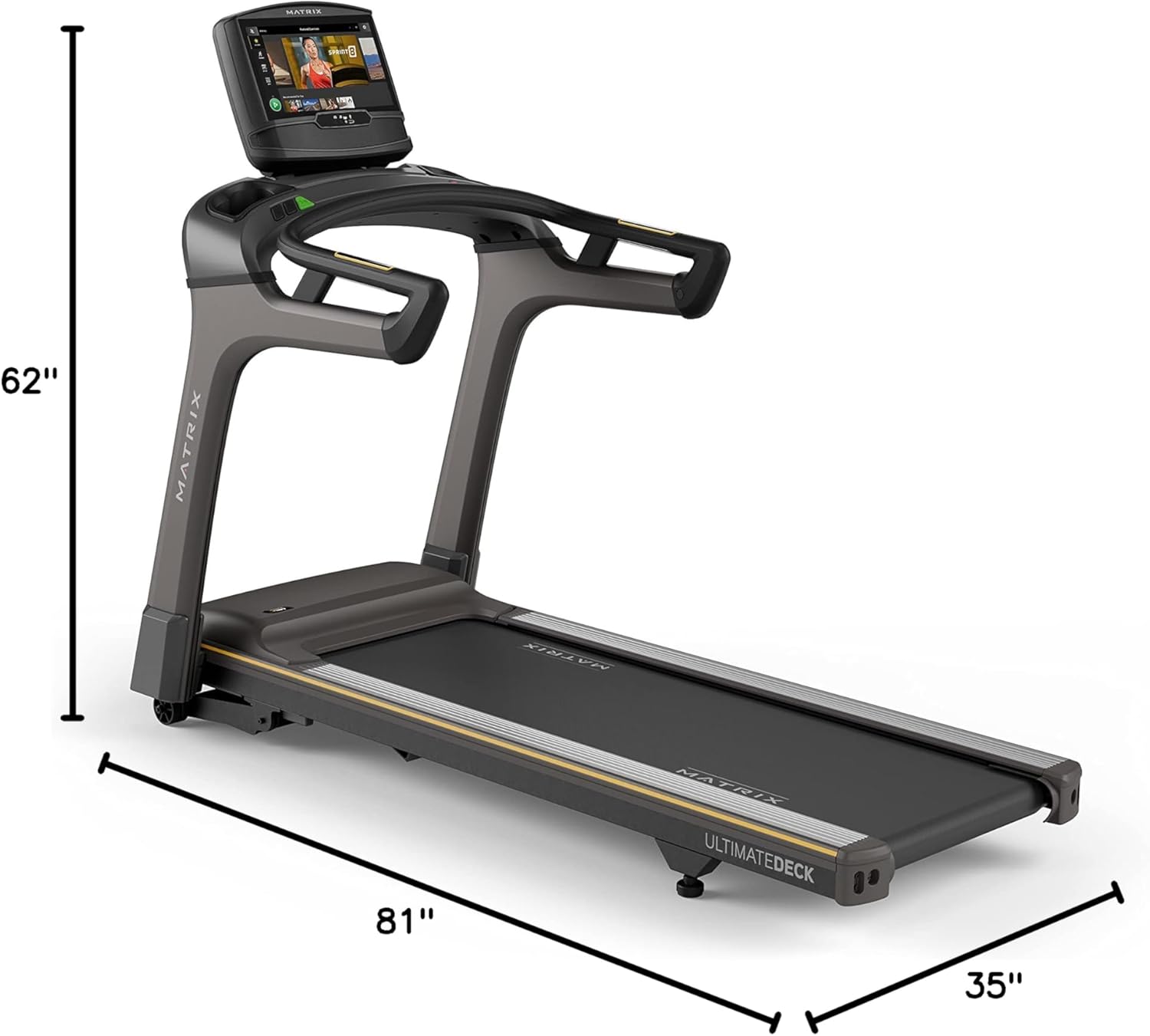
Figure 2.1: Treadmill Dimensions. This image illustrates the overall dimensions of the assembled treadmill, including its length (81 inches), width (35 inches), and height (62 inches).
3. تعليمات التشغيل
The Matrix Fitness T50 Treadmill with XIR Console offers a range of features for a comprehensive workout experience.
XIR Console Overview:
The 16-inch touchscreen XIR Console is your central control hub. It provides access to various workout programs, entertainment apps, and performance metrics.

Figure 3.1: XIR 16" Touchscreen Console. This image highlights key features of the console, including its large HD touchscreen, streaming app compatibility, Virtual Active and iFIT integration, Bluetooth FTMS, integrated HDMI, 13 metric-driven programs, and Bluetooth HR with included strap.
بدء التمرين:
- تشغيل الطاقة: Connect the power cord to a grounded outlet. The console will power on.
- مفتاح الأمان: ثبّت مشبك مفتاح الأمان على ملابسك، ثم أدخل مفتاح الأمان في الفتحة المخصصة له على لوحة التحكم. لن يعمل جهاز المشي بدون مفتاح الأمان.
- اختر البرنامج: From the console's main screen, choose from the 13 pre-programmed workouts, or select a manual workout. You can also access iFIT or Virtual Active for guided experiences.
- ضبط الإعدادات: Use the console controls to adjust speed (0.5-12.5 mph) and incline (0-15%) as desired during your workout.
- التوقف في حالات الطوارئ: In case of an emergency, pull the safety key from the console or press the large red STOP button.
مميزات وحدة التحكم:
- تطبيقات البث: The XIR Console supports streaming apps like Netflix, YouTube, and Spotify.
- iFIT و Virtual Active: Engage in interactive workouts with iFIT or explore scenic routes with Virtual Active. A 30-day iFIT membership is included.
- الاتصال عبر البلوتوث: Connect to third-party apps via Bluetooth FTMS and monitor your heart rate with Bluetooth HR and the included strap.
- منفذ HDMI مدمج: Connect external devices for additional entertainment options.

Figure 3.2: XIR Console Displaying Sprint 8. This image shows the XIR console screen with the "Sprint 8" workout program interface visible.

Figure 3.3: XIR Console Entertainment Apps. This image displays the XIR console's interface showing various entertainment applications available for streaming during workouts, such as Netflix, YouTube, and Spotify.

Figure 3.4: XIR Console Virtual Active. This image shows the XIR console displaying a Virtual Active scenic workout, allowing users to experience virtual outdoor environments.
4. الصيانة
Regular maintenance ensures the longevity and optimal performance of your Matrix Fitness T50 Treadmill. Always unplug the treadmill before performing any maintenance.
النظافة العامة:
- امسح وحدة التحكم والإطار بقطعة قماش ناعمة.amp امسح بقطعة قماش بعد كل استخدام لإزالة العرق والغبار. تجنب المنظفات الكاشطة.
- Periodically vacuum underneath the treadmill to prevent dust and debris from accumulating in the motor area.
صيانة الحزام:
- Inspect the running belt for signs of wear or damage regularly.
- Ensure the running belt is properly centered and tensioned. Refer to the full service manual for detailed belt adjustment procedures if needed.

Figure 4.1: Ultimate Deck System. This diagram illustrates the robust construction of the Ultimate Deck System, highlighting its heavy-duty frame, extra-thick deck, and industrial-grade cushioning, which contribute to the treadmill's durability and comfort.

Figure 4.2: Johnson Drive System. This image provides a cutaway view of the Johnson Drive System, showcasing its internal components designed for quiet, durable, and responsive continuous-duty operation.
5. استكشاف الأخطاء وإصلاحها
This section addresses common issues you might encounter with your Matrix Fitness T50 Treadmill. For problems not listed here, please contact customer support.
| مشكلة | السبب المحتمل | حل |
|---|---|---|
| جهاز المشي لا يعمل. | سلك الطاقة غير موصول بالكامل؛ قاطع الدائرة الكهربائية مفصول؛ مفتاح الأمان غير مُدخل. | Ensure power cord is securely plugged into a live outlet. Check household circuit breaker. Insert safety key fully into the console. |
| حزام الجري ينزلق أو يتردد. | شد الحزام غير كافٍ؛ يحتاج الحزام إلى التشحيم. | Refer to the full service manual for instructions on adjusting belt tension. Lubricate the belt according to maintenance guidelines. |
| أصوات غير عادية أثناء التشغيل. | Loose components; debris under the belt; motor issue. | Check all visible bolts and screws for tightness. Vacuum under the treadmill. If noise persists, contact customer support. |
6. المواصفات
Detailed technical specifications for the Matrix Fitness T50 Treadmill with XIR Console.
| مواصفة | قيمة |
|---|---|
| ماركة | المصفوفة |
| اسم الموديل | Matrix Fitness T50 Treadmill |
| أسلوب | T50 Treadmill with XIR Console |
| رمز المنتج الموحد | 763165008884 |
| لون | أسود/أصفر |
| أبعاد المنتج (الطول × العرض × الارتفاع) | 81 بوصة عمق × 35 بوصة عرض × 62 بوصة ارتفاع |
| وزن العنصر | 265 رطل |
| مادة | سبائك الفولاذ |
| السرعة القصوى | 12.5 ميلا في الساعة |
| الحد الأدنى للسرعة | 0.5 ميلا في الساعة |
| الحد الأقصى للنسبة المئوية للانحدارtage | 15% |
| أقصى قوة حصان | 3.25 حصان |
| Running Surface (Deck Length x Width) | 60 بوصة × 20 بوصة |
| توصية الوزن الأقصى | 400 رطل |
| نوع العرض | LCD (16-inch Touchscreen) |
| عدد البرامج | 13 |
| مصدر الطاقة | كهرباء سلكية |
| تكنولوجيا الاتصال | Power cord, Bluetooth FTMS, HDMI |
| مطلوب التجميع | نعم |
| الاستخدامات الموصى بها للمنتج | Home fitness |
| المميزات الخاصة | Ultimate Deck System, Johnson Drive System, XIR Console |
7. الضمان والدعم
معلومات الضمان:
The Matrix Fitness T50 Treadmill comes with the following manufacturer's warranty:
- وحدة التحكم: 5 years parts / 1 year labor
- إطار: 7 years parts / 2 years labor
- Frame, Motor, and Cushioning: ضمان مدى الحياة
يرجى الاحتفاظ بإثبات الشراء الخاص بك لمطالبات الضمان.
دعم العملاء:
For technical assistance, parts, or service inquiries, please contact Matrix Fitness USA customer support. You can find contact information on the official Matrix Fitness webالموقع أو من خلال بائع التجزئة الخاص بك.
For general inquiries regarding your purchase, you may also refer to the Matrix Fitness USA seller page on Amazon.


