1. المقدمة
This manual provides essential information for the installation, operation, and maintenance of the ABB Winpower SNMP Network Interface Card. This card is designed to enable real-time monitoring and management of ABB PowerValue 11RT G2 Uninterruptible Power Supply (UPS) systems (6-10 kVA) via a standard web المتصفح.
The Network Interface Card facilitates real-time visibility into your UPS system's status, allowing for proactive problem identification and resolution. It includes monitoring software for comprehensive system oversight.
ملاحظة هامة: This Network Interface Card is intended for use within private networks. For deployment in public networks, additional security measures, such as firewalls, are required to ensure system integrity and data protection.
2. ماذا يوجد في الصندوق
Carefully unpack the contents and verify that all items are present and undamaged. If any items are missing or damaged, please contact your supplier immediately.
- SNMP Network Card
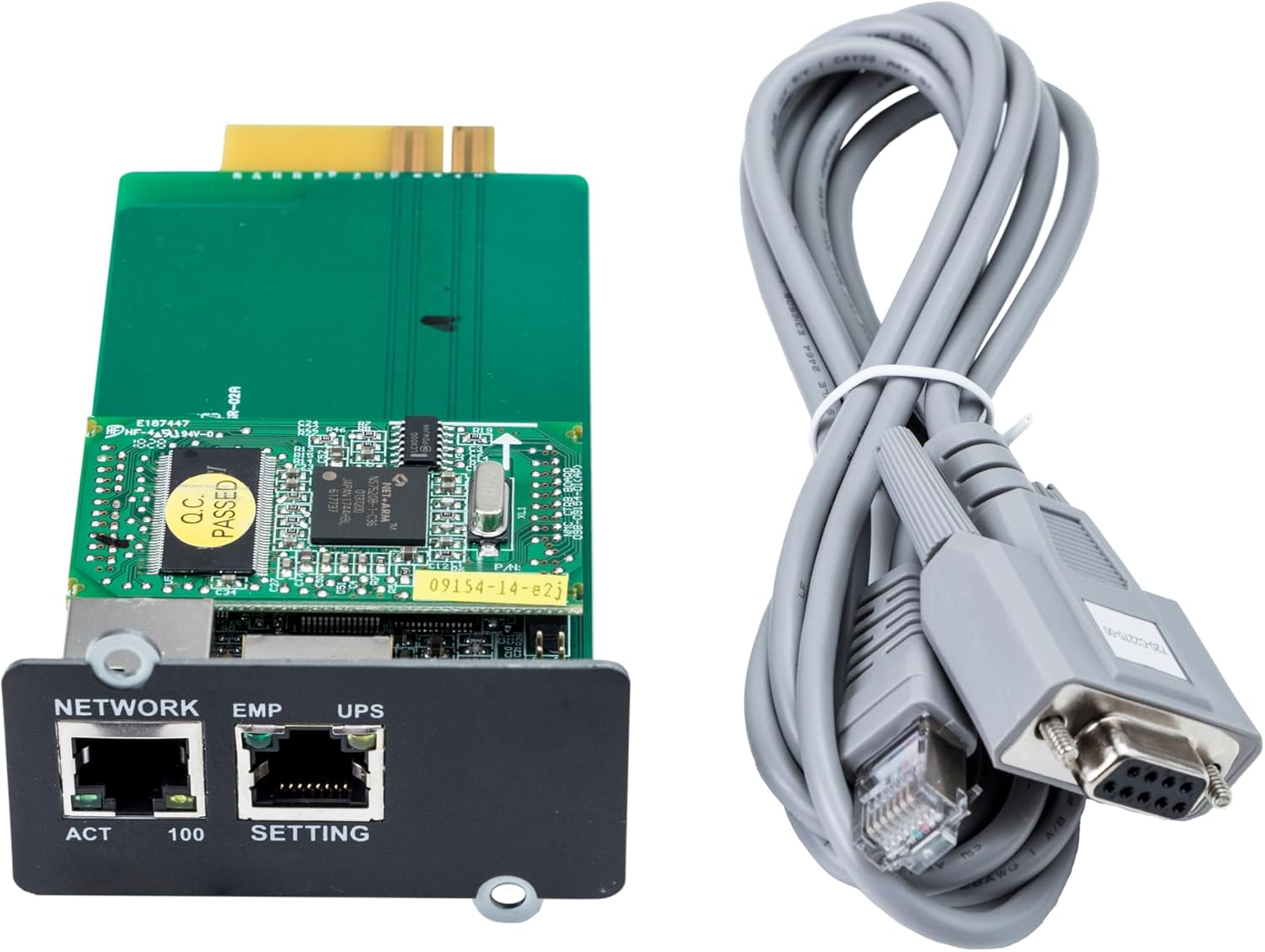
الشكل 2.1: الجبهة view of the ABB Winpower SNMP Network Interface Card and its accompanying serial cable.

الشكل 2.2: خلفي view of the ABB Winpower SNMP Network Interface Card, showing the circuit board components.
3. الإعداد والتثبيت
Follow these steps to properly install the Network Interface Card into your compatible ABB PowerValue 11RT G2 UPS system.
- Power Down UPS: Before beginning installation, ensure the UPS system is completely powered off and disconnected from all power sources to prevent electrical hazards. Refer to your UPS manual for proper shutdown procedures.
- تحديد موقع فتحة التوسعة: Identify the designated expansion slot on your PowerValue 11RT G2 UPS for network interface cards. This is typically a dedicated slot on the rear or side panel.
- أدخل بطاقة الشبكة: Carefully align the Network Interface Card with the expansion slot. Gently push the card into the slot until it is firmly seated. Do not force the card; if it does not insert easily, re-check alignment.
- بطاقة آمنة: Once seated, secure the card using any provided screws or retention clips specific to your UPS model.
- توصيل كابل الشبكة: Connect a standard Ethernet cable from your network switch or router to the 'NETWORK' port on the newly installed SNMP card.
- Power Up UPS: Reconnect the UPS to its power source and power it on according to the UPS manufacturer's instructions. The SNMP card will initialize with the UPS.
- الترتيب الأولي: Once the UPS and card are powered on, refer to the separate Winpower software documentation or the card's web interface guide for initial network configuration, IP address assignment, and monitoring setup.
4. تعليمات التشغيل
The ABB Winpower SNMP Network Interface Card allows for remote monitoring and management of your UPS system. After successful installation and initial network configuration, you can access the card's web interface or use the Winpower monitoring software.
- الوصول إلى Web الواجهة: افتح web browser and enter the IP address assigned to the SNMP card. Log in using the default credentials (refer to the card's specific documentation for these details, and change them immediately after the first login for security).
- Monitoring UPS Status: ال web interface and Winpower software provide real-time data on UPS parameters such as battery status, load level, input/output voltage, and event logs.
- إشعارات الأحداث: Configure email or SNMP trap notifications to be alerted of critical UPS events, such as power outages, battery low warnings, or system faults.
- الإدارة عن بعد: Depending on the card's features and UPS model, you may be able to perform remote actions such as scheduled shutdowns or reboots.
5. الصيانة
Regular maintenance ensures the optimal performance and longevity of your Network Interface Card and UPS system.
- تحديثات البرامج الثابتة: Periodically check the ABB support website for firmware updates for your SNMP card. Keeping the firmware updated can improve performance, add features, and address security vulnerabilities.
- البحث الجسدي: During routine UPS maintenance, visually inspect the SNMP card and its network cable connections. Ensure cables are securely plugged in and there are no signs of physical damage.
- الظروف البيئية: Ensure the UPS environment is clean, dry, and within the recommended temperature and humidity ranges to prevent damage to electronic components.
- الأمنview: إعادة بانتظامview the security settings of the SNMP card, including user accounts and network access controls, especially if the card is exposed to a public network (with appropriate firewall protection).
6. استكشاف الأخطاء وإصلاحها
If you encounter issues with your ABB Winpower SNMP Network Interface Card, refer to the following troubleshooting steps:
- لم يتم اكتشاف البطاقة:
- Ensure the UPS is powered off before installation and then powered on correctly.
- تأكد من تثبيت البطاقة بالكامل في فتحة التوسعة الخاصة بها.
- Check the UPS manual to confirm compatibility with the SNMP card.
- لا يوجد اتصال بالشبكة:
- Check the Ethernet cable connection between the card and your network switch/router.
- Verify that the network port on the switch is active and functioning.
- Confirm the network settings (IP address, subnet mask, gateway) on the SNMP card are correct and match your network configuration.
- Check the network status indicator LEDs on the card and the network switch.
- لا يمكن الوصول Web الواجهة:
- Ensure your computer is on the same network segment as the SNMP card or has proper routing configured.
- Verify the IP address entered in the web browser is correct.
- Temporarily disable any firewall software on your computer to rule out blocking issues.
- Try pinging the card's IP address from your computer to confirm basic network reachability.
- Incorrect UPS Data or Alerts:
- Ensure the SNMP card's firmware is up to date.
- Verify the UPS model and configuration settings within the SNMP card's interface are correct.
- Consult the Winpower software documentation for specific configuration details.
If problems persist after attempting these steps, please contact ABB technical support.
7. المواصفات
| ميزة | التفاصيل |
|---|---|
| رقم الموديل | 4NWP100110R0001 (SNMP adapters) |
| أبعاد المنتج | 5.24 × 2.36 × 1.3 بوصة (13.31 × 5.99 × 3.3 سم) |
| وزن العنصر | 7 أونصة (0.2 كجم) |
| واجهة الأجهزة | إيثرنت |
| بروتوكول ربط البيانات | إيثرنت |
| الأجهزة المتوافقة | ABB PowerValue 11RT G2 (6-10 kVA) UPS systems |
| الشركة المصنعة | ABB Ltd. |
| ASIN | B098HPTHBR |
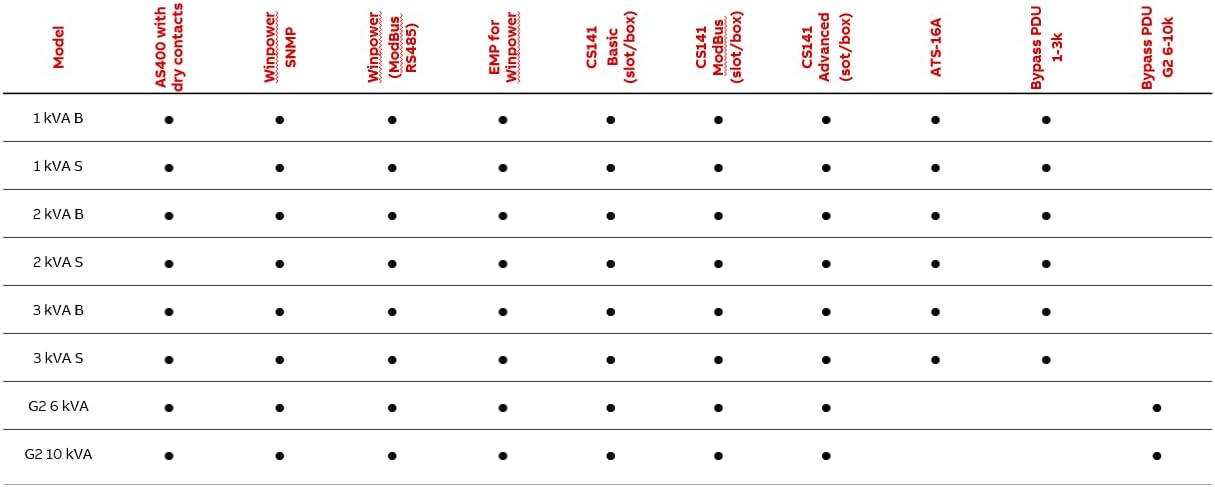
Figure 7.1: Compatibility table for ABB UPS digital accessories.
8. الضمان والدعم
Specific warranty terms and conditions for the ABB Winpower SNMP Network Interface Card are typically provided with the product documentation or can be found on the official ABB webيرجى الاحتفاظ بإثبات الشراء الخاص بك للمطالبة بالضمان.
For technical support, service, or further inquiries, please visit the official ABB website or contact your local ABB representative. Support contact information may vary by region.


