1. المقدمة
This manual provides instructions for the installation, operation, and troubleshooting of your ARRIS Touchstone TM804G DOCSIS 3.0 Telephone Modem. The TM804G is designed to provide high-speed data access and up to four lines of Voice over IP (VoIP) telephone service over your cable network. It features DOCSIS 3.0 technology for enhanced internet speeds and reliability.
2. الميزات الرئيسية
- DOCSIS 3.0 compliant for high-speed internet.
- Four (4) dedicated VoIP telephone ports.
- Supports download speeds up to 343 Mbps.
- Two independent 96MHz RF tuners.
- Ethernet connectivity for network devices.
3. محتويات العبوة
تأكد من أن الحزمة الخاصة بك تحتوي على العناصر التالية:
- ARRIS Touchstone TM804G Telephone Modem
- محول الطاقة
- كابل إيثرنت
- التوثيق (دليل البدء السريع، معلومات السلامة)
Note: A backup battery is sold separately and is not included in the standard package.
4. السمات الجسدية
4.1 مؤشرات اللوحة الأمامية
The front panel of the TM804G modem features several LED indicators that provide status information.

الشكل 1: أمام view of the ARRIS Touchstone TM804G Telephone Modem. This image shows the modem's black casing with ventilation holes on top and a row of green LED indicator lights on the right side of the front panel.
| مؤشر | حالة | وصف |
|---|---|---|
| قوة | أخضر صلب | المودم قيد التشغيل. |
| DS (المصب) | أخضر صلب | تم توصيل القناة المتجهة نحو المصب. |
| الولايات المتحدة (المنبع) | أخضر صلب | تم توصيل القناة العلوية. |
| متصل | أخضر صلب | The modem is registered and online. |
| وصلة | أخضر صلب | An Ethernet device is connected. |
| هاتف 1-4 | أخضر صلب | Telephone line is active. |
4.2 منافذ اللوحة الخلفية
The rear panel provides all necessary connection ports for the modem.
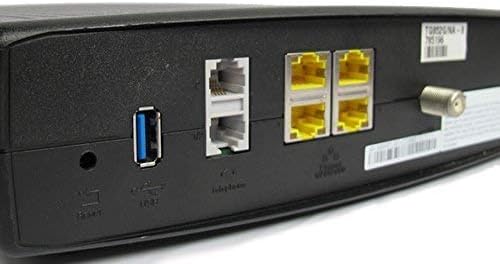
الشكل 2: مؤخرة view of the ARRIS Touchstone TM804G Telephone Modem. This image displays the back of the modem, featuring a coaxial cable connector, four yellow Ethernet ports, two grey telephone ports (RJ-11), a USB port, a reset button, and the power input.
- متحد المحور: يتصل بمأخذ الكابل الجداري.
- ETHERNET (LAN): Four (4) RJ-45 ports for connecting to a computer or router.
- TEL1-4 (RJ-11): Four (4) telephone ports for connecting to telephones or a home telephone wiring system.
- USB: (Functionality may vary or be disabled by your service provider).
- إعادة: Recessed button to reset the modem to factory defaults (use with caution).
- قوة: يتصل بمحول الطاقة.
5. الإعداد والتثبيت
Follow these steps to install your ARRIS Touchstone TM804G modem.
- توصيل الكابل المحوري: Connect one end of a coaxial cable to the COAXIAL port on the modem and the other end to a cable wall outlet. Ensure the connection is finger-tight.
- توصيل كابل إيثرنت: Connect one end of the Ethernet cable to one of the ETHERNET ports on the modem and the other end to your computer's network port or your wireless router's WAN/Internet port.
- ربط خطوط الهاتف: If using telephone service, connect your telephone(s) or home telephone wiring to the TEL1, TEL2, TEL3, or TEL4 ports on the modem using standard RJ-11 telephone cables.
- توصيل محول الطاقة: قم بتوصيل محول الطاقة بمنفذ الطاقة الموجود على المودم، ثم قم بتوصيل المحول بمأخذ كهربائي.
- تشغيل الطاقة: The modem will automatically power on. Observe the front panel indicator lights. The POWER, DS, US, and ONLINE lights should eventually turn solid green, indicating a successful connection to the cable network and internet. The TEL lights will illuminate when telephone lines are active.
- تفعيل الخدمة: Contact your Internet Service Provider (ISP) to activate the modem. You will need to provide them with the MAC address and serial number, typically found on a label on the bottom or back of the modem.
Important: Do not connect the modem to a power outlet until all other connections are made.
6. تعليمات التشغيل
Once the modem is successfully installed and activated, it operates automatically.
- خدمة الإنترنت: Any device connected via Ethernet to the modem (or through a connected router) should have internet access once the ONLINE light is solid green.
- خدمة هاتف: If your service plan includes VoIP, connected telephones will have dial tone and function once the corresponding TEL lights are solid green.
- حالة المراقبة: Refer to the front panel LED indicators (Section 4.1) to monitor the modem's operational status.
7. الصيانة
- تنظيف: Keep the modem clean and free of dust. Use a soft, dry cloth to wipe the exterior. Do not use liquid cleaners or aerosols.
- تهوية: Ensure the modem is placed in a well-ventilated area to prevent overheating. Do not block the ventilation holes.
- تحديثات البرامج الثابتة: عادةً ما تتم إدارة تحديثات البرامج الثابتة تلقائيًا بواسطة مزود خدمة الإنترنت الخاص بك. لا تحاول تحديث البرامج الثابتة يدويًا إلا إذا طلب منك مزود خدمة الإنترنت ذلك.
- Restarting the Modem: If you experience connectivity issues, try restarting the modem by unplugging the power adapter for 10-15 seconds and then plugging it back in.
- اعدادات المصنع: The recessed RESET button on the rear panel can be used to restore factory default settings. This should only be done if instructed by your ISP, as it will erase all custom configurations. To perform a factory reset, use a paperclip to press and hold the RESET button for at least 10 seconds.
8. استكشاف الأخطاء وإصلاحها
If you encounter problems with your modem, refer to the following common issues and solutions.
| مشكلة | السبب المحتمل | حل |
|---|---|---|
| لا يوجد طاقة | محول الطاقة غير متصل أو المنفذ معيب. | Ensure power adapter is securely connected to the modem and a working electrical outlet. Check the POWER LED. |
| لا يوجد اتصال بالإنترنت | Coaxial cable loose, modem not activated, or ISP outage. |
|
| No Dial Tone on Phone | Telephone cable loose, TEL light off, or service issue. |
|
| سرعة الانترنت بطيئة | ازدحام الشبكة، أو جهاز التوجيه القديم، أو مشكلة في مزود خدمة الإنترنت. |
|
For further assistance, contact your Internet Service Provider's technical support.
9. المواصفات
| رقم الموديل | TM804G |
| معيار DOCSIS | DOCSIS 3.0 |
| Internet Download Speed | حتى 343 ميجابت في الثانية (يعتمد على مزود خدمة الإنترنت) |
| منافذ VoIP | 4 (آر جيه-11) |
| منافذ إيثرنت | 4 (آر جيه-45) |
| تكنولوجيا الاتصال | إيثرنت |
| الأبعاد (الطول × العرض × الارتفاع) | حوالي 11.81 × 9.13 × 2.56 بوصة |
| وزن | حوالي 2.16 رطل |
| مزودي خدمة الإنترنت المتوافقين | Optimum, Mediacom (and others, check with your provider) |
10. الضمان والدعم
هذا المنتج مُتاح كمنتج مُجدد من أمازون. تخضع منتجات أمازون المُجددة لفحص واختبار دقيقين من قِبل متخصصين لضمان عملها ومظهرها كأنها جديدة. يحق لك استبدالها أو استرداد ثمنها بموجب ضمان أمازون المُجدد إذا لم تكن راضيًا عن عملية الشراء.
For technical support, troubleshooting, or service-related inquiries, please contact your Internet Service Provider (ISP) directly. Your ISP is responsible for the activation, configuration, and ongoing support of the modem on their network.


