مقدمة
This user manual provides comprehensive instructions for the HW16 Smart Watch. It covers setup, operation, maintenance, and troubleshooting to help you maximize your device's potential. The HW16 Smart Watch features a 1.72-inch full screen, Bluetooth call functionality, music system, heart rate sensor, fitness tracking, and password lock screen, compatible with both iOS and Android devices.
يثبت
1. شحن الجهاز
Before first use, fully charge your HW16 Smart Watch. Connect the magnetic charging cable to the charging points on the back of the watch and plug the USB end into a compatible power adapter (not included) or a computer USB port. The watch display will indicate charging status.
2. تشغيل / إيقاف التشغيل
To power on, press and hold the side button until the screen illuminates. To power off, press and hold the side button, then select the power off option on the screen.
3. الاقتران بهاتفك الذكي
The HW16 Smart Watch connects via Bluetooth. Download the recommended companion application (e.g., Wearfit Pro APP as mentioned in specifications) from your smartphone's app store. Ensure Bluetooth is enabled on your phone. Open the app, follow the on-screen instructions to search for and pair with your HW16 device. Confirm the pairing request on both your phone and the watch.
تعليمات التشغيل
ملاحة
The HW16 features a full touch screen. Swipe left/right, up/down to navigate through menus and features. Press the side button to return to the home screen or access the app list.
وظيفة الاتصال عبر البلوتوث
Once paired with your phone, the watch supports HD-Dial calls. You can swipe to answer incoming calls, dial numbers directly from the watch, and synchronize your mobile phone call history and address book. This feature allows for hands-free communication.

Image: The HW16 Smart Watch showing its HD-Dial Call feature, including options to answer, dial, and access contacts. This image illustrates the watch's capability for direct phone calls.
نظام الموسيقى
Control music playback on your connected smartphone directly from your watch. Play, pause, skip tracks, and adjust volume without needing to take out your phone.
تتبع اللياقة البدنية
The watch tracks various fitness metrics including steps, distance, and calories burned. Utilize the multi-sport mode for specific activity tracking.
مستشعر معدل ضربات القلب
Monitor your heart rate in real-time. Access the heart rate application on the watch to view معدل ضربات قلبك الحالي والبيانات التاريخية.

الصورة: الجزء الخلفي view of the HW16 Smart Watch, highlighting the optical heart rate sensor. This sensor uses light to detect blood flow and measure heart rate.
شاشة قفل كلمة المرور
Enhance your privacy and security by setting a password lock for your watch. This prevents unauthorized access to your data.

Image: The HW16 Smart Watch screen showing a numerical keypad for entering a password. This feature provides enhanced security for the device.
ميزات مراقبة الصحة
The HW16 Smart Watch offers comprehensive health data detection, including:
- معدل ضربات القلب: مراقبة مستمرة لمعدل ضربات قلبك.
- الأكسجين في الدم: Measurement of blood oxygen saturation levels.
- ضغط الدم: Estimation of blood pressure (for reference only, not medical device).
- مراقبة النوم: يتتبع أنماط النوم، بما في ذلك النوم العميق والنوم الخفيف وأوقات الاستيقاظ.
- اختبار الإجهاد: يقدم رؤى حول مستويات التوتر.
- تدريب التنفس: تمارين التنفس الموجهة للاسترخاء.
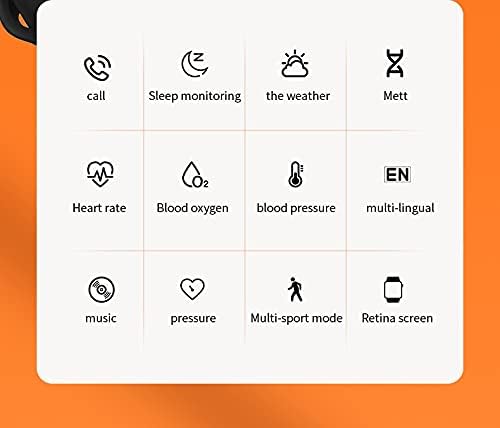
Image: A grid of icons illustrating the various functions of the HW16 Smart Watch, including call, sleep monitoring, weather, Mett, heart rate, blood oxygen, blood pressure, multi-lingual support, music, pressure, multi-sport mode, and Retina screen.
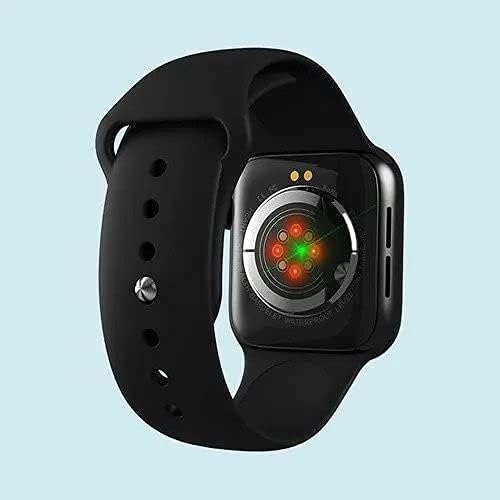
Image: This image showcases the health data detection capabilities of the HW16 Smart Watch, including a MET graph and a custom component display for personalized shortcuts.
تحديد
| ميزة | التفاصيل |
|---|---|
| اسم الموديل | منزل رقم 16 |
| حجم العرض | 1.72 بوصة |
| دقة | 320*385 |
| تكنولوجيا الاتصال | بلوتوث 5.2 |
| مادة الجسم | Zinc alloy + IML injection process |
| مادة الحزام | السيليكون السائل |
| سعة البطارية | 250 مللي أمبير |
| نظام التشغيل المتوافق | iOS 10.0 وما فوق / أندرويد 5.0 وما فوق |
| أبعاد | 43.4 مم*38 مم*11 مم |
| حجم السوار | 260 مم*20 مم*2.5 مم |
| المميزات الخاصة | Camera (remote control), Heart Rate Sensor, Fitness Tracker, Password Lock Screen, Music System |
| ضد للماء | Yes (implied by "Waterproof" keyword, but no specific IP rating provided) |
| اللغات المدعومة | Chinese, English, Arabic, French, German, Spanish, Portuguese, Russian, Thai, Polish, Italian, Japanese, Traditional, Czech, Turkish, Greek, Latin, Romanian, Vietnamese, Danish... |

Image: The HW16 Smart Watch, black casing with a blue strap, displayed on a watch stand. The screen shows time, steps, and various app icons.

Image: The HW16 Smart Watch worn on a wrist, displaying its main menu with various circular app icons for different functions.
صيانة
- تنظيف: امسح الساعة والحزام بانتظام بقطعة قماش ناعمة.amp قماش. تجنب استخدام الكيماويات القاسية أو المواد الكاشطة.
- مقاومة الماء: While the watch is waterproof (as per keywords), avoid prolonged submersion or exposure to hot water/steam. Dry the watch thoroughly if it gets wet.
- الشحن: Use only the provided charging cable. Do not force the charger into the port.
- تخزين: قم بتخزين الساعة في مكان بارد وجاف عندما لا تكون قيد الاستخدام.
استكشاف الأخطاء وإصلاحها
الساعة لا تعمل
تأكد من شحن الساعة بالكامل. قم بتوصيلها بالشاحن لمدة 30 دقيقة على الأقل قبل محاولة تشغيلها مرة أخرى.
Cannot Pair with Phone
- تأكد من تمكين البلوتوث على هاتفك والساعة.
- تأكد من أن الساعة ضمن نطاق البلوتوث الخاص بهاتفك.
- أعد تشغيل هاتفك والساعة.
- Clear previous Bluetooth connections on your phone and try pairing again.
- تأكد من تثبيت التطبيق المصاحب وتشغيله.
بيانات صحية غير دقيقة
Ensure the watch is worn snugly on your wrist, not too loose or too tight. Clean the sensor on the back of the watch regularly. Note that health data is for reference only and not intended for medical diagnosis.
الشاشة لا تستجيب
Try restarting the watch. If the issue persists, ensure the screen is clean and dry. If the problem continues, contact customer support.
الضمان والدعم
For warranty information and customer support, please refer to the documentation included with your purchase or visit the official SmartWatch brand webالموقع. احتفظ بإثبات الشراء الخاص بك لتقديم مطالبات الضمان.


