1. المقدمة
شكرا لك على الشراءasing the Blaupunkt BSR 20 Portable Bluetooth Jobsite Radio. This device is designed to provide robust and reliable audio entertainment in demanding environments. It features FM radio, Bluetooth connectivity, and an AUX-IN port, all housed in a durable, splash-proof casing. Please read this manual thoroughly to ensure proper use and to maximize the lifespan of your product.
2. تعليمات السلامة
- مصدر الطاقة: استخدم فقط محول الطاقة أو البطاريات المحددة. تأكد من أن مستوى الصوتtagيتوافق مع متطلبات الجهاز.
- الماء والرطوبة: While the device is IPX5 splash-proof, do not immerse it in water or expose it to heavy rain. Keep the battery compartment dry.
- تهوية: لا تسد فتحات التهوية. تأكد من تدفق الهواء الكافي حول الجهاز.
- حرارة: احتفظ بالجهاز بعيدًا عن مصادر الحرارة مثل المشعات أو فتحات التدفئة أو المواقد أو الأجهزة الأخرى (بما في ذلك ampالمُضخِّمات) التي تنتج الحرارة.
- تنظيف: افصل التيار الكهربائي قبل التنظيف. استخدم قطعة قماش ناعمة وجافة. لا تستخدم المنظفات السائلة أو المنظفات البخاخة.
- الخدمة: لا تحاول خدمة هذا المنتج بنفسك. قم بإحالة جميع أعمال الصيانة إلى أفراد الخدمة المؤهلين.
- البطاريات: Dispose of used batteries according to local regulations. Do not expose batteries to excessive heat or fire.
3. مواصفات المنتج
- صوت قوي: 5W RMS output for clear sound in noisy environments.
- الربط اللاسلكي: Bluetooth 4.2 for streaming music from smartphones and other compatible devices.
- التوصيل السلكي: Integrated AUX-IN (3.5mm jack) for connecting MP3 players or other audio sources.
- راديو FM: Digital FM tuner with up to 20 station presets.
- تصميم متين: Shock-resistant, splash-proof, dust-proof, and dirt-resistant (IPX5 rated).
- قابلية النقل: Lightweight (2.5 kg) with an integrated foldable carrying handle.
- عناصر تحكم سهلة الاستخدام: Robust buttons designed for use even with work gloves.
- خيارات الطاقة: Operates via mains power or 6x LR14 (1.5V) C-cell batteries.
4. الإعداد
4.1 تشغيل الجهاز
The Blaupunkt BSR 20 can be powered by either mains electricity or batteries.
التيار الكهربائي:
- حدد موقع منفذ إدخال الطاقة على الجهاز.
- قم بتوصيل محول الطاقة المرفق بالجهاز.
- قم بتوصيل محول الطاقة بمأخذ الحائط المناسب.
طاقة البطارية:
For portable use, the radio requires 6x LR14 (1.5V) C-cell batteries (not included).
- Locate the battery compartment on the back or bottom of the radio.
- افتح غطاء حجرة البطارية.
- Insert 6x LR14 (1.5V) C-cell batteries, ensuring correct polarity (+/-).
- Close the battery compartment cover securely to maintain IPX5 rating.
4.2 التشغيل المبدئي
اضغط على قوة زر (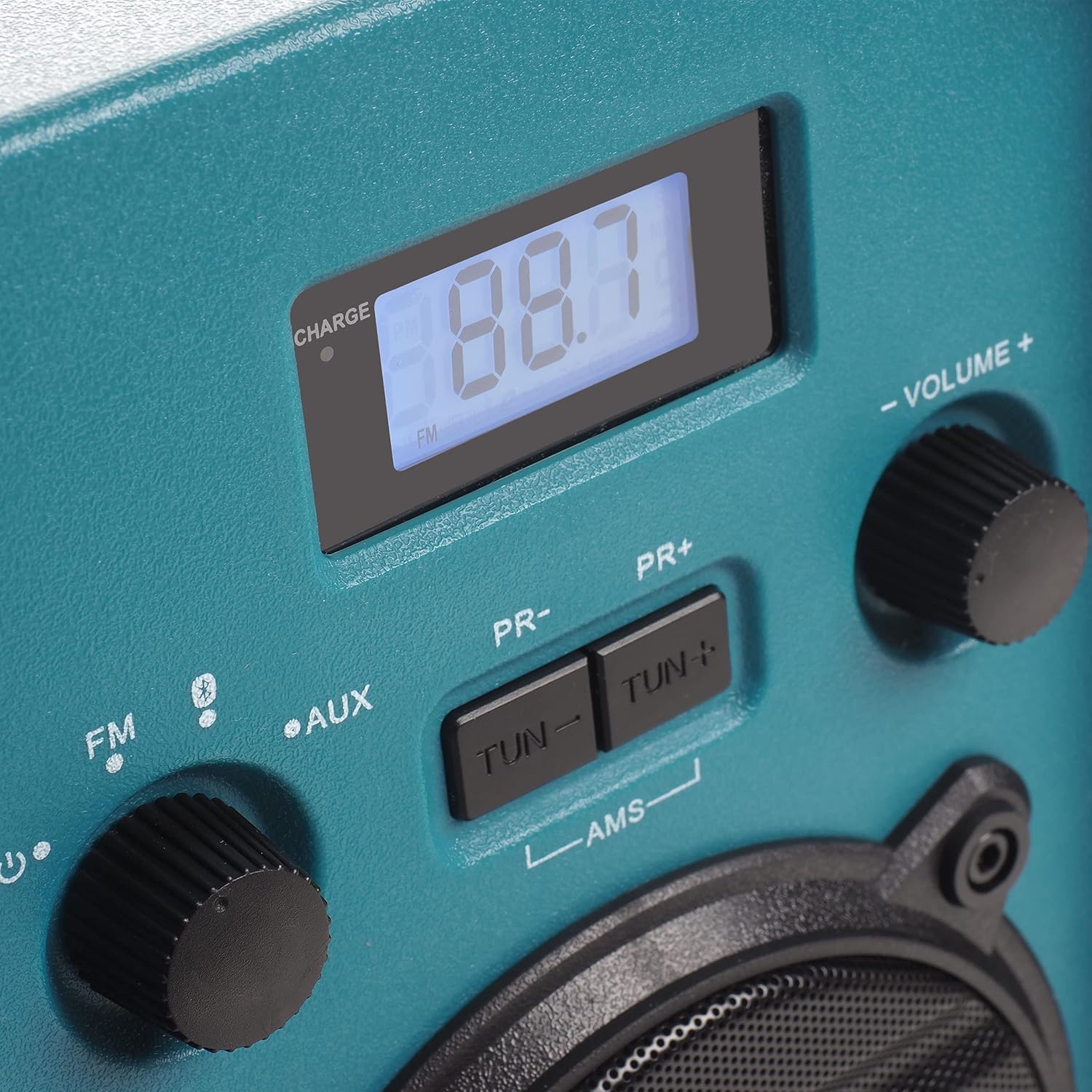 ) to turn on the radio. The display will illuminate.
5. تعليمات التشغيل
5.1 اختيار الوضع
Rotate the left knob to select between FM Radio, Bluetooth (), and AUX-IN modes.
تشغيل راديو 5.2 FM
- يختار FM mode using the left knob.
- قم بتمديد الهوائي للحصول على استقبال مثالي.
- استخدم تون- و TUN + أزرار لضبط التردد المطلوب يدويًا.
- To automatically scan and store stations, press and hold the أ.م.س button. The radio will scan for available FM stations and store them as presets.
- استخدم العلاقات العامة- و العلاقات العامة + buttons to navigate through stored preset stations.
5.3 اقتران بلوتوث
- يختار بلوتوث mode using the left knob. The display will show "BT" and flash, indicating it is in pairing mode.
- على هاتفك الذكي أو أي جهاز بلوتوث آخر، قم بتمكين البلوتوث وابحث عن الأجهزة المتوفرة.
- Select "Blaupunkt BSR 20" from the list of devices.
- Once paired, the display will show a steady "BT" and you can play audio from your connected device.
وصلة AUX-IN 5.4
- يختار مدخل مساعد mode using the left knob.
- Connect one end of a 3.5mm audio cable (not included) to the AUX-IN port on the radio.
- Connect the other end of the audio cable to the headphone jack or audio output of your external device (e.g., MP3 player, smartphone).
- قم بتشغيل الصوت من جهازك الخارجي.
5.5 التحكم في مستوى الصوت
Rotate the right knob labeled الحجم +/- لضبط مستوى إخراج الصوت.
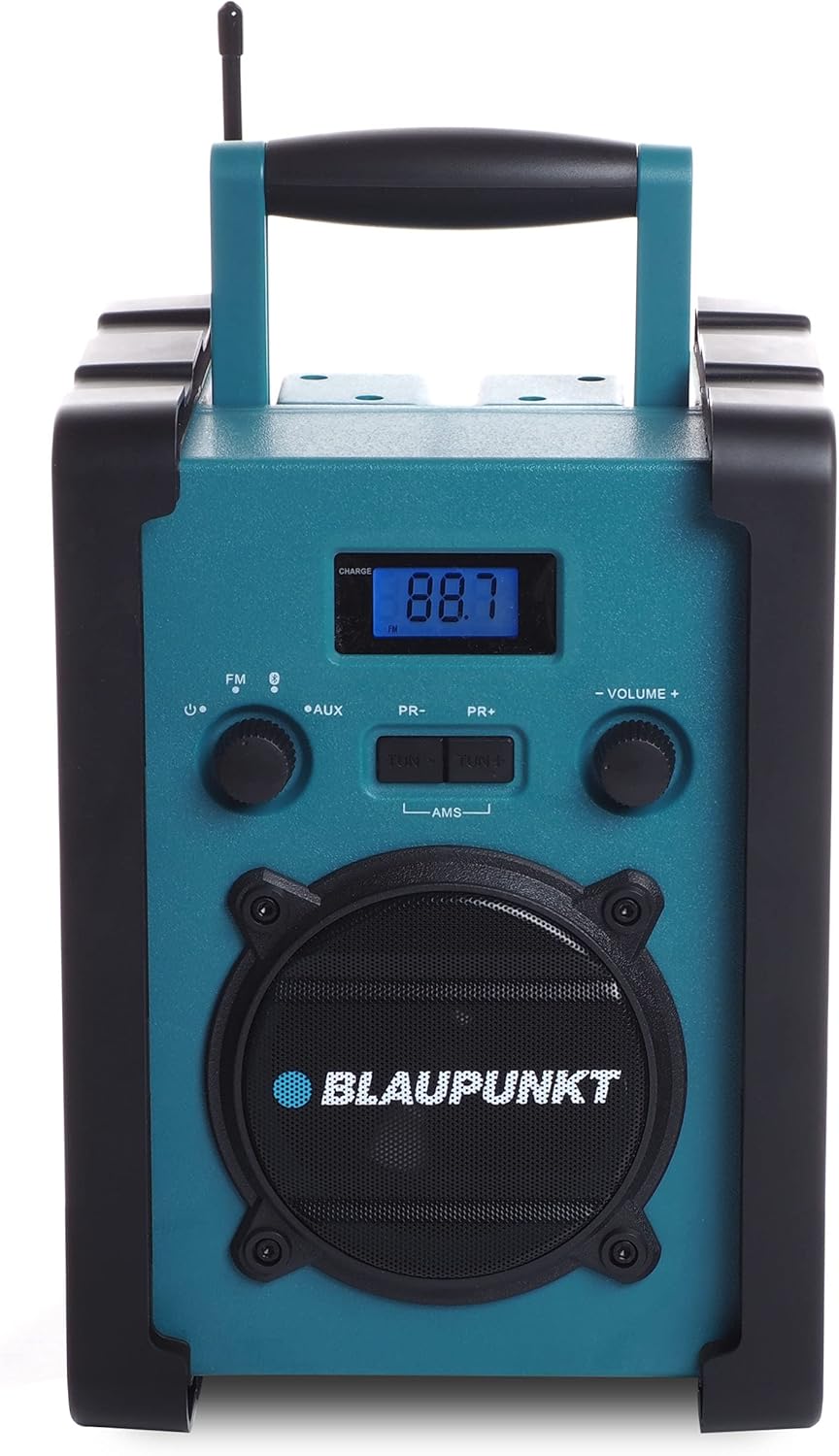
الشكل 1: الجبهة view of the Blaupunkt BSR 20 jobsite radio, showing the display, controls, and speaker.
Figure 2: Close-up of the control panel, showing the digital display, FM/AUX/Bluetooth selection, tuning buttons, and volume knob.
6. الصيانة
6.1 التنظيف
To clean the radio, ensure it is powered off and disconnected from the mains. Use a soft, slightly damp cloth to wipe down the exterior. Do not use abrasive cleaners, solvents, or strong chemicals, as these may damage the surface.
6.2 التخزين
When not in use for extended periods, store the radio in a cool, dry place. If using batteries, remove them to prevent leakage and potential damage to the device.
7. استكشاف الأخطاء وإصلاحها
| مشكلة | السبب المحتمل | حل |
|---|---|---|
| لا يوجد طاقة | محول الطاقة غير موصول؛ البطاريات فارغة أو تم إدخالها بشكل غير صحيح. | تحقق من توصيل محول الطاقة؛ استبدل البطاريات أو تأكد من صحة القطبية. |
| لا يوجد صوت | Volume too low; Incorrect mode selected; Device not paired (Bluetooth); AUX cable not connected properly. | Increase volume; Select correct mode (FM, BT, AUX); Re-pair Bluetooth device; Check AUX cable connection. |
| استقبال FM ضعيف | الهوائي غير ممتد، منطقة الإشارة ضعيفة. | Fully extend the antenna; Try repositioning the radio. |
| البلوتوث غير متصل | Radio not in pairing mode; Device too far; Bluetooth disabled on external device. | Ensure radio is in Bluetooth pairing mode; Move device closer; Enable Bluetooth on external device. |
8. المواصفات
- ماركة: بلاوبونكت
- نموذج: بي إس آر 20
- لون: أزرق
- تقنية الاتصال: بلوتوث
- المميزات الخاصة: Shock-resistant, Portable, IPX5 Splash-proof
- الأجهزة المتوافقة: هاتف ذكي، جهاز لوحي، مشغل MP3
- أبعاد المنتج (الطول × العرض × الارتفاع): 19.8 سم × 18.8 سم × 27.4 سم
- تقنية الضبط: رقمي
- مصدر الطاقة: Mains / Battery powered
- نطاقات الراديو المدعومة: FM
- نوع البطارية: 6x LR14 (1.5V) C-cell batteries (not included)
- إخراج RMS: 5W
9. الضمان والدعم
This product is covered by a manufacturer's warranty. Please refer to the warranty card included with your purchase for specific terms and conditions. For technical support, service, or warranty claims, please contact your retailer or the official Blaupunkt customer service. Keep your proof of purchase for warranty validation.


