1. انتهى المنتجview
The Ricoh WG-7 is a robust digital camera designed for demanding outdoor conditions. It features a durable construction that is waterproof, dustproof, freeze-proof, and shock-resistant, making it suitable for a wide range of adventures. This manual provides essential information for setting up, operating, and maintaining your WG-7 camera.

الشكل 1.1: الجبهة view of the Ricoh WG-7 Digital Camera, showcasinبفضل تصميمها المتين وعدستها.
المميزات الرئيسية:
- ضد للماء: Operable up to 20 meters (65 feet) for two continuous hours.
- مقاومة للصدمات: Withstands drops from heights of up to 2.1 meters (6.9 feet).
- مقاوم للسحق: Designed to endure forces up to 100 kilograms (220 pounds).
- Freeze-Proof: Functions reliably in temperatures as low as -10 degrees Celsius (14 degrees Fahrenheit).
- تصوير عالي الدقة: Equipped with approximately 20 million effective pixels.
- التكبير البصري: Features a 5x optical zoom lens.
- تسجيل فيديو 4K: Supports high-definition video capture.
2. معلومات السلامة
Please read these safety precautions carefully before using your Ricoh WG-7 camera to ensure safe and proper operation.
- Do not attempt to disassemble or modify the camera. This can cause electric shock or malfunction and will void the warranty.
- احفظ الكاميرا وملحقاتها بعيداً عن متناول الأطفال الصغار لمنع وقوع الحوادث.
- Use only the specified battery and charger. Incorrect power sources can cause overheating, fire, or explosion.
- Ensure all covers (battery/card slot, USB/HDMI port) are securely closed before exposing the camera to water or dust. Failure to do so will compromise its waterproof and dustproof capabilities.
- تجنب تعريض الكاميرا لدرجات حرارة عالية، أو أشعة الشمس المباشرة لفترات طويلة، أو الرطوبة العالية.
- If the camera is dropped or subjected to a strong impact, inspect it for damage before further use, especially before exposing it to water.
3. البدء (الإعداد)
3.1. إدخال البطارية وبطاقة الذاكرة
- Open the battery/card compartment cover located on the side of the camera. Ensure the lock mechanism is fully disengaged.
- Insert the battery with the contacts facing the correct direction, as indicated inside the compartment. Push until it clicks into place.
- أدخل بطاقة ذاكرة من نوع SD/SDHC/SDXC في فتحة البطاقة مع توجيه الملصق في الاتجاه الصحيح. اضغط حتى تسمع صوت طقطقة.
- Close the battery/card compartment cover firmly until it locks securely. A proper seal is crucial for the camera's waterproof integrity.
3.2. التشغيل الأولي والإعدادات
- اضغط مع الاستمرار على تشغيل/إيقاف button (located on the top of the camera) to power on the camera.
- عند تشغيل الجهاز لأول مرة، قد يُطلب منك ضبط التاريخ والوقت واللغة. استخدم أزرار الاتجاهات و OK زر للتنقل وتأكيد اختياراتك.
- Familiarize yourself with the camera's controls.

الشكل 3.1: الجزء العلوي view of the Ricoh WG-7, showing the ON/OFF button, GPS indicator, and mode dial.
4. التشغيل الأساسي
4.1. التقاط الصور
- Turn the camera on using the تشغيل/إيقاف زر.
- Rotate the mode dial to select your desired shooting mode (e.g., Auto, Program, Scene modes).
- قم بتأطير لقطتك باستخدام شاشة LCD.
- اضغط زر الغالق حتى المنتصف للتركيز. سيتحول إطار التركيز إلى اللون الأخضر عند ضبط التركيز.
- اضغط على زر الغالق بالكامل لالتقاط الصورة.
4.2. تسجيل مقاطع الفيديو
- قم بتشغيل الكاميرا.
- اضغط على الزر المخصص فيلم button (red dot icon) to start recording.
- اضغط على فيلم زر مرة أخرى لإيقاف التسجيل.
4.3. عملية التكبير
Use the zoom lever (often labeled 'W' for Wide and 'T' for Telephoto) to adjust the optical zoom. The WG-7 features a 5x optical zoom.
4.4. Using the Flash and Ring Light
The camera has a built-in flash and a ring light around the lens for macro photography. Access flash settings through the menu or a dedicated button, typically indicated by a lightning bolt icon. The ring light can be activated for close-up illumination.

الشكل 4.1: الجبهة view of the Ricoh WG-7 with the ring light around the lens illuminated, ideal for macro shots.
4.5. إعادةviewمشاركة الصور ومقاطع الفيديو
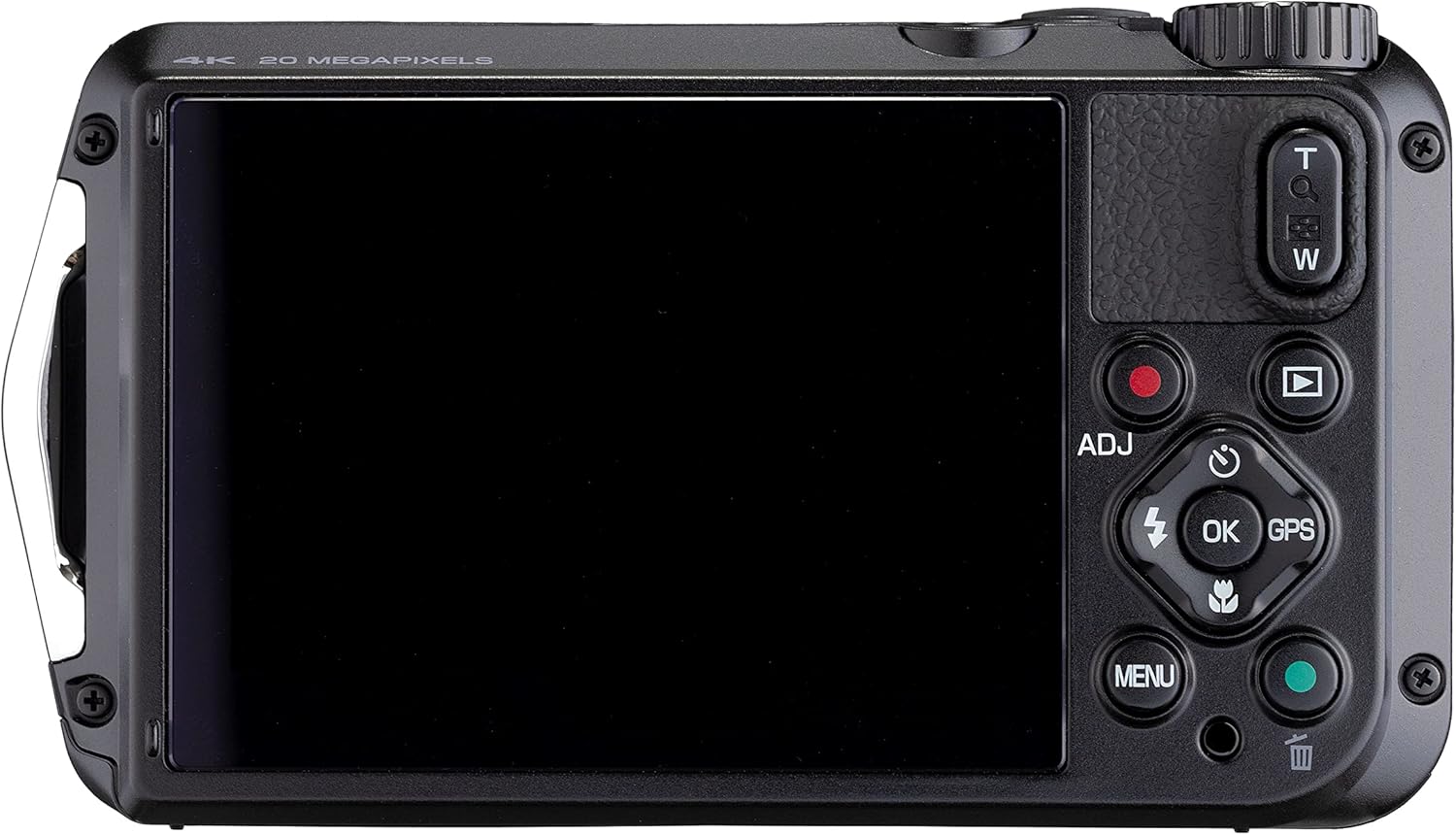
الشكل 4.2: خلفي view of the Ricoh WG-7, showing the LCD screen and playback controls.
اضغط على التشغيل button (triangle icon) to enter playback mode. Use the directional buttons to scroll through your photos and videos. Press OK ل view للمزيد من التفاصيل أو تشغيل الفيديوهات.
5. الصيانة والعناية
5.1. تنظيف الكاميرا
- After use in water, rinse the camera with fresh water and wipe it dry with a soft cloth. Do not use detergents or organic solvents.
- Clean the lens and LCD screen with a soft, lint-free cloth specifically designed for optical surfaces. Avoid touching the lens directly.
- Ensure no sand or debris is lodged in the compartment seals.
5.2. العناية بالبطارية
- Charge the battery fully before each use, especially for extended shooting sessions.
- قم بإزالة البطارية إذا كنت لن تستخدم الكاميرا لفترة طويلة.
- قم بتخزين البطاريات في مكان بارد وجاف.
5.3. التخزين
Store the camera in a dry, well-ventilated area away from direct sunlight and extreme temperatures. For long-term storage, remove the battery and memory card.
6. استكشاف الأخطاء وإصلاحها
If you encounter issues with your Ricoh WG-7, refer to the following common problems and solutions:
- الكاميرا لا تعمل:
- تأكد من شحن البطارية بالكامل وإدخالها بشكل صحيح.
- حاول استخدام بطارية أخرى مشحونة بالكامل إذا كانت متاحة.
- الصور غير واضحة:
- تأكد من أن العدسة نظيفة وخالية من البقع أو قطرات الماء.
- Ensure the camera is properly focused by pressing the shutter button halfway before fully pressing.
- In low light, use the flash or increase ISO settings (if in a manual mode).
- تسرب مياه:
- Immediately power off the camera and remove the battery and memory card.
- Inspect the battery/card compartment cover and USB/HDMI port cover for proper sealing. Ensure no foreign objects are trapped in the seals.
- If water has entered, contact customer support for service.
- خطأ بطاقة الذاكرة:
- تأكد من إدخال بطاقة الذاكرة بشكل صحيح.
- حاول تهيئة البطاقة (سيؤدي هذا إلى مسح جميع البيانات، لذا قم بعمل نسخة احتياطية أولاً).
- جرب بطاقة ذاكرة مختلفة.
7. المواصفات
| ميزة | مواصفة |
|---|---|
| اسم الموديل | WG-7 |
| الشركة المصنعة | ريكو |
| دقة مستشعر الصورة | 20 ميجا بكسل |
| التكبير البصري | 5x |
| الطول البؤري الأقصى | 140 مليمتر |
| الطول البؤري الأدنى | 28 مليمتر |
| دقة الفيديو | 2160 بكسل (4K) |
| مستوى مقاومة الماء | ضد للماء |
| عمق مقاومة الماء | 65 قدم (20 متر) |
| نوع البطارية | ليثيوم أيون (متضمن) |
| متوسط عمر البطارية | 2 Hours (video recording) |
| حجم الشاشة | 3 بوصة |
| تثبيت الصورة | الرقمية والبصرية |
| مدعوم File شكل | JPEG |
| التكنولوجيا اللاسلكية | واي فاي |
| وزن العنصر | 1.2 رطل |
8. الضمان والدعم
Your Ricoh WG-7 camera is covered by a manufacturer's warranty. Please refer to the warranty card included with your product for specific terms and conditions, including warranty period and coverage details.
For technical support, service, or further inquiries, please visit the official Ricoh Imaging webالموقع الإلكتروني أو تواصل مع قسم خدمة العملاء. عادةً ما تجد معلومات الاتصال على موقع الشركة المصنعة. webالموقع أو في عبوة المنتج.


