1. انتهى المنتجview
The DALY Smart BMS (Battery Management System) is designed for Li-ion 17S 60V 60A battery packs. It features a programmable Bluetooth module and a common port for both charging and discharging. This BMS provides essential protection functions and allows for real-time monitoring and parameter adjustments via a mobile application.

Figure 1: DALY Smart BMS with Bluetooth module and smartphone app interface.
المميزات الرئيسية:
- Supports up to 60A continuous discharge and 30A charge current. Suitable for high current applications.
- Programmable temperature protection: Stops current if battery temperature limits are exceeded.
- Programmable over-charge and over-discharge protection: Stops charging/discharging when voltage limits are reached.
- Programmable over-current protection: Stops charging/discharging if current exceeds limits.
- Integrated Bluetooth module for mobile app (iOS & Android) connectivity.
- UART cable for PC monitoring and parameter setting.
- SOC (State of Charge) calculation with automatic learning function.
- Automatic battery charge function or static balance function.

Figure 2: The DALY Smart BMS offers 12 protection functions including Bluetooth, programmable settings, over-charging, over-discharging, over-current, short-circuit, over-voltage, balance, NTC temperature, waterproof, moistureproof, fireproof, and dustproof features.
2. معلومات السلامة
Adherence to safety guidelines is crucial for the proper and safe operation of the DALY Smart BMS. Failure to follow these instructions may result in damage to the product, battery, or personal injury.
- Do not charge the battery pack at temperatures below -1°C.
- Always follow battery management guidelines to prevent over-charge, over-discharge, and voltagه عدم التوازن.
- Keep the BMS and battery pack away from extreme temperatures and humidity.
- Ensure all wiring connections are secure and correct before operation. Incorrect wiring can cause damage.
- Only use the specified balance wires and cables provided with the BMS.
- Consult a qualified professional if you are unsure about any installation or operation steps.
3. الإعداد والتثبيت
Careful installation is essential for the correct functioning of your DALY Smart BMS. Please follow these steps precisely.
3.1 توصيل الأسلاك
- تحضير: Ensure all power sources are disconnected. Tools needed include a soldering machine (suggested 662°F/350°C), scissors, double-sided tape, tin wire, and a multimeter.
- Balance Wires: Disconnect balance wires from the BMS connection port. Connect the balance wires to your battery pack, ensuring correct polarity and sequence.
- BMS Connection: Connect the main negative (B-) and positive (P+) wires from the battery pack to the BMS.
- Balance Wire Reconnection: After confirming all balance wires are correctly welded and installed, connect them to the BMS connection port.
- NTC and Bluetooth Module: Plug in the NTC (temperature sensor) and Bluetooth module into their respective ports on the BMS.
- التفعيل: Press the button on the Bluetooth module to activate the smart BMS.

Figure 3: Wiring diagram showing connections for the DALY Smart BMS, battery pack, charger, and motor/load. Ensure balance wires are connected correctly from the last series to the first series of the battery cells.
3.2 إعداد تطبيق الهاتف المحمول
- تحميل التطبيق: بحث عن "Smart BMS" in the Huawei App Store or Apple App Store and download the application.
- الاتصال عبر البلوتوث: Open the Smart BMS app and connect to the corresponding Bluetooth device listed.
- إعداد المعلمة الأولية: For the first power-on, the battery capacity must be set to the actual capacity of your battery pack. The initial password for parameter changes is 123456.
Video 1: Official DALY Smart BMS setup and app connection guide. This video demonstrates the wiring process, activating the BMS, connecting to the mobile app, viewing battery parameters, and setting initial battery capacity.
4. تعليمات التشغيل
The DALY Smart BMS allows for comprehensive monitoring and control of your battery pack.
4.1 المراقبة في الوقت الحقيقي
Use the "Smart BMS" mobile application to monitor battery status in real-time. This includes:
- الدولة المسؤول (SOC)
- التيار (الشحن/التفريغ)
- المجلدtage (total and individual cell voltagالعناوين)
- درجة حرارة
- Warning and fault messages
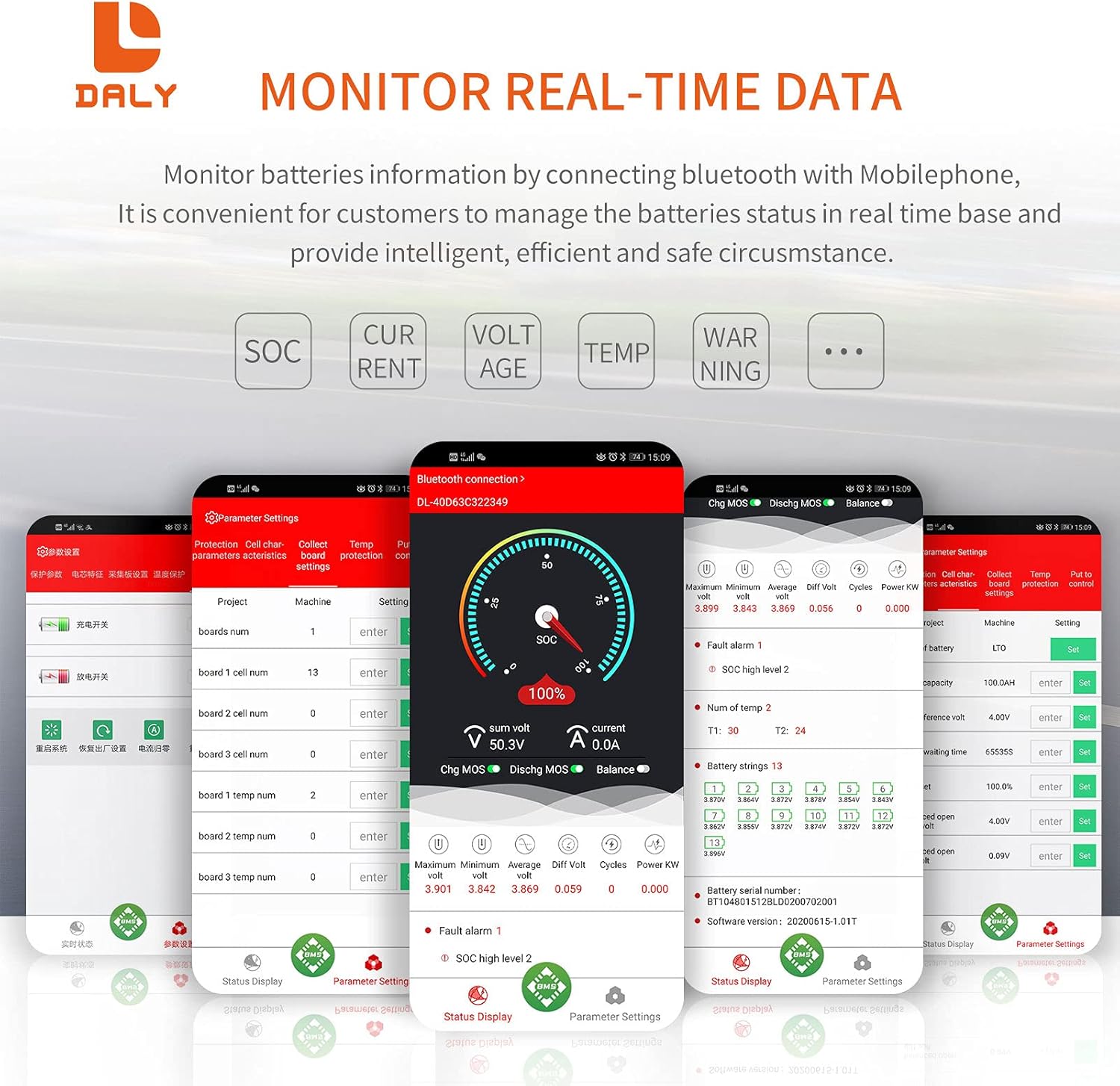
Figure 4: Real-time data monitoring via the DALY Smart BMS mobile application, showing SOC, current, voltagه ودرجة الحرارة.
4.2 إعدادات المعلمة
The app allows you to adjust various protection parameters to suit your battery type and application. Always ensure you understand the implications of changing these settings.
- مجلد الخليةtage high/low protection limits.
- إجمالي المجلدtage high/low protection limits.
- Charge/discharge over-current protection limits.
- High/low temperature protection limits for charging and discharging.
- بداية الرصيد المجلدtagالبريد والمجلد التفاضليtage.
The BMS also supports PC monitoring via the UART cable, providing a detailed interface for advanced users to view وضبط المعلمات.
5. الصيانة
Regular maintenance ensures the longevity and optimal performance of your DALY Smart BMS and battery pack.
- فحوصات الاتصال: افحص جميع توصيلات الأسلاك بشكل دوري للتأكد من إحكامها وخلوها من التآكل. فالتوصيلات غير المحكمة قد تؤدي إلى ضعف الأداء أو مخاطر السلامة.
- تحديثات البرامج الثابتة: Check the DALY website or app for any available firmware updates for your BMS model. Updates can improve performance and add new features.
- الظروف البيئية: Ensure the BMS is operated within its specified temperature and humidity ranges. Avoid exposure to direct sunlight, water, or excessive dust.
- تنظيف: حافظ على نظافة نظام إدارة البطارية وخلوه من الغبار والشوائب. استخدم قطعة قماش ناعمة وجافة للتنظيف. لا تستخدم المنظفات السائلة.
- معايرة البطارية: The BMS features automatic SOC calibration. For accurate readings, ensure the battery is fully charged periodically until the voltage reaches the high protection limit, allowing the BMS to recalibrate.
6. استكشاف الأخطاء وإصلاحها
This section addresses common issues you might encounter with your DALY Smart BMS.
| مشكلة | السبب المحتمل | حل |
|---|---|---|
| BMS not activating / no power output |
|
|
| تطبيق البلوتوث لا يتصل |
|
|
| BMS shuts down unexpectedly |
|
|
| Inaccurate SOC or cell voltagقراءات البريد |
|
|
7. المواصفات
Detailed technical specifications for the DALY Smart BMS Li-ion 17S 60V 60A.
| ميزة | التفاصيل |
|---|---|
| نوع المنتج | Li-ion 17S 60A Common Port with Balance |
| الاتصالات | UART, Bluetooth (Optional: CAN/RS485) |
| تيار التفريغ | 60 أمبير (مستمر) |
| الإفراط في التفريغ الحالي | 90A ± 9A (Programmable) |
| تيار الشحن | 30 أمبير (مستمر) |
| Overcharge Current | 90A ± 9A (Programmable) |
| زيادة حجم المجلدtage | 4.25V ± 0.05V (per string, Programmable) |
| الإفراط في التفريغ Voltage | 2.7V ± 0.1V (per string, Programmable) |
| حجم الشحنtage | 71.4V (Programmable) |
| نموذج | R25T |
| أبعاد | 128 × 66 × 18 ملم (5.04 × 2.6 × 0.71 بوصة) |
| Output Wire Gauge | 16AWG |
| Balance Wires | 24AWG / 350 مم |
| وزن | ~333g (12.8 ounces) |
| مادة | البولي كربونات (PC) |
| تكنولوجيا الاتصال | بلوتوث |
| مصدر الطاقة | تعمل بالبطارية |
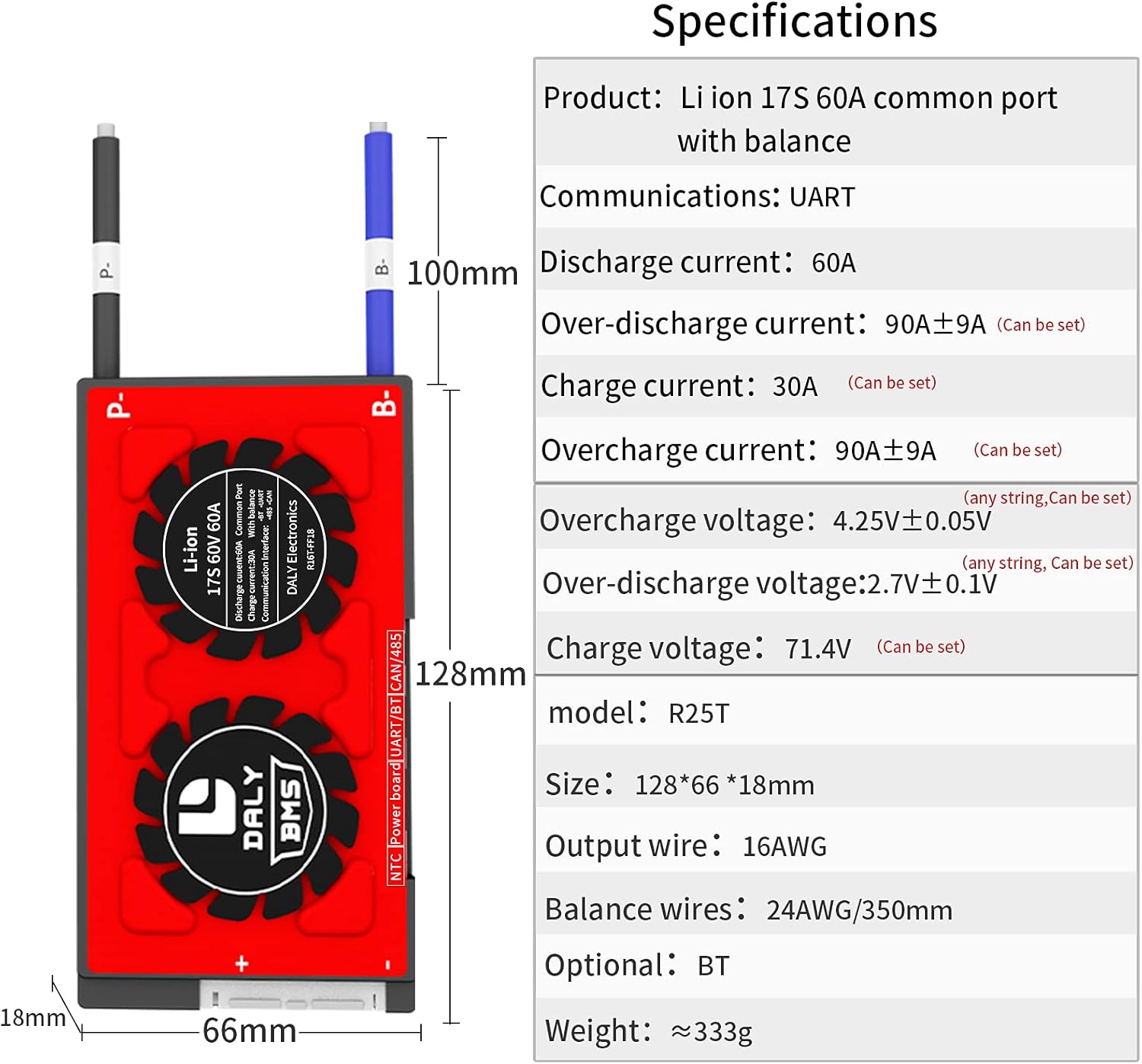
Figure 5: Physical dimensions and key electrical specifications of the DALY Smart BMS.
8. الضمان والدعم
For warranty information, technical support, or service inquiries, please refer to the official DALY webالموقع أو اتصل بتاجر التجزئة الخاص بك.
- خطط الحماية: Optional 2-Year and 3-Year protection plans may be available for purchase. Refer to your purchase documentation for details.
- سياسة العائدات: A 30-day refund/replacement return policy typically applies. Consult your seller for specific terms.
- الشركة المصنعة: دالي
- اتصال: لمزيد من المساعدة، قم بزيارة DalyBMS Store on Amazon or the official DALY webموقع.


