1. انتهى المنتجview
The ALLIANCE LAUNDRY SYSTEMS Control Board and Overlay Assembly (Model 204074P) is a genuine OEM replacement part designed for commercial dryer applications. This assembly includes the H4 Std Blu Overlay and a 120V Control Board, serving as a critical component for managing the dryer's operational cycles and settings.
It is engineered to replace part number 204074 and is compatible with Alliance brand appliances, including Speed Queen and Alliance Laundry Systems washers.
2. معلومات السلامة والتركيب
إشعار هام للسلامة: Before attempting any installation or repair, it is imperative to disconnect the appliance from all utilities (power, water, gas, etc.). Always wear appropriate protective safety equipment, such as gloves and eye protection, to prevent injury. If you are unsure about any step, consult a qualified technician.
This Control Board and Overlay Assembly is a replacement part. Installation typically involves removing the existing control board and connecting the new assembly. Refer to your specific appliance's service manual for detailed, model-specific installation instructions.
- Ensure the appliance is completely powered off and unplugged.
- Locate the existing control board within your dryer.
- Carefully disconnect all wiring harnesses and mounting screws from the old board. Note the position of each connection if not clearly marked.
- Install the new 204074P Control Board and Overlay Assembly, ensuring all connections are secure and correctly seated.
- Secure the new board with its mounting hardware.
- قم باستعادة الطاقة للجهاز واختباره للتأكد من التشغيل السليم.
3. تشغيل لوحة التحكم
The overlay provides the user interface for selecting wash cycles, settings, and options. Below is a general guide to the functions typically found on this type of control panel. The specific functionality may vary slightly based on the appliance model it is installed in.
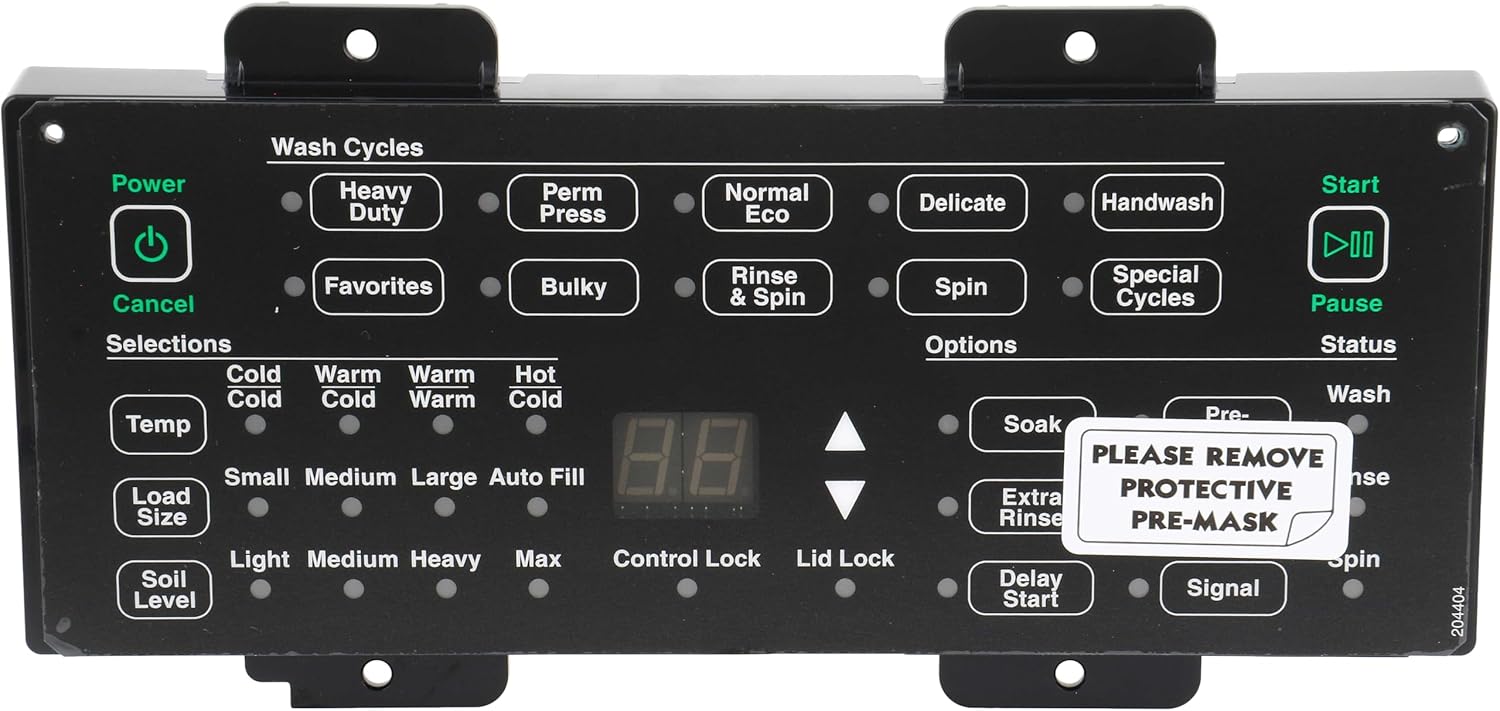
الصورة: الجبهة view of the ALLIANCE LAUNDRY SYSTEMS Control Board and Overlay Assembly (204074P), showing the user interface with buttons for Power, Start/Pause, Wash Cycles (Heavy Duty, Perm Press, Normal Eco, Delicate, Handwash, Favorites, Bulky, Rinse & Spin, Spin, Special Cycles), Selections (Temp, Load Size, Soil Level), Options (Soak, Extra Rinse, Delay Start, Signal), and Status indicators. A protective film with "PLEASE REMOVE PROTECTIVE PRE-MASK" is visible on the right side.
Control Panel Sections:
- Power / Cancel:
- زر الطاقة: اضغط لتشغيل الجهاز أو إيقاف تشغيله.
- زرالإلغاء: Press to stop the current cycle or clear selections.
- بدء وقفة:
- زر البدء: Press to begin a selected cycle.
- زر الإيقاف المؤقت: Press to temporarily stop a running cycle. Press again to resume.
- دورات الغسيل: Select the desired wash program based on the fabric type and soil level.
- واجب ثقيل: للأغراض المتينة شديدة الاتساخ.
- الصحافة بيرم: For permanent press and synthetic fabrics.
- ايكو عادي: An energy-efficient cycle for everyday loads.
- حساس: للأغراض الهشة التي تتطلب عناية خاصة.
- غسل اليد: Mimics handwashing for very delicate garments.
- المفضلات: Allows saving and recalling custom cycle settings.
- ضخم: For large items like blankets or comforters.
- شطف وتدور: For items that need only rinsing and spinning.
- غزل: To extract excess water from items.
- دورات خاصة: Additional pre-programmed cycles for specific needs.
- الاختيارات: Customize cycle parameters.
- درجة الحرارة: Adjusts wash water temperature (Cold/Cold, Warm/Cold, Warm/Warm, Hot/Cold).
- حجم التحميل: Selects the appropriate water level for the load (Small, Medium, Large, Auto Fill).
- مستوى التربة: Adjusts wash time based on how dirty the items are (Light, Medium, Heavy, Max).
- خيارات: Add extra features to the selected cycle.
- نقع: Adds a pre-soak period before the main wash.
- شطف إضافية: إضافة دورة شطف إضافية.
- تأخير البدء: Allows setting a delay before the cycle begins.
- الإشارة: Activates or deactivates end-of-cycle signals.
- حالة: Indicators for the current phase of the wash cycle (e.g., Wash, Rinse, Spin).
- عرض رقمي: Shows cycle time remaining, error codes, or other relevant information (e.g., "8.8" in the image, likely for time display).
- Control Lock / Lid Lock:
- قفل التحكم: يمنع التغييرات العرضية في الإعدادات أثناء التشغيل.
- قفل غطاء: Indicates if the lid is locked during operation for safety.
Note: A protective film labeled "PLEASE REMOVE PROTECTIVE PRE-MASK" is visible on the new overlay and should be removed after installation.
4. الصيانة
The Alliance Control Board and Overlay Assembly is designed for durability and requires minimal maintenance. To ensure its longevity and proper function:
- تنظيف: امسح سطح الطبقة الخارجية برفق بقطعة قماش ناعمة.amp cloth. Avoid abrasive cleaners or solvents that could damage the plastic or printed labels.
- تقتيش: Periodically inspect the connections to the control board to ensure they remain secure.
- الظروف البيئية: Ensure the appliance operates within recommended environmental conditions to prevent damage to electronic components from excessive heat, cold, or humidity.
5. استكشاف الأخطاء وإصلاحها
If you experience issues with your appliance after installing the control board, consider the following general troubleshooting steps:
- لا يوجد طاقة/عرض:
- Check if the appliance is properly plugged into a working electrical outlet.
- تأكد من عدم انقطاع قاطع الدائرة.
- Ensure all wiring harnesses to the control board are securely connected.
- الأزرار غير مستجيبة:
- Ensure the "Control Lock" feature is not activated.
- Power cycle the appliance (turn off, wait a few minutes, then turn on).
- Inspect the overlay for any physical damage or debris that might be obstructing button presses.
- سلوك الدورة غير الصحيح:
- Confirm that the correct wash cycle and options have been selected.
- Refer to your appliance's specific user manual for detailed cycle descriptions and troubleshooting.
- رموز الخطأ:
- If the digital display shows an error code, consult your appliance's specific service manual for the meaning of the code and recommended solutions.
For persistent issues, it is recommended to contact a qualified appliance technician or the manufacturer's support.
6. المواصفات
| يصف | التفاصيل |
|---|---|
| العلامة التجارية | ALLIANCE LAUNDRY SYSTEMS |
| معلومات النموذج | 204074 بكسل |
| وزن العنصر | 1.1 رطل |
| أبعاد المنتج | 11.75 × 8 × 6 بوصة |
| رقم موديل العنصر | 204074 بكسل |
| رقم القطعة | 204074 بكسل |
| المكونات المضمنة | Single Control Board + Overlay Assembly |
| هل تحتاج إلى بطاريات؟ | لا |
| ASIN | B0973P9CWC |
| تاريخ أول توفر | 11 يونيو 2021 |
7. معلومات الضمان
Specific warranty details for the ALLIANCE LAUNDRY SYSTEMS Control Board and Overlay Assembly (204074P) are not provided in this manual. Please refer to the original purchase documentation or contact ALLIANCE LAUNDRY SYSTEMS directly for warranty terms and conditions.
8. دعم العملاء
For technical assistance, replacement parts, or further inquiries regarding the ALLIANCE LAUNDRY SYSTEMS Control Board and Overlay Assembly (204074P), please contact ALLIANCE LAUNDRY SYSTEMS customer service. Contact information can typically be found on the manufacturer's official website or on your appliance's documentation.


