مقدمة
يُقدّم هذا الدليل معلومات أساسية لتشغيل وتركيب وصيانة جهاز تكييف الهواء ومزيل الرطوبة المحمول IRIS USA WOOZOO 3-in-1 بشكل آمن وفعّال. يُرجى قراءة هذا الدليل جيدًا قبل استخدام الجهاز والاحتفاظ به للرجوع إليه مستقبلاً.
معلومات السلامة
اتبع دائمًا احتياطات السلامة الأساسية عند استخدام الأجهزة الكهربائية لتقليل خطر الحريق والصدمة الكهربائية وإصابة الأشخاص.
- تأكد من أن مصدر الطاقة يطابق المجلدtage كما هو موضح على ملصق تصنيف الوحدة.
- لا تقم بتشغيل الوحدة بسلك أو قابس تالف.
- لا تقم بسد مداخل أو منافذ الهواء.
- أبعد الأطفال عن الجهاز. فعّل خاصية قفل الأطفال لمزيد من الأمان.
- لا تدخل أصابعك أو أي أجسام غريبة في فتحة التهوية.
- افصل الوحدة عن التيار الكهربائي قبل التنظيف أو إجراء أي صيانة.
- هذه الوحدة مدرجة في قائمة UL لتلبية معايير السلامة الأمريكية.
المنتج انتهىview
تعرّف على مكونات وميزات مكيف الهواء المحمول الخاص بك.

الشكل 1: مكيف الهواء المحمول IRIS USA WOOZOO معروض مع جهاز التحكم عن بعد الخاص به. الوحدة بيضاء اللون مع لوحة علوية سوداء وشبكة أمامية سوداء، ومزودة بعجلات لسهولة النقل.

الشكل 2: رسم توضيحي يسلط الضوء على قدرات التبريد القوية للوحدة، بما في ذلك قدرة تبريد التيار المتردد 10,000 وحدة حرارية بريطانية، و3 سرعات مروحة قابلة للتعديل، وقدرة إزالة الرطوبة تبلغ 74 لترًا في اليوم.

الشكل 3: رسم توضيحي يُبين الأبعاد التفصيلية لمكيف الهواء المحمول، موضحًا ارتفاعه (30 بوصة)، وعمقه (16 بوصة)، وعرضه (12 بوصة). وتشمل المواصفات الرئيسية الوزن (55 رطلاً)، و...tagيتم عرض e (1010 واط)، وطول الكابل (71 بوصة)، ونطاق درجة الحرارة (61 درجة فهرنهايت - 86 درجة فهرنهايت).

الشكل 4: تُظهر هذه الصورة جهاز التحكم عن بُعد كامل الوظائف المزود بشاشة رقمية، مما يُسهّل تشغيل الجهاز. وفي الأسفل، تُظهر صورة مقرّبة للعجلات المدمجة سهولة تحريك الجهاز.
الإعداد والتثبيت
يُعدّ التركيب الصحيح أمراً بالغ الأهمية لتحقيق الأداء الأمثل. تتضمن هذه الوحدة طقم نافذة لتهوية العادم.
- فك التعبئة: أخرج الوحدة وجميع الملحقات من العبوة بحرص. تحقق من وجود أي تلف.
- التمركز: ضع الجهاز على سطح مستوٍ وثابت. تأكد من وجود مساحة لا تقل عن 20 سم (8 بوصات) حول الجهاز لضمان تدفق الهواء بشكل صحيح. الجهاز مزود بعجلات لسهولة نقله.
- تركيب مجموعة النوافذ:
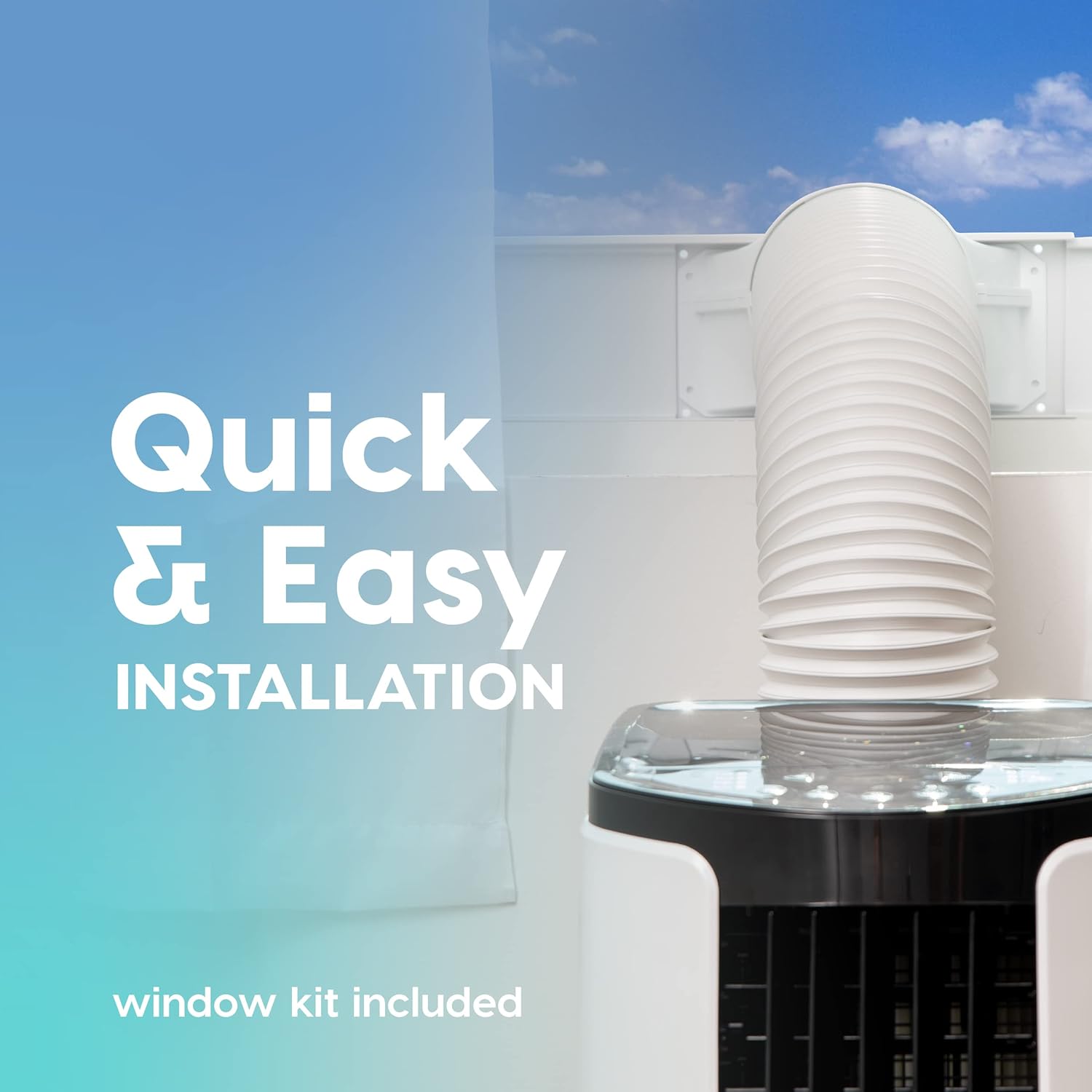
الشكل 5: توضح هذه الصورة عملية التثبيت السريعة والسهلة، حيث تظهر خرطوم العادم متصلاً بالوحدة وممتداً عبر نافذة باستخدام مجموعة النوافذ المرفقة.
- قم بتجميع مجموعة لوحة إحكام إغلاق النافذة وفقًا للتعليمات الواردة في دليل مجموعة النوافذ المنفصل.
- قم بتوصيل خرطوم العادم بمنفذ العادم الخاص بالوحدة وقم بتمديده إلى مجموعة النافذة.
- تأكد من عدم وجود انثناء أو انحناء حاد في الخرطوم، لأن ذلك قد يقيد تدفق الهواء ويقلل من الكفاءة.
- توصيل الطاقة: قم بتوصيل سلك الطاقة بمأخذ كهربائي أرضي.
تعليمات التشغيل
يوفر مكيف الهواء المحمول الخاص بك أوضاعًا متعددة لتوفير الراحة حسب رغبتك. ويمكن تشغيل جميع الوظائف بسهولة باستخدام جهاز التحكم عن بعد المرفق.
لوحة التحكم وجهاز التحكم عن بعد
يمكن التحكم في الوحدة عبر لوحة التحكم العلوية أو جهاز التحكم عن بعد. يتميز جهاز التحكم عن بعد بشاشة رقمية لسهولة الاستخدام. viewعمل.
أوضاع التشغيل
- وضع التبريد: يوفر تبريدًا قويًا للغرف التي تصل مساحتها إلى 450 قدمًا مربعًا.
- اضغط على وضع اضغط على الزر حتى يضيء مؤشر التبريد.
- اضبط درجة الحرارة المطلوبة باستخدام + or - الأزرار (النطاق: 61 درجة فهرنهايت / 16 درجة مئوية إلى 86 درجة فهرنهايت / 30 درجة مئوية).
- ضبط سرعة المروحة باستخدام مروحة زر (3 سرعات متوفرة).
- وضع المروحة: يدور الهواء دون تبريد.
- اضغط على وضع اضغط على الزر حتى يضيء مؤشر المروحة.
- ضبط سرعة المروحة باستخدام مروحة زر.
- وضع مزيل الرطوبة: يزيل الرطوبة الزائدة من الهواء.
- اضغط على وضع اضغط على الزر حتى يضيء مؤشر مزيل الرطوبة.
- ستقوم الوحدة بتصريف المكثفات تلقائيًا في معظم البيئات.
وظائف إضافية
- وضع السكون: يُفعّل وضع التشغيل الهادئ ويضبط درجة الحرارة تدريجيًا لنوم مريح. اضغط على ينام زر.
- وظيفة المؤقت: اضبط الجهاز ليتم تشغيله أو إيقافه تلقائيًا خلال فترة 24 ساعة. اضغط على المؤقت زر واستخدام + or - لضبط الوقت المطلوب.
- قفل الطفل: يمنع هذا الخيار التغييرات غير المقصودة في الإعدادات. راجع تعليمات جهاز التحكم عن بُعد لتفعيله.
- التذبذب: يمكن ضبط كل من التذبذب الرأسي والأفقي يدويًا لتوجيه تدفق الهواء.
صيانة
تضمن الصيانة الدورية طول عمر وكفاءة مكيف الهواء المحمول الخاص بك.
تنظيف الفلتر

الشكل 6: تُظهر هذه الصورة فلتر الهواء القابل لإعادة الاستخدام أثناء تنظيفه تحت الماء الجاري، مما يؤكد سهولة صيانته باستخدام الصابون والماء فقط.
الوحدة مزودة بفلتر هواء قابل للغسل، ويمكن تنظيفه بالماء والصابون. يُنصح بتنظيف الفلتر كل أسبوعين أو أكثر حسب الاستخدام وجودة الهواء.
- افصل الوحدة عن مأخذ الطاقة.
- حدد مكان فلتر الهواء وقم بإزالته من الجزء الخلفي أو الجانبي للوحدة.
- اغسل الفلتر تحت الماء الجاري باستخدام منظف معتدل.
- اشطف الفلتر جيداً واتركه يجف تماماً في الهواء قبل إعادة إدخاله في الوحدة.
الرعاية العامة
- امسح الجزء الخارجي من الوحدة بقطعة قماش ناعمة دamp قماش. لا تستخدم مواد كيميائية قاسية أو منظفات كاشطة.
- للتخزين طويل الأمد، قم بتصريف أي مياه متراكمة، ونظف الفلتر، وخزن الوحدة في مكان جاف.
استكشاف الأخطاء وإصلاحها
راجع هذا القسم للتعرف على المشكلات الشائعة وحلولها.
| مشكلة | السبب المحتمل | حل |
|---|---|---|
| الوحدة لا تعمل. | لا يوجد طاقة، سلك الطاقة غير موصول، قاطع الدائرة معطل. | تحقق من توصيل الطاقة، وأعد ضبط قاطع الدائرة. |
| الوحدة لا تبرد بشكل فعال. | فلتر الهواء متسخ، خرطوم العادم مسدود/ملتوي، الغرفة كبيرة جدًا، النوافذ/الأبواب مفتوحة. | نظف فلتر الهواء، وتحقق من خرطوم العادم، وتأكد من الحجم المناسب للغرفة، وأغلق النوافذ/الأبواب. |
| الوحدة صاخبة. | الوحدة ليست على سطح مستوٍ، والمروحة تعيق الحركة. | ضعها على سطح مستوٍ، وتحقق من عدم وجود عوائق في منطقة المروحة. |
| تسرب مياه. | سدادة التصريف غير محكمة الإغلاق بشكل صحيح، والوحدة مائلة. | تأكد من إحكام سدادة التصريف، ثم ضع الوحدة على سطح مستوٍ. |
تحديد
| ميزة | التفاصيل |
|---|---|
| نموذج | مكيف هواء محمول من ووزو |
| ASIN | B096SHCS8J |
| سعة التبريد | 10,000 وحدة حرارية بريطانية (ASHRAE) |
| منطقة التغطية | تصل إلى 450 قدم مربع |
| قدرة التجفيف | 74 مكاييل / يوم |
| مدى درجة الحرارة | 61 درجة فهرنهايت (16 درجات مئوية) إلى 86 درجة فهرنهايت (30 درجات مئوية) |
| سرعات المروحة | 3 |
| استهلاك الطاقة | 1010 واط |
| المجلدtage | 115 فولت |
| مستوى الضوضاء | 30 ديسيبل |
| الأبعاد (D x W x H) | 31.5 عمق × 39.5 عرض × 77 ارتفاع سنتيمتر (تقريبًا 12.4 عمق × 15.6 عرض × 30.3 ارتفاع بوصة) |
| وزن | 55 رطل (حوالي 24.9 كجم) |
| المميزات الخاصة | شاشة عرض درجة الحرارة بتقنية LED، تحكم عن بعد، وضع السكون، مؤقت، قفل أمان للأطفال، وظيفة التصريف التلقائي |
الضمان والدعم
للحصول على معلومات الضمان أو الدعم الفني، يُرجى الرجوع إلى بطاقة الضمان المرفقة مع المنتج أو الاتصال بخدمة عملاء IRIS USA. احتفظ بإيصال الشراء كإثبات للشراء.
للحصول على مزيد من المساعدة، تفضل بزيارة الموقع الرسمي لشركة IRIS USA webالموقع أو الاتصال بخط دعم العملاء الخاص بهم.


