مقدمة
Thank you for choosing the Hbada Ergonomic Gaming Chair. This manual provides essential information for the safe and efficient assembly, operation, and maintenance of your new chair. Please read these instructions carefully before use and retain them for future reference.

Image: The Hbada Ergonomic Gaming Chair in a modern gaming environment, showcasinتصميمها وحضورها.
معلومات السلامة
- تأكد من وجود جميع المكونات وسلامتها قبل التجميع. لا تستخدم المنتج إذا كان أيٌّ منها مفقودًا أو مكسورًا.
- Follow the assembly instructions precisely. Incorrect assembly can lead to instability and injury.
- لا تقف على الكرسي. استخدمه للجلوس فقط.
- لا تتجاوز الحد الأقصى للوزن المسموح به (راجع المواصفات).
- أبقِ الأطفال والحيوانات الأليفة بعيداً عن الكرسي أثناء التركيب.
- تجنب تعريض الكرسي لأشعة الشمس المباشرة أو درجات الحرارة العالية لمنع تدهور المواد.
أبعاد المنتج
Understanding the dimensions of your chair is important for proper placement and comfortable use. Below are the key measurements:
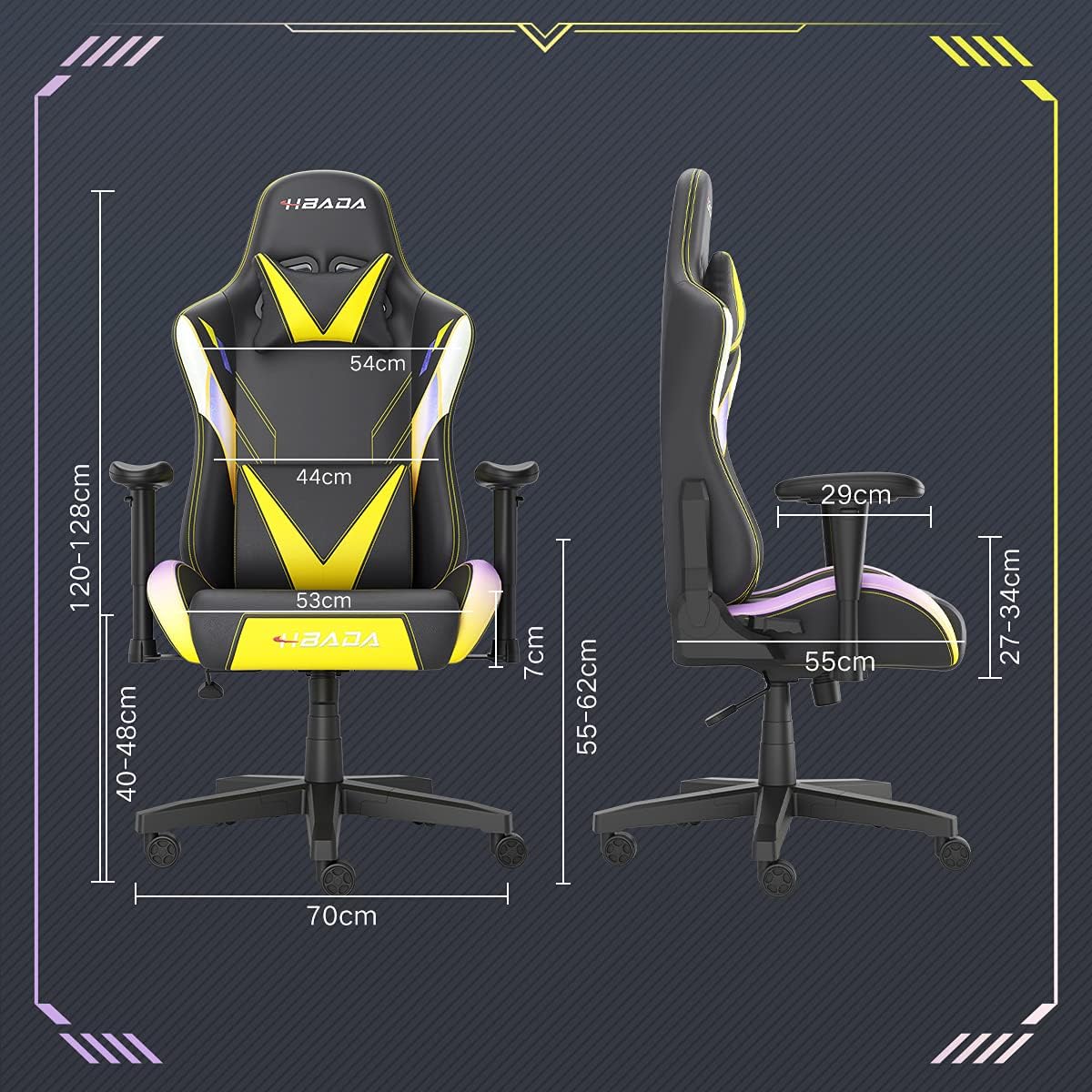
Image: A detailed diagram illustrating the various dimensions of the Hbada Gaming Chair, including height, width, and depth measurements.
- الارتفاع الكلي: 120-128 سم (قابل للتعديل)
- ارتفاع المقعد: 40-48 سم (قابل للتعديل)
- عرض المقعد: 53 سم
- عمق المقعد: 55 سم
- عرض مسند الظهر: 54 cm (shoulder area), 44 cm (lumbar area)
- ارتفاع مسند الذراع (من المقعد): 7 سم (قابل للتعديل)
- قطر القاعدة: 70 سم
الإعداد والتجميع
Please follow these steps carefully to assemble your Hbada Gaming Chair. It is recommended to have a clear, spacious area for assembly.
خطوات التجميع:
- Step 1: Assemble the Base and Wheels
Insert the five casters into the holes on the star base. Then, place the gas lift cylinder into the center hole of the base.

Image: Illustration of attaching the five casters to the chair's star-shaped base and inserting the gas lift cylinder.
- Step 2: Attach the Seat and Backrest
Connect the backrest to the seat using the provided screws and mounting plates. Ensure all screws are tightened securely.

Image: Diagram showing the process of securing the backrest to the seat cushion using screws and brackets.
- الخطوة 3: تثبيت مساند الذراعين
Attach the armrests to the sides of the seat using the designated screws. Make sure they are firmly attached.

Image: Visual guide for attaching the armrests to the chair's seat base.
- Step 4: Connect Seat to Base
Carefully place the assembled seat onto the gas lift cylinder, ensuring it is properly seated and stable.

Image: Depiction of lowering the assembled seat onto the gas lift cylinder, connecting the upper and lower parts of the chair.
- Step 5: Attach Headrest and Lumbar Pillow
Secure the detachable headrest and lumbar support pillow to the chair as desired for optimal comfort.

Image: Instructions for attaching the headrest and lumbar support pillows to the gaming chair.
تعليمات التشغيل
Your Hbada Gaming Chair is designed with several adjustable features to provide personalized comfort and support.
Key Adjustable Functions:
- Adjustable Sitting Height: Use the lever located under the seat on the right side to raise or lower the chair. Pull the lever up to adjust the height, then release it at your desired position. The seat has an 8 cm elevation range.
- Reclining Backrest (90° to 155°): The backrest can be reclined from 90 degrees (upright) to 155 degrees (nearly flat). Use the recline lever on the side of the chair to adjust the angle. Lean back to your preferred position and lock the lever.
- مساند للذراعين قابلة للتعديل: The armrests can be adjusted in height by 7 cm. Locate the button or lever on the side of each armrest to unlock, adjust, and then lock them into your desired height.
- 360° Free Swivel: The chair features a full 360-degree swivel function, allowing for easy movement and access to your surroundings without needing to move the entire chair.
- Detachable Headrest and Lumbar Support: The chair includes a removable headrest pillow and lumbar support cushion for enhanced ergonomic comfort. Adjust their positions or remove them based on your preference.

الصورة: أكثر منview of the chair's ergonomic systems, highlighting adjustable sitting height, armrests, 155° reclining, 360° swivel, cool racing casters, and durable base.

Image: The Hbada Gaming Chair demonstrated in its 155-degree reclined position, illustrating the recline controller.
صيانة
Regular maintenance will help prolong the life and appearance of your Hbada Gaming Chair.
- تنظيف الجلد الصناعي: امسح أسطح الجلد الصناعي بقطعة قماش ناعمة و...amp قطعة قماش. بالنسبة للبقع العنيدة، استخدم محلول صابون لطيف ثم امسح بقطعة قماش نظيفة.amp cloth. Avoid harsh chemicals or abrasive cleaners, as these can damage the material.
- العناية بالعجلات: Periodically check the casters for accumulated dust or hair. Clean them with a brush or vacuum cleaner to ensure smooth movement and prevent damage to your flooring.
- الهيكل والمكونات: Regularly inspect all screws and bolts to ensure they are tight. Re-tighten if necessary to maintain stability.
- تجنب أشعة الشمس المباشرة: Prolonged exposure to direct sunlight can cause the PU leather to fade and crack. Position your chair away from direct sunlight when possible.
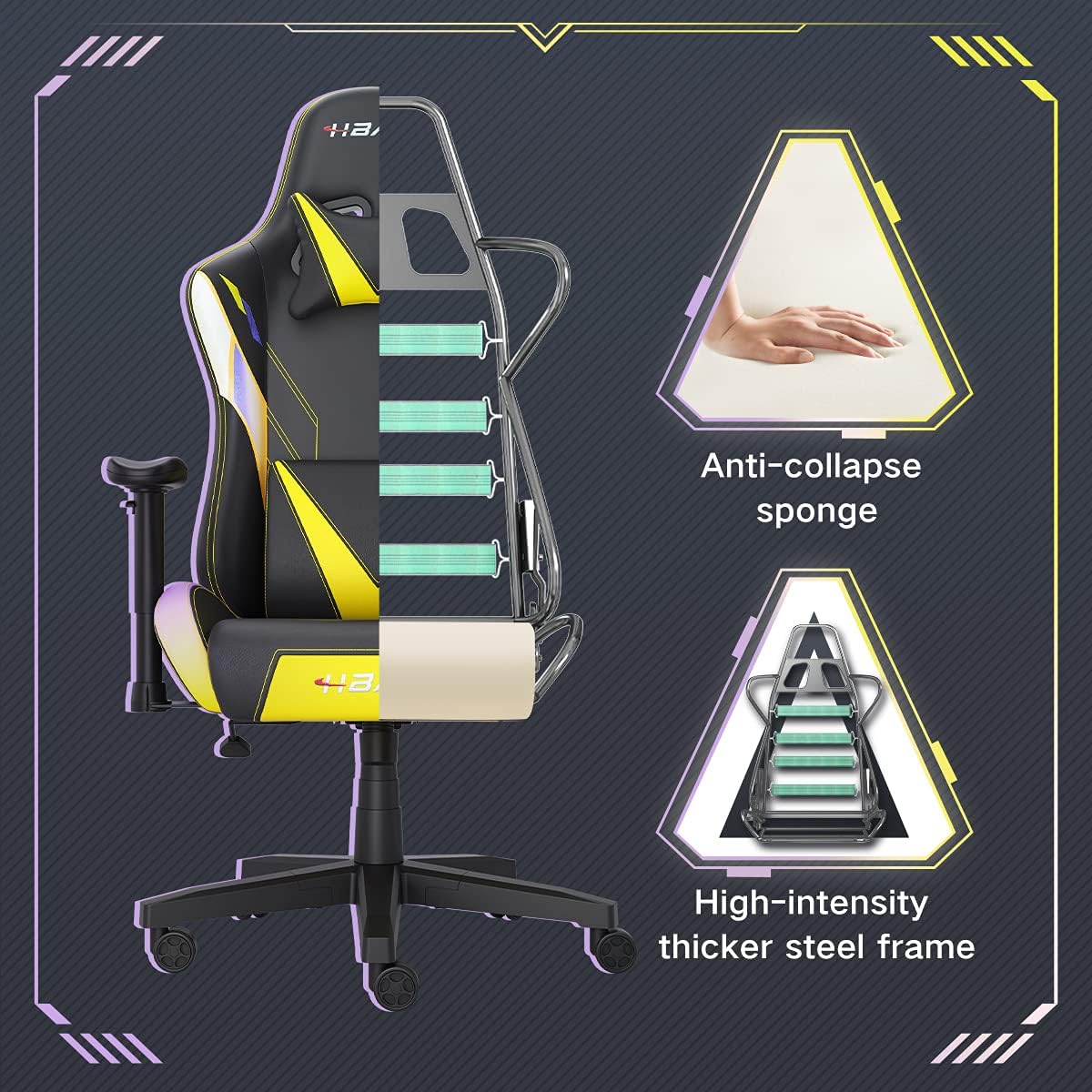
الصورة: مقطع view of the chair's internal structure, highlighting the anti-collapse sponge padding and the high-intensity thicker steel frame, indicating durable construction.
استكشاف الأخطاء وإصلاحها
If you encounter any issues with your Hbada Gaming Chair, refer to the following common problems and solutions:
| مشكلة | السبب المحتمل | حل |
|---|---|---|
| الكرسي لا يمكن تعديل ارتفاعه | عطل في رفع الغاز أو عدم تفعيل الرافعة. | تأكد من تثبيت ذراع ضبط الارتفاع بالكامل. إذا استمرت المشكلة، فقد يلزم استبدال رافعة الغاز. تواصل مع خدمة العملاء. |
| Chair is wobbly or unstable | براغي فضفاضة أو تجميع غير صحيح. | Check all assembly screws and bolts, and tighten them securely. Refer to the assembly instructions. |
| العجلات لا تدور بسلاسة | الحطام (الشعر، الغبار) المحاصر في العجلات. | اقلب الكرسي وقم بإزالة أي حطام من عجلات الدوارة. |
| لا يمكن إمالة مسند الظهر أو تثبيته | آلية الإمالة عالقة أو الرافعة غير منخرطة. | Ensure the recline lever is fully engaged. Check for any obstructions around the mechanism. |
تحديد
| ميزة | التفاصيل |
|---|---|
| ماركة | هباده |
| رقم الموديل | W203YMA/EU |
| ASIN | B095PSFLKX |
| لون | أصفر |
| مادة | PU Leather, Metal Frame |
| أبعاد المنتج | 70 × 70 × 128 سم (الطول × العرض × الارتفاع) |
| وزن المنتج | 22 كيلوغرام |
| المميزات الخاصة | Ergonomic, Swivel, Casters, Headrest Support, Adjustable Recline (90°-155°), Adjustable Seat Height (8cm range), Adjustable Armrests (7cm range) |
| عدد الوحدات | 1.0 عدد |
الضمان والدعم
Your Hbada Gaming Chair comes with a ضمان لمدة سنة واحدة يسري هذا الضمان من تاريخ الشراء، ويغطي عيوب التصنيع وعيوب المواد في ظل الاستخدام العادي.
If you experience any issues during use, including problems with installation, damage, or missing parts, please do not hesitate to contact Hbada customer service. We are committed to providing reliable service and can offer free exchanges for covered issues.
For support, please visit the official Hbada webالموقع أو اتصل بتاجر التجزئة الخاص بك.


