مقدمة
This manual provides essential instructions for the safe and efficient operation of your Miroir M600 1080p Battery-Powered Projector. Please read this manual thoroughly before using the device and retain it for future reference.
ماذا يوجد في الصندوق
تأكد من تضمين جميع العناصر المدرجة أدناه في الحزمة الخاصة بك:
- جهاز عرض ميروار M600
- كابل HDMI
- AC Adapter and Charger

Image: Contents of the Miroir M600 Projector package.
المنتج انتهىview
The Miroir M600 is a compact, portable 1080p projector designed for various projection needs. Familiarize yourself with its components:
أمام View

الصورة: الجبهة view of the Miroir M600 Projector, showing the projection lens and ventilation grille.
مؤخرة View والموانئ

الصورة: الخلفية view of the Miroir M600 Projector, highlighting the various input/output ports.
- مخرج صوت 3.5 ملم: لتوصيل مكبرات الصوت الخارجية أو سماعات الرأس.
- USB-C Video Port: For video input from compatible USB-C devices.
- منفذ HDMI: For video input from HDMI-enabled devices.
- منفذ شحن USB: لشحن الأجهزة الخارجية.
- مدخلات طاقة التيار المستمر: For connecting the AC adapter to power and charge the projector.
يثبت
1. التشغيل والشحن
- Connect the AC adapter to the DC Power Input port on the projector and then to a power outlet. The projector can operate while charging.
- Press and hold the power button (location not specified in data, assume standard placement) for a few seconds until the projector powers on.
- The internal battery provides portable operation. Ensure it is sufficiently charged for use without the AC adapter.
2. الوضع والإسقاط
Position the projector on a stable, flat surface or mount it on a compatible stand. Ensure the lens is unobstructed and pointed towards your desired projection surface (wall or screen).

Image: Miroir M600 Projector positioned on a stand for optimal projection.
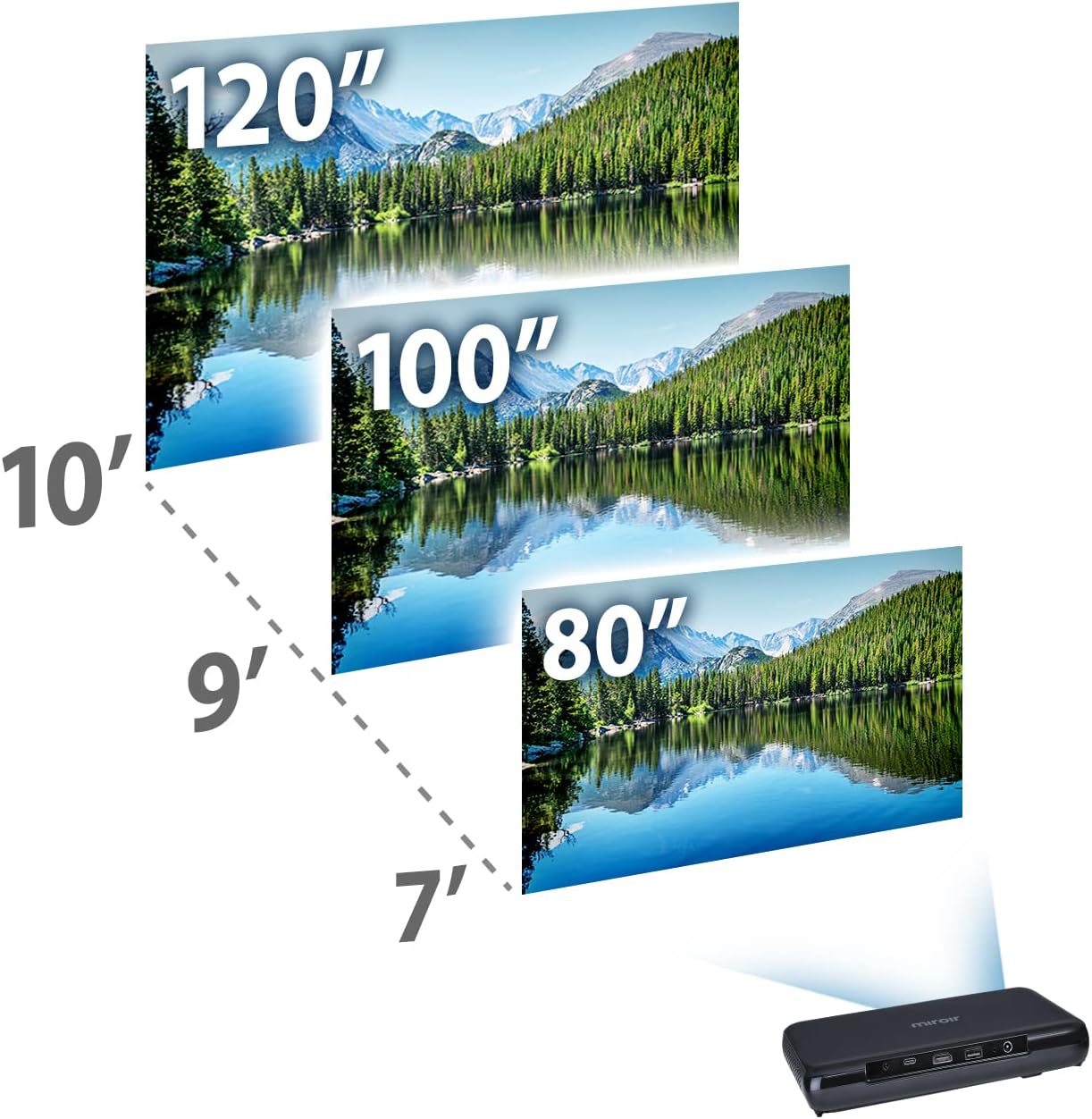
Image: Guide for projection distances to achieve various screen sizes (e.g., 7 feet for 80 inches, 10 feet for 120 inches).
التشغيل
1. توصيل أجهزة الإدخال
- HDMI: Connect an HDMI cable from your source device (laptop, streaming stick, game console) to the HDMI port on the projector.
- USB-C Video: For compatible devices, connect a USB-C cable from your source to the USB-C Video port on the projector.
2. ضبط الصورة والتركيز
The Miroir M600 features automatic keystone correction to adjust the image shape. For focus, manual adjustment may be required via a focus wheel (location not specified in data, assume standard placement near lens).
3. مخرج الصوت
The projector includes a built-in 5-watt speaker. For enhanced audio, connect external speakers or headphones to the 3.5mm Audio Out jack.
4. لamp الأوضاع
الصمام لamp offers two modes:
- الوضع العادي: Up to 20,000 hours of lamp حياة.
- نمط الصدى: Up to 30,000 hours of lamp life, providing extended usage and reduced power consumption.
صيانة
1. تنظيف جهاز العرض
- عدسة: استخدم قطعة قماش ناعمة وخالية من الوبر، مُخصصة للعدسات البصرية. تجنّب استخدام منظفات كاشطة أو استخدام قوة مفرطة.
- الخارج: امسح الجزء الخارجي من جهاز العرض بقطعة قماش ناعمة وجافة. تجنب استخدام المنظفات السائلة مباشرة على الجهاز.
- تهوية: Ensure the ventilation grilles are clear of dust and debris to prevent overheating.
2. العناية بالبطارية
- للحصول على عمر بطارية مثالي، تجنب تفريغ البطارية بالكامل بشكل متكرر.
- قم بتخزين جهاز العرض في مكان بارد وجاف عندما لا يكون قيد الاستخدام لفترات طويلة.
استكشاف الأخطاء وإصلاحها
If you encounter issues with your Miroir M600 projector, refer to the following common solutions:
- لا توجد صورة: Ensure the input source is correctly connected and selected. Check all cable connections.
- صورة ضبابية: Adjust the focus manually. Ensure the projection surface is flat and the projector is stable.
- لا يوجد صوت: Verify that the volume is not muted on both the projector and the source device. If using external speakers, ensure they are properly connected and powered.
- ارتفاع درجة الحرارة: تأكد من وجود تهوية كافية حول جهاز العرض. لا تسد فتحات التهوية.
For more detailed troubleshooting steps, please consult the full user manual available for download (see Support section).
تحديد
| ميزة | التفاصيل |
|---|---|
| أبعاد المنتج | 9 × 5 × 1 بوصة |
| وزن العنصر | 1.6 رطل |
| رقم موديل العنصر | م600 |
| البطاريات | 1 بطارية ليثيوم بوليمر (متضمنة) |
| الشركة المصنعة | ميروير |
| ماركة | ميروير |
| الاستخدامات الموصى بها | عمل |
| ميزة خاصة | Pico, Speakers |
| تكنولوجيا الاتصال | USB ، HDMI |
| دقة العرض | 1920 × 1080 (1080 بكسل) |
| Lamp Life (Normal Mode) | تصل إلى 20,000 ساعة |
| Lamp الحياة (وضع الاقتصاد) | تصل إلى 30,000 ساعة |
| مكبر صوت مدمج | 5 واط |
| قطري الشاشة المرئية | 120 بوصة / 305 سم |
معلومات الضمان
Specific warranty details are not provided in this document. Please refer to the official Miroir website or the warranty card included with your product for comprehensive warranty terms and conditions.
الدعم والاتصال
For further assistance, detailed instructions, or to contact customer support:
- دليل المستخدم الكامل: A comprehensive PDF user manual is available for download هنا.
- الشركة المصنعة Webموقع: Visit the official Miroir website for product registration, FAQs, and support resources.


