1. المقدمة
Thank you for choosing the QuWireless A950S QuSpot Antenna. This device is an integrated solution designed to provide robust LTE, Wi-Fi, and GPS connectivity. It features an omnidirectional LTE antenna, an omnidirectional Wi-Fi antenna, and a GPS antenna, all housed within a single enclosure. The QuSpot A950S also includes dedicated space for mounting a RUT950/900 series router (router not included), creating a compact and efficient communication hub. This manual provides essential information for the proper installation, operation, and maintenance of your QuWireless A950S antenna.
2. معلومات السلامة
Please read all safety instructions carefully before installing or operating the device. Failure to follow these guidelines may result in injury, damage to the device, or voiding of the warranty.
- Ensure the device is installed by qualified personnel.
- Do not expose the device to extreme temperatures, humidity, or direct sunlight beyond its specified operating conditions.
- Avoid installing the antenna near high-voltage power lines or other electrical hazards.
- Use only approved cables and connectors.
- افصل الطاقة قبل القيام بأي إجراءات صيانة أو تركيب.
3. محتويات العبوة
تأكد من وجود جميع العناصر في الحزمة الخاصة بك:
- QuWireless A950S QuSpot Antenna Unit
- Mounting Kit (brackets, screws, nuts)
- دليل البدء السريع (إن وجد)
- بطاقة الضمان (إن وجدت)
Note: The RUT950/900 series router is not included and must be purchased separately.
4. انتهى المنتجview
The QuWireless A950S QuSpot is a robust outdoor antenna solution designed for various applications requiring reliable wireless connectivity. It integrates multiple antenna types into a single, durable enclosure.
4.1 الميزات الرئيسية
- Multiband Antenna: Supports LTE (694-2700 MHz), Wi-Fi (2400-6000 MHz), and GPS frequencies.
- التصميم المتكامل: Combines LTE, Wi-Fi, and GPS antennas in one unit.
- Router Compartment: Internal space for mounting a Teltonika RUT950/900 series router.
- Omnidirectional Coverage: Provides 360-degree signal reception for LTE and Wi-Fi.
- غلاف متين: Designed for outdoor use, offering protection against environmental elements.
4.2 تحديد المكون
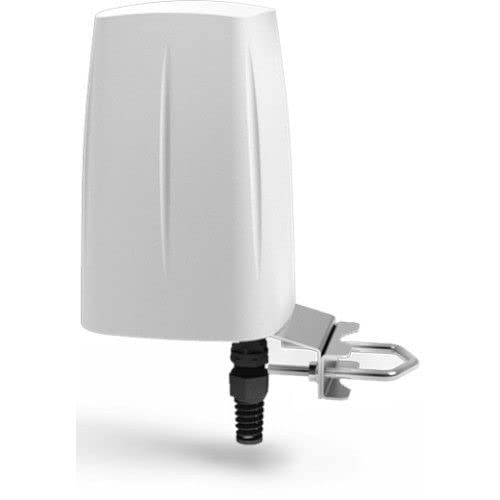
الشكل 1: QuWireless A950S QuSpot Antenna. This image displays the compact, cylindrical design of the QuSpot antenna, highlighting its robust enclosure suitable for outdoor installations. The antenna features multiple ports for connectivity, typically located at the base, and is designed for pole or wall mounting.
Refer to the diagram above for a visual representation of the antenna. Specific port labels and mounting points are detailed in the setup section.
5. الإعداد والتثبيت
يُعدّ التركيب الصحيح أمراً بالغ الأهمية للحصول على أفضل أداء. اتبع هذه الخطوات بعناية.
5.1 اختيار الموقع
- Choose a location with clear line-of-sight to cellular towers and Wi-Fi coverage areas.
- Mount the antenna as high as possible to minimize obstructions.
- Ensure the mounting surface is sturdy enough to support the antenna's weight and withstand wind loads.
5.2 تركيب الهوائي
- Assemble the mounting brackets according to the included instructions.
- Securely attach the brackets to a pole or wall using appropriate hardware.
- Attach the QuWireless A950S unit to the mounted brackets, ensuring it is firmly fastened and oriented correctly.
5.3 Router Installation (Optional)
If you are integrating a RUT950/900 series router:
- Open the QuSpot enclosure by unscrewing the designated fasteners.
- Carefully insert the RUT950/900 router into the designated slot.
- Connect the router's LTE, Wi-Fi, and GPS antenna ports to the corresponding internal antenna cables of the QuSpot.
- Connect the router's power and Ethernet cables as required.
- Close the enclosure, ensuring a watertight seal.
5.4 اتصالات الكابلات
- Connect the necessary coaxial cables from the antenna ports to your router or other communication equipment.
- Ensure all connections are tight and properly sealed to prevent moisture ingress.
- Route cables neatly and secure them to prevent damage.
6. تشغيل الهوائي
The QuWireless A950S is a passive antenna system. Its operation is dependent on the connected communication device (e.g., router, modem).
- Once the antenna is physically installed and connected to your communication device, power on the device.
- Refer to your communication device's manual for specific instructions on configuring LTE, Wi-Fi, and GPS settings.
- Monitor signal strength and quality through your connected device's interface to ensure optimal antenna placement and performance.
7. الصيانة
The QuWireless A950S antenna is designed for minimal maintenance. However, periodic checks are recommended to ensure longevity and optimal performance.
- التفتيش البصري: Annually inspect the antenna and mounting hardware for any signs of damage, corrosion, or loose connections.
- تنظيف: If necessary, gently clean the exterior of the antenna with a soft, damp قماش. لا تستخدم مواد كيميائية قاسية أو مواد كاشطة.
- سلامة الكابل: Check all cables for wear, kinks, or damage. Replace any compromised cables immediately.
- سلامة الختم: Ensure the enclosure's seals remain intact, especially after opening for router maintenance.
8. استكشاف الأخطاء وإصلاحها
إذا واجهت أي مشكلات، راجع المشكلات والحلول الشائعة التالية:
| مشكلة | السبب المحتمل | حل |
|---|---|---|
| Poor LTE/Wi-Fi Signal | Incorrect antenna placement, obstructions, faulty cables, router misconfiguration. | Adjust antenna position, ensure clear line-of-sight, check cable connections, verify router settings. |
| لا توجد إشارة GPS | Antenna not connected, GPS receiver disabled in router, poor satellite visibility. | Ensure GPS antenna is connected, enable GPS in router settings, ensure clear view من السماء. |
| Water Ingress in Enclosure | Improper sealing after opening, damaged seals. | Ensure all screws are tightened and seals are properly seated. Replace damaged seals if necessary. |
If the problem persists, contact QuWireless technical support or your reseller for further assistance.
9. المواصفات
| ميزة | التفاصيل |
|---|---|
| رقم الموديل | A950S |
| LTE Frequency Range | 694 - 2700 ميجاهرتز |
| نطاق تردد الواي فاي | 2400 - 6000 ميجاهرتز |
| نوع الهوائي | Omnidirectional LTE, Omni Wi-Fi, GPS |
| أبعاد المنتج | 6.3 × 6.3 × 9.45 بوصة |
| وزن العنصر | 3.3 رطل |
| الشركة المصنعة | كووايرلس |
| ASIN | B093HLWSSF |
| رمز المنتج الموحد | 748528967008 |
10. مقاطع فيديو المنتج
لا تتوفر مقاطع فيديو رسمية للمنتج من البائع لهذا العنصر في هذا الوقت.
11. الضمان والدعم
QuWireless products are designed for reliability and performance. For specific warranty terms and conditions, please refer to the warranty card included with your product or visit the official QuWireless webالموقع. احتفظ بإثبات الشراء الخاص بك لتقديم مطالبات الضمان.
For technical support, troubleshooting assistance, or to report issues, please contact your authorized QuWireless reseller or QuWireless customer service directly. Contact information can typically be found on the QuWireless webالموقع أو في وثائق المنتج الخاص بك.


