1. المقدمة
This manual provides detailed instructions for the assembly, operation, and maintenance of your CaDA Master 1:17 Remote Control Telehandler building set, Model C61051W. Please read this manual carefully before beginning assembly or operation to ensure correct usage and to maximize your experience with this product.

Image 1: The CaDA Master 1:17 Remote Control Telehandler product box, showing the model and remote control.
2. معلومات السلامة
WARNING: CHOKING HAZARD - Contains Small Parts. Not for Children under 3 years.
- يجب الإشراف على الأطفال دائماً أثناء التجمع واللعب.
- Keep small parts away from infants and young children to prevent choking.
- Do not ingest any components.
- Ensure all electrical connections are secure and correctly installed to prevent malfunction.
- تخلص من البطاريات بطريقة مسؤولة وفقًا للوائح المحلية.
3. ماذا يوجد في الصندوق
Your CaDA Master 1:17 Remote Control Telehandler package includes the following items:
- 1469 building block pieces for the telehandler model.
- Remote control unit.
- Power functions components (motors, battery box, receiver).
- 1 Lithium Polymer battery (included for power functions).
- Printed instruction manual (English language not guaranteed).
- High-quality packaging.
4. الإعداد والتجميع
Follow the step-by-step instructions provided in the included printed manual for the complete assembly of your CaDA Master Telehandler. Pay close attention to the diagrams and part numbers.
4.1 تركيب البطارية
- Locate the battery compartment on the power functions unit.
- Insert the included Lithium Polymer battery, ensuring correct polarity.
- أغلق حجرة البطارية بشكل آمن.
- For the remote control, refer to its specific instructions for battery type and installation.
4.2 الاتصال الأولي
After assembly and battery installation, turn on the power functions unit on the telehandler and the remote control. The units should automatically pair. If not, refer to the printed manual for specific pairing instructions.
5. تعليمات التشغيل
The CaDA Master Telehandler features full-function remote control capabilities, allowing for precise movements and operation of its telescopic arm.
5.1 Basic Vehicle Movements
- إلى الأمام / الخلف: Use the designated joystick or buttons on the remote control to move the telehandler forward or backward.
- Left/Right Turning: Use the steering controls on the remote to turn the vehicle left or right.
5.2 Telescopic Arm Operation
- التمديد/الانكماش: Controls on the remote allow for the telescopic arm to extend outwards and retract inwards.
- Lifting/Lowering: Separate controls manage the vertical movement of the arm, allowing it to lift and lower loads.
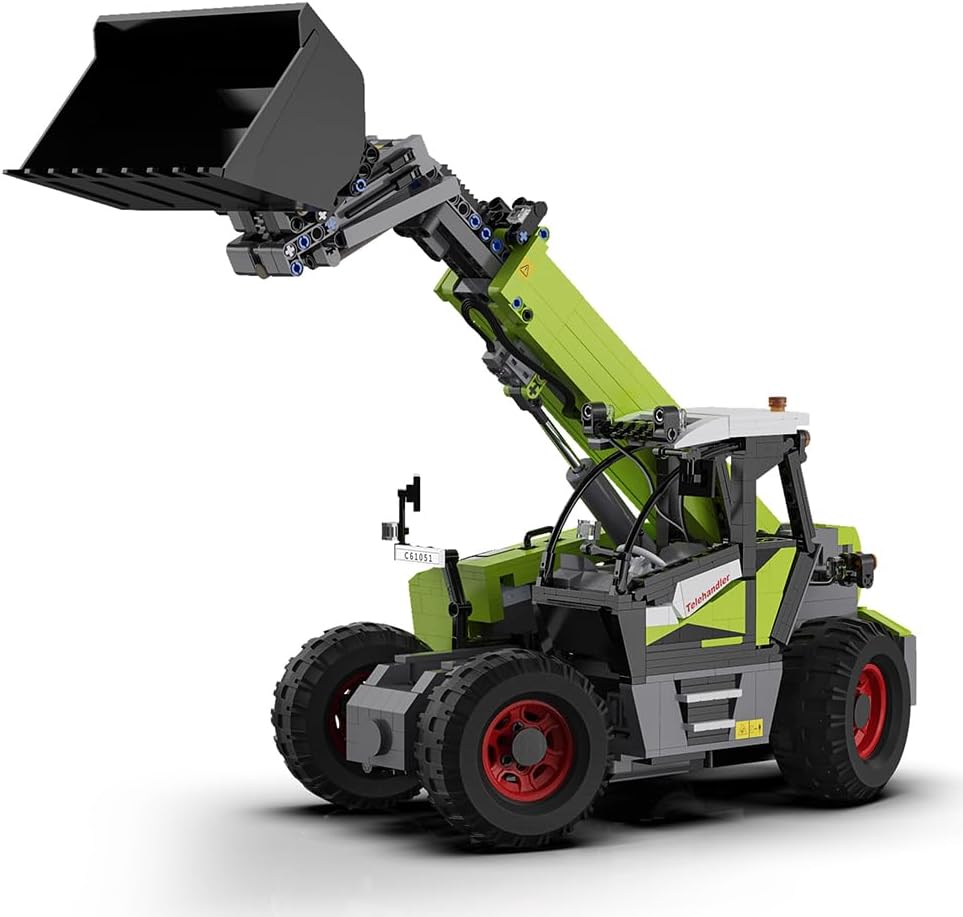
Image 2: The telehandler model with its arm fully extended and bucket attached, demonstrating its reach.
5.3 ملحقات قابلة للتبديل
The model includes interchangeable attachments such as digging buckets and forks. To change attachments:
- Carefully detach the current attachment from the end of the telescopic arm.
- Align the desired attachment (e.g., fork or bucket) with the connection points on the arm.
- Securely attach the new implement, ensuring it is firmly in place before operation.

الصورة 3: الجانب أ view of the telehandler, highlighting the articulation of the telescopic arm and the detailed cabin.
5.4 Realistic Cabin Detailing
The model features an accurately replicated cabin with a steering wheel, seats, and functional left and right rearview mirrors. While these are static details, they enhance the realism of the model.

الصورة 4: الجبهة view of the telehandler with its arm retracted, showcasing the compact design and cabin details.
6. الصيانة
Proper maintenance will ensure the longevity and performance of your CaDA Telehandler.
- تنظيف: Use a soft, dry cloth to gently wipe down the model. Avoid using water or chemical cleaners, as these can damage the plastic components or electronics.
- تخزين: قم بتخزين النموذج في مكان بارد وجاف بعيدًا عن أشعة الشمس المباشرة ودرجات الحرارة القصوى.
- العناية بالبطارية: Remove batteries from the power functions unit and remote control if the model will not be used for an extended period.
- فحص المكونات: قم بفحص جميع الوصلات والأجزاء المتحركة بشكل دوري للتأكد من أنها آمنة وتعمل بشكل صحيح.
7. استكشاف الأخطاء وإصلاحها
If you encounter issues with your CaDA Telehandler, refer to the following common problems and solutions:
- Model falls apart easily during play: This can often be due to incomplete or loose connections during assembly. Carefully re-examine the sections that are coming apart and ensure all bricks are firmly pressed together. Pay extra attention to structural support points.
- جهاز التحكم عن بعد لا يستجيب: Check if the batteries in both the telehandler's power unit and the remote control are correctly installed and charged. Ensure both units are powered on and within range. Re-attempt the pairing process if necessary.
- Unclear assembly instructions: The included printed instructions may sometimes be challenging to follow. Take your time, review each step carefully, and compare your progress with the diagrams. Online communities or video tutorials for CaDA models may also offer additional visual guidance.
- Excess cables after assembly: During assembly, carefully route all electrical cables to prevent them from being pinched or interfering with moving parts. There are often designated channels or spaces within the model's structure for cable management. If cables are too long, gently coil and secure them within available space without creating tension.
- Motor functions are weak or inconsistent: Ensure batteries are fully charged. Check all electrical connections from the motors to the power unit and receiver for any loose plugs.
8. المواصفات
| ميزة | التفاصيل |
|---|---|
| رقم الموديل | سي61051 دبليو |
| أبعاد المنتج | 18.11 × 14.96 × 4.13 بوصة |
| وزن العنصر | 7.08 رطل |
| العمر الموصى به من قبل الشركة المصنعة | 6 سنوات وما فوق |
| البطاريات المطلوبة | 1 بطارية ليثيوم بوليمر (متضمنة) |
| عدد القطع | 1469 قطع |
| الشركة المصنعة | كادا |
9. الضمان والدعم
For warranty information or technical support regarding your CaDA Master 1:17 Remote Control Telehandler, please refer to the contact details provided in the product packaging or visit the official CaDA webالموقع. احتفظ بإثبات الشراء الخاص بك لاستخدامه في أي مطالبات بالضمان.
If you have missing parts or require further assistance, please contact the seller or manufacturer directly.


