1. المقدمة
The Energizer Connect Smart WiFi Plug allows you to control your electronic devices remotely using a mobile application or voice commands. This smart plug connects directly to your home's 2.4GHz Wi-Fi network, eliminating the need for a separate hub. It is compatible with Amazon Alexa, Google Assistant, and Siri for convenient voice control. This manual provides detailed instructions for setting up, operating, maintaining, and troubleshooting your smart plug.
2. معلومات السلامة
Please read and understand all safety instructions before using this product. Failure to follow these instructions may result in electric shock, fire, or property damage.
- للاستخدام الداخلي فقط.
- لا تتجاوز الحد الأقصى للحمولة وهو 15 Amps (120 Volts).
- Do not immerse the plug in water or expose it to moisture.
- لا تحاول فك أو تعديل الجهاز.
- يحفظ بعيدًا عن متناول الأطفال.
- تأكد من إدخال القابس بالكامل في مأخذ الحائط.
- افصل الجهاز عن مأخذ التيار قبل التنظيف.
3. محتويات العبوة
- 1 x Energizer Connect Smart WiFi Plug
- 1 × دليل المستخدم (هذه الوثيقة)
4. انتهى المنتجview
The Energizer Connect Smart WiFi Plug features a compact design that allows access to the second outlet. It includes a power button and an LED indicator for status.

الصورة 4.1: The Energizer Connect Smart WiFi Plug shown with its retail packaging, highlighting key features like 15 Amps of power, grouping, voice control, and Wi-Fi connectivity. The plug itself is white and compact.

الصورة 4.2: لقطة أمامية مقرّبة view of the Energizer Connect Smart WiFi Plug, showing the standard Type B electrical outlet configuration (two vertical slots and a round ground hole).

الصورة 4.3: This image displays the compact dimensions of the Energizer Connect Smart WiFi Plug. The side view shows a depth of 1.0625 inches, and the front view indicates a diameter of 1.125 inches, illustrating its mini size.
4.1. المكونات
- زر الطاقة: Press to manually turn the connected device on or off. Press and hold for 5 seconds to initiate pairing mode (LED will blink rapidly).
- مؤشر LED:
- الأزرق الصلبة: الجهاز قيد التشغيل.
- عن: الجهاز مغلق.
- Rapidly Blinking Blue: وضع الإقتران.
- يومض ببطء باللون الأزرق: قطع الاتصال بشبكة Wi-Fi.
5. تعليمات الإعداد
Follow these steps to set up your Energizer Connect Smart WiFi Plug.
5.1. متطلبات النظام
- A stable 2.4GHz Wi-Fi network (5GHz networks are not supported).
- A smartphone or tablet running iOS 10.0 or higher, or Android 6.0 or higher.
- Access to the Apple App Store or Google Play Store.
5.2. تنزيل التطبيق وتثبيته
- تنزيل تطبيق Energizer Connect من متجر تطبيقات أبل أو متجر جوجل بلاي. بحث عن "Energizer Connect".
- افتح التطبيق واتبع التعليمات التي تظهر على الشاشة لإنشاء حساب أو تسجيل الدخول.

الصورة 5.1: A smartphone displaying the Energizer Connect App interface, showing the smart plug in an "ON" state. The image also includes the physical smart plug and icons for downloading the app from the App Store and Google Play.
5.3. Pairing the Smart Plug
- Plug the Energizer Connect Smart WiFi Plug into a standard 120V wall outlet.
- The LED indicator on the plug should begin blinking rapidly, indicating it is in pairing mode. If not, press and hold the power button on the side of the plug for 5 seconds until it blinks rapidly.
- افتح تطبيق Energizer Connect.
- Tap the "+" icon (or "Add Device") to add a new device.
- حدد "مأخذ كهربائي" أو "قابس ذكي" من قائمة الأجهزة.
- Confirm that the indicator light is blinking rapidly in the app.
- Enter your 2.4GHz Wi-Fi network name and password. Ensure your phone is connected to the same 2.4GHz network.
- The app will attempt to connect to the smart plug. This may take a few moments.
- Once successfully paired, the LED indicator on the plug will turn solid blue, and the app will confirm the connection.
- You can then rename your smart plug within the app for easier identification (e.g., "Living Room Lamp," "Coffee Maker").

الصورة 5.2: A visual guide showing the three easy steps for setting up the Energizer Connect Smart WiFi Plug: download the app, install the device, and set up and control via the app or voice assistants. The image also features the Energizer bunny mascot.
6. تعليمات التشغيل
Control your smart plug using the Energizer Connect App or compatible voice assistants.
6.1. التحكم اليدوي
Press the power button on the side of the smart plug to manually turn the connected device on or off.
6.2. التحكم في التطبيق
- تشغيل/إيقاف: Open the Energizer Connect App, select your smart plug, and tap the power icon to toggle its state.
- الجدولة: Set custom schedules for your plug to turn on or off automatically at specific times or days. This is useful for lights, coffee makers, or other appliances.
- المؤقتات: Set countdown timers for the plug to turn off after a set duration.
- الوصول عن بعد: Control your smart plug from anywhere with an internet connection, even when you are away from home.
- التجميع: Group multiple Energizer Connect smart plugs together to control them simultaneously with a single command.
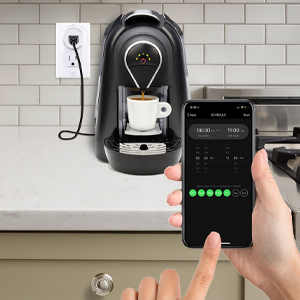
الصورة 6.1: A hand holding a smartphone displaying the Energizer Connect App's scheduling interface, set to turn on a coffee maker at a specific time. The smart plug is visible in the background, connected to the coffee machine.

الصورة 6.2: A person using a smartphone to remotely control a smart plug, demonstrating the ability to turn devices on or off from any location. The image shows a split view of the person and a living room with a lamp connected to a smart plug.
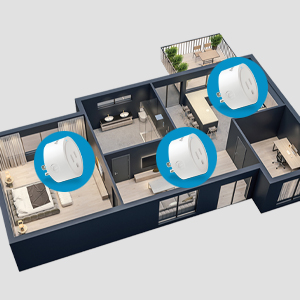
الصورة 6.3: An overhead diagram of a home showing multiple Energizer Connect Smart WiFi Plugs placed in different rooms, illustrating the concept of grouping and controlling several devices simultaneously.
6.3. التحكم الصوتي
The Energizer Connect Smart WiFi Plug is compatible with Amazon Alexa, Google Assistant, and Siri. To enable voice control:
- Ensure your smart plug is successfully paired with the Energizer Connect App.
- Open your Amazon Alexa, Google Home, or Apple Home app.
- Follow the app's instructions to link the "Energizer Connect" skill or service. You will need to log in with your Energizer Connect account credentials.
- بمجرد الارتباط، يمكنك استخدام الأوامر الصوتية مثل:
- "Alexa, turn on [Plug Name]."
- "Hey Google, turn off [Plug Name]."
- "Hey Siri, turn on [Plug Name]." (Requires setting up Siri Shortcuts in the Energizer Connect App)

الصورة 6.4: A living room scene demonstrating voice control capabilities. The image shows a smart plug connected to a fan, with icons for Google Assistant, Alexa, and Siri Shortcuts, indicating compatibility with these voice assistants.
7. الصيانة
To ensure optimal performance and longevity of your smart plug:
- تنظيف: افصل القابس الذكي عن مأخذ الطاقة قبل التنظيف. استخدم قطعة قماش ناعمة وجافة لمسح السطح. لا تستخدم المنظفات السائلة أو البخاخات.
- تخزين: When not in use, store the smart plug in a cool, dry place away from direct sunlight and moisture.
- الظروف البيئية: Avoid exposing the plug to extreme temperatures or humidity.
8. استكشاف الأخطاء وإصلاحها
If you encounter issues with your Energizer Connect Smart WiFi Plug, refer to the following solutions:
| مشكلة | السبب المحتمل | حل |
|---|---|---|
| Plug not connecting to Wi-Fi / LED blinking slowly | Incorrect Wi-Fi password, 5GHz network selected, plug too far from router, network interference. |
|
| App cannot find the plug during pairing | Plug not in pairing mode, incorrect app used, network issues. |
|
| التحكم الصوتي لا يعمل | Voice assistant not linked, incorrect device name, internet connectivity issues. |
|
| Plug unresponsive | قوة أوtage, device malfunction. |
|
9. المواصفات
| ميزة | التفاصيل |
|---|---|
| رقم الموديل | B0929DFGZY |
| رمز المنتج الموحد | 805106871352 |
| حجم الإدخالtage | 120 فولت |
| ماكس الحمل الحالي | 15 Amps |
| تردد الواي فاي | 2.4 جيجاهرتز (IEEE 802.11 b/g/n) |
| التوافق | Amazon Alexa, Google Assistant, Siri (via Shortcuts) |
| الشهادات | FCC Certified, ETL Certified |
| مادة | البلاستيك والمطاط |
| لون | أبيض |
| وزن العنصر | 2.89 أونصات |
| Dimensions (Approx. Plug Body) | 1.125" (Diameter) x 1.0625" (Depth from outlet face) |
10. الضمان والدعم
For warranty information and technical support, please contact the manufacturer or seller directly. The manufacturer of this product is Jem Accessories, and the brand is Energizer Connect (distributed by XTREME DIGITAL LIFESTYLE ACCESSORIES).
يرجى الاحتفاظ بإثبات الشراء الخاص بك لمطالبات الضمان.
For further assistance, visit the Energizer Connect webالموقع أو الرجوع إلى معلومات الاتصال المقدمة مع عبوة المنتج الخاص بك.


