مقدمة
شكرا لك على الشراءasing the MageGee V620 Wireless Keyboard and Mouse Combo. This manual provides detailed instructions on how to set up, operate, maintain, and troubleshoot your new wireless peripheral set. Please read this manual carefully before use to ensure optimal performance and longevity of your product.

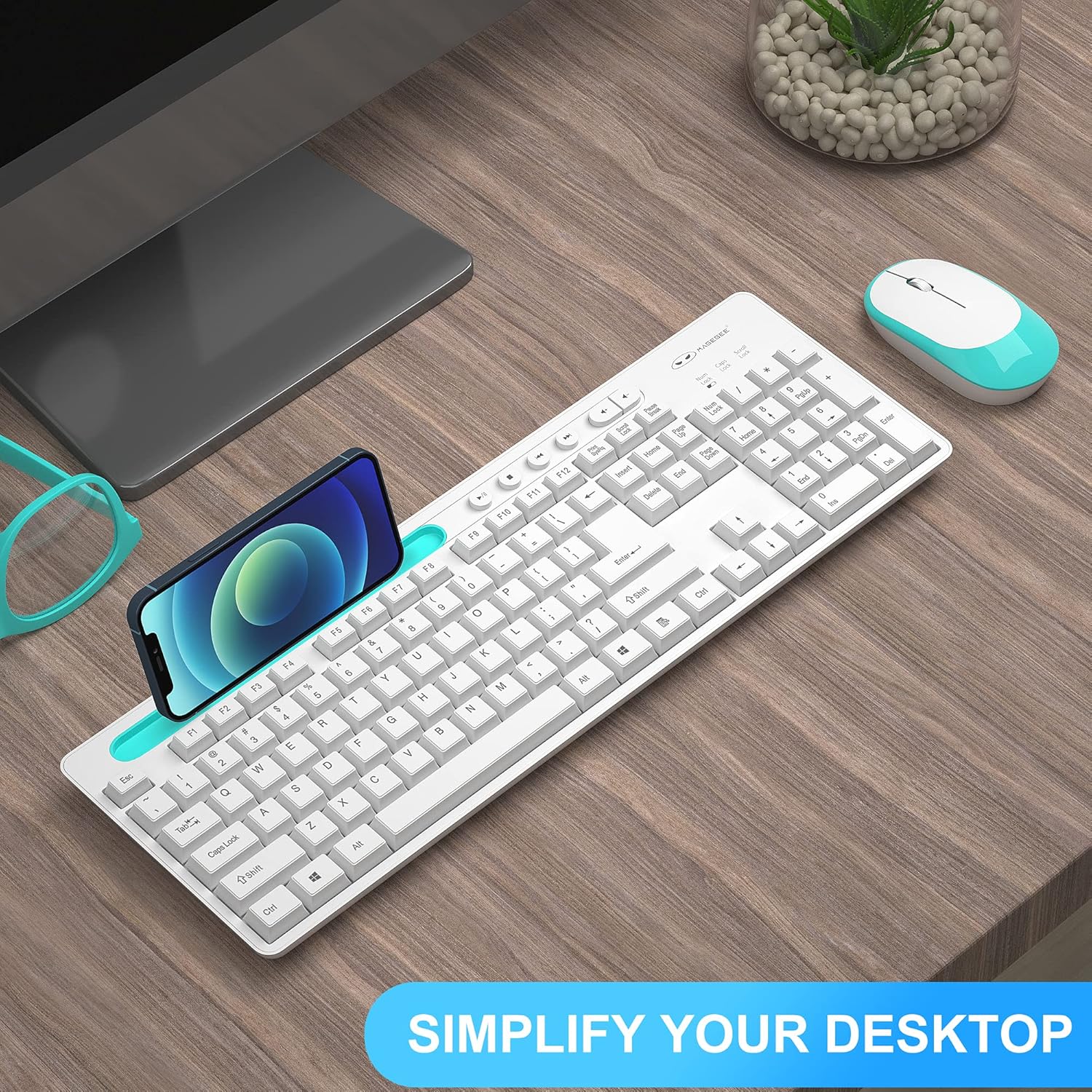
Image: The MageGee V620 wireless keyboard and mouse combo, featuring a full-size keyboard with an integrated phone holder and a compact, ergonomic mouse. A smartphone is shown placed in the keyboard's holder.
محتويات الحزمة
- MageGee V620 Wireless Keyboard
- MageGee Wireless Mouse
- USB Receiver (stored in the mouse battery compartment)
- دليل المستخدم (هذا المستند)
- AA Battery (for mouse, pre-installed or included)
يثبت
Follow these steps to set up your MageGee V620 Wireless Keyboard and Mouse Combo:
- تركيب البطاريات:
- الفأر: Open the battery compartment cover on the bottom of the mouse. Insert the provided AA battery, ensuring correct polarity (+/-). Close the cover.
- لوحة المفاتيح: The keyboard typically uses AAA batteries (not explicitly mentioned in JSON, but common for wireless keyboards). Open the battery compartment on the bottom of the keyboard and insert the required batteries (usually 2x AAA, not included based on JSON).
- تحديد موقع جهاز استقبال USB: The USB receiver for both the keyboard and mouse is usually stored inside the mouse's battery compartment for safekeeping during transport. Carefully remove it.
- توصيل جهاز استقبال USB: Plug the USB receiver into an available USB port on your computer (desktop, laptop, PC).
- تشغيل الطاقة:
- الفأر: قم بتشغيل مفتاح الطاقة الموجود في الجزء السفلي من الماوس.
- لوحة المفاتيح: Ensure the keyboard is powered on (some keyboards have a power switch, others activate upon key press).
- الاتصال التلقائي: The keyboard and mouse should automatically connect to your computer within a few seconds. No additional drivers are typically required for Windows, macOS, or Linux systems.

Image: Illustration demonstrating the 2.4GHz wireless connection of the MageGee V620 combo. A USB receiver is shown plugged into a laptop, wirelessly connecting to both the keyboard and mouse, indicating a range of 33 feet.
تعليمات التشغيل
مميزات لوحة المفاتيح
- تخطيط بالحجم الكامل: يتضمن لوحة مفاتيح رقمية لإدخال البيانات بكفاءة.
- Quiet Crater-Switch Keys: Designed for responsive and quiet typing, reducing noise during use.
- حامل الهاتف المتكامل: A convenient slot at the top of the keyboard allows you to prop up your smartphone or tablet for easy viewعمل.
- Media Shortcut Keys: Access common functions quickly with dedicated media keys (e.g., volume control, play/pause).
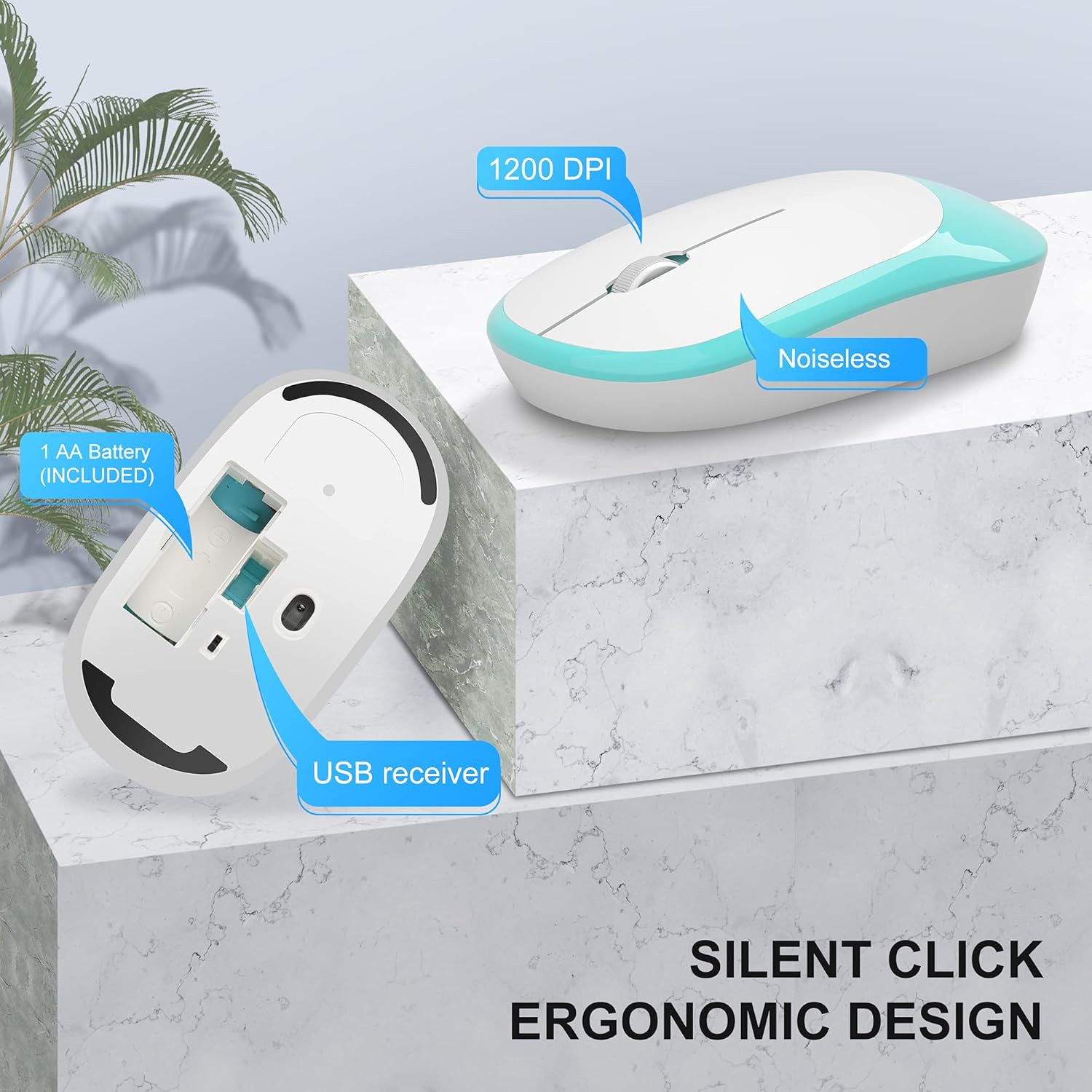
Image: The MageGee V620 wireless keyboard, with highlighted sections indicating the integrated phone holder and the location of 6 media shortcut keys.

الصورة: لقطة مقربة view of the MageGee V620 keyboard keys, emphasizing the responsive and quiet crater-switch design. Icons below indicate anti-scratch, comfortable touch, soft click, and crater switch features.
الماوس الميزات
- تصميم مريح: Shaped for comfortable use over extended periods.
- نقرة صامتة: Reduces click noise, ideal for quiet environments.
- 1200 نقطة لكل بوصة: Provides precise and smooth cursor control.
- تخزين جهاز استقبال USB: The USB receiver can be conveniently stored inside the mouse when not in use, preventing loss.
الصورة: تفصيلية view of the MageGee V620 wireless mouse, pointing out its silent click feature, ergonomic design, 1200 DPI sensitivity, and the location of the AA battery compartment and USB receiver storage.
صيانة
- تنظيف: Use a soft, dry cloth to wipe down the keyboard and mouse. For stubborn dirt, a slightly damp cloth with mild soap can be used, ensuring no liquid enters the device. Do not use harsh chemicals or abrasive cleaners.
- استبدال البطارية:
- When the keyboard or mouse becomes unresponsive or experiences lag, it may be time to replace the batteries.
- Refer to the "Setup" section for instructions on opening battery compartments and inserting new batteries.
- تخلص من البطاريات القديمة بطريقة مسؤولة وفقًا للوائح المحلية.
- تخزين: When not in use for extended periods, turn off the mouse to conserve battery life. Store the USB receiver inside the mouse's compartment to prevent loss.
استكشاف الأخطاء وإصلاحها
If you encounter issues with your MageGee V620 combo, try the following solutions:
- No Connection / Unresponsive:
- تأكد من توصيل جهاز استقبال USB بشكل آمن بمنفذ USB يعمل على جهاز الكمبيوتر الخاص بك.
- Check if the mouse and keyboard are powered on.
- استبدل البطاريات في كل من لوحة المفاتيح والماوس.
- حاول توصيل مستقبل USB بمنفذ USB مختلف.
- قم بتقريب لوحة المفاتيح والماوس من جهاز استقبال USB لاستبعاد مشاكل النطاق.
- أعد تشغيل الكمبيوتر الخاص بك.
- تأخر أو انقطاع الاتصال:
- Ensure there are no large metal objects or other electronic devices (like Wi-Fi routers, other wireless devices) between the keyboard/mouse and the receiver that might cause interference.
- Try using a USB extension cable to position the receiver closer to the keyboard and mouse, away from potential interference sources.
- التحقق من مستويات البطارية.
- Keys Not Working / Mouse Cursor Not Moving:
- Clean any debris from around the affected keys or the mouse sensor.
- Ensure the Num Lock or Caps Lock indicators are functioning correctly (for keyboard).
- Re-establish connection by unplugging and re-plugging the USB receiver.
تحديد
| ميزة | التفاصيل |
|---|---|
| ماركة | ماجي |
| نموذج | رقم V620 |
| تكنولوجيا الاتصال | 2.4 جيجاهرتز لاسلكي (مستقبل USB) |
| الأجهزة المتوافقة | Gaming Console, Laptop, Personal Computer (Windows, PC) |
| ميزة خاصة | Ergonomic Design, Quiet Keys, Phone Holder |
| مؤشر الماوس DPI | 1200 نقطة في البوصة |
| وصف لوحة المفاتيح | حجم كامل مع لوحة أرقام |
| وزن العنصر | 1.44 رطل (حوالي 0.65 كجم) |
| أبعاد الحزمة | 17.48 × 8.62 × 1.5 بوصة (حوالي 44.4 × 21.9 × 3.8 سم) |

Image: Technical drawing showing the dimensions of the MageGee V620 wireless keyboard: approximately 440mm (length), 145mm (width), and 27mm (height).

Image: Technical drawing showing the dimensions of the MageGee V620 wireless mouse: approximately 108mm (length), 60mm (width), and 26mm (height).
الضمان والدعم
MageGee products are designed for reliability and performance. For warranty information or technical support, please refer to the contact details provided with your purchase or visit the official MageGee webالموقع. احتفظ بإيصال الشراء الخاص بك كإثبات للشراء في حالة مطالبات الضمان.
For further assistance, you may contact MageGee customer service through their official channels. You can often find support information on the متجر ماجي على أمازون.


