مقدمة
This manual provides essential information for the safe and proper assembly, operation, maintenance, and troubleshooting of your Arcade1Up Outrun Stand Up Edition arcade game. Please read this manual thoroughly before assembly and retain it for future reference.
The Arcade1Up Outrun cabinet includes four classic racing games: تجاوز, Turbo Outrun, Outrunners، و Power Drift. It features a steering wheel, gas pedal, and brake pedal for an authentic arcade experience.
معلومات السلامة
Always follow basic safety precautions when assembling and operating this product to reduce the risk of fire, electric shock, or injury.
- يحفظ بعيداً عن الماء والرطوبة.
- لا تحاول تفكيك الوحدة أو تعديلها.
- تأكد من وضع الوحدة على سطح ثابت ومستو.
- افصل الوحدة عن مأخذ الطاقة قبل التنظيف أو الصيانة.
- هذا المنتج مخصص للاستخدام الداخلي فقط.
محتويات الحزمة
Verify that all components are present before beginning assembly. If any parts are missing or damaged, contact Arcade1Up customer support.
- لوحات خزائن ألعاب الفيديو
- Control Panel Assembly (Steering Wheel, Buttons)
- Gas and Brake Pedal Assembly
- خيمة مضيئة
- شاشة
- محول الطاقة
- Hardware Pack (Screws, Bolts, etc.)
- دليل التعليمات
الإعداد والتجميع
Assembly typically requires two adults. Follow the numbered steps carefully. Tools required (not included): Phillips head screwdriver.
- فك مكونات الحزمة: قم بإزالة جميع الأجزاء من العبوة بعناية وضعها على سطح نظيف وناعم لمنع الخدوش.
- تجميع الألواح الجانبية: Attach the base and back panels to the main side panels using the provided hardware. Ensure all connections are secure.
- Install Monitor: Mount the monitor into the designated slot within the cabinet structure. Connect the necessary video and power cables.
- إرفاق لوحة التحكم: Secure the control panel, including the steering wheel and buttons, to the front of the cabinet. Connect the control panel wiring to the main board.
- Install Pedal Assembly: Place the gas and brake pedal assembly at the base of the cabinet and connect its cable to the main board.
- Mount Light-Up Marquee: Attach the light-up marquee to the top of the cabinet and connect its power cable.
- الفحوصات النهائية: Before powering on, double-check all connections and ensure all screws are tightened.

Figure 1: Fully assembled Arcade1Up Outrun cabinet.

Figure 2: Close-up of the control panel and screen displaying game options.
تعليمات التشغيل
Once assembled and plugged in, the unit is ready for operation.
- تشغيل الطاقة: Locate the power switch, typically on the back or side of the cabinet, and switch it to the 'ON' position. The marquee will light up and the screen will display the game selection menu.
- Select Game: Use the steering wheel or directional buttons (if present) and the 'SELECT' or 'ENTER' button to navigate through the available games: تجاوز, Turbo Outrun, Outrunners، و Power Drift.
- ابدأ اللعبة: Press the 'START' button to begin playing the selected game.
- Gameplay Controls:
- المقود: Turn left or right to control your vehicle's direction.
- دواسة البنزين: اضغط لأسفل للتسارع.
- دواسة الفرامل: Press down to decelerate or stop.
- Shift Lever (if applicable): Use to change gears (High/Low).
- Exiting a Game: To return to the main game selection menu, press and hold the 'PLAYER 1 START' button for approximately 5 seconds.
- إيقاف التشغيل: When finished playing, switch the power button to the 'OFF' position.
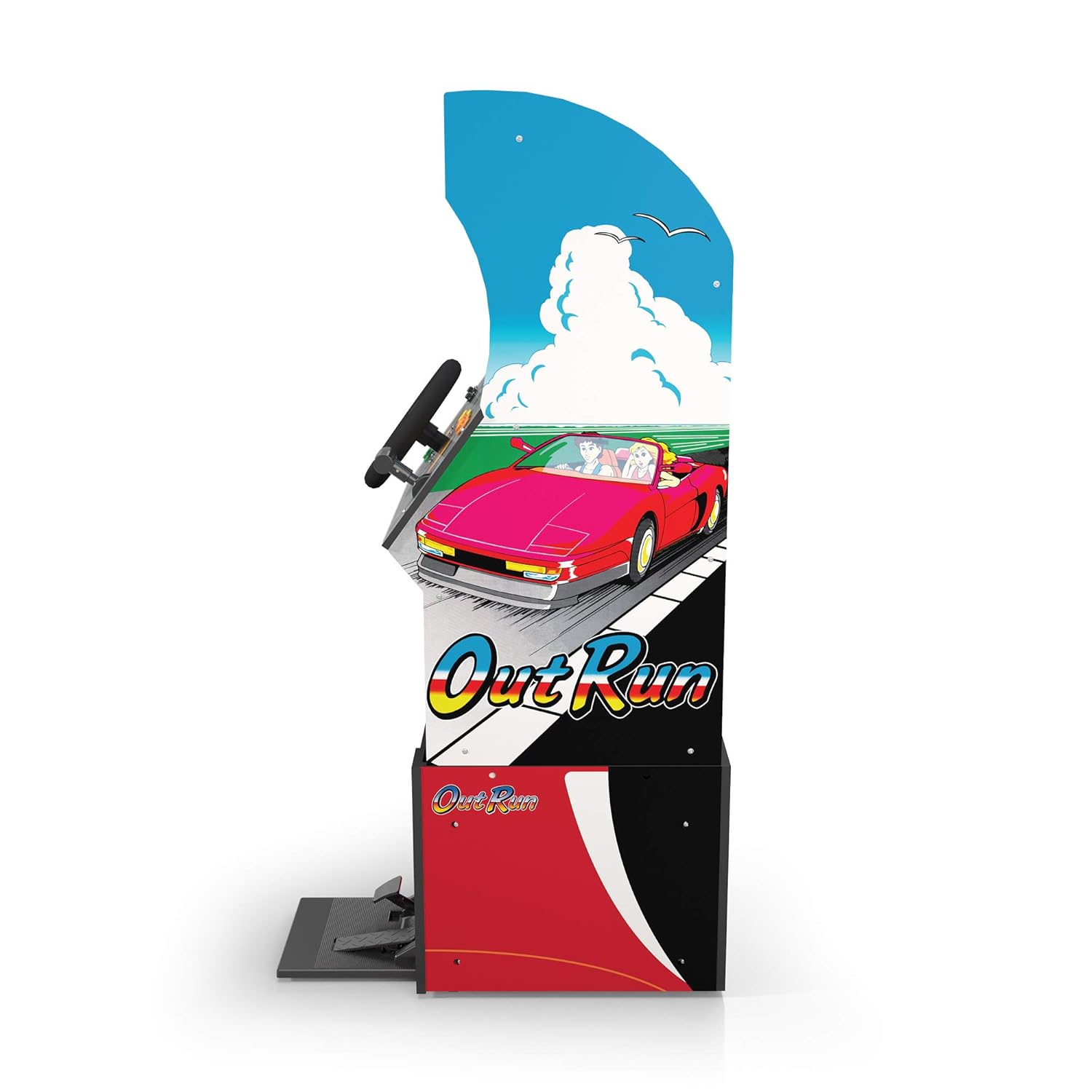
الشكل 3: الجانب الإيجابيfile of the arcade cabinet, illustrating the driving controls.
صيانة
Regular maintenance ensures the longevity and optimal performance of your arcade cabinet.
- تنظيف: استخدم قطعة قماش ناعمة وجافة لمسح أسطح الخزائن. بالنسبة للبقع الصعبة، استخدم قطعة قماش مبللة قليلاً.amp cloth with mild soap can be used, followed by drying. Avoid abrasive cleaners or excessive moisture.
- العناية بالشاشة: Clean the monitor screen with a microfiber cloth specifically designed for electronics. Do not spray liquid directly onto the screen.
- صيانة الدواسة: Periodically check the gas and brake pedals for any debris or obstructions that might hinder their movement. Keep the area around the pedals clean.
- إدارة الكابلات: Ensure all cables are neatly tucked away and not pinched or exposed, which could lead to damage.
استكشاف الأخطاء وإصلاحها
راجع هذا القسم للاطلاع على المشكلات الشائعة وحلولها. إذا استمرت المشكلة، يُرجى التواصل مع خدمة العملاء.
| مشكلة | السبب المحتمل | حل |
|---|---|---|
| الوحدة لا تعمل بالطاقة. | Power cable not connected; Power outlet issue; Power switch off. | Ensure power cable is securely plugged into the unit and a working outlet. Check power switch is 'ON'. |
| لا توجد صورة على الشاشة. | Monitor cable loose; Monitor not powered. | Check monitor's power and video cables are securely connected. |
| Controls (steering wheel/pedals) unresponsive. | Control panel/pedal cables loose; Software glitch. | Verify all control panel and pedal cables are firmly connected to the main board. Try restarting the unit. |
| تتجمد اللعبة أو تتعطل. | مشكلة برمجية مؤقتة. | Power off the unit, wait 10 seconds, then power back on. |
تحديد
- رقم الموديل: 195570000861
- الأبعاد (مجمعة): 47.75 x 23.75 x 10.5 inches (Height x Width x Depth)
- وزن: 89.5 رطل
- الألعاب المضمنة: Outrun, Turbo Outrun, Outrunners, Power Drift
- عناصر التحكم: Steering Wheel, Gas Pedal, Brake Pedal, Game Selection Buttons
- قوة: AC Adapter (Input: 100-240V ~ 50/60Hz, Output: Specific to adapter, refer to label)
- الشركة المصنعة: Arcade 1Up
- تاريخ الافراج عنه: 7 أبريل 2021
الضمان والدعم
Arcade1Up products typically come with a limited manufacturer's warranty. For specific warranty terms and conditions, please refer to the warranty card included with your product or visit the official Arcade1Up webموقع.
For technical support, missing parts, or warranty claims, please contact Arcade1Up Customer Support:
- Webموقع: arcade1up.com/pages/contact-us
- هاتف: الرجوع إلى المسؤول webموقع لأرقام الاتصال الإقليمية.
When contacting support, please have your model number (195570000861) and proof of purchase readily available.


