1. المقدمة
Welcome to the user manual for your ANYQOO Stylus Pen C6. This guide provides essential information for the proper setup, operation, and maintenance of your stylus pen. Please read this manual thoroughly to ensure optimal performance and longevity of your device.

Image: The ANYQOO Stylus Pen C6, shown in purple, accompanied by three replacement tips.
2. التوافق
The ANYQOO Stylus Pen C6 is designed for specific iPad models released from 2018 to 2025. It is not compatible with pre-2018 iPads, iPhones, or Android devices. Please verify your iPad model number before use.
- آيباد برو: 13-inch (M4/M3), 12.9-inch (3rd/4th/5th/6th Gen), 11-inch (All Generations)
- آيباد إير: 13-inch (M3/M2), 11-inch (M3/M2), 5th/4th/3rd Gen
- آيباد: 11th/10th/9th/8th/7th/6th Gen
- آيباد ميني: A17 Pro/6th/5th Gen
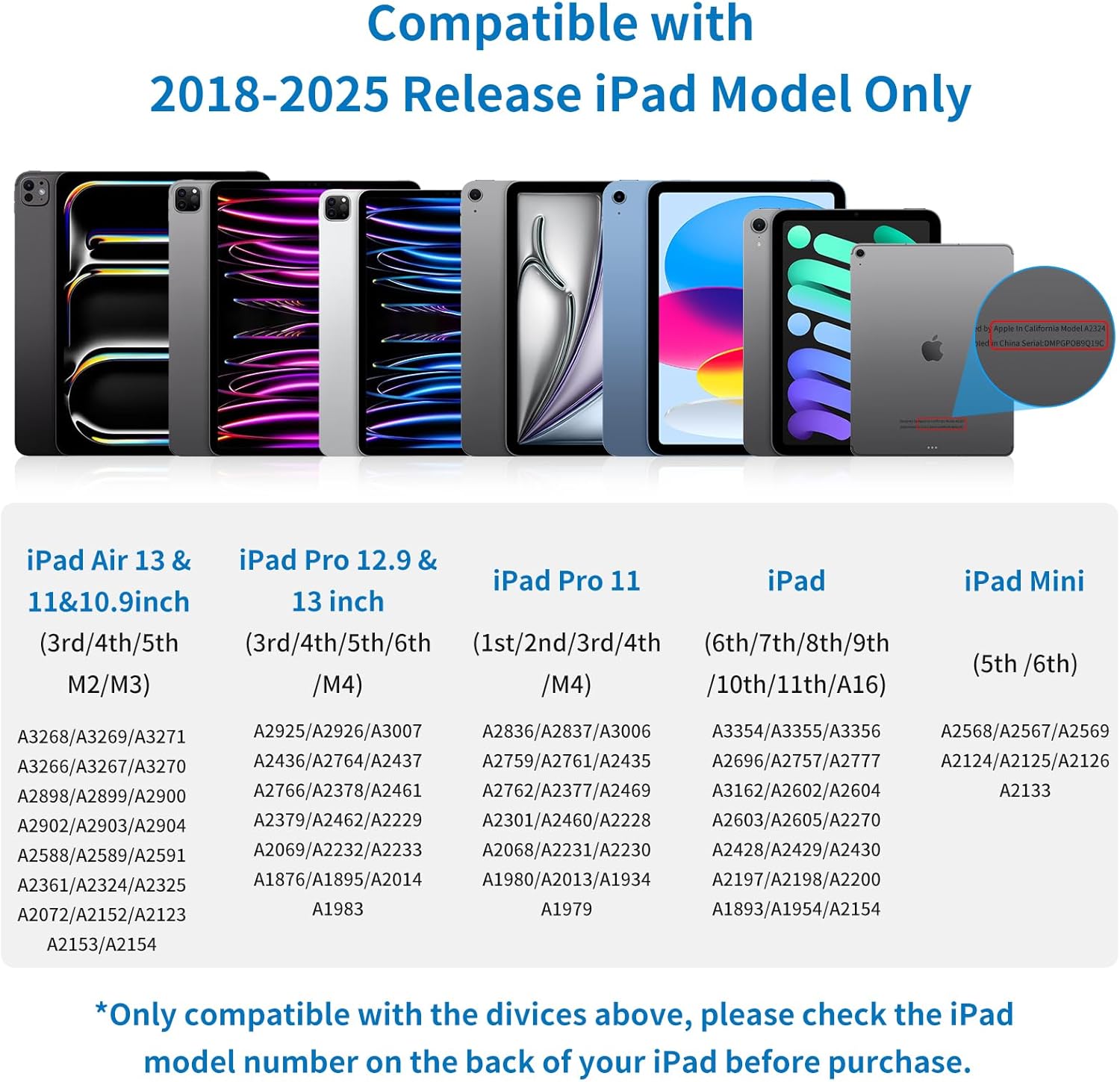
Image: A detailed chart illustrating the compatibility of the stylus pen with various iPad models and their specific model numbers.
To find your iPad's model number, check the back of your device. It typically starts with the letter 'A' followed by four digits (e.g., A2324).
3. محتويات العبوة
Upon opening your ANYQOO Stylus Pen C6 package, you should find the following items:
- 1x ANYQOO Stylus Pen C6
- 3x Replacement Tips
- 1x USB-C شحن كابل
- 1x دليل المستخدم (هذه الوثيقة)

Image: The complete contents of the ANYQOO Stylus Pen C6 package, laid out for clear viewعمل.
4. الإعداد
4.1 الشحن الأولي
Before first use, fully charge your ANYQOO Stylus Pen C6. Connect the provided USB-C charging cable to the pen's charging port and a compatible USB power source. The indicator lights on the pen will show charging status.
4.2 تشغيل/إيقاف التشغيل
To power on the stylus, simply double-tap the cap. Double-tap again to power it off. The pen will automatically enter sleep mode after 10 minutes of inactivity to conserve battery life.
4.3 Pairing (No Bluetooth Required)
The ANYQOO Stylus Pen C6 does not require Bluetooth pairing or any special app installation. Once powered on, it is ready for immediate use with compatible iPad models.
5. تعليمات التشغيل
5.1 Palm Rejection Technology
The stylus features advanced palm rejection technology, allowing you to rest your hand comfortably on the iPad screen while writing or drawing, without creating unintended marks. This provides a natural writing experience.
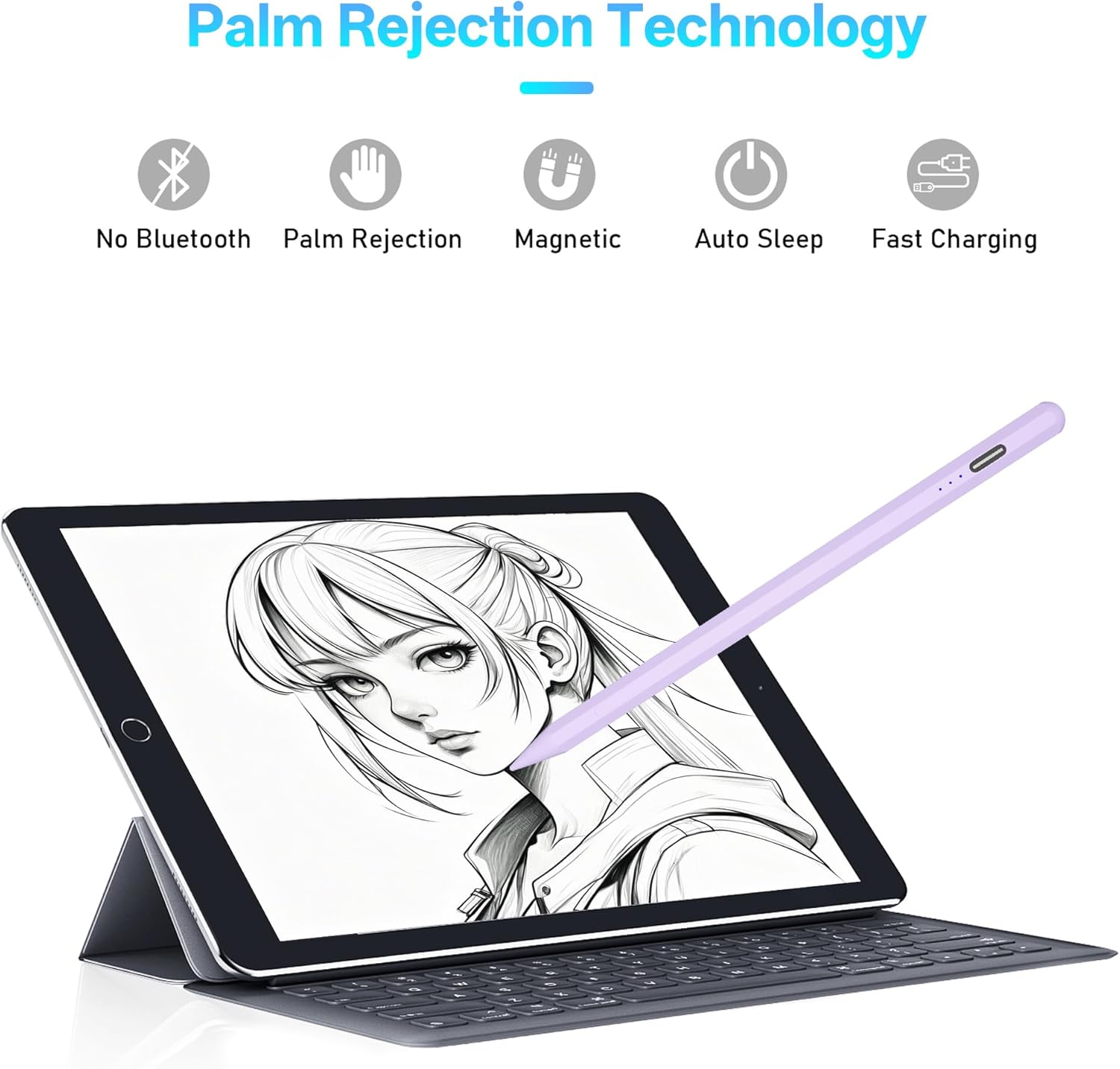
Image: A user drawing on an iPad with the stylus, demonstrating the palm rejection feature.
5.2 التحكم في الإمالة
The ANYQOO Stylus Pen C6 supports tilt sensitivity. By adjusting the angle at which you hold the pen, you can create lines of varying thickness, similar to using a traditional pencil. This feature is ideal for shading and artistic applications.

Image: A visual representation of how tilt sensitivity works, showing line variations based on pen angle.
5.3 الامتزاز المغناطيسي
The stylus can magnetically attach to the side of compatible iPad models for convenient storage and to prevent loss. This feature ensures your pen is always within reach when not in use.

Image: The stylus pen shown adhering magnetically to the side of an iPad.
6. الصيانة
6.1 استبدال رأس القلم
The ANYQOO Stylus Pen C6 comes with three replacement tips. If the pen tip becomes worn or damaged, follow these steps to replace it:
- Gently twist the old tip counter-clockwise to remove it from the pen.
- Select a new replacement tip.
- Carefully twist the new tip clockwise onto the pen until it is securely fastened. Do not overtighten.

الصورة: انفجار view demonstrating the process of replacing the stylus pen tip.
6.2 التنظيف
To clean your stylus pen, wipe it with a soft, dry, lint-free cloth. Avoid using abrasive materials or harsh chemicals, as these can damage the pen's finish.
7. استكشاف الأخطاء وإصلاحها
| مشكلة | حل |
|---|---|
| القلم لا يعمل. | Ensure the pen is charged. Double-tap the cap to power on. |
| Pen does not write or draw. | Verify iPad compatibility. Ensure the pen is powered on. Check if the pen tip is securely attached and not worn. |
| Inaccurate or intermittent response. | Ensure the iPad screen is clean. Replace the pen tip if it appears worn. Restart your iPad. |
| خاصية منع راحة اليد لا تعمل. | Ensure your iPad model supports palm rejection with third-party styluses. Some apps may have specific settings for stylus input. |
8. المواصفات
- نموذج: C6
- ماركة: أي كيوو
- مادة: الألومنيوم
- وزن السلعة: 0.32 أونصة (حوالي 9 جرامًا)
- أبعاد الحزمة: 8.23 × 2.36 × 0.67 بوصة
- نوع البطارية: بوليمر ليثيوم أيون
- البطاريات: 1 بطارية ليثيوم بوليمر (متضمنة)
- منفذ الشحن: يو اس بي-سي
- سمات: Palm Rejection, Tilt Control, Magnetic Adsorption, Auto Sleep
9. الضمان والدعم
ANYQOO provides a ضمان لمدة 12 شهرًا for the Stylus Pen C6, covering manufacturing defects from the date of purchase. For any inquiries, technical assistance, or warranty claims, please contact our customer support team.
- خدمة العملاء: Available 24 hours.
- موقع الدعم: US-based customer support.
Please refer to your purchase documentation for specific contact details or visit the official ANYQOO webالموقع للحصول على أحدث معلومات الدعم.


