ALFAJR CW-15 Automatic Islamic Azan Prayer Clock User Manual
Model: CW-15 | Brand: ALFAJR
مقدمة
This manual provides comprehensive instructions for setting up and operating your ALFAJR CW-15 Automatic Islamic Azan Prayer Clock. Designed for both wall mounting and table placement, this digital clock automatically calculates and plays the Azan five times a day based on your set location. Please read this manual carefully to ensure proper use and to fully utilize all features of your new clock.
Automatic Azan time adjustment after initial city/time setup.
Gregorian and Hijri calendar display.
عرض درجة الحرارة بالدرجة المئوية أو الفهرنهايت.
Daylight Saving Time (DST) option.
English and Arabic display languages.
Wall-mountable or table-standing design.
Dimensions: Approximately 9 inches (width) x 8.5 inches (height).
Powered by 4 AA batteries (included) or USB-C (cable not included).
دليل الإعداد
1. تركيب البطارية
The ALFAJR CW-15 clock operates on 4 AA batteries. These are included in your package.
حدد مكان حجرة البطارية على الجزء الخلفي من الساعة.
افتح غطاء حجرة البطارية.
Insert the 4 AA batteries, ensuring correct polarity (+ and -).
أغلق غطاء حجرة البطارية جيدًا.
Alternatively, the clock can be powered via a USB-C cable (not included) connected to a compatible power adapter.
2. Initial Power On and Display Overview
Upon inserting batteries or connecting USB-C power, the clock will power on. The display will show the current time, date, and temperature. Familiarize yourself with the buttons on the side/back of the clock: UP, تعيين، و تحت.
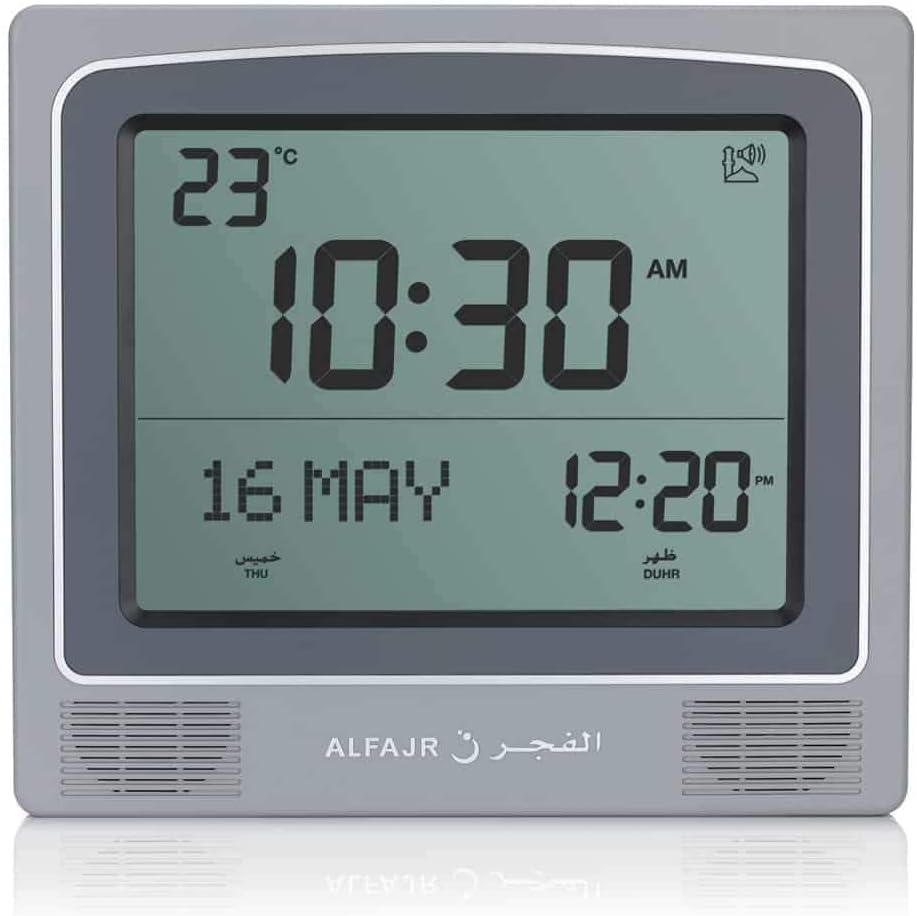
الشكل 1: الجبهة view of the ALFAJR CW-15 clock, showing the digital display with time, date, and temperature. The speaker grilles are visible at the bottom.
الشكل 2: الجبهة view of the ALFAJR CW-15 clock, similar to Figure 1, but with the ALFAJR brand logo visible at the bottom center.
3. ضبط الوقت والتاريخ
اضغط مع الاستمرار على تعيين button for approximately 3 seconds until the time display starts flashing.
استخدم UP و تحت الأزرار لضبط الساعة. اضغط تعيين للتأكيد والانتقال إلى محضر الاجتماع.
اضبط الدقائق باستخدام UP و تحتثم اضغط تعيين.
Continue this process to set the year, month, and day.
بعد ضبط التاريخ، اضغط تعيين to exit the time/date setting mode.
4. Setting Location (City or Coordinates)
Accurate Azan times depend on correct location settings. You can select a pre-programmed city or enter latitude/longitude.
اضغط على تعيين button once (short press) to enter the main menu.
يستخدم UP or تحت to navigate to the "CITY" or "LOCATION" setting.
يضعط تعيين to enter the location setting.
Option A: Select Pre-programmed City: يستخدم UP or تحت to scroll through the list of cities. Once your city is displayed, press تعيين للتأكيد.
Option B: Enter Latitude/Longitude: If your city is not listed, select the option to enter coordinates. Use UP و تحت to adjust the values for latitude, longitude, and time zone offset (GMT). Press تعيين بعد كل قيمة.
After confirming your location, the clock will automatically calculate the Azan times.
5. Azan Calculation Method
The clock supports various Azan calculation methods. Consult local Islamic authorities for the recommended method in your region.
From the main menu (short press تعيين), navigate to "CALC. METHOD".
يضعط تعيين للدخول.
يستخدم UP or تحت to select the desired calculation method (e.g., Muslim World League, Umm Al-Qura, Egyptian General Authority of Survey, etc.).
يضعط تعيين للتأكيد.
6. التوقيت الصيفي (DST)
If your region observes Daylight Saving Time, enable this feature.
From the main menu, navigate to "DST".
يضعط تعيين.
يستخدم UP or تحت to toggle between "ON" and "OFF".
يضعط تعيين للتأكيد.
7. وحدة درجة الحرارة
You can choose to display temperature in Celsius or Fahrenheit.
From the main menu, navigate to "TEMP UNIT".
يضعط تعيين.
يستخدم UP or تحت to select "C" (Celsius) or "F" (Fahrenheit).
يضعط تعيين للتأكيد.
8. Calendar Display
The clock can display either the Gregorian or Hijri calendar.
From the main menu, navigate to "CALENDAR".
يضعط تعيين.
يستخدم UP or تحت to select "GREGORIAN" or "HIJRI".
يضعط تعيين للتأكيد.
تعليمات التشغيل
1. Adjusting Azan Volume
The clock features adjustable Azan volume. The volume buttons are typically located on the side or back of the unit.
During an Azan, press the UP or تحت buttons to increase or decrease the volume.
Alternatively, some models may have a dedicated volume switch or buttons on the back. Refer to the physical clock for exact button placement.
2. Changing Azan Reciter
You can select from five different Azan reciters.
From the main menu (short press تعيين), navigate to "AZAN VOICE" or "RECITER".
يضعط تعيين للدخول.
يستخدم UP or تحت to cycle through the available reciters (Makkah, Madina, Egypt, AlQuds, Riyadh).
يضعط تعيين لتأكيد اختيارك.
3. Daily Alarms
The clock includes daily alarm functions in addition to the Azan. These can be set for specific times.
From the main menu, navigate to "DAILY ALARM".
يضعط تعيين.
يستخدم UP or تحت to set the desired alarm time (hour and minute).
يضعط تعيين to confirm and enable the alarm.
To disable, navigate back to "DAILY ALARM" and set the time to "OFF" or a similar option.
4. أوضاع العرض
The clock typically cycles through different display information or allows manual switching.
The default display shows time, date, and temperature.
الضغط القصير على UP or تحت buttons outside of menu mode may cycle through additional information like next prayer time or Qibla direction (if available on this model).
خيارات التركيب
The ALFAJR CW-15 clock is designed for versatile placement, either on a wall or a flat surface.
1. التثبيت على الحائط
To mount the clock on a wall:
Locate the keyhole slot on the back of the clock.
Choose a suitable location on a wall.
Install a screw (not included) into the wall, leaving a small portion protruding. Ensure the screw head fits into the keyhole slot.
Carefully hang the clock onto the screw, ensuring it is securely seated.
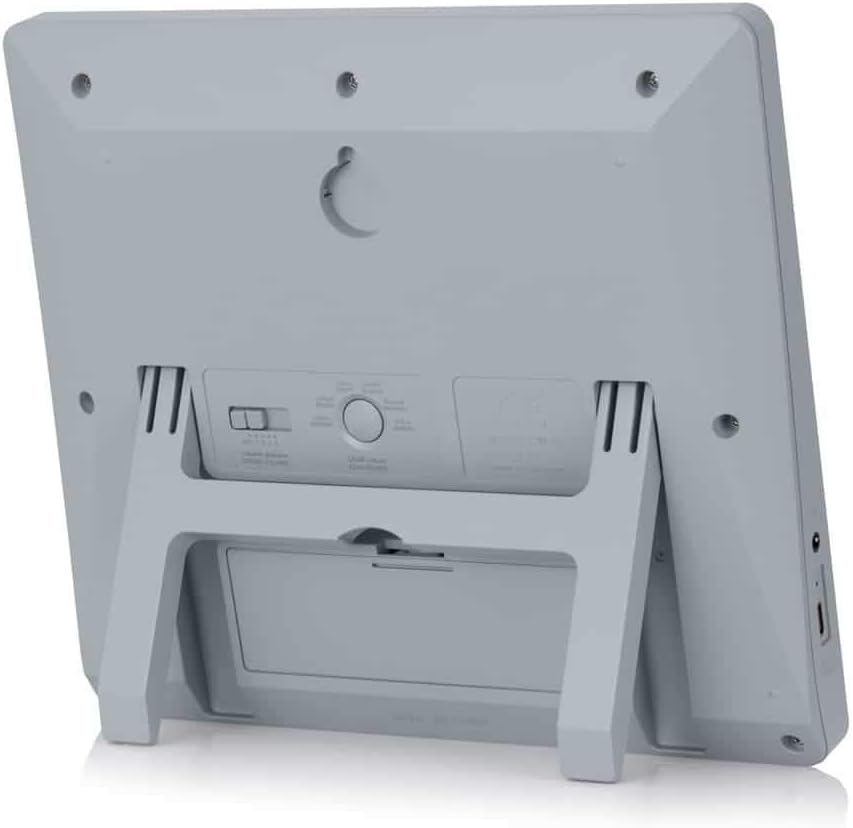
الشكل 3: خلفي view of the ALFAJR CW-15 clock, highlighting the keyhole for wall mounting and the battery compartment.
2. Table Placement
For table or desk placement:
Locate the integrated stand on the back of the clock.
Pull out the stand until it locks into position.
Place the clock on a flat, stable surface.
الشكل 4: الجانب view of the ALFAJR CW-15 clock, showing the integrated kickstand extended for stable table placement.
صيانة
1. التنظيف
To maintain the appearance and functionality of your clock:
Wipe the clock's surface with a soft, dry cloth.
لا تستخدم المنظفات الكاشطة أو المذيبات أو البخاخات الكيميائية، لأنها قد تتلف الشاشة أوasing.
Avoid getting moisture into the clock's openings.
2. استبدال البطارية
When the display dims or the clock functions become erratic, it's time to replace the batteries.
افتح حجرة البطارية في الجزء الخلفي من الساعة.
قم بإزالة بطاريات AA القديمة.
Insert four new AA batteries, observing correct polarity.
أغلق حجرة البطارية.
You may need to re-enter the time and location settings after battery replacement.
استكشاف الأخطاء وإصلاحها
مشكلة
السبب المحتمل
حل
الساعة لا تعمل.
Batteries are dead or incorrectly inserted. No USB-C power.
Check battery polarity. Replace with new batteries. Ensure USB-C cable (if used) is connected and power source is active.
Verify city, latitude, longitude, and GMT offset. Select the correct Azan calculation method for your region. Check DST setting.
Azan sound is too low or too high.
إعداد مستوى الصوت يحتاج إلى تعديل.
Adjust the volume using the dedicated buttons or through the menu.
العرض خافت أو وميض.
انخفاض طاقة البطارية.
استبدل جميع بطاريات AA الأربعة بأخرى جديدة.
Clock resets unexpectedly.
Intermittent power loss or very low batteries.
Ensure batteries are fresh and securely seated. If using USB-C, check the connection and power source stability.
تحديد
نموذج: CW-15
ماركة: الفجر
نوع العرض: رقمي
لون: رمادي
مادة: بلاستيك
أبعاد المنتج: 8.5 بوصة (عرض) × 9 بوصة (ارتفاع)
وزن السلعة: 3 أونصات
مصدر الطاقة: 4 AA batteries (included) or USB-C (cable not included)
نوع التركيب: حامل حائط / حامل طاولة
المميزات الخاصة: Automatic Azan, Multiple Azan Reciters, Gregorian/Hijri Calendar, Temperature Display, Daylight Saving Time
اللغات: الإنجليزية, العربية
الضمان والدعم
ضمان محدود
The ALFAJR CW-15 Azan Clock comes with a limited warranty. Please refer to the warranty card included in your original packaging for specific terms, conditions, and duration. This warranty typically covers manufacturing defects under normal use.
دعم العملاء
For technical assistance, troubleshooting not covered in this manual, or warranty claims, please contact ALFAJR customer support through their official website or the retailer from whom you purchased the product. Please have your model number (CW-15) and purchase date available when contacting support.
المستندات ذات الصلة - CW-15
دليل مستخدم مبرد صناعي S&A CW-5000/5200 دليل المستخدم لمبردات الصناعية من سلسلة S&A CW-5000 وCW-5200 من شركة GUANGZHOU TEYU ELECTROMECHANICAL CO., LTD.، يغطي التركيب والتشغيل والمواصفات واستكشاف الأخطاء وإصلاحها.
دليل مستخدم مبردات التبريد الصناعية من سلسلة S&A CW-5000 وCW-5200 دليل استخدام مبردات التبريد الصناعية من سلسلة S&A CW-5000 وCW-5200 من شركة قوانغتشو تيو الكهروميكانيكية المحدودة. يغطي هذا الدليل التركيب والتشغيل والمواصفات واستكشاف الأخطاء وإصلاحها للتحكم الدقيق في درجة الحرارة.
دليل مستخدم مبردات التبريد الصناعية من سلسلة CW-5200 دليل المستخدم لمبرد التبريد الصناعي من سلسلة CW-5200، والذي يغطي معلومات السلامة، والتركيب، والتشغيل، والتعديل، والإنذارات، واستكشاف الأخطاء وإصلاحها، والمواصفات.
دليل مستخدم مبردات التبريد الصناعية من سلسلة CW-5202 يوفر دليل المستخدم هذا تعليمات مفصلة لمبرد التبريد الصناعي من سلسلة CW-5202، بما في ذلك التركيب والتشغيل واحتياطات السلامة واستكشاف الأخطاء وإصلاحها والمواصفات الفنية للحصول على الأداء الأمثل.
نظام Thermafiber Impasse: جدار ستارة محيطي لاحتواء الحرائق اكتشف نظام Thermafiber Impasse، وهو حلٌّ حاصل على براءة اختراع لاحتواء الحرائق في محيط الجدران الستارية من شركة Owens Corning. يُسهّل هذا النظام عملية التركيب، ويُعزز مقاومة الحرائق، ويُقدّم أداءً صوتيًا فائقًا.
دليل مستخدم سلسلة Epson CW-C4000 دليل مستخدم شامل لطابعات سلسلة Epson CW-C4000، يشمل الإعداد والتشغيل والصيانة واستكشاف الأخطاء وإصلاحها والمواصفات. تعرّف على كيفية تحقيق أقصى استفادة من طابعة Epson.