1. المقدمة
This manual provides instructions for the Sharp Digital Alarm Clock, Model SPC547AJAMZ. This device features an easy-to-read LED display, a high-speed USB charging port, and essential alarm functions. Please read this manual thoroughly before use to ensure proper operation and to maximize the product's lifespan.

Figure 1: Sharp Digital Alarm Clock (Model SPC547AJAMZ) front view.
2. مواصفات المنتج
The Sharp Digital Alarm Clock offers the following key features:
- شاشة سهلة القراءة: Large, clear green LED digits for visibility from a distance.
- High-Speed USB Charging Port: أ 2 AMP USB port for rapid charging of compatible devices such as smartphones and tablets.
- حجم التنبيه قابل للتعديل: Select between high and low alarm volume settings.
- عملية بسيطة: Intuitive button controls for setting time and alarm.
- البطارية النسخ الاحتياطي: يحافظ على إعدادات الوقت والتنبيه أثناء انقطاع الطاقةtages (requires 2 AAA batteries, not included). The display will be blank during battery backup mode, but the internal clock will continue to run, and the alarm will sound at the set time.

Figure 2: Alarm clock with a smartphone connected to the USB charging port.
3. محتويات العبوة
تأكد من وجود جميع العناصر في العبوة:
- Sharp Digital Alarm Clock (Model SPC547AJAMZ)
- محول التيار المتردد
- دليل المستخدم (هذا المستند)
Note: 2 AAA batteries for backup are not included and must be purchased separately.
4. معلومات السلامة
يرجى مراعاة احتياطات السلامة التالية:
- لا تعرض الوحدة للماء أو الرطوبة الزائدة.
- تجنب وضع الوحدة بالقرب من مصادر الحرارة أو في ضوء الشمس المباشر.
- استخدم فقط محول الطاقة المرفق.
- لا تحاول تفكيك الوحدة أو تعديلها.
- يحفظ بعيدًا عن متناول الأطفال.
- تأكد من التهوية المناسبة حول الوحدة.
5. الإعداد
5.1 توصيل الطاقة
- Plug the AC power adapter into the DC IN jack located on the back of the alarm clock.
- قم بتوصيل الطرف الآخر من محول الطاقة المتردد بمأخذ حائط قياسي (120 فولت تيار متردد، 60 هرتز).
- The display will illuminate, and the clock will be ready for time setting.
5.2 تركيب بطارية احتياطية
To ensure time and alarm settings are retained during a power outage:
- حدد مكان حجرة البطارية في الجزء السفلي من الوحدة.
- افتح غطاء حجرة البطارية.
- أدخل بطاريتين جديدتين من نوع AAA، مع مراعاة القطبية الصحيحة (+ و -) كما هو موضح داخل الحجرة.
- أغلق غطاء حجرة البطارية جيدًا.
Note: Batteries are for backup only. The clock display will not be lit during a power outage when operating on battery backup, but the internal clock will continue to run, and the alarm will sound at the set time.
6. تعليمات التشغيل
Familiarize yourself with the control buttons located on the top of the unit:
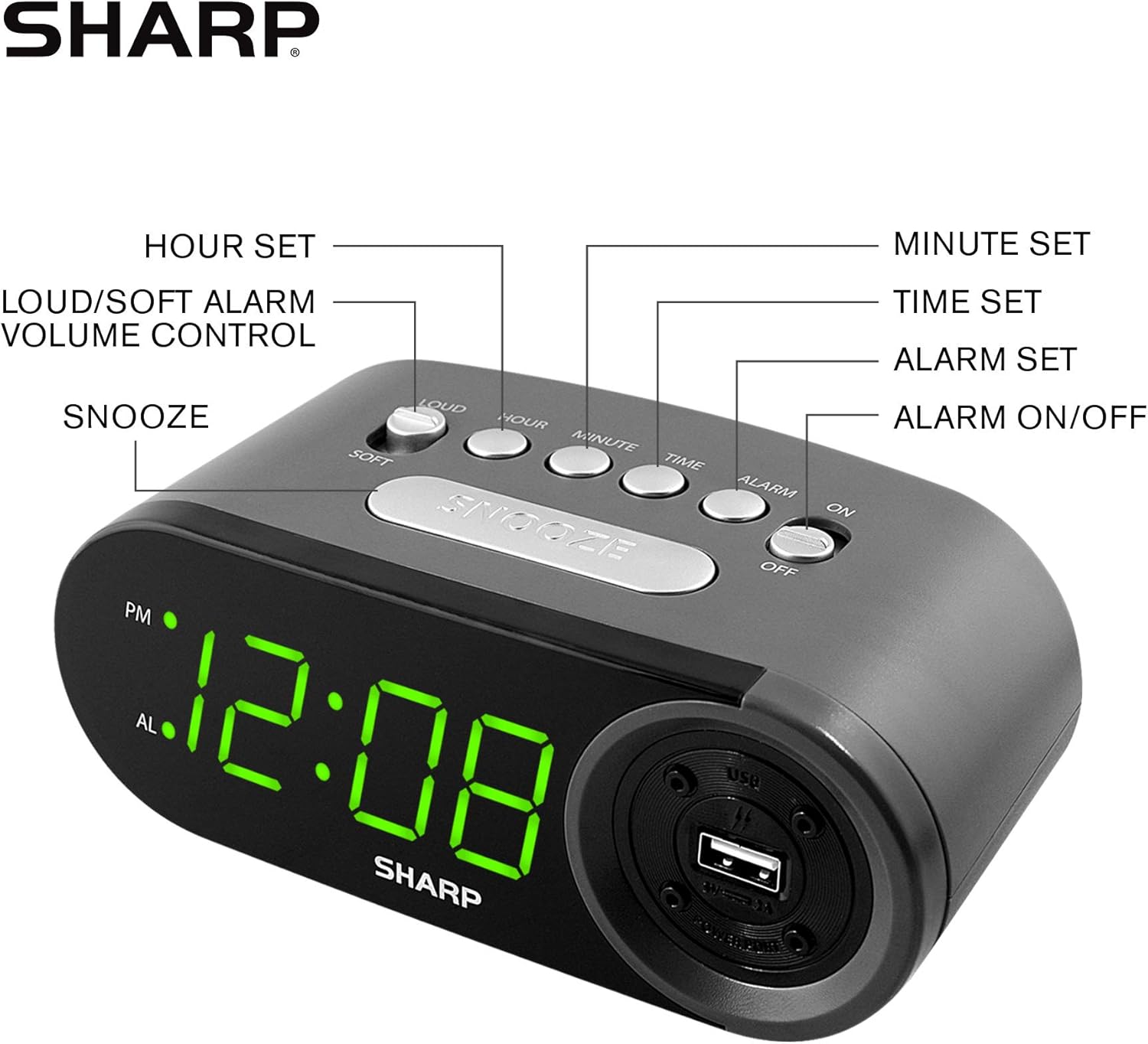
Figure 3: Top panel controls and their functions.
6.1 ضبط الوقت الحالي
- اضغط مع الاستمرار على وقت button until the display begins to flash.
- اضغط على ساعة button repeatedly to set the hour. Observe the PM indicator for afternoon hours.
- اضغط على دقيقة button repeatedly to set the minutes.
- بمجرد ضبط الوقت المطلوب، اضغط على وقت اضغط على الزر مرة أخرى للتأكيد والخروج من وضع ضبط الوقت.
6.2 ضبط وقت المنبه
- اضغط مع الاستمرار على إنذار button until the alarm time display begins to flash. The "AL" indicator will also flash.
- اضغط على ساعة button repeatedly to set the alarm hour. Observe the PM indicator.
- اضغط على دقيقة button repeatedly to set the alarm minutes.
- بمجرد ضبط وقت التنبيه المطلوب، اضغط على إنذار اضغط على الزر مرة أخرى لتأكيد والخروج من وضع ضبط التنبيه.
6.3 تفعيل/إلغاء تفعيل جهاز الإنذار
- لتشغيل المنبه ONحرك تشغيل / إيقاف الإنذار switch to the "ON" position. The "AL" indicator will appear on the display.
- لتشغيل المنبه عنحرك تشغيل / إيقاف الإنذار switch to the "OFF" position. The "AL" indicator will disappear.
6.4 وظيفة الغفوة
عندما يصدر صوت التنبيه، اضغط على الزر الكبير غفوة button. The alarm will temporarily stop and sound again after approximately 9 minutes.
6.5 إيقاف الإنذار
To stop the alarm completely after it sounds (without using snooze), slide the تشغيل / إيقاف الإنذار switch to the "OFF" position. The alarm will reset for the next day if the switch is moved back to "ON".
6.6 ضبط مستوى صوت المنبه
اضغط على LOUD/SOFT button to toggle between high and low alarm volume settings.
6.7 استخدام منفذ شحن USB
ال2 AMP USB charging port is located on the right side of the unit.
- Connect your device's USB charging cable (not included) to the USB port on the alarm clock.
- Connect the other end of the cable to your smartphone, tablet, or other compatible USB-powered device.
- Ensure the alarm clock is connected to AC power for the USB port to function.
Note: Charging speed may vary depending on your device and cable.
7. الصيانة
To keep your alarm clock in optimal condition:
- تنظيف: امسح الوحدة بقطعة قماش ناعمة وجافة. لا تستخدم منظفات أو مذيبات كاشطة.
- استبدال البطارية: Replace AAA backup batteries annually or when the battery low indicator (if present) appears, to ensure reliable backup functionality.
- تخزين: في حالة تخزين الوحدة لفترة طويلة، قم بإزالة البطاريات الاحتياطية لمنع التسرب.
8. استكشاف الأخطاء وإصلاحها
| مشكلة | السبب المحتمل | حل |
|---|---|---|
| شاشة الساعة فارغة. | لا يوجد تيار متردد؛ انقطاع التيار الكهربائيtagهـ؛ تم فصل الوحدة عن الكهرباء. | Ensure AC adapter is securely plugged into the unit and a working wall outlet. Check for power outagإِسْ |
| لا يصدر صوت الإنذار. | Alarm is not activated; alarm time is incorrect; volume is too low. | Slide ALARM ON/OFF switch to "ON". Verify alarm time is set correctly. Adjust alarm volume using the LOUD/SOFT button. |
| منفذ شحن USB لا يعمل. | Clock not connected to AC power; device not compatible; faulty cable. | Ensure the clock is plugged into AC power. Try a different USB cable or device to confirm compatibility. |
| تُفقد إعدادات الوقت/المنبه بعد انقطاع التيار الكهربائيtage. | البطاريات الاحتياطية ميتة أو غير مثبتة. | Install two fresh AAA batteries in the battery compartment, ensuring correct polarity. |
9. المواصفات
- ماركة: حاد
- نموذج: SPC547AJAMZ
- نوع العرض: شاشة LED رقمية (خضراء)
- مصدر الطاقة: Corded Electric (AC 120V, 60Hz)
- البطارية النسخ الاحتياطي: بطاريتان AAA (غير متضمنتان)
- منفذ شحن USB: 2 AMP (5V)
- أبعاد المنتج: تقريبًا 6.2 بوصة عرضًا × 2.3 بوصة ارتفاعًا × 3.25 بوصة عمقًا
- وزن السلعة: حوالي 9.6 أونصة
- مادة: بلاستيك
- رمز المنتج العالمي: 049353006000

الشكل 4: أبعاد المنتج.
10. الضمان والدعم
10.1 معلومات الضمان
This Sharp product is covered by a limited manufacturer's warranty. For specific warranty terms and conditions, please refer to the warranty card included with your purchase or visit the official Sharp webالموقع. احتفظ بإيصال الشراء كإثبات للشراء.
10.2 دعم العملاء
If you have any questions, require assistance, or need to report an issue with your Sharp Digital Alarm Clock, please contact Sharp customer support. Contact details can typically be found on the official Sharp webالموقع أو على عبوة المنتج.
لمزيد من المعلومات، قم بزيارة متجر Sharp على أمازون.


