1. المقدمة
Thank you for choosing the Lenco SCD-720 Boombox. This versatile audio system offers a wide range of playback options, including DAB+ and FM radio, Bluetooth 5.0 connectivity, a CD/MP3 player, a cassette player, and a USB port for digital audio files. It features 2 x 6W RMS audio output with Bass Reflex for enhanced sound and comes with a remote control for convenient operation. This manual provides essential information for setting up, operating, and maintaining your device.
2. معلومات هامة حول السلامة
- اقرأ جميع التعليمات بعناية قبل استخدام الجهاز.
- احتفظ بهذا الدليل للرجوع إليه في المستقبل.
- لا تعرض الجهاز للمطر أو الرطوبة لتجنب نشوب حريق أو التعرض لصدمة كهربائية.
- تأكد من التهوية الجيدة. لا تسد أي فتحات تهوية.
- لا تضع الوحدة بالقرب من مصادر الحرارة مثل المشعات أو فتحات التدفئة أو المواقد أو أي أجهزة أخرى (بما في ذلك ampالمُضخِّمات) التي تنتج الحرارة.
- احمِ سلك الطاقة من أن يدوس عليه أحد أو يضغط عليه، وخاصةً عند المقابس ومنافذ التوصيل الكهربائية ونقطة خروجها من الجهاز.
- استخدم فقط المرفقات/الملحقات المحددة من قبل الشركة المصنعة.
- افصل هذا الجهاز أثناء العواصف الرعدية أو عند عدم استخدامه لفترات طويلة.
- أحل جميع أعمال الصيانة إلى موظفي الصيانة المؤهلين. يلزم إجراء الصيانة عند تعرض الجهاز للتلف بأي شكل من الأشكال، مثل تلف سلك مصدر الطاقة أو القابس، أو انسكاب السوائل أو سقوط الأشياء داخل الجهاز، أو تعرض الجهاز للمطر أو الرطوبة، أو عدم تشغيله بشكل طبيعي، أو سقوطه.
3. انتهى المنتجview
Familiarize yourself with the main components and controls of your Lenco SCD-720 Boombox.
أمام View مع منفذ USB

This image shows the front of the Lenco SCD-720 Boombox, highlighting the main control panel, speakers, and a USB stick inserted into the USB port on the top left.
أمام View with CD Compartment Open

This image displays the Lenco SCD-720 Boombox from the front, with the top-loading CD compartment lid open, ready for CD insertion.
مؤخرة View
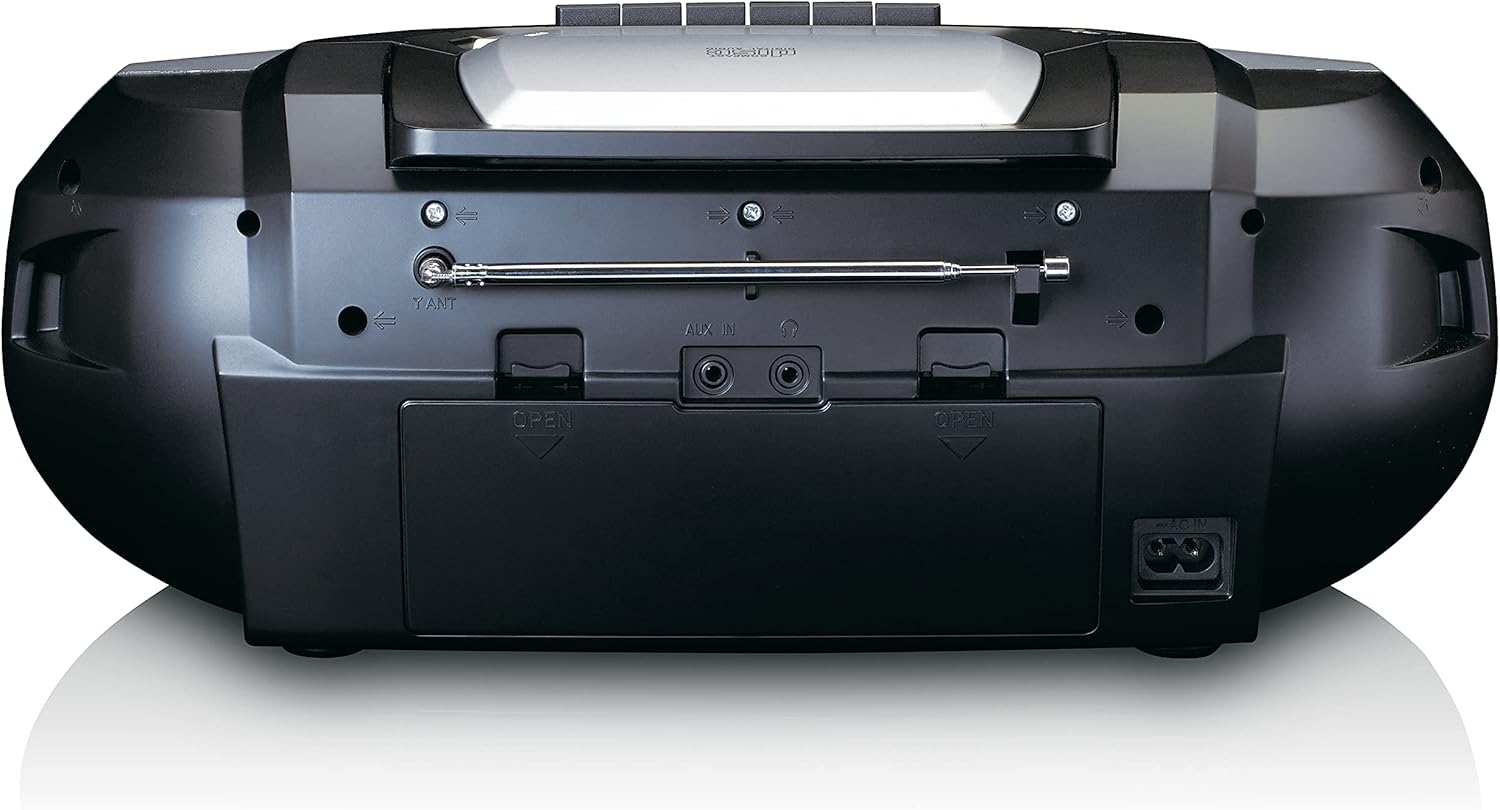
This image shows the back of the Lenco SCD-720 Boombox, featuring the telescopic antenna, AUX input, headphone jack, and the AC power input socket.
Control Panel Close-up

تفصيلية view of the Lenco SCD-720 Boombox's central control panel, including the digital display, source selection buttons, tuning/navigation buttons, and the illuminated volume knob.
Boombox with Remote Control
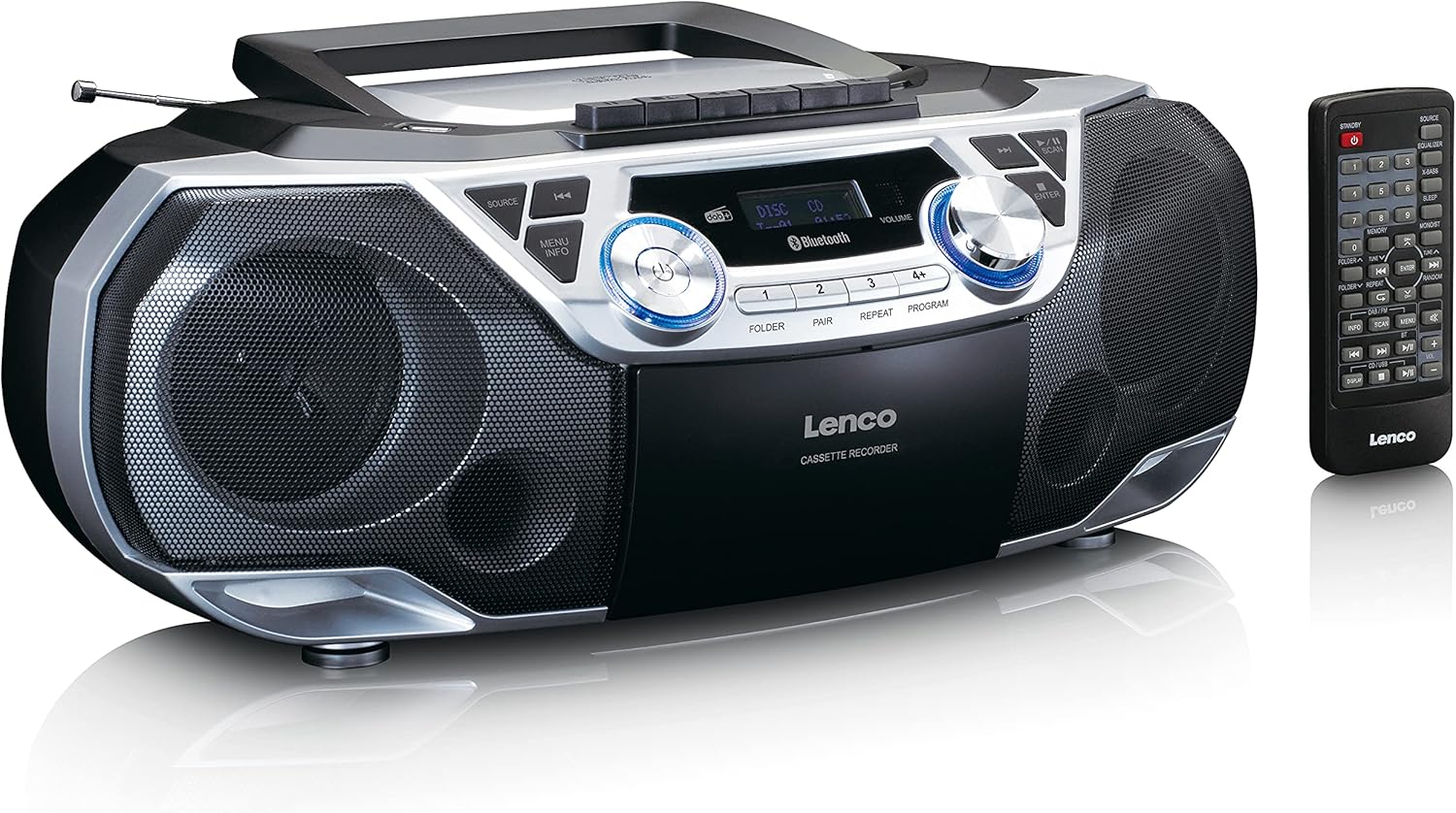
The Lenco SCD-720 Boombox is displayed next to its included remote control, illustrating the complete package.
تخطيط التحكم عن بعد

A close-up image of the remote control for the Lenco SCD-720 Boombox, showing all buttons for power, source selection, playback, tuning, and other functions.
4. الإعداد
4.1 توصيل الطاقة
The Lenco SCD-720 Boombox can be powered by AC mains or batteries.
- طاقة التيار المتردد: Connect the supplied AC power cord to the AC IN socket on the rear of the unit and then to a standard wall outlet.
- تشغيل البطارية: For portable use, open the battery compartment on the rear of the unit and insert 8 x 'C' type batteries (not included), ensuring correct polarity. Close the compartment securely.
4.2 ضبط الهوائي
For optimal radio reception, extend the telescopic antenna fully. Adjust its position and angle to achieve the best signal quality for both DAB+ and FM broadcasts.
4.3 التشغيل المبدئي
اضغط على قوة button on the unit or remote control to turn on the boombox. The display will light up, and the unit will typically start in the last used mode.
5. تعليمات التشغيل
5.1 الضوابط العامة
- تشغيل/إيقاف التشغيل: اضغط على قوة زر.
- التحكم في مستوى الصوت: تدوير مقدار زر التحكم الموجود على الوحدة أو استخدم الحجم + / - الأزرار الموجودة على جهاز التحكم عن بعد.
- اختيار المصدر: اضغط على مصدر button on the unit or the dedicated source buttons (DAB/FM, CD/USB, BT) on the remote to switch between modes (DAB+, FM, CD, USB, Bluetooth, AUX).
5.2 تشغيل الراديو (DAB+/FM)
- حدد الوضع: اضغط على مصدر button until DAB+ or FM mode is selected.
- التأكد الذاتي: في وضع DAB+ أو FM، اضغط على مسح ضوئي زر للبحث التلقائي عن المحطات المتاحة وتخزينها.
- ضبط يدوي: استخدم TUNE < / > أزرار لضبط التردد يدويًا.
- المحطات مسبقة الضبط: The unit allows you to save your favorite stations. Press and hold one of the numbered preset buttons (1-4) to store the current station. Briefly press a preset button to recall a stored station.
- DAB+ Information: في وضع DAB+، اضغط على معلومات button to cycle through various information such as program type, signal strength, time, and date.
5.3 تشغيل الأقراص المدمجة/ملفات MP3
- تحميل القرص المضغوط: Open the CD compartment lid by pressing the يفتح button. Place a CD or MP3 CD with the label side facing up. Close the lid securely.
- التشغيل: The CD will start playing automatically. If not, press the تشغيل/إيقاف مؤقت زر.
- عناصر التحكم: يستخدم SKIP << / >> buttons to skip tracks. Press and hold to fast forward/rewind.
- يكرر: يضعط يكرر to repeat the current track or all tracks.
- برنامج: يضعط برنامج to create a custom playback order for tracks.
5.4 تشغيل وتسجيل الكاسيت
- تحميل الشريط: Open the cassette compartment. Insert a cassette tape.
- التشغيل: اضغط على يلعب زر.
- تسجيل: To record from Radio, CD, USB, or AUX, select the desired source. Insert a blank cassette. Press the سِجِلّ button (usually red) along with the يلعب اضغط على الزر في وقت واحد.
- عناصر التحكم: يستخدم التقديم السريع و إعادة أزرار. صحافة توقف / إخراج to stop playback and open the compartment.
اتصال 5.5 بلوتوث 5.0
- الدخول إلى وضع البلوتوث: اضغط على مصدر اضغط على الزر حتى تظهر كلمة "BT" أو "Bluetooth" على الشاشة. سيدخل الجهاز في وضع الاقتران، ويُشار إلى ذلك برمز بلوتوث وامض.
- الاقتران: On your smartphone or tablet, enable Bluetooth and search for available devices. Select 'Lenco SCD-720' from the list. Once paired, the Bluetooth icon will stop flashing.
- التشغيل: Start playing audio on your connected device. The sound will be streamed to the boombox.
5.6 تشغيل USB
- أدخل منفذ USB: أدخل محرك أقراص فلاش USB يحتوي على MP3 files في منفذ USB.
- حدد وضع USB: اضغط على مصدر button until 'USB' appears. The unit will automatically scan and begin playing MP3 files.
- عناصر التحكم: استخدم أزرار التحكم في التشغيل (PLAY/PAUSE, SKIP << / >>) لإدارة موسيقاك.
5.7 مدخل ايه يو اكس
Connect external audio devices (e.g., MP3 players, smartphones without Bluetooth) to the AUX IN jack on the rear of the unit using a 3.5mm audio cable (not included). Select AUX mode via the مصدر زر.
5.8 مخرج سماعة الرأس
للاستماع الخاص، قم بتوصيل سماعات الرأس بـ سماعة الرأس jack on the rear of the unit. The main speakers will be muted automatically.
5.9 التحكم عن بعد
The included remote control provides full functionality for the boombox, allowing you to control power, source, volume, playback, tuning, and other settings from a distance. Ensure the remote has working batteries and is pointed towards the front of the boombox.
6. الصيانة
6.1 تنظيف الوحدة
Wipe the exterior of the boombox with a soft, dry cloth. Do not use abrasive cleaners, waxes, or solvents as they may damage the finish. For stubborn stains, a slightly damp يمكن استخدام قطعة قماش، ثم قطعة قماش جافة.
6.2 العناية بعدسات الأقراص المدمجة
If CD playback becomes erratic, the CD lens may need cleaning. Use a commercially available CD lens cleaner disc. Do not touch the lens directly.
6.3 تنظيف رأس الكاسيت
قم بتنظيف رؤوس الكاسيت وبكرات الضغط والكابستان بانتظام باستخدام قطعة قطن مبللة قليلاً بالكحول الأيزوبروبيلي لضمان جودة صوت مثالية ومنع تلف الشريط.
6.4 استبدال البطارية
If the unit is powered by batteries and performance degrades, replace all 8 'C' type batteries with new ones, ensuring correct polarity. Do not mix old and new batteries or different types of batteries.
7. استكشاف الأخطاء وإصلاحها
| مشكلة | السبب المحتمل | حل |
|---|---|---|
| لا يوجد طاقة | سلك الطاقة غير متصل؛ البطاريات فارغة أو تم إدخالها بشكل غير صحيح. | تحقق من توصيل سلك التيار المتردد؛ استبدل البطاريات مع التأكد من صحة القطبية. |
| لا يوجد صوت | مستوى الصوت منخفض جدًا؛ تم اختيار مصدر غير صحيح؛ تم توصيل سماعات الرأس. | ارفع مستوى الصوت؛ اختر المصدر الصحيح؛ افصل سماعات الرأس. |
| استقبال الراديو ضعيف | الهوائي غير ممتد أو غير مثبت بشكل صحيح؛ إشارة ضعيفة. | Extend and adjust the telescopic antenna; Try moving the unit to a different location. |
| لا يعمل القرص المضغوط/ذاكرة USB | Disc dirty/scratched; USB format not supported; Incorrect mode. | Clean or replace disc; Ensure USB contains MP3 files; Select CD or USB mode. |
| فشل اقتران البلوتوث | Boombox not in pairing mode; Device too far; Bluetooth off on device. | Ensure boombox is in BT pairing mode; Move device closer; Enable Bluetooth on your device. |
| Cassette recording issues | Incorrect source selected; Cassette write-protect tab engaged. | Select the desired recording source; Ensure the write-protect tab on the cassette is not broken off. |
8. المواصفات
- نموذج: SCD-720SI
- ماركة: لينكو
- الاتصال: DAB+, FM Radio, Bluetooth 5.0, CD/MP3 Player, Cassette Player, USB Playback, AUX Input, Headphone Output
- مخرج الصوت: 2 × 6 وات RMS
- مصدر الطاقة: AC 230V ~ 50Hz or 8 x 'C' type batteries (DC 12V)
- تنسيقات الصوت المدعومة: CD, CD-R/RW, MP3 (from CD/USB)
- المميزات الخاصة: Bass Reflex, Remote Control
- الأبعاد (الطول × العرض × الارتفاع): تقريبًا 38.5 سم × 23.5 سم × 14.5 سم
- لون: فضي
- الشركة المصنعة: Lenco GmbH
- بلد المنشأ: الصين
9. الضمان والدعم
Lenco products are covered by a warranty in accordance with European law. For specific warranty terms and conditions, please refer to the warranty card included with your product or visit the official Lenco website. For technical support, service, or spare parts information, please contact Lenco customer service or your local dealer. Please have your model number (SCD-720SI) and purchase details ready when contacting support.
Information regarding software updates and spare parts availability is not provided at this time.


