1. معلومات هامة حول السلامة
Before operating the Zipro Nix Rower, please read and understand all instructions in this manual. Keep this manual for future reference.
- استشر الطبيب قبل البدء بأي برنامج رياضي.
- تأكد من تجميع جميع الأجزاء وإحكام ربطها بشكل صحيح قبل كل استخدام.
- Place the rower on a flat, stable surface. Ensure adequate clear space around the equipment (at least 0.6 meters).
- أبقِ الأطفال والحيوانات الأليفة بعيدًا عن الجهاز أثناء التشغيل.
- لا تتجاوز الحد الأقصى لوزن المستخدم وهو 120 كجم (264 رطلاً).
- ارتدِ ملابس وأحذية رياضية مناسبة.
- إذا شعرت بألم أو دوار أو ضيق في التنفس، فتوقف عن ممارسة الرياضة على الفور واستشر طبيباً.
- Regularly inspect the rower for wear and tear, especially cables, straps, and moving parts. Do not use if damaged.
2. محتويات العبوة
Carefully unpack the carton and verify all parts are present and undamaged. If any parts are missing or damaged, contact customer support immediately.
- Main Rower Frame (pre-assembled components)
- Seat and Rail Assembly
- مساند القدمين
- المقود
- وحدة تحكم الكمبيوتر
- مجموعة أدوات (مسامير، غسالات، صواميل، أدوات)
- دليل المستخدم
3. التجميع والإعداد
Follow these steps to assemble your Zipro Nix Rower. It is recommended to have two people for assembly.
- فك مكونات الحزمة: Lay out all parts on a clean, flat surface. Refer to the parts diagram in the included manual for identification.
- تثبيت المثبتات: Secure the front and rear stabilizers to the main frame using the provided bolts and washers. Ensure they are tightly fastened for stability.
- تركيب قضيب المقعد: Attach the seat rail to the main unit. Ensure the seat carriage slides smoothly along the rail.
- تركيب مساند القدمين: Secure the footrests to the main frame. Ensure the adjustable straps are correctly positioned.
- توصيل المقود: Attach the handlebar to the pulling mechanism. Verify the strap or chain is securely connected.
- تثبيت وحدة تحكم الكمبيوتر: Mount the computer console onto its designated bracket. Connect any necessary sensor cables from the main unit to the console. Insert batteries if required.
- التحقق النهائي: Double-check all bolts and connections to ensure they are secure. Test the seat movement and handlebar pull for smooth operation.

الشكل 3.1: The Zipro Nix Rower with its approximate dimensions: Length 183 cm, Width 46 cm, Height 48 cm. These dimensions are important for planning the placement of the rower in your home.
4. تعليمات التشغيل
4.1. ضبط المقاومة
The Zipro Nix Rower features an 8-level magnetic resistance system. To adjust the resistance, locate the rotary knob on the main unit, typically near the footrests. Turn the knob clockwise to increase resistance (levels 1-8) and counter-clockwise to decrease it. Start with a lower resistance level and gradually increase as your fitness improves.

الشكل 4.1: عن قرب view of the adjustable footrests and the 8-level resistance control knob on the Zipro Nix Rower.
4.2. استخدام وحدة تحكم الكمبيوتر
The easy-to-use LCD computer console displays various workout data to help you monitor your progress.
الشكل 4.2: The LCD computer display of the Zipro Nix Rower, showing icons for Time, Calories, Speed, and Pulse, along with numerical readouts.
- تشغيل/إيقاف التشغيل: The console typically powers on automatically when you begin rowing or press any button. It will power off after a period of inactivity.
- الوظائف: The display cycles through or allows selection of the following metrics:
- وقت: مدة التمرين الخاص بك.
- COUNT (Strokes): إجمالي عدد الضربات التي تم تنفيذها.
- سعرات حراريه: عدد السعرات الحرارية المحروقة أثناء التمرين.
- سرعة: سرعة التجديف الحالية.
- نبض: Heart rate (if a compatible heart rate monitor is used and connected).
- إعادة تعيين: Press and hold the button (usually marked 'MODE' or 'RESET') to clear all current workout data.
4.3. أسلوب التجديف الصحيح
To maximize effectiveness and prevent injury, maintain proper form:
- يمسك: Start with knees bent, arms extended forward, and back straight.
- يقود: Push off with your legs, then lean back slightly, and finally pull the handlebar towards your abdomen.
- ينهي: Legs are extended, body leans back slightly, and handlebar is at your abdomen.
- استعادة: مد ذراعيك للأمام، ثم انحنِ للأمام، وأخيراً اثنِ ركبتيك للعودة إلى وضعية الإمساك.

الشكل 4.3: The ergonomically designed seat of the Zipro Nix Rower, providing comfort during extended workouts.
5. الصيانة والتخزين
5.1. التنظيف
Wipe down the rower after each use with a damp cloth to remove sweat and dust. Do not use abrasive cleaners or solvents, as they may damage the finish or electronic components.
5.2. التشحيم
The magnetic resistance system is largely maintenance-free. However, periodically check the seat rail for any debris and wipe it clean. If the seat movement becomes less smooth, a small amount of silicone-based lubricant can be applied to the rail, but avoid oil-based lubricants.
5.3. التخزين
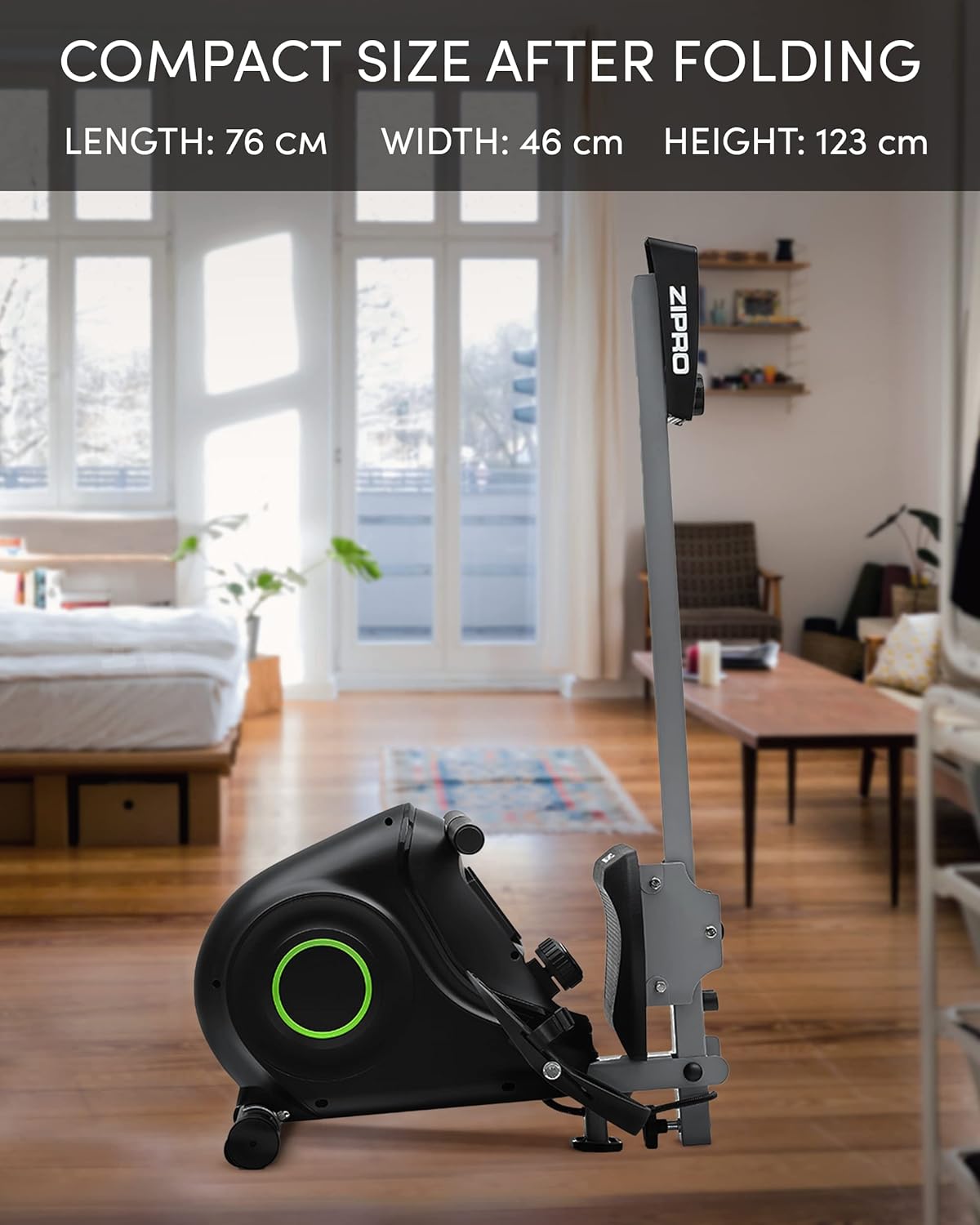
The Zipro Nix Rower is designed to be foldable for compact storage, saving space when not in use.
- قابلة للطي: Follow the instructions in your assembly manual for folding the rower into its vertical position. This typically involves releasing a locking pin or knob and folding the rail upwards.
- ينقل: Utilize the integrated transport wheels located on the rear stabilizer to easily move the rower. Tilt the rower onto its wheels and push it to your desired storage location.

الشكل 5.1: The Zipro Nix Rower in its compact, folded position, ideal for space-saving storage.

الشكل 5.2: عن قرب view of the transport wheels on the Zipro Nix Rower, facilitating easy relocation of the unit.
6. استكشاف الأخطاء وإصلاحها
If you encounter issues with your Zipro Nix Rower, refer to the following common problems and solutions:
| مشكلة | السبب المحتمل | حل |
|---|---|---|
| No display on computer console | Batteries are dead or incorrectly installed. Loose sensor cable connection. | Replace batteries. Check battery orientation. Ensure sensor cable is securely plugged into the console. |
| تبدو المقاومة غير متناسقة أو منخفضة/عالية للغاية | Resistance knob not set correctly. Internal magnetic mechanism issue. | Adjust the resistance knob to a different level. If problem persists, contact customer support. |
| لم ينزلق المقعد بسلاسة | Debris on the rail. Rail or wheels need lubrication. | Clean the seat rail and wheels. Apply a small amount of silicone-based lubricant to the rail. |
| أصوات غير عادية أثناء التشغيل | Loose bolts or components. Internal friction. | Check and tighten all visible bolts. If noise persists, discontinue use and contact customer support. |
7. المواصفات
Detailed technical specifications for the Zipro Nix Rower:
| ميزة | مواصفة |
|---|---|
| رقم الموديل | 6299217 |
| ماركة | زيبرو |
| آلية المقاومة | مغناطيسي |
| مستويات المقاومة | 8 |
| نوع العرض | شاشة الكريستال السائل |
| Displayed Metrics | Time, Strokes (Count), Calories, Speed, Pulse |
| مادة الإطار | الفولاذ الكربوني |
| الحد الأقصى لوزن المستخدم | 120 كيلوغرامًا (264 رطلاً) |
| أبعاد المنتج (الطول × العرض × الارتفاع) | 183 x 46 x 48 cm (72 x 18.1 x 18.9 inches) |
| الأبعاد المطوية (الطول × العرض × الارتفاع) | تقريبًا 76 × 46 × 123 سم (30 × 18.1 × 48.4 بوصة) |
| وزن العنصر | 27 كيلوغرامًا (59.5 رطلاً) |
| مصدر الطاقة (وحدة التحكم) | تعمل بالبطارية |
| المميزات الخاصة | Adjustable foot strap, Foldable design, Transport wheels |
8. الضمان والدعم
للحصول على معلومات الضمان، يرجى الرجوع إلى بطاقة الضمان المرفقة مع المنتج أو زيارة موقع ZIPRO الرسمي. website. If you require technical assistance, replacement parts, or have any questions not covered in this manual, please contact ZIPRO customer support through their official channels.
يرجى إحضار رقم الموديل الخاص بك (6299217) وإثبات الشراء عند الاتصال بالدعم.


