1. المقدمة
This manual provides detailed instructions for the safe and efficient use of your Hoco HC3 Bounce Sports Wireless Speaker. Please read this manual thoroughly before operating the device and retain it for future reference. The Hoco HC3 is a versatile portable speaker supporting Bluetooth, FM radio, TF card, USB, AUX, and TWS modes.

Figure 1: Hoco HC3 Bounce Sports Wireless Speaker. This image displays the speaker in a vertical orientation, showcasing its black mesh grille, the 'hoco' logo at the bottom right, and a braided carrying strap attached to the top left side. The control buttons are visible on the side panel.
2. محتويات العبوة
تأكد من وجود جميع العناصر عند فتح الصندوق:
- Hoco HC3 Bounce Sports Wireless Speaker
- كابل شحن USB
- دليل المستخدم (هذا المستند)
- AUX Audio Cable (if included with your model)
3. انتهى المنتجview
3.1 مكونات السماعات

Figure 2: Rear panel of the Hoco HC3 speaker. This image highlights the various input ports and control buttons located on the back of the speaker. Visible elements include the power switch, USB port, TF card slot, AUX input, and LED indicator.
تعرّف على عناصر التحكم والمنافذ الخاصة بالسماعة:
- زر الطاقة: Long press to power on/off. Short press to switch modes.
- زر التشغيل/الإيقاف المؤقت: تشغيل الصوت أو إيقافه مؤقتًا. الرد على المكالمات أو إنهاؤها.
- زر رفع الصوت / المسار التالي: ضغطة قصيرة للانتقال إلى المقطع التالي، وضغطة طويلة لرفع مستوى الصوت.
- زر خفض الصوت / المسار السابق: ضغطة قصيرة للانتقال إلى المقطع السابق، وضغطة طويلة لخفض مستوى الصوت.
- زر الوضع (M): Short press to cycle through Bluetooth, FM, TF card, USB, and AUX modes.
- منفذ USB: لتشغيل الملفات من محرك أقراص USB.
- فتحة بطاقة TF: لتشغيل الملفات من بطاقة TF (MicroSD).
- مدخلات AUX: مقبس 3.5 ملم لتوصيل الصوت السلكي.
- منفذ الشحن: Micro USB port for charging the speaker.
- مؤشر LED: Displays charging status and operating mode.
3.2 الميزات الرئيسية
- بلوتوث V5.0: يوفر اتصالاً لاسلكياً مستقراً وفعالاً.
- أوضاع التشغيل المتعددة: Supports Bluetooth, FM radio, TF card, USB drive, and AUX input.
- ستيريو لاسلكي حقيقي (TWS): Allows two HC3 speakers to connect wirelessly for a stereo sound experience.
- عمر بطارية طويل: 2400mAh battery capacity offers up to 5 hours of music playback.
- مكبرات صوت مزدوجة: Equipped with two 45mm speaker units, each with 5W power output.
- صغير الحجم وقابل للحمل: Dimensions of 202*60*60mm and weight of 561g for easy transport.
4. الإعداد
4.1 شحن السماعة
- قم بتوصيل كابل الشحن USB المرفق بمنفذ شحن السماعة.
- Connect the other end of the USB cable to a 5V USB power adapter (not included) or a computer's USB port.
- The LED indicator will illuminate to show charging status. It typically takes about 3 hours for a full charge.
- Once fully charged, the LED indicator will change or turn off (refer to specific LED behavior in the troubleshooting section if unsure).
ملاحظة: للحصول على عمر بطارية مثالي، قم بشحن السماعة بالكامل قبل الاستخدام الأول.
4.2 تشغيل/إيقاف التشغيل
- لتشغيل: Long press the Power button until you hear an audible prompt and the LED indicator lights up.
- لإيقاف التشغيل: Long press the Power button again until you hear an audible prompt and the LED indicator turns off.
5. تعليمات التشغيل
5.1 اقتران بلوتوث
- Ensure the speaker is powered on and in Bluetooth mode (the LED indicator will typically flash blue, indicating it's ready for pairing). If not, short press the Mode (M) button to switch to Bluetooth mode.
- قم بتفعيل البلوتوث على جهازك المحمول (الهاتف الذكي، الجهاز اللوحي، الكمبيوتر).
- بحث عن available Bluetooth devices. You should see "HC3" or "Hoco HC3" in the list.
- Select "HC3" to connect. Once paired, the speaker will emit an audible confirmation, and the LED indicator will stop flashing and remain solid blue.
- يمكنك الآن تشغيل الصوت من جهازك عبر مكبر الصوت.
Note: The speaker will automatically attempt to reconnect to the last paired device when powered on, if that device's Bluetooth is active and within range.
5.2 وضع راديو FM
- قم بتشغيل مكبر الصوت.
- Short press the Mode (M) button repeatedly until you enter FM radio mode.
- To auto-scan and save available FM stations, short press the Play/Pause button. The speaker will scan and store stations.
- Use the Volume Up / Next Track and Volume Down / Previous Track buttons to navigate between saved stations.
تشغيل بطاقة TF / USB 5.3
- قم بتشغيل مكبر الصوت.
- Insert a TF (MicroSD) card into the TF card slot or a USB flash drive into the USB port.
- The speaker should automatically switch to TF card or USB mode and begin playing audio files. If not, short press the Mode (M) button to select the correct mode.
- Use the Play/Pause, Volume Up / Next Track, and Volume Down / Previous Track buttons to control playback.
Note: Ensure your TF card or USB drive contains compatible audio file(على سبيل المثال، تنسيق MP3).
5.4 وضع AUX
- قم بتشغيل مكبر الصوت.
- Connect one end of a 3.5mm audio cable (if included) to the speaker's AUX input port.
- Connect the other end of the audio cable to the audio output jack of your external device (e.g., MP3 player, computer).
- The speaker should automatically switch to AUX mode. If not, short press the Mode (M) button to select AUX mode.
- Control playback from your external device. Volume can be adjusted on both the speaker and the external device.
وظيفة 5.5 TWS (ستيريو لاسلكي حقيقي)
The TWS function allows you to pair two Hoco HC3 speakers together for a true stereo sound experience.
- تأكد من إيقاف تشغيل مكبرات الصوت HC3.
- قم بتشغيل كلا السماعتين في وقت واحد. يجب أن تدخل كلتاهما في وضع الاقتران عبر البلوتوث.
- On واحد of the speakers (this will become the primary speaker), long press the Mode (M) button or a dedicated TWS button (if present, otherwise try the Play/Pause button for 3-5 seconds) until you hear a pairing tone. The speakers will attempt to connect to each other.
- Once successfully paired, you will hear a confirmation tone, and one speaker's LED will indicate it's the primary (e.g., flashing slowly), while the other's LED will be solid.
- Now, connect your mobile device to the أساسي speaker via Bluetooth as described in section 5.1.
- سيتم الآن تشغيل الصوت بنظام ستيريو من خلال كلا السماعتين.
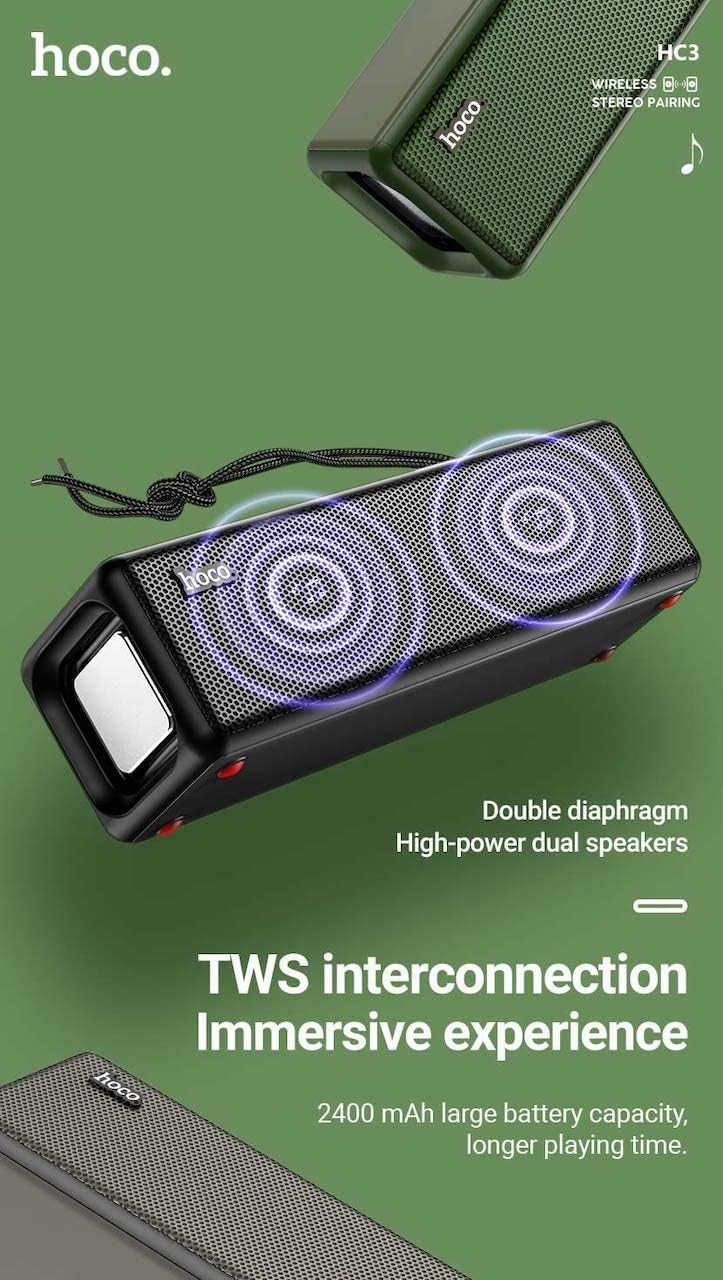
Figure 3: TWS Interconnection. This image illustrates the concept of two Hoco HC3 speakers wirelessly connected to provide a stereo audio experience, highlighting the dual speaker setup and the 2400 mAh battery capacity.
5.6 معالجة المكالمات
عند الاتصال بالهاتف الذكي عبر البلوتوث:
- الرد على المكالمة: اضغط قصيرًا على زر التشغيل / الإيقاف المؤقت.
- إنهاء المكالمة: اضغط لفترة قصيرة على زر التشغيل/الإيقاف المؤقت أثناء المكالمة.
- رفض المكالمة: اضغط مطولاً على زر التشغيل/الإيقاف المؤقت عند رنين مكالمة واردة.
- إعادة الاتصال بالرقم الأخير: اضغط مرتين على زر التشغيل/الإيقاف المؤقت.
6. الصيانة
- تنظيف: Use a soft, dry cloth to clean the speaker's surface. Do not use abrasive cleaners, alcohol, or other chemical solvents.
- تخزين: قم بتخزين مكبر الصوت في مكان بارد وجاف بعيدًا عن أشعة الشمس المباشرة ودرجات الحرارة القصوى.
- العناية بالبطارية: To prolong battery life, charge the speaker regularly, even if not in use for extended periods (e.g., once every 3 months). Avoid fully discharging the battery frequently.
- مقاومة الماء: While designed for sports, avoid submerging the speaker in water. Refer to product specifications for any IP rating.
- تجنب التأثير: Protect the speaker from drops and strong impacts.
7. استكشاف الأخطاء وإصلاحها
If you encounter issues with your Hoco HC3 speaker, refer to the following table for common problems and solutions:
| مشكلة | السبب المحتمل | حل |
|---|---|---|
| لا يتم تشغيل مكبر الصوت. | بطارية منخفضة. | اشحن السماعة لمدة 30 دقيقة على الأقل. |
| لا يمكن الاقتران عبر البلوتوث. | Bluetooth not enabled on device; speaker not in pairing mode; too far from device. | Ensure Bluetooth is on, speaker is in pairing mode (flashing blue LED), and devices are within 10 meters. Forget "HC3" on your device and try pairing again. |
| لا يوجد صوت. | مستوى الصوت منخفض جدًا؛ تم اختيار وضع غير صحيح؛ الجهاز لا يُشغّل الصوت. | Increase volume on both speaker and connected device. Verify correct mode (Bluetooth, AUX, TF, USB). Ensure audio is playing on the source device. |
| استقبال الراديو FM ضعيف. | إشارة ضعيفة؛ تداخل بيئي. | Move the speaker to a location with better reception. Re-scan for stations. |
| تشغيل بطاقة الذاكرة/منفذ USB لا يعمل. | Card/drive not inserted correctly; incompatible file تنسيق تالف files. | Ensure card/drive is fully inserted. Check file formats (MP3 recommended). Try another card/drive. |
| فشل اقتران TWS. | السماعات ليست في وضع الاقتران اللاسلكي؛ المسافة بينهما كبيرة جدًا. | Ensure both speakers are powered on and in TWS pairing mode. Keep them close during pairing. Refer to section 5.5. |
8. المواصفات
| ميزة | التفاصيل |
|---|---|
| نموذج | اتش سي 3 |
| أبعاد | 202 × 60 × 60 ملم |
| وزن | 561 جرام |
| نسخة البلوتوث | V5.0 (Chip: JLAC6928B) |
| سعة البطارية | 2400 مللي أمبير |
| وقت الشحن | حوالي 3 ساعات |
| نقاش / موسيقى | تصل إلى 5 ساعة |
| وحدة مكبر الصوت | 45 مم * 2 |
| خرج طاقة مكبر الصوت | شنومكسو * شنومكس |
| أوضاع الاتصال | Bluetooth, FM, TF card, USB, AUX, TWS |
| وضع إخراج الصوت | محيط |
| الشركة المصنعة | هوكو |
| بلد المنشأ | الصين |
9. الضمان والدعم
Hoco products are manufactured to high quality standards. For information regarding warranty coverage, please refer to the warranty card included with your purchase or contact your local Hoco distributor or retailer. Keep your proof of purchase for any warranty claims.
For technical support or further assistance, please visit the official Hoco website or contact their customer service department. Contact details are typically available on the product packaging or the official webموقع.


