المنتج انتهىview
The Sharp HP-TW30 True Wireless Noise Cancelling Earphones are designed for an immersive audio experience with enhanced comfort and durability. Featuring active noise cancellation, these earphones reduce background noise, making them ideal for various environments. They offer wireless charging, Bluetooth 5.0 connectivity, and are splashproof for active lifestyles.
المميزات الرئيسية:
- إلغاء الضوضاء النشط: Reduces ambient noise by 22dB for improved focus and enjoyment.
- الشحن اللاسلكي: Convenient charging with the included case, providing up to 4 full charges.
- بلوتوث شنومكس: Ensures stable and efficient wireless connectivity with a range of up to 33 feet.
- IPX4 Splashproof: Resistant to splashes, sweat, and light rain, suitable for workouts and outdoor activities.
- ضوابط اللمس: Intuitive controls for managing playback, calls, and voice assistants.
- التحكم الصوتي: Full integration with Apple Siri and Google Assistant for hands-free operation.
- وقت اللعب الطويل: يصل وقت تشغيل الصوت إلى 6 ساعات بشحنة واحدة.

Figure 1: Sharp HP-TW30 True Wireless Earphones (Black)
محتويات الحزمة
قبل أن تبدأ، يرجى التأكد من وجود جميع العناصر في العبوة:
- سماعات أذن لاسلكية حقيقية من شارب طراز HP-TW30 (يسار ويمين)
- حافظة الشحن
- USB Type-C Charging Cable (not explicitly listed in 'whats_in_the_box' but implied by 'Charging Port: USB Type C')
- Small, Medium, and Large Ultra-comfortable Ear Tips (3 sizes)
- دليل التعليمات (هذا المستند)
يثبت
1. شحن سماعات الأذن والعلبة
For first-time use, fully charge the earphones and the charging case. The charging case provides approximately 4 full charges for the earphones.
- Place both earphones into their respective slots in the charging case. Ensure they are seated correctly.
- قم بتوصيل كابل الشحن من النوع C USB بمنفذ الشحن الموجود على العلبة والطرف الآخر بمصدر طاقة USB (مثل محول الحائط أو منفذ USB للكمبيوتر).
- The LED indicators on the case will show charging status. Charging time for the case and earphones is approximately 2 hours.
- بمجرد الشحن بالكامل ، افصل كابل الشحن.
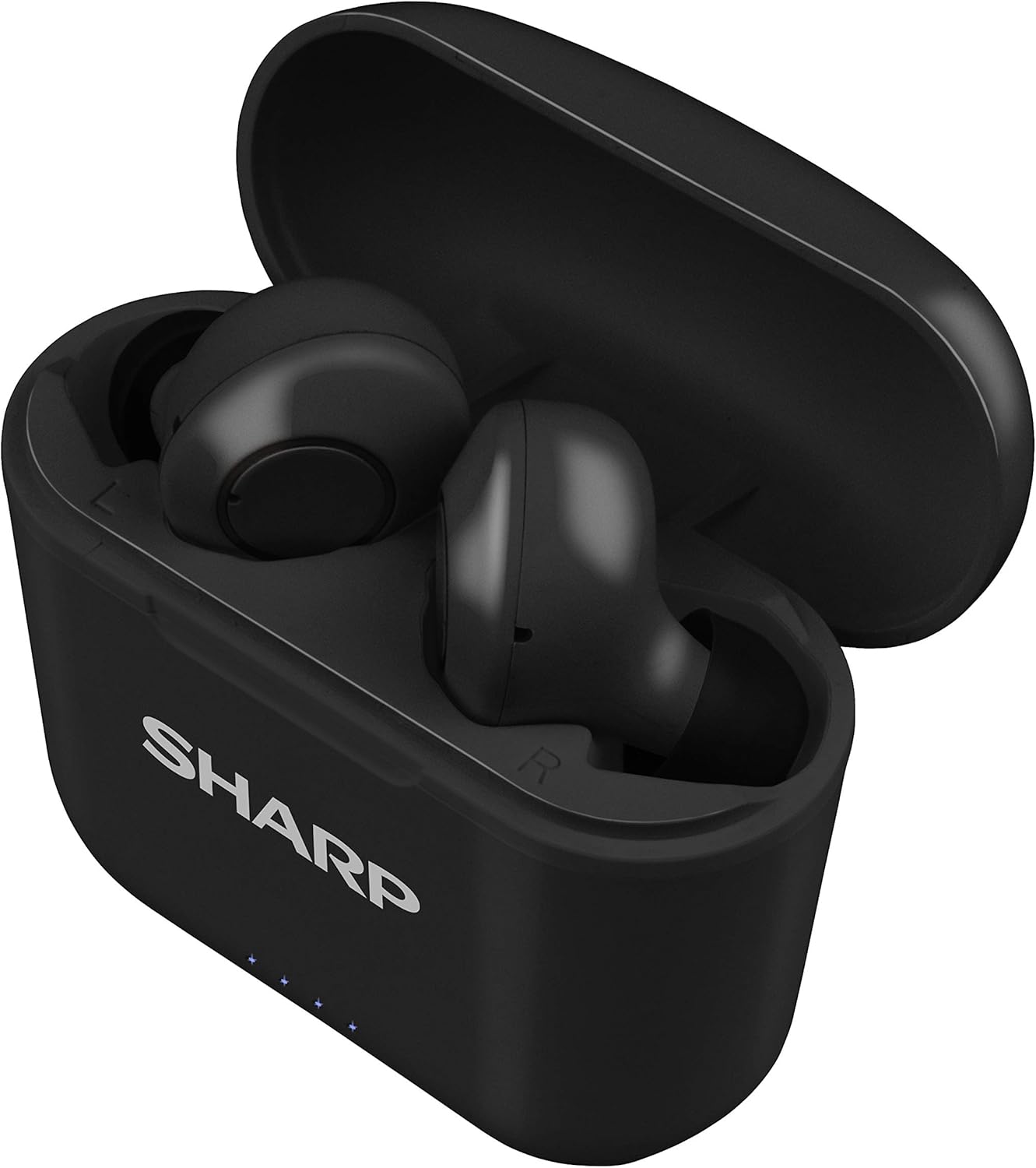
الشكل 2: سماعات الأذن في علبة الشحن
2. الاقتران بجهازك
The HP-TW30 earphones feature auto-pairing for effortless setup.
- افتح علبة الشحن. سيتم تشغيل سماعات الأذن تلقائيًا ودخول وضع الاقتران.
- على هاتفك الذكي أو جهازك اللوحي أو أي جهاز آخر يدعم تقنية Bluetooth، انتقل إلى إعدادات Bluetooth.
- بحث عن available devices and select "HP-TW30" from the list.
- بمجرد الاتصال، سيؤكد صوت التنبيه نجاح الاقتران.
- سيتم إعادة توصيل سماعات الأذن تلقائيًا بالجهاز المقترن الأخير عند إخراجها من العلبة، إذا تم تمكين البلوتوث على الجهاز.
تعليمات التشغيل
عناصر التحكم باللمس
The HP-TW30 earphones utilize touch-sensitive controls on each earbud for various functions:
- تشغيل/إيقاف مؤقت: ضغطة واحدة على أي سماعة أذن.
- المسار التالي: اضغط مرتين على سماعة الأذن اليمنى.
- المسار السابق: اضغط مرتين على سماعة الأذن اليسرى.
- الرد/إنهاء المكالمة: اضغط مرة واحدة على أي سماعة أذن أثناء المكالمة الواردة.
- رفض المكالمة: اضغط مع الاستمرار على أي سماعة أذن لمدة ثانيتين أثناء المكالمة الواردة.
- Activate Voice Assistant (Siri/Google Assist): اضغط ثلاث مرات على أي سماعة أذن.
- Active Noise Cancellation (ANC) On/Off: اضغط مع الاستمرار على سماعة الأذن اليمنى لمدة ثانيتين.
إلغاء نشطة للضوضاء (ANC)
The ANC feature reduces ambient background noise, providing a more focused listening experience. Activate or deactivate ANC using the touch control as described above.
مقاومة الماء (IPX4)
The earphones are rated IPX4 splashproof, meaning they are resistant to water splashes from any direction. This makes them suitable for light rain, sweat, and gym use. Do not submerge the earphones in water.
صيانة
تضمن الصيانة المناسبة طول عمر سماعات الأذن والأداء الأمثل لها.
- تنظيف: Regularly clean the earphones and charging case with a soft, dry, lint-free cloth. Do not use abrasive cleaners or solvents.
- نصائح الأذن: قم بإزالة أطراف الأذن وتنظيفها بشكل دوري باستخدام مزيل البقع.amp قطعة قماش وصابون خفيف، ثم جففها جيدًا قبل إعادة ربطها.
- تخزين: عند عدم الاستخدام، قم بتخزين سماعات الأذن في علبة الشحن الخاصة بها لحمايتها من الغبار والتلف.
- درجة حرارة: تجنب تعريض سماعات الأذن لدرجات حرارة قصوى (ساخنة أو باردة) أو رطوبة عالية.
- شحن جهات الاتصال: تأكد من أن نقاط اتصال الشحن الموجودة على سماعات الأذن وداخل العلبة نظيفة وخالية من الحطام للحفاظ على الشحن المناسب.
استكشاف الأخطاء وإصلاحها
If you encounter issues with your Sharp HP-TW30 earphones, try the following solutions:
- Earphones not pairing/connecting:
- تأكد من شحن كلتا السماعتين بالكامل.
- قم بإيقاف تشغيل البلوتوث على جهازك، ثم قم بتشغيله مرة أخرى.
- Forget/delete "HP-TW30" from your device's Bluetooth list and attempt to re-pair.
- Place both earphones back into the charging case, close the lid for 5 seconds, then open it again to reset.
- Only one earbud playing sound:
- تأكد من شحن كلا سماعات الأذن.
- أعد وضع سماعتي الأذن في علبة الشحن، وأغلق الغطاء، ثم افتحه مجددًا. يؤدي هذا غالبًا إلى إعادة مزامنتهما.
- قم بتنظيف نقاط اتصال الشحن الموجودة على سماعتي الأذن وداخل العلبة.
- Try resetting and re-pairing the earphones as described above.
- انخفاض مستوى الصوت أو جودة الصوت رديئة:
- قم بضبط مستوى الصوت على جهازك وسماعات الأذن.
- Ensure the ear tips are the correct size for a snug fit and are clean.
- Check for any obstructions in the earbud nozzles.
- سماعات الأذن لا يتم شحنها:
- تأكد من توصيل كابل الشحن بشكل آمن بكل من العلبة ومصدر الطاقة.
- حاول استخدام كابل USB Type-C ومحول طاقة مختلفين.
- نظف نقاط التلامس الخاصة بالشحن على سماعات الأذن وداخل العلبة.
تحديد
| اسم الموديل | HP-TW30(BK) |
| تكنولوجيا الاتصال | لاسلكي (بلوتوث) |
| نسخة البلوتوث | 5.0 |
| مدى البلوتوث | حتى 33 قدم (10 أمتار) |
| التحكم في الضوضاء | Active Noise Cancellation (22dB reduction) |
| وقت اللعب | حوالي 6 ساعات |
| وقت الاستعداد | حوالي 90 ساعات |
| وقت الشحن | Approx. 2 hours (earphones and case) |
| منفذ الشحن | يو إس بي من النوع سي |
| مقاومة الماء | مقاومة للرذاذ IPX4 |
| نوع التحكم | التحكم باللمس |
| التحكم الصوتي | أبل سيري، مساعد جوجل |
| المكونات المضمنة | Small, Medium, and Large Ultra-comfortable Ear tips |
| مادة | سيليكون (أطراف الأذن) |
| وزن العنصر | 7.9 أونصات |
الضمان والدعم
Sharp products are manufactured to the highest quality standards. For warranty information, technical support, or service inquiries, please refer to the warranty card included with your purchase or visit the official Sharp support website. Please have your model number (HP-TW30(BK)) and proof of purchase ready when contacting support.
For further assistance, you may visit the Sharp Store on Amazon: متجر شارب الرسمي


