1. المقدمة
This manual provides essential information for the safe and efficient operation of your DOOGEE S97 Pro Rugged Smartphone. Please read it thoroughly before using your device.

Image 1.1: The DOOGEE S97 Pro Rugged Smartphone, showcasinبفضل تصميمه وشاشته المتينة.
2. انتهى الجهازview
The DOOGEE S97 Pro is a rugged smartphone designed for durability and performance. Key features include:
- نظام التشغيل: أندرويد 11
- المعالج: Helio G95 Octa Core 2.1GHz 12nm
- ذاكرة: 8 جيجا بايت رام + 128 جيجا بايت روم
- بطارية: 8500mAh Super Battery with 33W Fast Charging and 10W Wireless Charging
- عرض: 5.71-inch Corning Gorilla Glass
- الكاميرا الخلفية: Samsung 48MP AI Main Camera (48MP + 8MP + 2MP + 2MP)
- الكاميرا الأمامية: 16 ميجا بكسل
- المميزات الخاصة: 40m Rangefinder, IP68 Waterproof, Dustproof, Shockproof, NFC Support
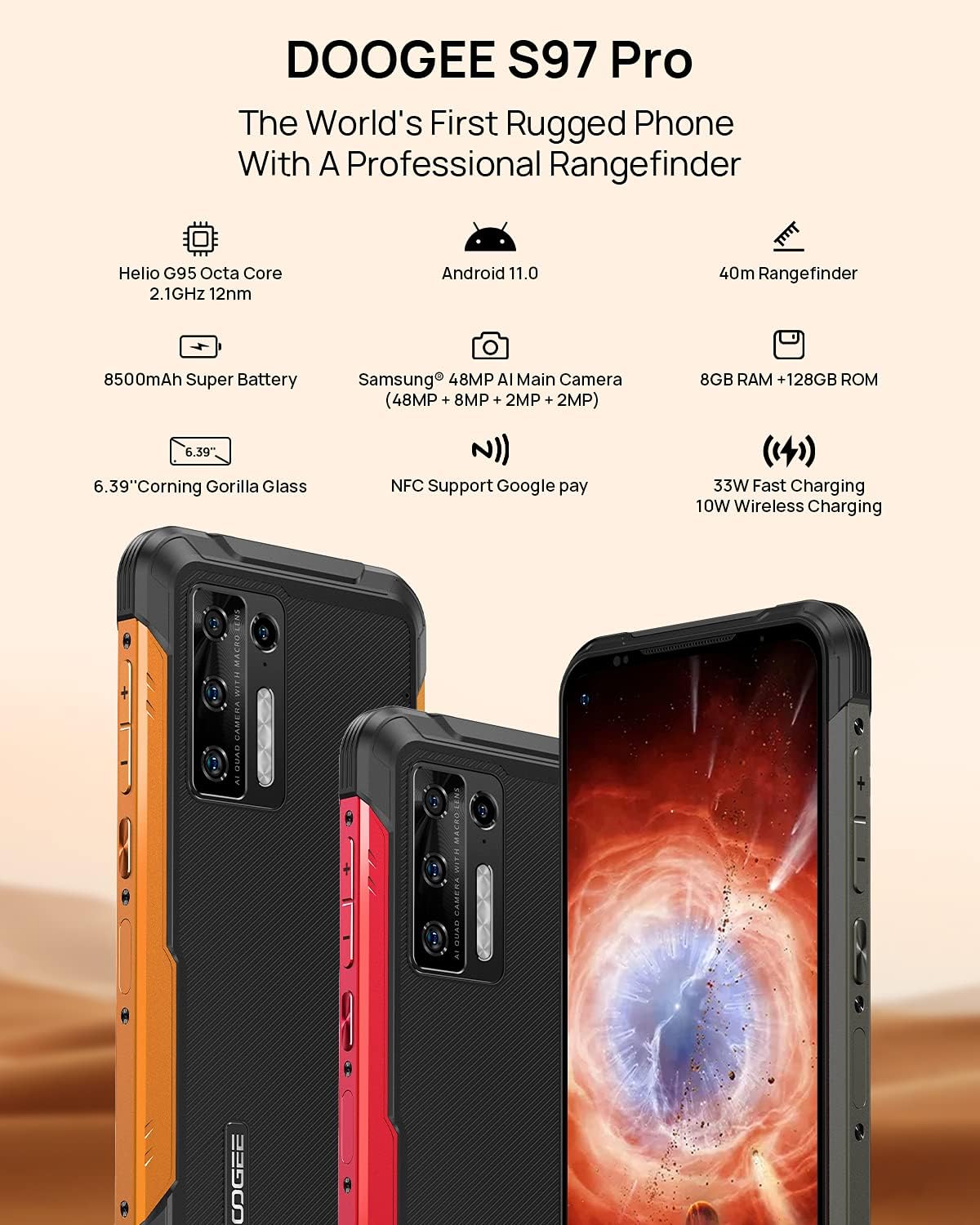
Image 2.1: Visual representation of the DOOGEE S97 Pro's main features, including processor, battery, camera, and display.
3. الإعداد
3.1 تركيب بطاقة SIM
- حدد مكان درج بطاقة SIM على جانب جهازك.
- استخدم أداة إخراج بطاقة SIM المتوفرة لفتح الدرج.
- Carefully place your Nano SIM card(s) into the designated slots. Ensure proper orientation.
- Gently push the SIM card tray back into the device until it is flush with the body.
ملحوظة: This device supports specific frequency bands. Please verify compatibility with your network carrier before use. The DOOGEE S97 Pro does not support certain CDMA network carriers such as Verizon, Sprint, Xfinity, and TracFone.
3.2 التشغيل المبدئي
- Press and hold the Power button located on the side of the device until the DOOGEE logo appears.
- اتبع الإرشادات التي تظهر على الشاشة لإكمال الإعداد الأولي، بما في ذلك تحديد اللغة، واتصال Wi-Fi، وإعداد حساب Google.
4. تعليمات التشغيل
4.1 الملاحة الأساسية
- Back Function: Swipe from the left or right edge of the screen towards the center.
- الشاشة الرئيسية: اسحب لأعلى من أسفل الشاشة للعودة إلى الشاشة الرئيسية.
- التطبيقات الأخيرة: Swipe up from the bottom of the screen and hold briefly to view recent applications. Swipe left or right along the very bottom of the screen to scroll through recent apps.
- درج التطبيقات: The device does not feature a traditional app drawer. All installed applications are displayed on the home screen. Additional home screens are automatically added to the right as more apps are installed.
4.2 استخدام الكاميرا
The DOOGEE S97 Pro is equipped with a versatile camera system:
- الكاميرا الخلفية: 48MP main sensor, 8MP ultra-wide angle, 2MP portrait, and 2MP macro lens.
- الكاميرا الأمامية: كاميرا بدقة 16 ميجابكسل لالتقاط صور السيلفي وإجراء مكالمات الفيديو.
To access the camera, tap the Camera icon on your home screen. Select desired modes (Photo, Video, Portrait, Macro, etc.) from the interface.

الصورة 4.1: عن قرب view of the Samsung 48MP AI Quad Rear Camera system on the DOOGEE S97 Pro.
4.3 Rangefinder Functionality
The integrated 40m laser rangefinder allows for precise distance measurements. To use:
- Locate and open the 'Rangefinder' application on your device.
- Select the desired measurement mode (Length, Area, Volume, Pythagoras).
- Follow the on-screen instructions to aim the laser and take measurements.

Image 4.2: Screenshots of the DOOGEE S97 Pro's 40m Rangefinder application interface, showing various measurement modes.
4.4 إدارة البطارية
The DOOGEE S97 Pro features an 8500mAh battery. To optimize battery life and charging:
- الشحن السلكي: Use the provided USB Type-C cable and a compatible 33W fast charger for optimal charging speed.
- الشحن اللاسلكي: The device supports 10W wireless charging. Place the phone on a compatible wireless charging pad.
- تحسين البطارية: Access battery settings to manage app power usage and enable power-saving modes.

Image 4.3: Illustration of the DOOGEE S97 Pro's 8500mAh Super Battery and charging capabilities.
4.5 ميزات المتانة
The S97 Pro is built to withstand harsh environments:
- تصنيف IP68: يوفر الحماية ضد دخول الغبار والغمر في الماء حتى عمق 1.5 متر لمدة 30 دقيقة.
- مقاوم للصدمات: Designed to resist drops and impacts.
- زجاج كورنينج غوريلا: Enhances screen durability against scratches and minor impacts.

Image 4.4: Demonstrations of the DOOGEE S97 Pro's waterproof, dustproof, and shockproof capabilities.
Video 4.5: An official video from DOOGEE showcasing the rugged features and capabilities of the S59 Pro smartphone.
نظام التشغيل 4.6 Android 11
The device runs on Android 11, offering enhanced privacy controls, improved notification management, and a streamlined user experience.

Image 4.6: Visual representation of the Android 11 operating system interface on the DOOGEE S97 Pro.
5. الصيانة
5.1 تنظيف جهازك
Due to its waterproof design, the DOOGEE S97 Pro can be cleaned with water. Ensure all ports are securely closed before rinsing. Use a soft, damp cloth to wipe the screen and body. Avoid harsh chemicals or abrasive materials.
5.2 تحديثات البرامج
تحقق بانتظام من وجود تحديثات للبرامج وقم بتثبيتها لضمان الأداء الأمثل والأمان والوصول إلى الميزات الجديدة. انتقل إلى الإعدادات > النظام > تحديث النظام للتحقق من التحديثات المتاحة.
6. استكشاف الأخطاء وإصلاحها
إذا واجهت مشاكل مع جهازك، فراجع الحلول الشائعة التالية:
- الجهاز لا يستجيب: اضغط مع الاستمرار على زر الطاقة لمدة 10-15 ثانية تقريبًا لفرض إعادة التشغيل.
- مشاكل الاتصال بالشبكة: Verify your SIM card is correctly inserted. Check network settings (الإعدادات> الشبكة والإنترنت> شبكة الهاتف المحمول). أعد تشغيل الجهاز.
- مشاكل الشحن: Ensure the USB cable and charger are securely connected and undamaged. Try a different charger or cable. For wireless charging, ensure the phone is correctly positioned on the charging pad.
- Fingerprint Sensor Inaccuracy: تأكد من أن إصبعك نظيف وجاف. أعد تسجيل بصمات أصابعك في الإعدادات> الأمان> بصمة الإصبع.
- الأداء البطيء: Close unused applications. Clear cache (الإعدادات > التطبيقات والإشعارات > عرض جميع التطبيقات > [اسم التطبيق] > التخزين وذاكرة التخزين المؤقت > مسح ذاكرة التخزين المؤقت). Consider a factory reset as a last resort (الإعدادات > النظام > خيارات إعادة الضبط > مسح جميع البيانات (إعادة ضبط المصنع)).
7. المواصفات
| ميزة | التفاصيل |
|---|---|
| أبعاد المنتج | 6.41 × 3.19 × 0.63 بوصة |
| وزن العنصر | 12 أونصة (340 جرامًا) |
| نظام التشغيل | أندرويد 11.0 |
| كبش | 8 GB (Note: Product data shows 4GB RAM, but images and title indicate 8GB. This manual uses 8GB as per prominent product claims.) |
| سعة تخزين الذاكرة | 128 جيجا بايت |
| حجم الشاشة | 5.71 بوصة |
| سعة البطارية | 8500 مليamp Hours (Note: Product data shows 10050 mAh, but images and title indicate 8500 mAh. This manual uses 8500 mAh as per prominent product claims.) |
| تقنيات الاتصالات اللاسلكية | خلوي، واي فاي |
| تكنولوجيا الخلوية | شبكة ال تي اي |
| نوع الموصل | يو اس بي نوع سي |
| مدخلات واجهة الإنسان | أزرار |
| ماذا يوجد في الصندوق | كابل يو اس بي |
For detailed specifications, please refer to the product packaging or the official DOOGEE webموقع.

Image 7.1: The DOOGEE S97 Pro highlighting its 8GB RAM and 128GB ROM, powered by a Helio G95 Octa Core processor.
8. الضمان والدعم
Your DOOGEE S97 Pro smartphone is covered by a manufacturer's warranty. Please refer to the warranty card included in your product packaging for specific terms and conditions, including warranty duration and coverage details.
For technical support, product inquiries, or service requests, please visit the official DOOGEE website or contact their customer service department. Contact information can typically be found on the DOOGEE webالموقع أو في عبوة المنتج.


