1. المقدمة
This manual provides essential information for the safe and efficient operation of your iProda 2 in 1 Laptop, Model M1169YM. Please read this manual thoroughly before using the device and retain it for future reference. This convertible laptop features an 11.6-inch touchscreen, powered by an Intel N4100 processor, and runs on Windows 10 Pro.

Image: The iProda 2 in 1 Laptop can be used in multiple configurations, including traditional laptop, tent, stand, and tablet modes, showcasinج- تنوعها.
2. معلومات السلامة
اتبع احتياطات السلامة التالية لمنع تلف جهازك أو إصابتك:
- لا تعرض الجهاز لدرجات حرارة عالية، أو أشعة الشمس المباشرة، أو الرطوبة العالية.
- تجنب إسقاط الجهاز أو تعريضه لصدمة شديدة.
- Use only the provided or approved power adapter for charging.
- احتفظ بالجهاز بعيدًا عن الماء والسوائل الأخرى.
- لا تحاول تفكيك الجهاز أو إصلاحه بنفسك. استشر فني صيانة مؤهلًا.
3. محتويات العبوة
تأكد من وجود جميع العناصر في الحزمة الخاصة بك:
- iProda 2 in 1 Laptop (Model M1169YM)
- محول الطاقة
- دليل المستخدم (هذا المستند)
4. انتهى المنتجview
The iProda 2 in 1 Laptop is designed for versatility, offering multiple usage modes and essential connectivity options.
4.1. الميزات الرئيسية
- شاشة لمس IPS مقاس 11.6 بوصة: A responsive 10-point precision touchscreen with 1920x1080 resolution for interactive use.
- تصميم قابل للتحويل: 360-degree hinge allows seamless transition between laptop, tablet, tent, and stand modes.
- Intel N4100 Processor: Provides efficient performance for daily tasks.
- ويندوز 10 برو: Pre-installed operating system for productivity and security.
- مساحة تخزين قابلة للتوسعة: Supports M.2 2242 SSD for additional storage capacity.

Image: Key features of the iProda laptop, including its touchscreen, operating system, display specifications, and camera resolution.

Image: The laptop's 360-degree hinge allows it to convert into a tablet, enabling direct interaction via its precision touchscreen.
4.2. المنافذ والأزرار
Familiarize yourself with the various ports and buttons on your laptop:
- ميناء من النوع C: Used for power supply and data transfer.
- مايكرو اتش دي ام اي: للاتصال بالشاشات الخارجية.
- ميكرو يو إس بي: لتوصيل أجهزة USB.
- فتحة بطاقة TF: For expanding storage with a TF (MicroSD) card.
- زر الطاقة: لتشغيل/إيقاف تشغيل الجهاز أو وضعه في وضع السكون.
- أزرار التحكم في الصوت: To adjust audio output.
- مدخل سماعة الأذن: لتوصيل سماعات الرأس أو مكبرات الصوت الخارجية.

الصورة: تفصيلية view of the laptop's side panels, indicating the location and function of each port and button for easy identification.
5. الإعداد
5.1. شحن البطارية
Before first use, fully charge the laptop's battery. Connect the provided power adapter to the Type-C port on the laptop and plug it into a power outlet. The charging indicator light will illuminate.
5.2. التمهيد الأول وإعداد Windows
- اضغط مع الاستمرار على زر التشغيل حتى تضيء الشاشة.
- اتبع التعليمات التي تظهر على الشاشة لإكمال الإعداد الأولي لنظام التشغيل Windows 10 Pro، بما في ذلك اختيار اللغة، والاتصال بالشبكة، وإنشاء حساب المستخدم.
6. تشغيل الكمبيوتر المحمول
6.1. استخدام شاشة اللمس
The 10-point precision touchscreen allows for intuitive interaction with Windows 10 Pro. Use gestures such as tapping, swiping, pinching, and stretching to navigate, zoom, and interact with applications.
6.2. لوحة المفاتيح ولوحة اللمس
The integrated keyboard and touchpad provide traditional input methods. The touchpad supports multi-touch gestures for scrolling, zooming, and switching applications.

Image: The laptop's full-size American keyboard and responsive touchpad, designed for comfortable typing and navigation.
6.3. أوضاع قابلة للتحويل
The 360-degree hinge allows you to switch between various modes:
- وضع الكمبيوتر المحمول: إعدادات قياسية للكتابة والإنتاجية.
- وضع الجهاز اللوحي: قم بطي الشاشة للخلف بالكامل للحصول على تجربة استخدام الجهاز اللوحي، وهو مثالي للتصفح أو الرسم.
- وضع الخيمة: Position the laptop like a tent for media consumption or presentations.
- وضع الوقوف: Flip the keyboard face down to use the screen as a display, suitable for watching videos.

Image: The laptop configured in tent mode, demonstrating its flexibility for viewعرض المحتوى دون أن تعيق لوحة المفاتيح الطريق.
7. توسيع التخزين
The laptop comes with 64GB eMMC storage. You can expand the storage capacity by installing an M.2 2242 SSD (128GB/256GB/512GB, not included).
7.1. Installing an M.2 2242 SSD
To install an M.2 2242 SSD:
- Power off the laptop and disconnect the power adapter.
- Carefully open the back cover of the laptop.
- حدد موقع فتحة M.2.
- Insert the M.2 2242 SSD into the slot and secure it with the appropriate screw (if provided).
- أعد تركيب الغطاء الخلفي.
- Upon booting, you may need to initialize and format the new SSD through Windows Disk Management.
Note: If you are unsure about this procedure, it is recommended to seek professional assistance.

Image: Visual representation of the M.2 SSD slot, illustrating how additional storage can be integrated into the laptop.
8. الاتصال
8.1. اتصال واي فاي
The laptop supports dual-frequency 2.4GHz/5GHz Wi-Fi. To connect to a wireless network:
- انقر على أيقونة Wi-Fi في علبة النظام.
- حدد الشبكة المطلوبة من القائمة.
- أدخل كلمة مرور الشبكة إذا طُلب منك ذلك، ثم انقر فوق "اتصال".
8.2. External Display (Micro HDMI)
Connect an external monitor or TV using a Micro HDMI to HDMI cable. Once connected, you can configure display settings (duplicate, extend, second screen only) through Windows display settings.
8.3. أجهزة USB
Use the Micro USB port or the Type-C port (with an appropriate adapter) to connect peripherals such as a mouse, keyboard, or external storage devices.
9. الصيانة
9.1. التنظيف
To clean the laptop, power it off and disconnect the power adapter. Use a soft, lint-free cloth slightly dampened with water or a screen cleaner for the display. Avoid harsh chemicals or abrasive materials.
9.2. العناية بالبطارية
لإطالة عمر البطارية:
- تجنب تفريغ البطارية بالكامل بشكل متكرر.
- لا تعرض الكمبيوتر المحمول لدرجات حرارة عالية.
- إذا كنت ستخزن الكمبيوتر المحمول لفترة طويلة، فتأكد من شحن البطارية إلى حوالي 50-70%.
10. استكشاف الأخطاء وإصلاحها
فيما يلي حلول للمشاكل الشائعة التي قد تواجهها:
| مشكلة | حل |
|---|---|
| الكمبيوتر المحمول لا يعمل. | Ensure the battery is charged. Connect the power adapter and try again. If still unresponsive, perform a hard reset by holding the power button for 10-15 seconds. |
| الشاشة فارغة أو تومض. | Restart the laptop. Check if an external display is connected and interfering. Update display drivers if possible. |
| مشاكل في الاتصال بشبكة Wi-Fi. | Ensure Wi-Fi is enabled. Restart your router and the laptop. Check network settings in Windows. |
| شاشة اللمس لا تستجيب. | أعد تشغيل الكمبيوتر المحمول. تأكد من نظافة الشاشة. تحقق من وجود أي تحديثات معلقة لنظام التشغيل ويندوز أو تحديثات لبرامج تشغيل شاشة اللمس. |
11. المواصفات
Technical specifications for the iProda 2 in 1 Laptop (Model M1169YM):
| ميزة | التفاصيل |
|---|---|
| ماركة | ايبرودا |
| رقم الموديل | M1169YM |
| نظام التشغيل | ويندوز 10 برو |
| حجم الشاشة | 11.6 بوصة |
| دقة الشاشة | 1920 × 1080 بكسل (1080 بكسل) |
| المعالج | Intel N4100 (up to 2.4 GHz Burst Frequency) |
| كبش | 4 جيجا بايت DDR4 |
| القرص الصلب | 64 جيجا بايت eMMC |
| بطاقة الرسوميات | Integrated (UHD 600 Graphics) |
| نوع لاسلكي | 2.4 GHz / 5 GHz Dual-frequency Wi-Fi |
| متوسط عمر البطارية | 8 Hours (3500mAh, 27Wh) |
| وزن العنصر | 3.63 رطل |
| أبعاد المنتج | 11.99 × 11.6 × 0.5 بوصة |
| تكنولوجيا الاتصال | HDMI, USB Type-C, Micro USB |
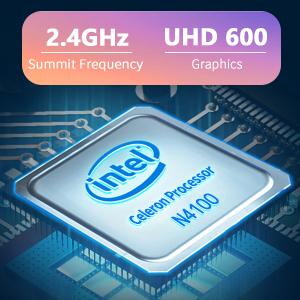
Image: The Intel Celeron N4100 processor, central to the laptop's performance, highlighting its clock speed and integrated graphics capabilities.

Image: The laptop's battery specifications, indicating its power capacity for extended use.
12. الضمان والدعم
For warranty information and technical support, please refer to the documentation included with your purchase or visit the official iProda website. Contact information for customer service can typically be found on the manufacturer's support page.


