1. معلومات السلامة والتحذيرات
Read all safety warnings and instructions carefully before operating this device. Failure to follow these instructions may result in serious injury or property damage.
- حافظ على مسافة آمنة: Always maintain a certain distance from the nozzle while installing and operating the machine.
- Do Not Aim at Persons: Never aim the nozzle directly towards any person when the machine is working.
- مطلوب إشراف الكبار: This appliance must be grounded. Use only with adult supervision.
- الاستخدام في الهواء الطلق فقط: مُصممة للاستخدام في الهواء الطلق.
- يحفظ بعيدا عن متناول الأطفال: Keep all serviceable parts away from children.
- تهوية: استخدم دائمًا في منطقة جيدة التهوية.
- CO2 Tank Handling: Ensure CO2 tanks are secured and handled according to manufacturer guidelines.
- تخفيف الضغط: Before disassembling, always turn off the CO2 bottle valve first, allow residual gas in the pipe to escape, then turn off the power, and finally disconnect the gas bottle.

2. انتهى المنتجview
The MOKA SFX DMX 512 Cryo CO2 Cannon is a professional-grade special effects machine designed to produce powerful CO2 fog jets for stage performances, DJ events, and other entertainment applications. It features adjustable spray angle and multiple control modes for versatile operation.
المميزات الرئيسية:
- Adjustable Spray Angle: The CO2 jet machine offers a 180° adjustable spray angle for flexible effect direction.
- قناة الأمان: Incorporates a safety channel that must be activated to prevent accidental spraying.
- موصلات سريعة: Built-in quick connectors ensure a swift, secure, and leak-free connection to the CO2 tank.
- High-Pressure Valve: Equipped with a 1400 psi upgraded valve, capable of spraying CO2 fog 10-12 meters high.
- Ice-Free Operation: Produces strong CO2 fog without generating ice.

3. المواصفات الفنية
| ميزة | مواصفة |
|---|---|
| المجلدtage | AC110V, 60HZ / 50HZ |
| قوة | 30 واط |
| طول الخرطوم | 20ft (Length customizable) |
| Hose Pressure Valve | 2600 رطل/بوصة مربعة |
| وضع التحكم | DMX512 and Manual Control |
| وقت الرش | Continuous injection (Suggestions for 20 seconds) |
| زاوية الرش | 0-180 degree adjustable |
| أقصى ضغط | 1400 رطل/بوصة مربعة |
| ارتفاع الرش | 10-12م |
| الوزن الإجمالي | 5.8كجم |
| وزن الشحن | 9.5كجم |
| حجم المنتج | 30 × 22 × 16 سم |
| الشهادات | CE / ROHS / FCC |
4. تعليمات الإعداد
Follow these steps to properly set up your MOKA SFX DMX 512 Cryo CO2 Cannon:
- وضع الوحدة: Place the CO2 Cannon on a stable, level surface in the desired location. Ensure there is adequate clearance around the nozzle and that the spray path is clear of people and obstructions.
- Connect CO2 Hose to Tank: Connect one end of the provided CO2 hose to your CO2 gas bottle. Ensure a tight and secure connection.
- Position CO2 Bottle: Lay the CO2 bottle down flat in a secure position to prevent it from tipping over.
- Connect CO2 Hose to Machine: Connect the other end of the CO2 hose to the quick-connector inlet on the CO2 Cannon. Ensure this connection is also tight and secure.
- Open Gas Bottle Valve: Slowly and carefully turn on the valve of the CO2 gas bottle. Listen for any leaks.
- Connect Power and DMX (Optional):
- Connect the power cable to the machine's 'POWER IN' port and then to a suitable power outlet (AC110V).
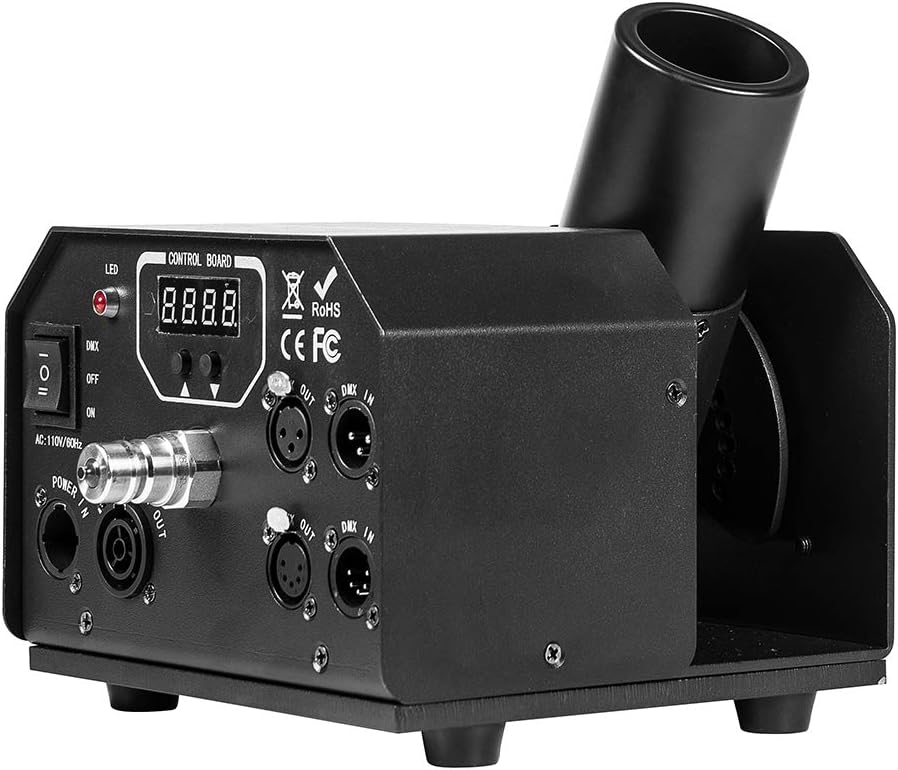
- If using DMX control, connect a DMX cable from your DMX console to the 'DMX IN' port on the CO2 Cannon. If linking multiple units, connect from 'DMX OUT' of the first unit to 'DMX IN' of the next.


5. تعليمات التشغيل
The MOKA SFX DMX 512 Cryo CO2 Cannon can be operated via DMX512 control or manual control.
5.1. التحكم اليدوي
- Ensure the CO2 gas bottle valve is open and the unit is powered on.
- Set the DMX/OFF/ON switch to 'ON' for manual operation.
- Press the manual trigger button on the control panel to activate the CO2 jet. Release to stop.
- مهم: Observe the recommended continuous injection time (e.g., 20 seconds) to prevent freezing or damage to the unit.
5.2. التحكم عبر DMX512
- Ensure the CO2 gas bottle valve is open and the unit is powered on.
- Set the DMX/OFF/ON switch to 'DMX'.
- Configure the DMX address on the unit's control board using the up/down buttons. Refer to your DMX console's manual for channel assignments.
- Activate the corresponding DMX channel on your console to trigger the CO2 jet.
- قناة الأمان: The unit features a safety channel. Ensure this channel is activated (e.g., set to a specific value) on your DMX console before the CO2 jet can be triggered. This prevents unintended activation.

6. الصيانة
Regular maintenance ensures the longevity and reliable performance of your CO2 Cannon.
- تنظيف: Periodically wipe down the exterior of the unit with a soft, dry cloth. Do not use harsh chemicals or abrasive cleaners.
- فحص الفوهة: Regularly check the CO2 nozzle for any obstructions or ice buildup. Ensure it is clear before operation.
- الخراطيم والوصلات: Inspect the CO2 hose and all connections for signs of wear, damage, or leaks before each use. Replace any damaged components immediately.
- تخزين: When not in use, store the unit in a dry, cool place, disconnected from the CO2 tank and power supply.
- خدمة احترافية: For any internal repairs or complex issues, contact qualified service personnel. Do not attempt to open the unit yourself.
7. استكشاف الأخطاء وإصلاحها
If you encounter issues with your CO2 Cannon, refer to the following common problems and solutions:
- No CO2 Jet:
- Ensure the CO2 gas bottle valve is fully open.
- تأكد من إحكام جميع وصلات الخراطيم.
- Verify the unit is powered on and the DMX/OFF/ON switch is set correctly (ON for manual, DMX for DMX control).
- If using DMX, confirm the DMX address is correct and the safety channel is activated on your console.
- Check if the CO2 tank is empty.
- Weak CO2 Jet:
- Ensure the CO2 tank has sufficient pressure.
- Check for any partial obstructions in the nozzle.
- Verify the hose is not kinked or damaged.
- التسريبات في التوصيلات:
- أحكم ربط جميع الوصلات بإحكام.
- افحص الحلقات المطاطية والأختام بحثًا عن أي تلف واستبدلها إذا لزم الأمر.
- الوحدة لا تعمل:
- Check the power cable connection to both the unit and the power outlet.
- تأكد من أن منفذ الطاقة يعمل.
- Check the unit's power switch.
8. الضمان والدعم
For warranty information, technical support, or service inquiries, please refer to the documentation provided with your purchase or contact MOKA SFX customer service directly. Keep your purchase receipt as proof of purchase for warranty claims.
MOKA SFX Store: Visit the MOKA SFX Store on Amazon


