1. المقدمة
Thank you for choosing the Hama 186369 Weather Forecast Center. This device provides comprehensive weather data, including satellite-based forecasts, indoor and outdoor temperature/humidity, and more. This manual will guide you through the setup, operation, and maintenance of your weather station to ensure optimal performance.
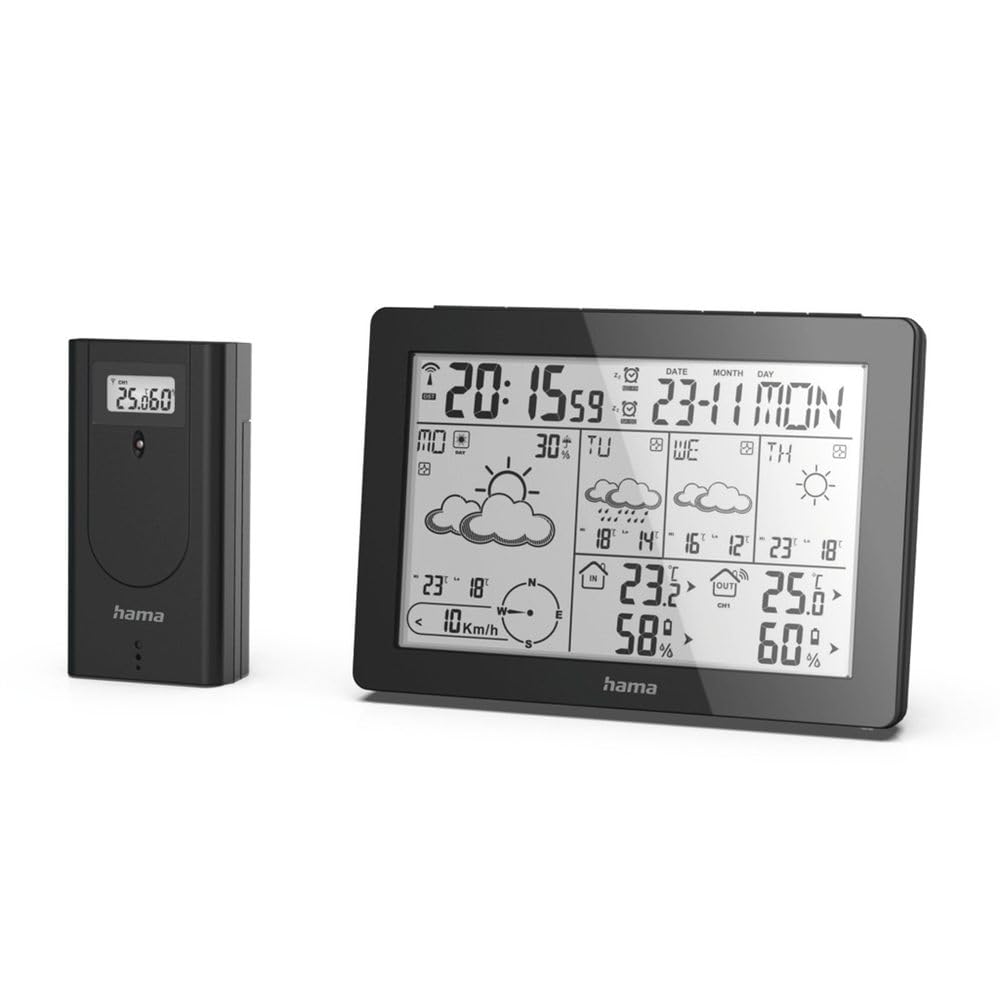
The Hama 186369 Weather Forecast Center main unit, showcasing its digital display with various weather parameters.
2. محتويات العبوة
Please check that all items listed below are present and in good condition:
- Hama 186369 Weather Forecast Center (Base Station)
- جهاز استشعار خارجي لاسلكي
- 4 x AA Batteries (for both units)
- دليل التعليمات هذا

The complete set, including the base station and the wireless outdoor sensor.
3. تعليمات السلامة
- لا تفتح الجهاز. قد يؤدي الإصلاح غير الصحيح إلى مخاطر كبيرة على المستخدم.
- Do not expose the product to direct sunlight, extreme temperatures, or high humidity.
- احتفظ بهذا المنتج ، مثل جميع المنتجات الكهربائية ، بعيدًا عن متناول الأطفال.
- حماية المنتج من الأوساخ والرطوبة وارتفاع درجة الحرارة.
- استخدم المنتج للغرض المخصص له فقط.
- لا تستخدم المنتج في المناطق التي لا يُسمح فيها بالمنتجات الإلكترونية.
- When inserting batteries, note the correct polarity (+ and - markings) and insert the batteries accordingly. Otherwise, the batteries could leak or explode.
- Replace all batteries of a set at the same time. Do not mix old and new batteries or batteries of different types.
4. الإعداد
4.1 إدخال البطاريات
The Hama 186369 Weather Forecast Center and its outdoor sensor require AA batteries for operation.
- Open the battery compartment cover on the back of both the base station and the outdoor sensor.
- Insert the AA batteries, ensuring correct polarity (+ and -). The base station requires 2x AA batteries, and the outdoor sensor requires 2x AA batteries.
- أغلق أغطية حجرة البطارية بشكل آمن.
Inserting batteries into the base station. Ensure correct polarity.

The wireless outdoor sensor, which also requires batteries.
4.2 Initial Operation and Signal Reception
After inserting the batteries, the base station will automatically search for the DCF-77 signal and connect to the outdoor sensor.
- Place the base station and the outdoor sensor close to each other during initial setup.
- The DCF-77 radio signal for time and date synchronization will be automatically received. This process may take several minutes.
- The outdoor sensor will transmit temperature and humidity data to the base station. Ensure they are within range (up to 30 meters in open areas).

زيادةview of the weather station's features and components, including the outdoor sensor and base station display.
5. Operating the Weather Forecast Center
5.1 عرض أكثرview
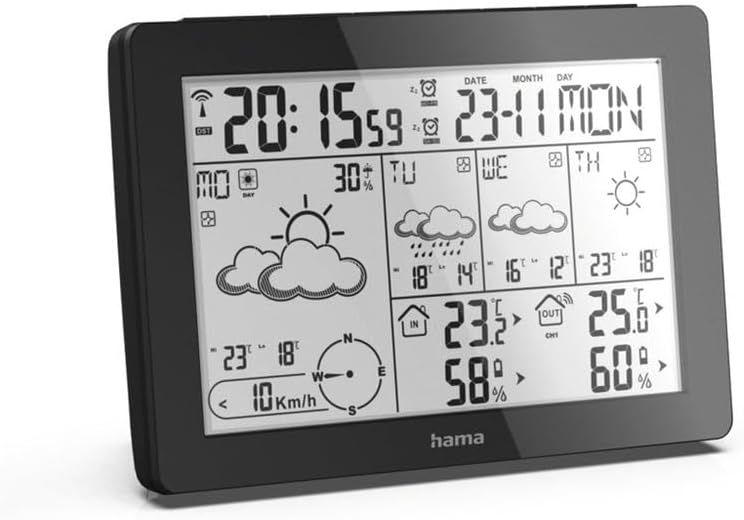
The main display shows various information at a glance:
- الوقت والتاريخ: Synchronized via DCF-77 signal.
- درجة الحرارة والرطوبة الداخلية: Measured by the base station.
- درجة الحرارة والرطوبة الخارجية: Received from the wireless outdoor sensor.
- النشرة الجوية: Satellite-based 4-day forecast for 60 regions/30 regions in Europe, updated daily.
- Rain Probability: Indication of precipitation likelihood.
- سرعة الرياح واتجاهها: معروضة بشكل بياني.
- إنذار الصقيع: Activates when temperatures drop to a critical level.
5.2 وظائف الأزرار
The buttons on the top of the base station allow you to adjust settings and view different information.

قمة view of the base station showing the control buttons.
- اتجاهات: Switches between display modes (e.g., time, alarm setting).
- قناة: Selects different outdoor sensor channels if multiple sensors are used.
- DAY/NIGHT/SNOOZE+LIGHT: Activates backlight, snooze function for alarm, or switches between day/night display.
- الاختبار: Initiates a test of the sensor connection.
- فوق تحت: Adjusts values during settings or navigates through forecast data.
5.3 Setting Time and Date (Manual Adjustment)
While the time and date are usually set automatically via the DCF-77 signal, you can manually adjust them if needed.
- اضغط مع الاستمرار على وضع اضغط على الزر حتى يبدأ عرض الوقت في الوميض.
- استخدم UP و تحت الأزرار لضبط الساعة، ثم اضغط وضع للتأكيد والانتقال إلى محضر الاجتماع.
- كرر ذلك للدقائق والسنة والشهر واليوم.
- يضعط وضع مرة أخرى للخروج من وضع الإعداد.
5.4 وظيفة الإنذار
تتضمن محطة الأرصاد الجوية وظيفة إنذار.
- اضغط على وضع button repeatedly until the alarm time is displayed.
- اضغط مع الاستمرار وضع للدخول في وضع إعداد التنبيه.
- يستخدم UP و تحت لضبط وقت التنبيه المطلوب.
- يضعط وضع لتأكيد كل إعداد.
- لتنشيط/إلغاء تنشيط التنبيه، اضغط على UP button when the alarm time is displayed. An alarm icon will appear/disappear.
6. الصيانة
6.1 التنظيف
- قم بتنظيف هذا المنتج فقط بمسحة خفيفة.ampاستخدم قطعة قماش خالية من النسالة ولا تستخدم مواد تنظيف قوية.
- تأكد من عدم دخول الماء إلى الجهاز.
6.2 استبدال البطارية
When the battery indicator appears on the display, replace all batteries in the respective unit (base station or outdoor sensor).
- Follow the steps in section 4.1 "Inserting Batteries".
- تخلص من البطاريات المستخدمة وفقا للوائح المحلية.
7. استكشاف الأخطاء وإصلاحها
| مشكلة | السبب المحتمل | حل |
|---|---|---|
| No display / Weak display | البطاريات فارغة أو تم إدخالها بشكل غير صحيح. | استبدال البطاريات، والتأكد من القطبية الصحيحة. |
| لا توجد قراءة لدرجة الحرارة/الرطوبة الخارجية | Outdoor sensor not connected or out of range. |
|
| الوقت/التاريخ غير صحيح | DCF-77 signal not received or interference. |
|
| توقعات الطقس غير دقيقة | Incorrect region setting or temporary signal issue. |
|
8. المواصفات
| ميزة | التفاصيل |
|---|---|
| رقم الموديل | 186369 |
| Dimensions (Base Station) | 3 × 15.3 × 10.5 سم |
| وزن | 510 جرام |
| مادة | أكريليك |
| مصدر الطاقة | Battery-powered (4 AA batteries required, included) |
| الاتصال | لاسلكي (للمستشعر الخارجي) |
| المميزات الخاصة | Alarm, Wireless Outdoor Sensor, Frost Alarm, DCF-77 Radio Clock |
| توقعات الطقس | Satellite-based 4-day forecast for 60 regions/30 regions in Europe, daily updated data for 611 locations. |
| الاستخدام الموصى به | Temperature measurement, hobby, private, business. |
9. الضمان والدعم
لا تتحمل شركة Hama GmbH & Co KG أي مسؤولية ولا تقدم أي ضمان عن التلف الناتج عن التركيب / التثبيت غير الصحيح أو الاستخدام غير السليم للمنتج أو عن عدم مراعاة تعليمات التشغيل و / أو ملاحظات السلامة.
For technical support or warranty claims, please contact your retailer or visit the official Hama webالموقع للحصول على مزيد من المساعدة.

Hama: Experience and competence since 1923.


