1. المقدمة
Thank you for choosing the Hama BB/CATV Amplifier 00205234. This device is designed to amplify antenna signals for both cable television (CATV) and satellite antenna systems, ensuring a clear and stable signal reception. With its adjustable gain of up to 25 dB, you can fine-tune the signal strength to suit your specific needs. Please read this manual carefully before installation and use to ensure proper operation and safety.
2. تعليمات السلامة
- This device is intended for indoor use only. Do not expose it to moisture, rain, or extreme temperatures.
- لا تفتح الجهازasinز. يجب أن تتم الصيانة فقط بواسطة أفراد مؤهلين.
- Ensure the power outlet is easily accessible and properly grounded.
- Disconnect the device from the power supply before cleaning or if it will not be used for an extended period.
- تجنب وضع الجهاز بالقرب من مصادر الحرارة أو تحت أشعة الشمس المباشرة.
3. محتويات العبوة
يرجى التأكد من أن جميع العناصر موجودة وفي حالة جيدة:
- Hama BB/CATV Amplifier 00205234 (Main Unit)
4. انتهى المنتجview
Familiarize yourself with the components of your Hama BB/CATV Ampمكبر:
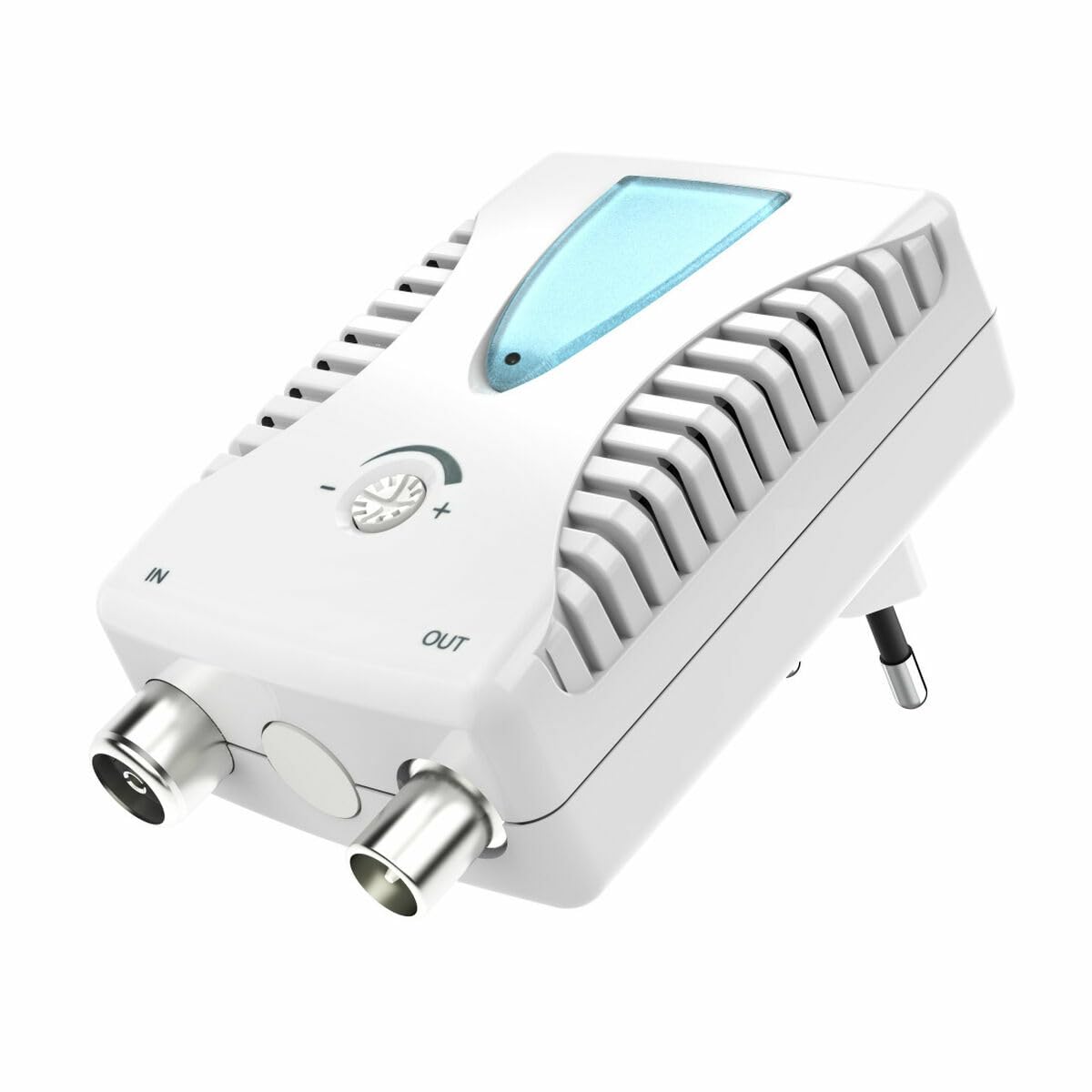
الشكل 1: أمام view of the Hama BB/CATV Amplifier 00205234. It features an "IN" port for the incoming antenna signal, an "OUT" port for the amplified signal to your television or receiver, a rotary knob for signal gain adjustment, a blue LED indicator, and an integrated power plug.
- في المنفذ: Connects to the incoming antenna cable (from wall outlet or satellite dish).
- منفذ الإخراج: Connects to your television, receiver, or distribution system.
- تعديل مقبض الباب: تستخدم للتحكم في amplification level (gain).
- مؤشر LED: يضيء عند تشغيل الجهاز.
- قابس طاقة مدمج: For connecting to a standard electrical outlet.
5. الإعداد والتثبيت
Follow these steps to install your Hama BB/CATV Ampمكبر:
- تحديد نقاط الاتصال: Locate the antenna cable coming from your wall outlet or satellite dish (this will be your input signal) and the input port on your television or receiver (this will be your output destination).
- Connect Input Cable: Connect the incoming antenna cable to the IN port on the Hama ampمكبر الصوت. تأكد من أن الاتصال آمن.
- Connect Output Cable: Use a suitable coaxial cable (not included) to connect the خارج port of the Hama amplifier to the antenna input on your television or receiver. Ensure the connection is secure.
- توصيل الطاقة: Plug the integrated power plug of the amplifier into a standard electrical wall outlet. The blue LED indicator on the amplifier should illuminate, indicating that the device is powered on.
- التعديل الأولي: Turn the adjustment knob to its minimum setting (usually fully counter-clockwise) before turning on your television.
ملحوظة: For optimal performance, ensure all coaxial cable connections are tight and free from damage.
6. تشغيل Ampالقمامة
The Hama BB/CATV Amplifier features an adjustable gain control to optimize your signal strength.
- تشغيل الطاقة: تأكد من amplifier is plugged into a power outlet and the blue LED is lit.
- Turn on TV/Receiver: Switch on your television or receiver and select the appropriate input source (e.g., "Antenna" or "Cable").
- ضبط الربح: Slowly turn the adjustment knob clockwise to increase the amplification. Observe your television screen for signal quality.
- If the picture is pixelated or distorted, the signal might be too weak or too strong.
- Adjust the knob until you achieve the clearest possible picture and sound.
- زيادة-amplification can lead to signal distortion, so avoid setting the gain higher than necessary.
- Scan Channels (if necessary): After adjusting the gain, you may need to perform a channel scan on your television or receiver to detect new or improved channels. Refer to your TV's manual for instructions on how to perform a channel scan.
7. الصيانة والعناية
- تنظيف: افصل amplifier from the power outlet before cleaning. Use a soft, dry, lint-free cloth to wipe the exterior. Do not use liquid cleaners or abrasive materials.
- تخزين: If storing the device for an extended period, unplug it and keep it in a cool, dry place away from direct sunlight and moisture.
- وصلات الكابلات: قم بفحص جميع توصيلات الكابلات بشكل دوري للتأكد من أنها آمنة وخالية من التآكل أو التلف.
8. استكشاف الأخطاء وإصلاحها
| مشكلة | السبب المحتمل | حل |
|---|---|---|
| No picture or poor signal quality. |
|
|
| Blue LED not illuminated. |
|
|
| Picture is distorted or over-saturated. |
|
|
9. المواصفات الفنية
| رقم الموديل: | 00205234 |
| ماركة: | حماه |
| Amplification (Gain): | Up to 25 dB (adjustable) |
| نطاق التردد: | 862 ميجا هرتز |
| نوع الموصل: | Auxiliary (Coaxial F-type) |
| الأجهزة المتوافقة: | Satellite Antenna, Television |
| بيئة الاستخدام: | داخلي |
| وزن السلعة: | 0.19 كيلوغرام |
10. الضمان والدعم
Hama products are subject to strict quality controls. Should you nevertheless experience a problem with this product, please contact your retailer or the Hama service department. Please retain your proof of purchase for any warranty claims. For detailed warranty terms and conditions, please refer to the official Hama webالموقع أو الاتصال بخدمة دعم العملاء الخاصة بهم.


