مقدمة
This manual provides detailed instructions for the setup, operation, and maintenance of your Rapoo M100G Multi-Mode Wireless Mouse. Please read this manual thoroughly before using the product to ensure proper functionality and to maximize your user experience. The Rapoo M100G mouse offers versatile connectivity options, including Bluetooth 3.0, Bluetooth 4.0, and 2.4G wireless, allowing connection to up to three devices simultaneously.
محتويات الحزمة
تأكد من وجود جميع العناصر في الحزمة الخاصة بك:
- Rapoo M100G Wireless Mouse
- جهاز إستقبال يو إس بي
- 1 AA Alkaline Battery (Pre-installed)
- دليل المستخدم
المنتج انتهىview
The Rapoo M100G is designed for comfort and efficiency, featuring a silent click mechanism and multi-device connectivity.

الصورة: من أعلى إلى أسفل view of the Rapoo M100G wireless mouse in blue, alongside its compact USB receiver.
يثبت
1. تركيب البطارية
The Rapoo M100G mouse comes with one AA alkaline battery pre-installed. If you need to replace the battery:
- افتح غطاء حجرة البطارية الموجود في الجانب السفلي من الفأرة.
- أدخل بطارية AA واحدة، مع التأكد من القطبية الصحيحة (+/-).
- أغلق غطاء حجرة البطارية.
The mouse features a power-saving design for extended battery life, approximately 9 months under normal conditions.
وضع اتصال USB 2.4G
- Locate the USB receiver, typically stored within the mouse's battery compartment.
- قم بتوصيل مستقبل USB بمنفذ USB متاح على جهاز الكمبيوتر الخاص بك.
- Turn on the mouse using the ON/OFF switch located on the underside.
- يجب أن يتصل الماوس بالكمبيوتر تلقائيًا.

Image: Illustration of plugging in the USB receiver and turning on the mouse for 2.4G wireless connection.
Bluetooth Connection Mode (Bluetooth 3.0 / 4.0)
The Rapoo M100G supports two Bluetooth channels, allowing connection to two separate Bluetooth-enabled devices.
- قم بتشغيل الماوس باستخدام مفتاح التشغيل/الإيقاف الموجود في الجانب السفلي.
- Press and hold the Bluetooth button (located on the underside of the mouse) for more than 3 seconds. The red LED will flash slowly, indicating the mouse is in searching/pairing mode for 2 minutes.
- On your device (PC, tablet, laptop), go to Bluetooth settings and search for new devices.
- Select the Rapoo M100G from the list of available devices to pair.
- Repeat these steps to connect a second Bluetooth device to the other Bluetooth channel.
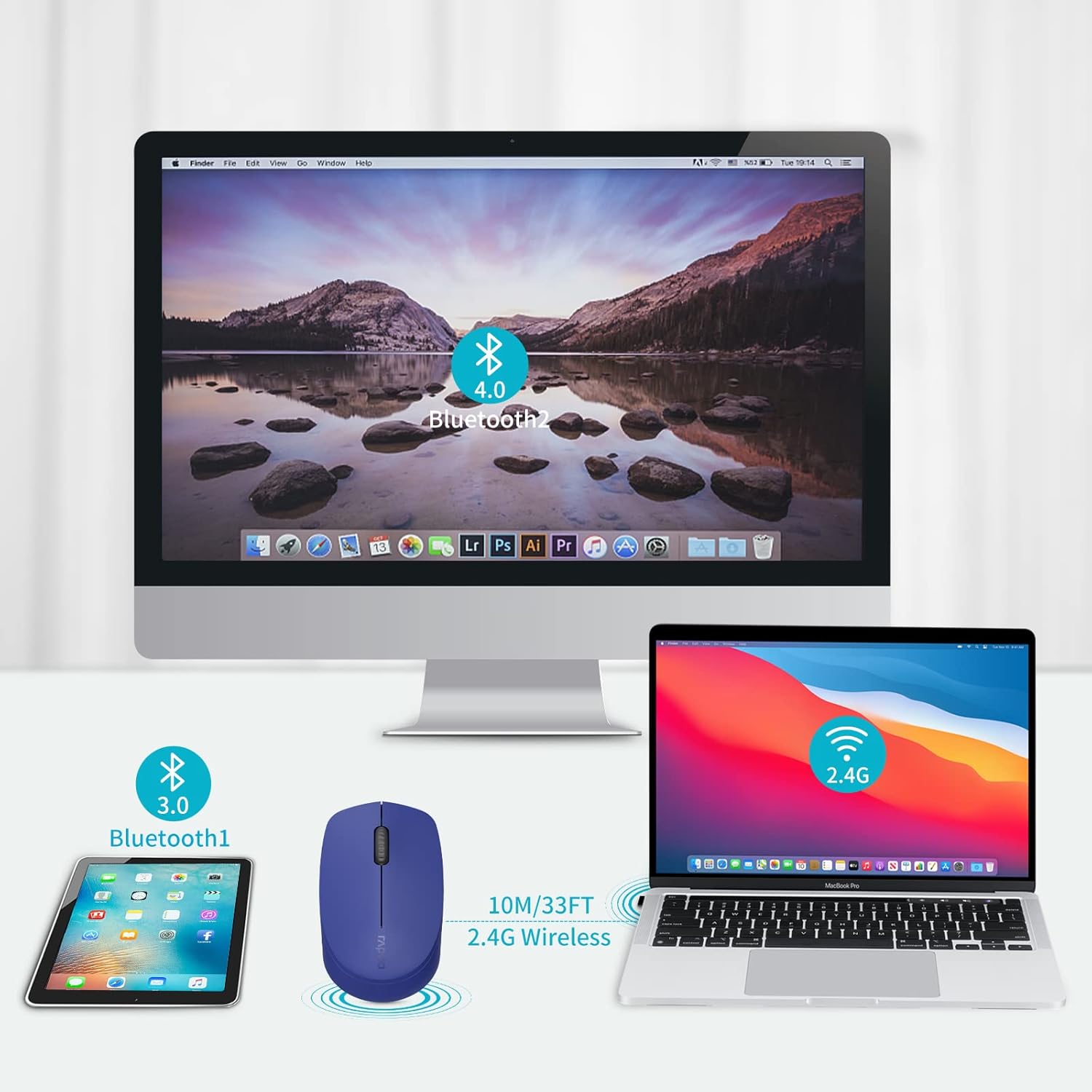
Image: Illustration of the Rapoo M100G mouse connecting to a tablet via Bluetooth 3.0, a desktop via Bluetooth 4.0, and a laptop via 2.4G wireless.
التبديل بين الأجهزة المتصلة
To switch between your connected devices (2.4G, Bluetooth 1, Bluetooth 2):
- للاتصال 2.4G: Ensure the USB receiver is plugged into the desired device.
- For Bluetooth connections: Briefly press the Bluetooth button on the underside of the mouse to cycle through the connected Bluetooth channels (Bluetooth 1 and Bluetooth 2).
ملحوظة: You cannot control three devices simultaneously. The mouse operates on one selected channel at a time.
التوافق
The Rapoo M100G mouse is widely compatible with various operating systems, including Windows, Mac OS, and Android devices, making it suitable for laptops, desktops, tablets, and Chromebooks.

Image: Visual representation of the mouse's compatibility with Windows, Mac OS, and Android operating systems.
تعليمات التشغيل
Silent Click Design
The Rapoo M100G features a silent click design, reducing click noise by 90%. This allows for a quiet working environment, minimizing disturbance to others and enhancing focus.

Image: Visual representation of the mouse's quiet click feature and ergonomic shape, suitable for various environments.
تصميم مريح
The mouse is designed with a symmetrical shape, suitable for both left and right-handed users. Its contoured form factor fits the natural curve of the hand, providing comfort and reducing fatigue during prolonged use. The high-precision optical engine allows for accurate tracking on various surfaces without a mouse pad.

Image: Depiction of the mouse's ergonomic design, highlighting its comfortable fit for the hand.
Anti-Fingerprint and Sweat-Proof Shell
The outer shell of the mouse is designed to be anti-fingerprint and sweat-proof, promoting breathability and moisture absorption for a fresh and cool feel during use.
Image: Close-up of the mouse's side texture, illustrating its anti-slip and anti-sweat properties.
تحديد
| نموذج | م100ج |
| تكنولوجيا الاتصال | Bluetooth 3.0, Bluetooth 4.0, 2.4G Wireless (USB Receiver) |
| كشف الحركة | بصري |
| المميزات الخاصة | Ergonomic Design, Lightweight, Portable, Silent Click, Multi-Device Switching |
| أبعاد المنتج | 3.92 × 2.41 × 1.4 بوصة (9.96 × 6.12 × 3.56 سم) |
| وزن العنصر | 1.98 أونصة (56 جرام) |
| نوع البطارية | 1 AA Alkaline Battery (included) |
| عمر البطارية | Up to 9 months (under normal conditions) |
| الشركة المصنعة | Shenzhen Rapoo Technology Co., Ltd |
استكشاف الأخطاء وإصلاحها
- الفأرة لا تستجيب:
- تأكد من تشغيل الماوس.
- تحقق من مستوى البطارية واستبدلها إذا لزم الأمر.
- For 2.4G connection, ensure the USB receiver is securely plugged into a working USB port. Try a different USB port.
- للاتصال عبر البلوتوث، تأكد من تفعيل البلوتوث على جهازك وأن الماوس مقترن. حاول إعادة إقران الماوس.
- Ensure the mouse is switched to the correct channel (2.4G, Bluetooth 1, or Bluetooth 2) for the device you are trying to use.
- Connection issues (drops frequently):
- قم بتقريب الماوس من جهاز استقبال USB أو الجهاز الذي يدعم تقنية Bluetooth لتقليل التداخل.
- تجنب استخدام الماوس على الأسطح المعدنية، لأنها قد تتداخل مع الإشارات اللاسلكية.
- Ensure there are no other strong wireless signals or devices operating on the same frequency nearby.
- Try updating your computer's Bluetooth drivers.
- Mouse cursor erratic or not moving smoothly:
- قم بتنظيف المستشعر البصري الموجود على الجانب السفلي للفأرة باستخدام قطعة قماش ناعمة وجافة.
- Ensure you are using the mouse on a suitable surface. While the optical engine is versatile, extreme textures or reflective surfaces can affect performance.
- Check for low battery.
- Cannot switch between devices:
- Ensure you are briefly pressing the Bluetooth button on the underside of the mouse to cycle through channels. Holding it down will initiate pairing mode.
- Verify that all devices are properly paired or connected to their respective channels.
صيانة
- تنظيف: استخدم قطعة قماش ناعمة وجافة لتنظيف الفأرة. لإزالة الأوساخ العنيدة، امسحها برفق بقطعة قماش جافة.amp يمكن استخدام قطعة قماش، ولكن تأكد من عدم دخول الرطوبة إلى الجهاز. لا تستخدم مواد كيميائية قاسية أو منظفات كاشطة.
- تخزين: When not in use for extended periods, turn off the mouse to conserve battery life. Store in a cool, dry place away from direct sunlight and extreme temperatures.
- استبدال البطارية: Replace the AA battery when the mouse performance degrades or it stops responding. Dispose of used batteries responsibly according to local regulations.
- مستقبل USB: When traveling or not using the 2.4G connection, store the USB receiver inside the mouse's dedicated compartment to prevent loss.
الضمان والدعم
Rapoo provides a one-year warranty for this product. Additionally, a 30-day return and refund or replacement policy is offered. For technical support, warranty claims, or further assistance, please refer to the contact information provided in your product packaging or visit the official Rapoo webموقع.
الشركة المصنعة: Shenzhen Rapoo Technology Co., Ltd


