1. المقدمة
Thank you for choosing the MEDION MD19601 Robot Vacuum Cleaner. This device is designed to provide efficient and automated cleaning for your home, combining vacuuming and mopping functionalities. This manual provides essential information for the safe and effective use, setup, operation, and maintenance of your robot vacuum cleaner. Please read it thoroughly before first use and keep it for future reference.

The MEDION MD19601 Robot Vacuum Cleaner on a wooden floor, showcasing its sleek design and low profile.
2. تعليمات السلامة
- اقرأ كافة التعليمات بعناية قبل استخدام الجهاز.
- هذا الجهاز مخصص للاستخدام المنزلي الداخلي فقط. لا تستخدمه في الهواء الطلق أو على الأسطح التجارية أو الصناعية.
- Do not allow children to operate the robot vacuum cleaner. Supervise children and pets when the robot is operating.
- Ensure the power adapter and charging station are placed in a dry area, away from water or moisture.
- Do not use the robot vacuum cleaner to pick up large debris, liquids, burning or smoking objects, or sharp objects.
- Before use, clear the area of loose cables, small objects, rugs with long fringes, and anything that could entangle the brushes.
- Do not operate the robot vacuum cleaner if it is damaged or malfunctioning. Contact customer support for assistance.
- Only use the original charging station and power adapter provided with the device.
3. محتويات العبوة
يرجى التحقق من محتويات الطرد عند فتحه. في حال وجود أي نقص أو تلف في المنتجات، يرجى التواصل مع خدمة العملاء.
- MEDION MD19601 Robot Vacuum Cleaner
- محطة شحن
- محول الطاقة
- 2 x Side Brushes (pre-installed)
- 2 x Spare Side Brushes
- خزان المياه
- قطعتان من وسادات الممسحة
- 1 x Spare Filter
- فرشاة التنظيف

All components included with the MEDION MD19601 Robot Vacuum Cleaner: the robot, charging station, power adapter, cleaning brush, spare side brushes, spare filter, water tank, and mop pads. Dimensions are indicated as 325mm diameter and 80mm height.
4. انتهى المنتجview
المميزات الرئيسية:
- تنظيف 2 في 1: Combines powerful vacuuming with effective mopping for comprehensive floor cleaning.
- التحكم الذكي: Control your robot via the dedicated MEDION Robots app (Android/iOS), or through voice commands using Amazon Alexa and Google Assistant.
- الملاحة الذكية: Equipped with sensors and bumpers for collision detection, obstacle avoidance, and stair detection, protecting both your furniture and the robot.
- التنظيف الفعال: Features powerful side and main brushes for thorough dirt and dust collection.
- عمر بطارية طويل: A powerful battery allows for up to 100 minutes of continuous cleaning on a single charge, with automatic return to the charging station.
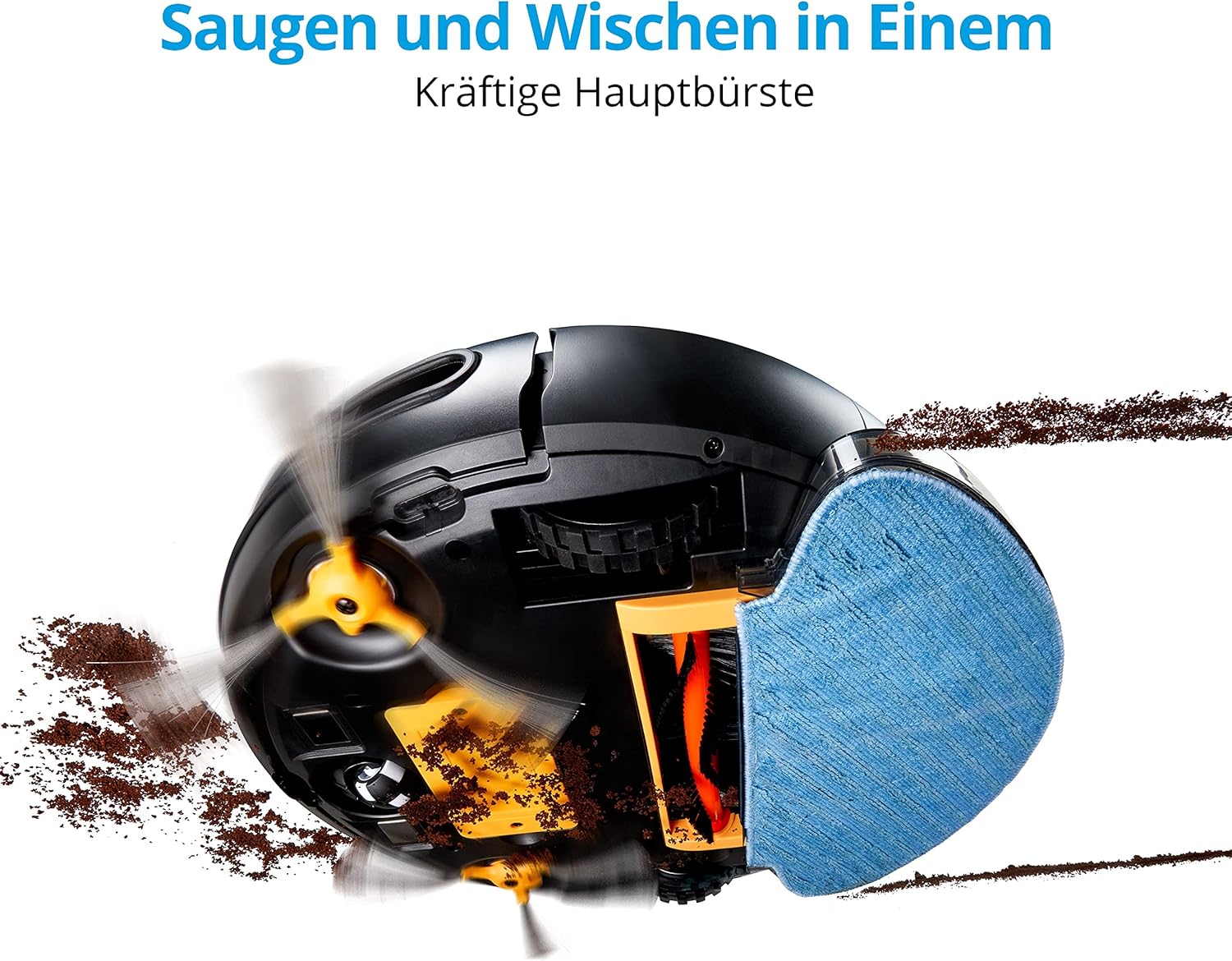
الجانب السفلي view of the MEDION MD19601 Robot Vacuum Cleaner demonstrating its powerful main brush and side brushes for simultaneous vacuuming and mopping.

من أعلى إلى أسفل view of the MEDION MD19601 Robot Vacuum Cleaner, highlighting its clean white and black design with the power button and MEDION logo.
5. الإعداد
5.1 وضع محطة الشحن
- Place the charging station against a wall in an open area, ensuring at least 0.5 meters (1.6 feet) of clear space on both sides and 1.5 meters (5 feet) in front.
- Connect the power adapter to the charging station and plug it into a power outlet. Ensure the indicator light on the charging station is on.
5.2 الشحن الأولي
- Place the robot vacuum cleaner onto the charging station, aligning its charging contacts with those on the station.
- Allow the robot to charge completely before its first use. The indicator light on the robot will change to indicate a full charge (refer to the robot's LED indicator guide for details).
5.3 تثبيت التطبيق وإقرانه
- Download the "MEDION Robots" app from the App Store (iOS) or Google Play Store (Android).
- افتح التطبيق وقم بإنشاء حساب أو تسجيل الدخول.
- Follow the in-app instructions to add your MD19601 robot vacuum cleaner. This typically involves connecting your smartphone to a 2.4GHz Wi-Fi network and then connecting the robot to the same network.
- Once paired, you can control the robot, set schedules, and monitor its status via the app.

A smartphone screen displaying the MEDION Robots app interface, showing options for manual control, scheduling, cleaning modes, push notifications, and suction power adjustment.
6. تعليمات التشغيل
6.1 بدء/إيقاف التنظيف
- البدء اليدوي: Press the power button on the robot once to start cleaning. Press it again to pause.
- التحكم في التطبيق: Use the "Start" or "Clean" button within the MEDION Robots app to initiate or stop a cleaning cycle.
6.2 أوضاع التنظيف
يوفر الروبوت أوضاع تنظيف متنوعة يمكن الوصول إليها عبر التطبيق:
- نظام آلي: يقوم الروبوت بالتنقل بذكاء وتنظيف المنطقة التي يمكن الوصول إليها بأكملها.
- وضع الحافة: يقوم الروبوت بالتنظيف على طول الجدران وحواف الأثاث.
- Spot/Circle Mode: يقوم الروبوت بتنظيف منطقة محددة بنمط حلزوني لتنظيف مركز.
6.3 الجدولة
Use the MEDION Robots app to set cleaning schedules for specific times and days. The robot will automatically start cleaning according to your programmed schedule.
6.4 وظيفة التنظيف
- Fill the water tank with clean water. You may add a small amount of neutral floor cleaner suitable for robot vacuums (avoid foaming detergents).
- Attach a clean mop pad securely to the water tank.
- Insert the filled water tank with the mop pad into the designated slot on the robot.
- Start a cleaning cycle. The robot will now vacuum and mop simultaneously.
- After mopping, remove the water tank and empty any remaining water. Clean the mop pad.
6.5 التحكم الصوتي
Integrate your MEDION MD19601 with Amazon Alexa or Google Assistant for convenient voice control. Follow the instructions in the MEDION Robots app or your smart home assistant app to link the devices. Common commands include:
- "Alexa, start MEDION Robot cleaning."
- "Hey Google, tell MEDION Robot to stop."

The MEDION MD19601 Robot Vacuum Cleaner with a speech bubble indicating voice control compatibility with Alexa and Google Assistant.

النفقات العامة view of the MEDION MD19601 Robot Vacuum Cleaner on a wooden floor, illustrating its intelligent navigation system mapping a cleaning path around obstacles like a laptop.
7. الصيانة
تضمن الصيانة المنتظمة الأداء الأمثل وتطيل عمر مكنسة الروبوت الخاصة بك.
7.1 تنظيف صندوق القمامة والفلتر
- افتح الغطاء العلوي للروبوت وقم بإزالة سلة المهملات.
- أفرغ محتويات سلة المهملات في صندوق القمامة.
- Remove the filter assembly (HEPA filter and sponge filter). Tap them gently to remove dust. Do not wash the HEPA filter with water.
- اشطف سلة المهملات بالماء إذا لزم الأمر، وتأكد من جفافها تمامًا قبل إعادة إدخالها.
- Reassemble the filters and dustbin, then place them back into the robot.
7.2 Brush Cleaning (Side and Main)
- اقلب الروبوت.
- Remove the side brushes by gently pulling them upwards. Remove any hair or debris wrapped around them.
- Remove the main brush cover and then the main brush. Use the provided cleaning tool to cut and remove tangled hair or fibers.
- Reinstall the main brush and cover, then reattach the side brushes.

مفصل view of the underside of the MEDION MD19601 Robot Vacuum Cleaner, showing the main brush, side brushes, and wheels.
7.3 تنظيف المستشعر
Wipe the cliff sensors (located on the bottom of the robot) and the bumper sensors (on the front) with a clean, dry cloth to ensure proper operation.
7.4 صيانة خزان المياه ووسادة الممسحة
- After each mopping session, empty any remaining water from the tank.
- Rinse the water tank thoroughly and allow it to air dry.
- Remove the mop pad and wash it by hand or machine. Allow it to dry completely before reuse.
8. استكشاف الأخطاء وإصلاحها
| مشكلة | السبب المحتمل | حل |
|---|---|---|
| الروبوت لا يبدأ أو لا يستجيب. | بطارية منخفضة؛ إيقاف تشغيل الطاقة؛ الروبوت عالق. | شحن الروبوت؛ التأكد من تشغيل مفتاح الطاقة؛ إزالة العوائق. |
| لا يستطيع الروبوت العودة إلى محطة الشحن. | محطة الشحن مغلقة؛ الروبوت بعيد جدًا عن المحطة. | Ensure clear space around charging station; Manually place robot closer. |
| أداء التنظيف ضعيف. | سلة المهملات ممتلئة؛ الفرش متشابكة؛ الفلتر مسدود. | Empty dustbin; Clean brushes; Clean or replace filter. |
| مشاكل اتصال التطبيق. | كلمة مرور الواي فاي غير صحيحة؛ جهاز التوجيه بعيد جدًا؛ شبكة واي فاي بتردد 5 جيجاهرتز. | Verify Wi-Fi password; Move robot closer to router; Ensure 2.4GHz Wi-Fi is used. |
| وظيفة التنظيف لا تعمل. | خزان المياه فارغ؛ وسادة الممسحة غير مثبتة بشكل صحيح. | Fill water tank; Attach mop pad securely. |
9. المواصفات
| ميزة | مواصفة |
|---|---|
| ماركة | MEDION |
| رقم الموديل | ام دي 19601 |
| لون | أبيض |
| مستوى الضوضاء | 44 ديسيبل |
| عمر البطارية | حتى 100 دقيقة |
| أبعاد المنتج (الطول × العرض × الارتفاع) | 32.5 × 32.5 × 8 سم |
| وزن العنصر | 2.9 كيلوغرام |
| ميزة خاصة | لاسلكي |
| التوافق | أمازون إيكو (أليكسا)، مساعد جوجل |
| نوع الفلتر | مرشح هواء عالي الكفاءة |
10. الضمان والدعم
MEDION offers a commitment to quality and support for its products.
- توفر قطع الغيار: Spare parts for the MEDION MD19601 are available for a period of 2 years from the date of purchase.
- For further assistance, troubleshooting, or to inquire about warranty services, please refer to the official MEDION webالموقع أو اتصل بدعم العملاء مباشرة.


