1. المقدمة
This manual provides comprehensive instructions for the One For All URC4912 Sony TV Replacement Remote Control. Designed to function identically to your original Sony TV remote, the URC4912 offers immediate compatibility with all Sony TV models (LCD, LED, Plasma) without requiring any setup. It also includes a learning feature for personalized customization of functions.
2. الإعداد
2.1 تركيب البطاريات
The URC4912 remote control requires two AA batteries (not included). Follow these steps to install them:
- حدد موقع غطاء حجرة البطارية في الجزء الخلفي من جهاز التحكم عن بعد.
- قم بتحريك الغطاء للأسفل أو اضغط على المزلاج لفتحه.
- قم بإدخال بطاريتين AA، مع التأكد من محاذاة الأطراف الموجبة (+) والسالبة (-) بشكل صحيح مع العلامات الموجودة داخل الحجرة.
- قم باستبدال غطاء حجرة البطارية عن طريق تحريكه مرة أخرى إلى مكانه حتى يصدر صوت نقرة آمنة.
Note: Always use new batteries and dispose of old batteries responsibly.
2.2 Initial Setup (No Configuration Required)
The One For All URC4912 remote control is pre-programmed for all Sony televisions. No setup or programming is required. Simply insert the batteries, and the remote is ready for immediate use with your Sony TV.
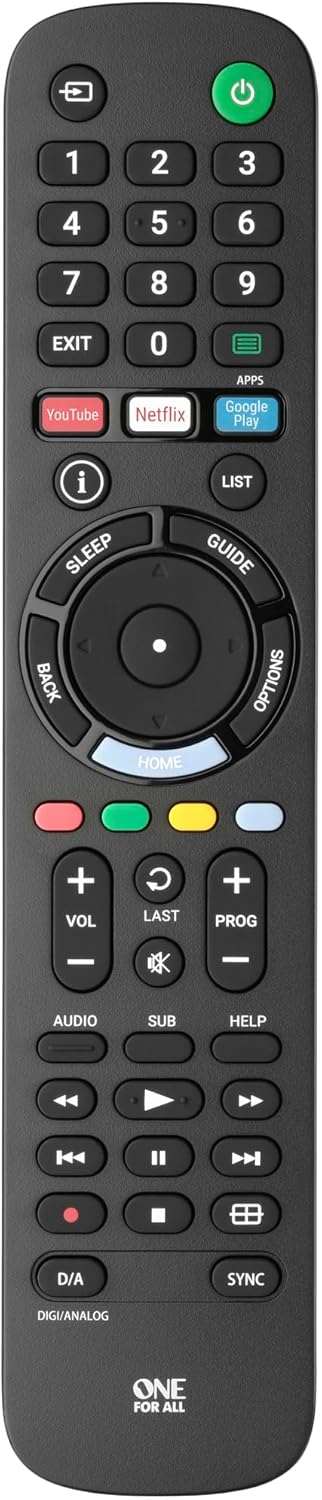
الصورة 1: الجبهة view of the One For All URC4912 remote control. This image displays the remote's layout, including number buttons, navigation pad, volume and channel controls, and dedicated app buttons for services like YouTube and Netflix.
3. تشغيل جهاز التحكم عن بعد
3.1 الوظائف الأساسية
The URC4912 remote provides all standard functions found on an original Sony TV remote:
- زر الطاقة: تشغيل التلفزيون أو إيقاف تشغيله.
- أزرار الأرقام (0-9): لاختيار القناة المباشرة.
- رفع/خفض مستوى الصوت (+/-): يضبط مستوى صوت التلفزيون.
- Channel Up/Down (PROG +/-): تغيير القنوات التلفزيونية.
- زر كتم الصوت: يقوم بإيقاف صوت التلفزيون.
- لوحة التنقل (أعلى، أسفل، يسار، يمين، موافق): للتنقل في القائمة والاختيار.
- زر الرجوع: يعود إلى الشاشة أو القائمة السابقة.
- زر الصفحة الرئيسة: Accesses the TV's main home screen or smart TV interface.
3.2 Specific Sony Functions
This remote supports common Sony-specific functions, including:
- مسرح: Activates or deactivates Theatre mode.
- i-Manual: Accesses the TV's electronic instruction manual.
- خيارات: Displays context-sensitive options for the current screen.
3.3 Learning Feature
The URC4912 remote includes a learning feature, allowing you to copy functions directly from your original remote control. This is useful for any specific functions not pre-programmed or for personalizing button assignments.
- Place the URC4912 remote and your original remote on a flat surface, facing each other, with their IR emitters approximately 1-2 inches apart.
- On the URC4912, press and hold the يثبت button (if available, or refer to the full manual for specific button combination to enter learning mode) until the LED indicator blinks twice and then stays lit.
- Press the button on the URC4912 that you wish to program. The LED will blink rapidly.
- On your original remote, press and hold the corresponding function button until the URC4912's LED blinks twice to confirm successful learning.
- كرر الخطوتين 3 و 4 لأي أزرار أخرى ترغب في برمجتها.
- للخروج من وضع التعلم، اضغط على يثبت الزر مرة أخرى. سيتم إيقاف تشغيل مؤشر LED.
Note: If the LED shows a long blink, the learning was unsuccessful. Try again, ensuring both remotes are stable and the original remote's batteries are fresh.

الصورة 2: بزاوية view of the One For All URC4912 remote control, highlighting its ergonomic design and button placement for easy access to various functions.
4. الصيانة
لضمان طول عمر جهاز التحكم عن بعد وأدائه الأمثل:
- تنظيف: Wipe the remote with a soft, dry cloth. Do not use abrasive cleaners or liquids.
- استبدال البطارية: Replace batteries when the remote's response becomes sluggish or the LED indicator (if present) signals low power. Always replace both batteries simultaneously.
- تخزين: قم بتخزين جهاز التحكم عن بعد في مكان جاف، بعيدًا عن أشعة الشمس المباشرة ودرجات الحرارة القصوى.
5. استكشاف الأخطاء وإصلاحها
| مشكلة | حل |
|---|---|
| لا يستجيب جهاز التحكم عن بعد. |
|
| بعض الأزرار لا تعمل. |
|
| Learning feature fails. |
|
6. المواصفات
| ماركة | واحد للجميع |
| نموذج | URC4912 |
| الأجهزة المتوافقة | Television (All Sony TV types: LCD, LED, Plasma) |
| المميزات الخاصة | Infrared, Learning Function |
| عدد العناصر | 1 |
| نوع البطارية | 2 بطاريات AA (غير متضمنة) |
| أبعاد المنتج | 19.5 × 4.4 × 2.5 سم |
| وزن العنصر | 100 جرام |
7. معلومات الضمان
For detailed warranty information regarding your One For All URC4912 remote control, please refer to the official One For All webيمكنك الاطلاع على شروط وأحكام الضمان على الموقع الإلكتروني أو على بطاقة الضمان المرفقة مع عملية الشراء. قد تختلف شروط وأحكام الضمان باختلاف المنطقة.
8. الدعم
Should you require further assistance, technical support, or have questions not covered in this manual, please visit the official One For All support website or contact their customer service. You can often find FAQs, additional guides, and contact information on their brand page:


