1. المقدمة
The Peaktech P2170 is a digital LCR meter with Equivalent Series Resistance (ESR) measurement capabilities. Designed for both component testing in professional environments and for service and maintenance tasks, its compact design and advanced features ensure precise measurements.
Key features include an illuminated multifunction display with a bargraph and a high measurement frequency of up to 100 kHz. The device also supports PC connectivity for data storage and analysis using the included software.
2. معلومات السلامة
احرص دائمًا على مراعاة احتياطات السلامة التالية لمنع الإصابة أو إتلاف الجهاز:
- Read the entire manual before operating the device.
- Do not operate the meter if it appears damaged or if the insulation is compromised.
- Ensure correct battery installation and replacement.
- Avoid contact with live circuits when connecting or disconnecting test leads.
- Do not exceed the maximum input ratings specified for each function.
- حافظ على الجهاز جافًا ونظيفًا.
3. انتهى المنتجview
The Peaktech P2170 LCR Meter is a handheld device designed for measuring inductance (L), capacitance (C), and resistance (R), along with other parameters like ESR, DCR, Dissipation Factor (D), Quality Factor (Q), and Phase Angle (θ).
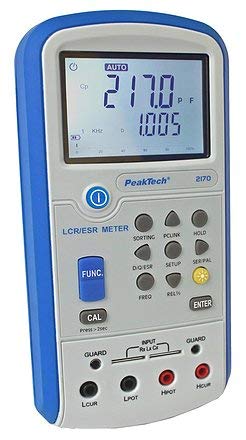
الشكل 1: الجبهة view of the Peaktech P2170 LCR Meter, showing the display, function buttons, and input terminals.
3.1 المكونات والملحقات
تتضمن الحزمة القياسية العناصر التالية:
- Peaktech P2170 LCR Meter
- كابل واجهة USB
- برامج الكمبيوتر
- Kelvin clips (test leads)
- حقيبة حمل واقية
- AAA batteries (6x 1.5V)
- دليل التعليمات
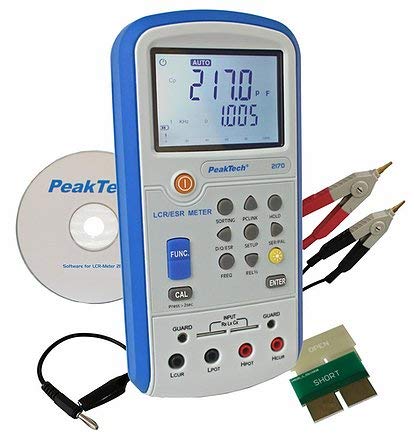
Figure 2: Peaktech P2170 LCR Meter shown with its included accessories, including Kelvin clips, USB cable, and software CD.
4. الإعداد
4.1 تركيب البطارية
The device operates on 6 x 1.5V AAA batteries. To install or replace batteries:
- تأكد من إيقاف تشغيل العداد.
- حدد موقع غطاء حجرة البطارية على الجزء الخلفي للجهاز.
- Open the cover and insert 6 AAA batteries, observing the correct polarity markings.
- أغلق غطاء حجرة البطارية جيدًا.
An optional 12V 500mA power adapter can also be used for external power.
4.2 توصيل أسلاك الاختبار
Use the provided Kelvin clips for accurate measurements. Connect them to the input terminals as follows:
- Connect the red Kelvin clip to the هبوت و هكور محطات.
- Connect the black Kelvin clip to the لبوت و لكور محطات.
- For 2-wire measurements, connect the test leads to هبوت و لبوت.
- Ensure a secure connection to minimize measurement errors.
4.3 Software Installation (PC Link)
The included PC software allows for data logging and analysis. Follow these steps to install:
- Insert the software CD into your computer's optical drive.
- اتبع الإرشادات التي تظهر على الشاشة لإكمال التثبيت.
- Connect the meter to your PC using the supplied USB interface cable.
- Launch the software and establish communication with the device. Refer to the software's help documentation for detailed usage.
5. تعليمات التشغيل
5.1 تشغيل/إيقاف التشغيل
اضغط على قوة زر لتشغيل أو إيقاف العداد.
5.2 أوضاع القياس
The P2170 supports various measurement modes. Press the FUNC button to cycle through the primary measurement parameters:
- Ls (Series Inductance)
- Cs (Series Capacitance)
- Lp (Parallel Inductance)
- Cp (Parallel Capacitance)
- دي سي آر (DC Resistance)
- معدل ترسيب كرات الدم الحمراء (Equivalent Series Resistance)
- Rp (Parallel Resistance)
- D (Dissipation Factor)
- Q (Quality Factor)
- θ (Phase Angle)
The illuminated display will show the selected mode and measurement results.
5.3 Measurement Frequency Selection
اضغط على التردد button to select the desired test frequency. Available frequencies include 100 Hz, 120 Hz, 1 kHz, 10 kHz, and 100 kHz. The chosen frequency will be displayed on the screen.
5.4 وظيفة الاحتفاظ بالبيانات
اضغط على يمسك button to freeze the current measurement reading on the display. Press it again to release the hold function.
5.5 المعايرة
To perform a calibration, ensure no component is connected to the input terminals. Press and hold the كال button for approximately 2 seconds. Follow any on-screen prompts.
6. الصيانة
6.1 التنظيف
امسح عداد Casing مع لينة، damp قطعة قماش. لا تستخدم منظفات كاشطة أو مذيبات. تأكد من إيقاف تشغيل الجهاز وفصله عن أي مصدر طاقة قبل التنظيف.
6.2 استبدال البطارية
When the low battery indicator appears on the display, replace all 6 AAA batteries as described in Section 4.1.
6.3 التخزين
If the meter is not used for an extended period, remove the batteries to prevent leakage. Store the device in its protective carrying case in a cool, dry place, away from direct sunlight and extreme temperatures.
7. استكشاف الأخطاء وإصلاحها
If you encounter issues with your Peaktech P2170, refer to the following common problems and solutions:
- لا يعمل العداد: Check battery installation and ensure batteries are not depleted. Try replacing with new batteries.
- قراءات غير دقيقة:
- تأكد من توصيل أسلاك الاختبار بشكل صحيح وعدم تلفها.
- Perform a calibration (Section 5.5).
- Verify the correct measurement mode and frequency are selected for the component being tested.
- Ensure the component is properly connected to the Kelvin clips.
- برنامج الكمبيوتر لا يتصل:
- تحقق من توصيل كابل USB.
- Ensure the software drivers are correctly installed.
- Restart both the meter and the PC.
If the problem persists, contact Peaktech customer support.
8. المواصفات
Detailed technical specifications for the Peaktech P2170 LCR Meter:
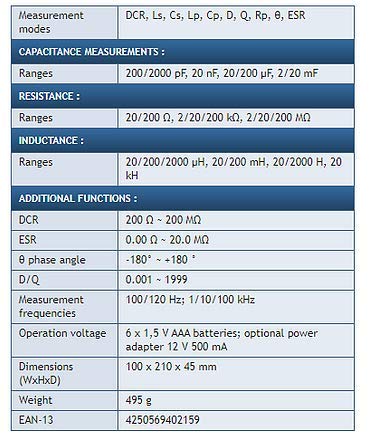
Figure 3: Detailed specifications table for the Peaktech P2170 LCR Meter, including measurement modes, ranges, frequencies, and physical characteristics.
| المعلمة | قيمة |
|---|---|
| طرق القياس | DCR, Ls, Cs, Lp, Cp, D, Q, Rp, θ, ESR |
| نطاقات السعة | 200/2000 pF, 20 nF, 20/200 µF, 2/20 mF |
| نطاقات المقاومة | 20/200 Ω, 2/20/200 kΩ, 2/20/200 MΩ |
| Inductance Ranges | 20/200/2000 µH, 20/200 mH, 20/2000 H, 20 kH |
| DCR Range | 200 أوم ~ 200 م أوم |
| ESR Range | 0.00 أوم ~ 20.0 م أوم |
| Phase Angle (θ) | -180° ~ +180° |
| D/Q Resolution | 0.001 ~ 1999 |
| Measurement Frequencies | 100/120 Hz; 1/10/100 kHz |
| الدقة الأساسية | 0.3% |
| عملية المجلدtage | 6 x 1.5 V AAA batteries; optional power adapter 12 V 500 mA |
| الأبعاد (العرض × الارتفاع × العمق) | 100 × 210 × 45 ملم |
| وزن | 495 جرام |
| الشركة المصنعة | بيكتيك |
9. الضمان والدعم
For warranty information, technical support, or service inquiries, please contact Peaktech directly or refer to their official webالموقع. احتفظ بإيصال الشراء كإثبات للشراء.


