مقدمة
The Metrel MD 9040 is a True RMS (TRMS) industrial digital multimeter designed for demanding applications in the industrial sector. It features a CAT IV / 1000 V overvoltage category rating, ensuring safety and reliability for measurements on power supply sources. This device offers high accuracy, a 2-line LCD display, and various measurement functions for versatile use.
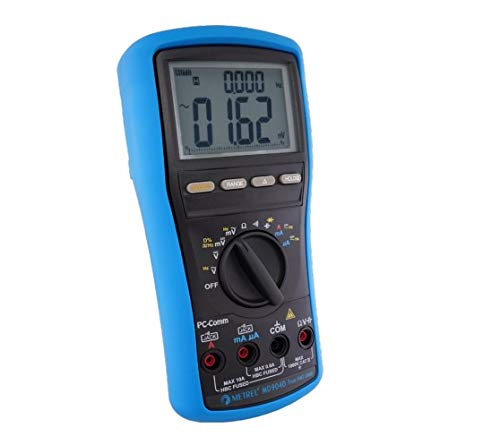
الشكل 1: The Metrel MD 9040 TRMS Industrial Digital Multimeter, showcasinبفضل تصميمه المتين وشاشته الواضحة.
الميزات الرئيسية
The MD 9040 incorporates several features designed for precision and user convenience:
- TRMS: Provides accurate readings for both sinusoidal and non-sinusoidal AC signals.
- Lead Alert: An audible and visual warning system for incorrect test lead connections, enhancing safety.
- النطاق التلقائي: Automatically selects the appropriate measurement range, with an option to switch to manual ranging.
- Relative Zero Mode: Allows for comparison of signal differences or removal of background noise by setting a reference point.
- امسك المعلومات: Freezes the current measurement on the display for convenient recording.
- رابط الكمبيوتر: Enables connection to a personal computer for data logging and analysis using optional software and interface.
- أمان: Rated CAT IV / 1000 V for high-level overvoltage protection, suitable for industrial environments.
- عرض: Features a large, bright 4-digit, 9999 counts dual LCD display for clear readability.
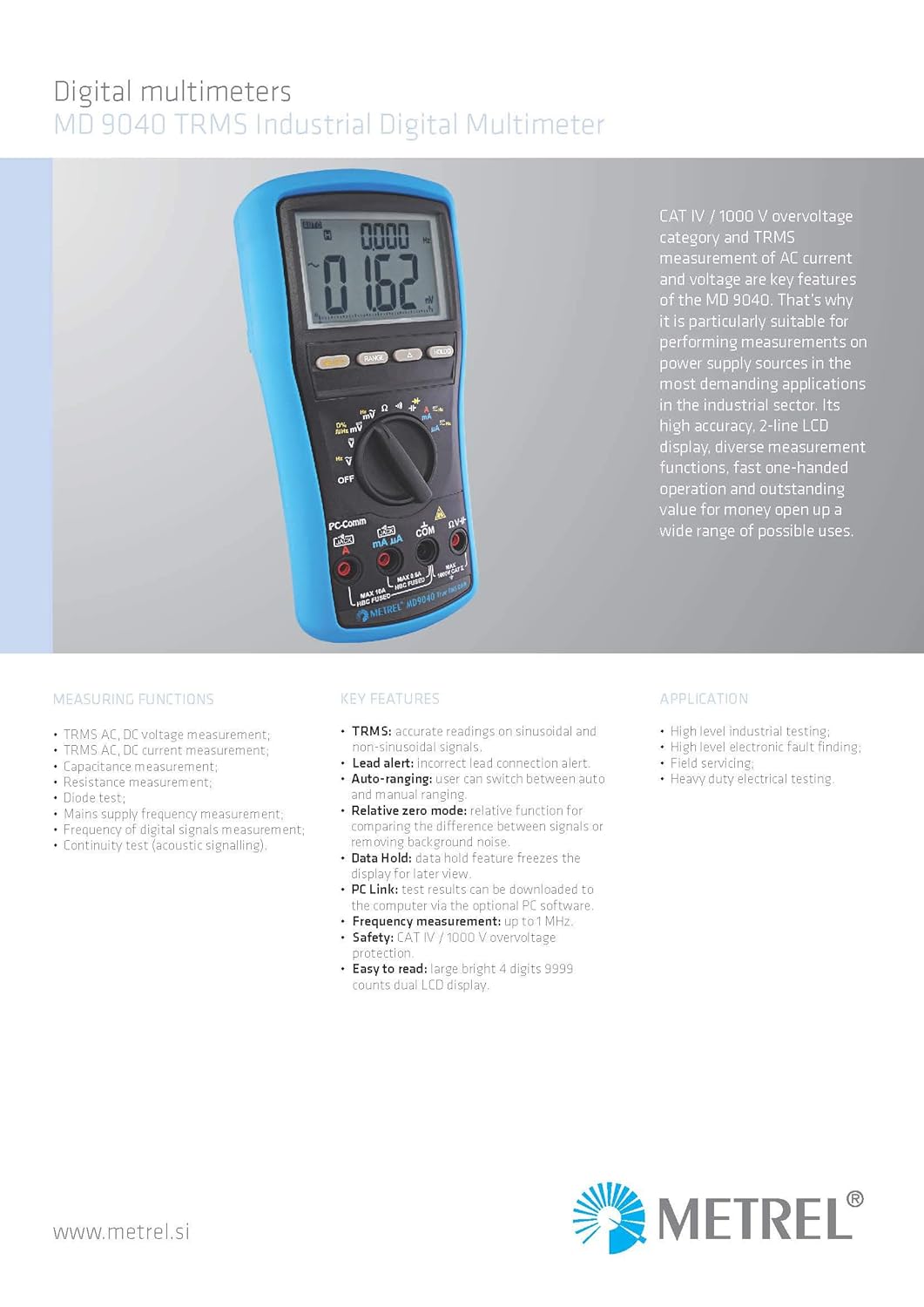
الشكل 2: انتهىview highlighting the key features, measuring functions, and typical applications of the MD 9040 multimeter.
يثبت
تركيب البطارية
The MD 9040 is powered by a 9V battery. To install or replace the battery, locate the battery compartment on the rear of the device. Open the compartment, insert the 9V battery ensuring correct polarity, and then securely close the cover. Always replace the battery when the low battery indicator appears on the display to maintain measurement accuracy.
اختبار اتصال الرصاص
Connect the test leads to the appropriate input jacks on the multimeter's front panel. The device features a lead alert system to indicate incorrect connections, enhancing user safety. Refer to the following guidelines:
- ل المجلدtage, resistance, capacitance, diode, and continuity measurements, connect the red test lead to the فولتا هرتز جاك والاختبار الأسود يؤديان إلى كوم جاك.
- ل current measurements (mA µA), connect the red test lead to the مللي أمبير μA جاك والاختبار الأسود يؤديان إلى كوم جاك.
- ل high current measurements (up to 10A), connect the red test lead to the 10 أمبير جاك والاختبار الأسود يؤديان إلى كوم جاك.

الشكل 3: عن قرب view of the MD 9040's front panel, showing the rotary switch, display, and input jacks for test lead connections.
تعليمات التشغيل
تشغيل/إيقاف الطاقة
To power on the MD 9040, rotate the central function switch from the عن position to the desired measurement function. To power off the device, rotate the switch back to the عن موضع.
وظائف القياس
The MD 9040 offers a comprehensive range of measurement capabilities:
- المجلدtage (AC/DC): يختار V~ لمجلد التيار المترددtagهـ أو V- لمجلد العاصمةtagالقياسات الإلكترونية.
- التيار (تيار متردد/تيار مستمر): يختار A~ for AC current or A- for DC current measurements. Ensure the test leads are connected to the appropriate current input jacks (mA µA or 10A).
- المقاومة (Ω): حدد أوم position for resistance measurements.
- السعة (F): حدد F position for capacitance measurements.
- اختبار الصمام الثنائي: Select the diode symbol for testing diodes.
- اختبار الاستمرارية: Select the continuity symbol for checking circuit continuity, indicated by an audible tone.
- التردد (هرتز): حدد Hz position for frequency measurements.
Auto-Ranging and Manual Ranging
The multimeter defaults to auto-ranging, which automatically selects the most suitable measurement range. To switch to manual ranging, press the RANGE button. In manual ranging, press RANGE repeatedly to cycle through available ranges. To return to auto-ranging, press and hold the RANGE زر.
وضع الصفر النسبي
اضغط على ريل button to activate relative zero mode. This function subtracts the current displayed reading from all subsequent measurements, which is useful for comparing values or nulling out background noise. Press ريل مرة أخرى للخروج من هذا الوضع.
الاحتفاظ بالبيانات
اضغط على يمسك button to freeze the current reading on the display. This allows for convenient recording of measurements. Press يمسك again to release the display and resume live readings.
صيانة
استبدال البطارية
When the low battery indicator appears on the display, replace the 9V battery promptly to ensure continued accurate operation. Refer to the 'Setup' section for detailed battery installation instructions.
تنظيف
To clean the multimeter casinز، استخدم ناعمًا، دamp cloth. Avoid using abrasive cleaners, solvents, or harsh chemicals, as these can damage the device. Ensure the multimeter is powered off and disconnected from any electrical circuits before cleaning.
تخزين
Store the MD 9040 in a dry, cool environment, away from direct sunlight, extreme temperatures, and high humidity. If the device will not be used for an extended period, it is recommended to remove the battery to prevent potential leakage and damage.
استكشاف الأخطاء وإصلاحها
This section addresses common issues you might encounter with your MD 9040 multimeter.
- لا يوجد عرض/طاقة: Check the battery charge level and ensure the 9V battery is correctly installed with proper polarity.
- قراءات غير دقيقة: Verify that the correct measurement function is selected on the rotary switch. Ensure test leads are properly connected to the correct input jacks and that the battery is not low.
- Lead Alert Warning: If the lead alert activates, recheck all test lead connections to ensure they are inserted into the appropriate input jacks for the selected measurement function.
- Display Shows "OL" (Overload): This indicates that the measured value exceeds the currently selected range. Switch to a higher measurement range or ensure the input signal is within the device's specified limits.
المواصفات الفنية
The Metrel MD 9040 TRMS Industrial Digital Multimeter adheres to the following technical specifications:
| وظيفة | يتراوح | دقة |
|---|---|---|
| المجلد ACtage (40 Hz - 20 kHz) | 60.00 mV - 999.9 V | ±(0.5% of reading + 3 digits) to ±(3.0% of reading + 4 digits) |
| المجلد العاصمةtage | 60.00 mV - 999.9 V | ±(0.06% of reading + 2 digits) to ±(0.1% of reading + 2 digits) |
| التيار المستمر | 600.0 µA - 10.00 A | ± (0.2٪ من القراءة + 4 أرقام) |
| تيار متردد TRMS | 600.0 µA - 10.00 A | from ±(0.6% of reading + 3 digits) to ±(1.0% of reading + 3 digits) |
| اختبار الصمام الثنائي | 2.000 فولت | ±(1.0% of reading + 1 digit) |
| مقاومة | 600.0 Ω - 60.00 MΩ | from ±(0.1% of reading + 3 digits) to ±(1.0% of reading + 5 digits) |
| تردد التيار الكهربائي | 15.00 هرتز - 50.00 هرتز | ± (0.04٪ من القراءة + 4 أرقام) |
| Frequency of digital equipment | 5.00 Hz - 1.000 MHz | ± (0.004٪ من القراءة + 4 أرقام) |
| السعة | 60.00 nF - 29.99 mF | from ±(1.0% of reading + 5 digits) to ±(5.0% of reading + 5 digits) |
- مصدر الطاقة: 9V Battery (NEDA1604C, JIS006P, or IEC6F22)
- أوفرفولtagالفئة هـ: CAT IV / 1000V
- أبعاد: 207 × 96 × 55 ملم
- وزن: 635 جرام

الشكل 4: Detailed technical specifications table for the Metrel MD 9040, including functions, ranges, and accuracy.
الضمان والدعم
معلومات الضمان
The Metrel MD 9040 TRMS Industrial Digital Multimeter is covered by a 2-year (24-month) manufacturer's warranty from the date of purchase. Please retain your original purchase receipt as proof of purchase for any warranty claims. The warranty covers defects in materials and workmanship under normal use.
دعم العملاء
For technical assistance, service, or further information regarding your MD 9040 multimeter, please contact Metrel customer support. You can find contact details and additional resources on the official Metrel website. When contacting support, please have your product model and serial number available.


