مقدمة
This manual provides comprehensive instructions for the safe and efficient use of your SUNMI M2 MAX Industrial Tablet, model TF700. Please read this manual thoroughly before operating the device and retain it for future reference.

الشكل 1: الجبهة view of the SUNMI M2 MAX Industrial Tablet, showing its display with various application icons.
يثبت
1. فك الصندوق والفحص الأولي
أزل جميع المكونات من العبوة بعناية. تأكد من وجود جميع العناصر المذكورة أدناه وعدم تلفها:
- SUNMI M2 MAX Industrial Tablet (TF700)
- محول الطاقة
- كابل USB Type-C
- Hand Strap (optional, if included with your model)
2. شحن الجهاز
Before first use, fully charge the tablet. Connect the USB Type-C cable to the tablet's charging port and the other end to the power adapter. Plug the power adapter into a wall outlet. The charging indicator will illuminate.
The tablet is equipped with an 8360mAh non-removable lithium polymer battery. A full charge can provide over 12 hours of continuous operation.
3. Installing SIM Card and MicroSD Card (Optional)
The device supports MicroSIM or NanoSIM cards (Config 1) and an eSIM (Config 2). It also supports MicroSD cards up to 128GB for expanded storage.
- حدد موقع فتحة بطاقة SIM/MicroSD على جانب الجهاز اللوحي.
- استخدم أداة إخراج شريحة SIM المرفقة (إن وجدت) أو مشبك ورق صغير لفتح الدرج.
- Carefully place the SIM card(s) and/or MicroSD card into the tray according to the diagram on the tray.
- ادفع الدرج برفق إلى الفتحة مرة أخرى حتى يستقر في مكانه.

الشكل 2: خلفي view of the SUNMI M2 MAX, highlighting the camera, pogo pin charging interface, and the location of the SIM/MicroSD card slot.
4. Attaching the Hand Strap (Optional)
If your model includes a hand strap, attach it to the designated points on the back of the tablet for secure handling during mobile operations.
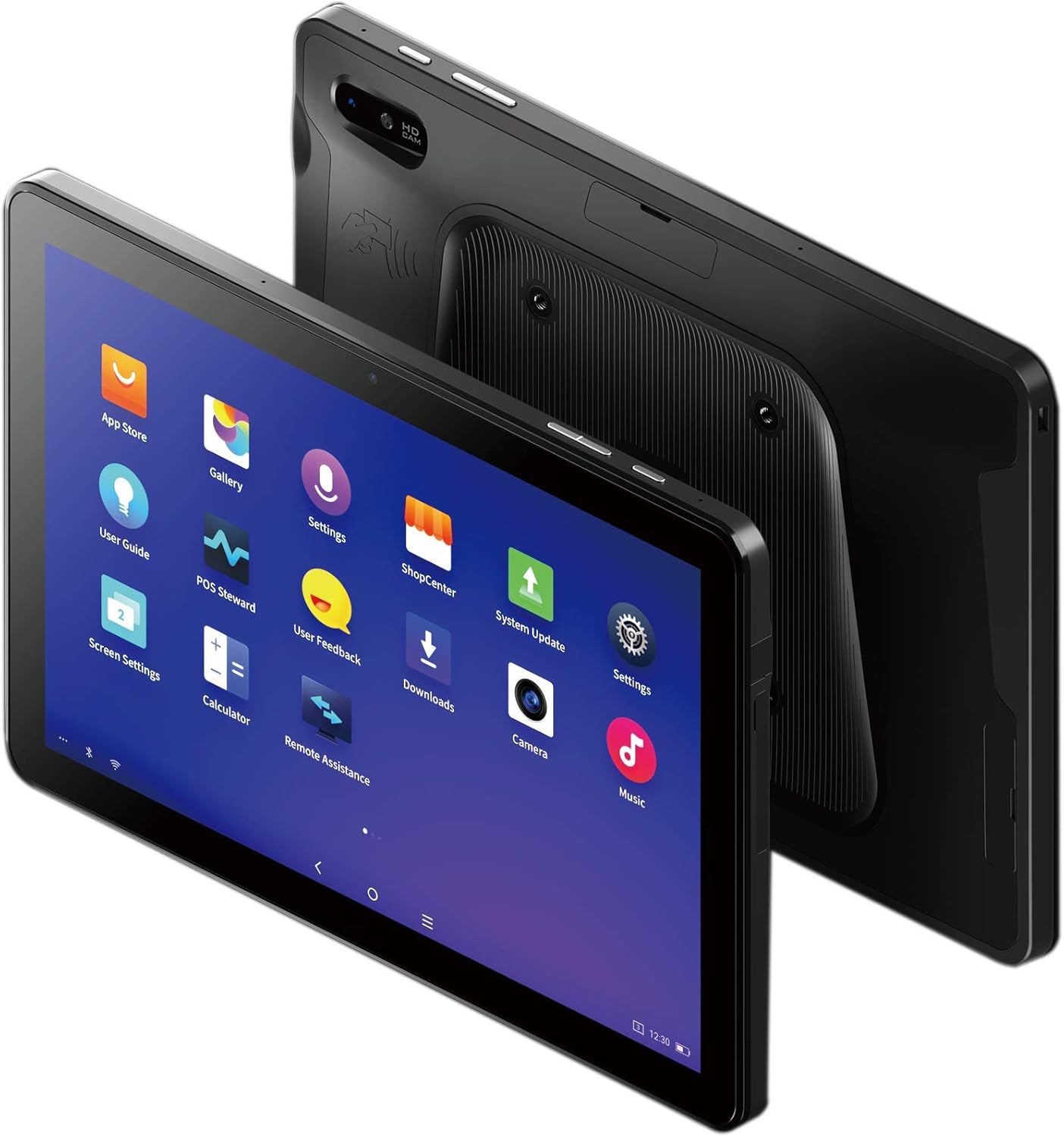
Figure 3: The SUNMI M2 MAX Industrial Tablet being held with an optional hand strap, demonstrating enhanced portability and secure grip.
تشغيل الجهاز
1. تشغيل/إيقاف التشغيل
- تشغيل الطاقة: Press and hold the Power button (located on the side) until the SUNMI logo appears on the screen.
- إيقاف التشغيل: Press and hold the Power button until a power-off menu appears. Select "Power Off" and confirm.
- إعادة تشغيل: From the power-off menu, select "Restart" to reboot the device.
2. التنقل الأساسي
The SUNMI M2 MAX runs on the Android operating system. Navigation is primarily touch-based:
- مقبض: لتحديد عنصر أو فتح تطبيق.
- انتقاد: للتنقل بين القوائم أو التبديل بين الشاشات.
- الضغط للتكبير: لتكبير أو تصغير الصور أو web الصفحات.
- زر الصفحة الرئيسة: يعود إلى الشاشة الرئيسية.
- زر الرجوع: العودة إلى الشاشة السابقة.
- زر التطبيقات الحديثة: يعرض التطبيقات المستخدمة مؤخرًا.
3. الاتصال بالشبكات
The tablet supports Wi-Fi (2.4GHz/5GHz, 802.11 a/b/g/n/ac) and cellular networks (2G, 3G, 4G).
- واي فاي: اذهب الى الإعدادات > الشبكة والإنترنت > Wi-Fiقم بتشغيل الواي فاي، واختر الشبكة التي تريدها، وأدخل كلمة المرور إذا لزم الأمر.
- البيانات الخلوية: Ensure a valid SIM card is inserted. Go to الإعدادات> الشبكة والإنترنت> شبكة الهاتف المحمول to enable mobile data and configure APN settings if necessary.
- بلوتوث: اذهب الى الإعدادات > الأجهزة المتصلة > البلوتوث to pair with Bluetooth devices (supports Bluetooth 5.0).
4. Using NFC
The SUNMI M2 MAX is equipped with NFC (Near Field Communication) for contactless transactions and data exchange. To use NFC, ensure it is enabled in settings and hold the tablet near a compatible NFC reader or device.
5. تشغيل الكاميرا
The tablet features a 13 MP rear camera with flash and autofocus, and a 5 MP front camera. Open the "Camera" application to capture photos or record videos.
صيانة
1. تنظيف الجهاز
استخدم قطعة قماش ناعمة وخالية من الوبر وامسحها برفق.ampened with water or a screen cleaner to wipe the display and exterior. Avoid using harsh chemicals, abrasive cleaners, or excessive moisture.
2. العناية بالبطارية
- Avoid exposing the tablet to extreme temperatures (below -20°C or above 70°C).
- لا تسمح للبطارية بالتفريغ الكامل بشكل متكرر.
- Use only the original or certified compatible power adapter and cable.
3. تحديثات البرامج
قم بفحص وتثبيت تحديثات النظام بانتظام لضمان الأداء الأمثل والأمان. انتقل إلى الإعدادات > النظام > تحديث النظام.
4. حماية البيئة
The SUNMI M2 MAX is designed with IP68 protection and a 1m drop specification, making it suitable for demanding environments. However, avoid intentional drops or prolonged submersion in water.
استكشاف الأخطاء وإصلاحها
| مشكلة | السبب المحتمل | حل |
|---|---|---|
| الجهاز لا يعمل. | بطارية منخفضة؛ تعطل البرنامج. | اشحن الجهاز لمدة 30 دقيقة على الأقل. اضغط مع الاستمرار على زر التشغيل لمدة 10-15 ثانية لإعادة تشغيله قسرًا. |
| لا يمكن الاتصال بشبكة Wi-Fi. | Incorrect password; Wi-Fi disabled; router issue. | Verify password. Ensure Wi-Fi is enabled in settings. Restart router. Forget and reconnect to the network. |
| شاشة اللمس لا تستجيب. | خلل مؤقت في البرنامج. | أعد تشغيل الجهاز بالقوة عن طريق الضغط باستمرار على زر الطاقة. |
| Applications crashing. | Insufficient RAM; app bug. | Close background apps. Clear app cache/data (Settings > Apps). Update the app. |
تحديد
The following table outlines the key technical specifications of the SUNMI M2 MAX Industrial Tablet (Model: TF700).

Figure 4: Comprehensive technical specifications for the SUNMI M2 MAX Industrial Tablet.
- نموذج: تي اف 700
- نظام التشغيل: Android 9.0 (SUNMI OS)
- المعالج: Kryo-260, Octa-core 2.2GHz (Qualcomm)
- ذاكرة: 3GB RAM + 32GB ROM (eMMC)
- عرض: 10.1-inch FHD, 1920x1200, Capacitive multitouch, Corning Gorilla Glass 3
- الكاميرات: Front: 5MP FF; Rear: 13MP AF + Flashlight, supports 1D/2D barcode recognition
- NFC: Type-A&B card, Mifare card, Felica card, ISO/IEC 14443 and ISO/IEC 15693 compliant
- مكبر الصوت/الميكروفون: 1W Speaker, 2x MIC
- فتحة بطاقة PSAM: 1x PSAM
- فتحة بطاقة SIM: 1x MicroSD (TF), 1x MicroSIM or 1x NanoSIM (TF700 Config 1), eSIM (TF700 Config 2)
- شبكة: 2G & 3G & 4G
- واي فاي: 2.4GHz/5GHz, 802.11 a/b/g/n/ac
- بلوتوث: Supports Bluetooth 2.1/3.0/4.2/5.0 (BLE)
- نظام تحديد المواقع العالمي (GPS): Supports AGPS, GPS, GLONASS, Beidou (Config 2)
- المستشعر: Gravity sensor, light sensor, compass, Hall
- أزرار: 1x Power (lock screen), 2x Volume (+/-)
- الموانئ: 1x Type-C (supports OTG), 1x Audio Jack, 1x MicroSD (up to 128GB expansion)
- بطارية: Non-removable Lithium Polymer battery, 8360mAh
- محول الطاقة: Input: AC 100-240V, Output: DC 5V/2A
- الأبعاد (الطول × العرض × الارتفاع): 249.8 × 160 × 9.9 ملم (0.39 × 6.3 × 9.84 بوصة)
- الوزن الإجمالي: 673 جم (1.48 رطل)
- حماية: IP68, 1m drop spec
- درجة حرارة التشغيل: -20 درجة مئوية إلى 55 درجة مئوية
- درجة حرارة التخزين: -40 درجة مئوية إلى 70 درجة مئوية
الضمان والدعم
For warranty information and technical support, please refer to the documentation provided with your purchase or visit the official SUNMI webالموقع. احتفظ بإثبات الشراء الخاص بك لتقديم مطالبات الضمان.
SUNMI Official Webموقع: www.sunmi.com


